PS3 (Research/Experimental) - NEC/TOKIN Capacitors Replacement - YLOD

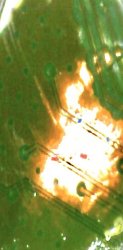
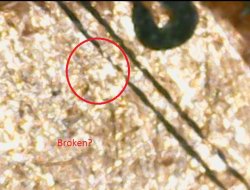
That first picture looks suspect to me in 2 places.
  1. Check the trace for continuity from the top of the scratch to the bottom of the scratch.
    • Where the solder mask is missing the trace could have gotten broken. Where the mask is intact it should be fine. So probe both ends of the trace to see if it has continuity. That means one of 2 things:
      1. The trace is intact or...
  2. Check the trace for continuity with the ground plane next to it.
    • That means you scratched the trace and ground. Now there is no separation between them and have a short.
    • You need to separate them again, by scratching away the copper between them to the substrate beneath. Be careful not to go too deep. There can be other layers beneath that. Scratch, probe, scratch, probe...Check other places to be sure it's not shorting there too before scratching too far...Etc.
View attachment 33467
The other scratch looks fine to me. I don't think the little one is the problem.
So i did a check for continuity and a short. I placed both probes on one trace and got continuity on both. Then one prob on trace and the black in the copper in the middle and the multimeter showed a short. Is it possible the the green masking stuff I scratched off actually keeps the trace separate from the rest of the copper and since I scratched it I broke the barrier? Could I apply the green stuff (uv something) would it stop the short? I even put on probe on trace and the other on the copper edge of the board and showed conifnuity....in other words feels like the black trace lines are broken and flowing into the middle copper. Could that be causing a short?
 
Last edited:
So i did a check for continuity and a short. I placed both probes on one trace and got continuity on both. Then one prob on trace and the black in the copper in the middle and the multimeter showed a short. Is it possible the the green masking stuff I scratched off actually keeps the trace separate from the rest of the copper and since I scratched it I broke the barrier? Could I apply the green stuff (uv something) would it stop the short? I even put on probe on trace and the other on the copper edge of the board and showed conifnuity....

red dots is where I placed the probes and got continuity/short. Blu dots is where I put the probes and got continuity/short. Black trace lines broke and touching the outside copper I the middle causing short?
 

Attachments

  • 29DCC1BC-8CF8-4744-BE07-FDCBF931FCB4.jpeg
    29DCC1BC-8CF8-4744-BE07-FDCBF931FCB4.jpeg
    52.5 KB · Views: 87
So i did a check for continuity and a short. I placed both probes on one trace and got continuity on both. Then one prob on trace and the black in the copper in the middle and the multimeter showed a short. Is it possible the the green masking stuff I scratched off actually keeps the trace separate from the rest of the copper and since I scratched it I broke the barrier? Could I apply the green stuff (uv something) would it stop the short? I even put on probe on trace and the other on the copper edge of the board and showed conifnuity....in other words feels like the black trace lines are broken and flowing into the middle copper. Could that be causing a short?
That's what's causing your problem. The traces are made by a router. The copper is one continuous plane of copper, then the traces are formed when a router cuts trenches through the copper layer to the FR4 fiberglass substrate beneath. What happened when you scratched the trace is you flattened the soft copper enough to make it bridge the gap. You spread it like butter. Copper is soft and steal is hard.

So what you need to do now is take an exacto knife and very carefully cut along the trench, to separate the trace from the plane next to it. You should be sraping into the FR4 firberglass behenth, but not too deep. Be gentile and works slowly looking in the microscope to be sure you'r focusing on the right places. Check with the probe as you go. Once it's separate and the chip works again, you should cover the scratch with soldermask. You can buy UV hardening mask and just shine a flashlight over it. That'll protect it from oxidation and ensure the fix lasts. Good luck!
 
Welcome!

First would you pleas provide us with a few things?
  1. Model of PS3 (you can find this on the back sticker. It should say something like CECHA01 for a Phat model, or CECH2001A for a slim model, etc.)
  2. Was the console sealed? Do you know if has been serviced before? What's the history of the console? If you don't know, when you opened it up, did it look like it had been worked on before? Most importantly, does it look like it has been reflowed before? Is there any flux residue in the RSX region?
  3. Type of YLOD (the original one, before you attempted this mod). For example, from when you press the power button to hearing 3 beeps, how much time elapses? less than a second, 1-2s, 2-10s, 10s-5mins, randomly occurs, only in games, or only in intense games.
  4. The model number of the capacitors you used (or a link to the product you bought if you don't know).
  5. Use a multimeter set to resistance and measure the resistance bewteen +/GND rails. Please provide us the RSX and CPU side resistances. This is kind like a PS3 health meter...
    • 0-1 Ohm = Dead or nearly so. You may have a Short (double check soldering). The RSX/CPU could be dead. Or there could be defective BGA affecting the resistance. Flux residues reduce this resistance, so be sure to clean it off thoroughly!
    • 1-2 Ohms = Not good, but not dead yet.
    • 2-3 Ohms = Normal wear and tear, nothing out of the ordinary.
    • 3+ Ohms = Very Healthy, like new!
As others mentioned you need to use a larger bridge wire. The NEC/TOKINs are internally connected from positive rail to positive rail, and that is where all the current that feeds the processors goes. When you use a thin wire, you are basically forcing all that current through a tiny pipe. It'll burst (literally vaporize) and cause an instant YLOD like you described. Or it's also possible you bridged the +/GND rails. So double check your soldering for a short. Be sure to check the Resistance from #5 above before and after so you know if your work is good.

Okay, and now for the truth. Youtube is currently behind on the state of this fix. Everyone was too excited by the "narrative" that this is the true problem and reballing is a waste of money. "Haha! The truth has been the tantalums all along..." and so on. It's a great story that gets lots of clicks, likes, subscribers, and so on. Trubble is, it was a red herring (BS). It is in fact only going to work for a small percentage of YLODs and reballing is still needed something like 90% of the time. All that was discovered in this thread was another possible cause. One that accounts for maybe 3% of the YLOD out there. The reason the console works after installing the Tantalums, is the same reason it works after heating the caps. Thermomechanical reconnection of the microscopic BGA defect by warping the board. It will relax over the next 2 weeks and then the YLOD returns. It looks like you repaired the console, makes for a great video, and has a satisfying narrative - "Don't waste $$$ on reballing! Tantalum has been the problem all along!" But they were wrong. The video doesn't show what happens to the console 2 weeks later. You don't get the full picture until it happens to you!

...And that's what brings you here!

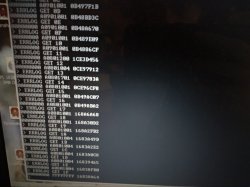
So, where do you go from here? To know if your console can be fixed using this method, you need to check the SYSCON error codes to diagnose the problem first. I made a windows tutorial here. If your NEC/TOKINs need replaced you'll get a 1002 error. If you need a reball, you 'll get a 3034. It does get more complicated than that, but those are the basics. If there is a 3034 in the errlog, then even if you fix the tantalums the YLOD will return. Unless the console has been reflowed previously. It's possible the reflow fixed the 3034 and we are just seeing an old error in the log. So this is why we need to know the console's work history.
Hi! Thank you for the helpful reply. So here's what I know.

1. Ps3 model is CECHA01
2. The console was not sealed when I got it. I was not told if it had been serviced before but from the looks of it, they only replaced a few thermal pads and the rest looked mostly untouched. Even the thermal paste looked stock and was dried up. And it does not appear to have been reflowed for there is no flux residue around the RSX.
3. Before I attempted the mod it took like 2-ish, maybe 3 seconds before the ylod occured.
4. Model number of the capacitors I used according to the description from the listing on ebay is AVX TPSD477M006R0045
5. My multimeter says that the rsx is 2 Ohms and the cell is 2.7 Ohms.

Some bonus info I'd like to add is before I replaced all of the capacitors, I replaced the 2 nec's behind the RSX chip first to see if that would fix it. I did not bridge them with the wire (yet). And to my amazement, it stayed on and booted into the cross menu. Though I turned it off because it was running hot and I did not want it to overheat. But when I went to turn it on again, the ylod came back. I figured I brought the other NECs back temporarily due to me trying to remove the NECs with the aid of a heat gun. So that's when I decided to go ahead and replace the rest of them and bridge them with the really thin wire and now I'm here. And also, which wire size should I use instead? Should I use 18 awg, 20 awg, or 22 awg?
18 seems a little big so maybe 20 or 22, idk.
 
...

  • 0-1 Ohm = Dead or nearly so. You may have a Short (double check soldering). The RSX/CPU could be dead. Or there could be defective BGA affecting the resistance. Flux residues reduce this resistance, so be sure to clean it off thoroughly!

    .


  • Dose 0 ohm dead means a dead processor chip it self? Or something else? And dose a reflow fix this?
 
No reflow won't fix under 1 ohm ic, not even a reball. All cases when a ic had a lower resistance and took it out of board it keeps that low resistance. As per example had few days back one 2500 jtp with 1, 6 ohm cpu on board and out. It is still working after reball.
Rsx is 2.9. From my point of view not sure how long will work but once this unit will fail I will replace motherboard or give money back for this work if it is failing in a year.
Gaming half hour is given constant 68 at variation of fan between 35~50.
In XMB its likely cpu 58 and 62 rsx after 8 hours (kindly forgot it opened).
 
No reflow won't fix under 1 ohm ic, not even a reball. All cases when a ic had a lower resistance and took it out of board it keeps that low resistance. As per example had few days back one 2500 jtp with 1, 6 ohm cpu on board and out. It is still working after reball.
Rsx is 2.9. From my point of view not sure how long will work but once this unit will fail I will replace motherboard or give money back for this work if it is failing in a year.
Gaming half hour is given constant 68 at variation of fan between 35~50.
In XMB its likely cpu 58 and 62 rsx after 8 hours (kindly forgot it opened).

Thank you for the reply. One another question, I need a tutorial to do a reflow on one of my MOBOs. Could you please lead me some? There are several ways in Youtube like oven or aluminum foil but I don't know which one is better.
Thank you again
 
Hi! Thank you for the helpful reply. So here's what I know.

1. Ps3 model is CECHA01
2. The console was not sealed when I got it. I was not told if it had been serviced before but from the looks of it, they only replaced a few thermal pads and the rest looked mostly untouched. Even the thermal paste looked stock and was dried up. And it does not appear to have been reflowed for there is no flux residue around the RSX.
3. Before I attempted the mod it took like 2-ish, maybe 3 seconds before the ylod occured.
4. Model number of the capacitors I used according to the description from the listing on ebay is AVX TPSD477M006R0045
5. My multimeter says that the rsx is 2 Ohms and the cell is 2.7 Ohms.
Thank you for those details, they help me track people's experience with this mod. I keep a spreadsheet compiling the DATA.

Anyway, your resistance's are normal. So no short. You just need to use appropriately sized conductors to bridge the gap. I recommend 16 AWG. If you have an old computer PSU, that wire is sufficient. Use 4 wires on each processor, 1 per tokin removed. That should be enough to install the tantalums correctly.

The caps you bought have too high an ESR. They should not be more than 9mOhms. To match the tokin array you would need to replace with 12x 4.5mOhm ESR caps. So even at 7 or 9mohms it's higher. Higher ESR means more heat, less noise rejection, and lower lifespan. Those caps may work, but not for long.
...Some bonus info I'd like to add is before I replaced all of the capacitors, I replaced the 2 nec's behind the RSX chip first to see if that would fix it. I did not bridge them with the wire (yet). And to my amazement, it stayed on and booted into the cross menu. Though I turned it off because it was running hot and I did not want it to overheat. But when I went to turn it on again, the ylod came back. I figured I brought the other NECs back temporarily due to me trying to remove the NECs with the aid of a heat gun. So that's when I decided to go ahead and replace the rest of them and bridge them with the really thin wire and now I'm here. And also, which wire size should I use instead? Should I use 18 awg, 20 awg, or 22 awg?
18 seems a little big so maybe 20 or 22, idk.
You are basically describing my exact experience the first time I tried this...lol! And after I read the entire thread I realized we were not alone. The OP and others wanted so bad for this mod to work they saw conflicting evidence as confirmation they should continue! It's called confirmation bias and a huge problem in science. Basically it's wishful thinking. For example, people say heating causes a "chemical reaction" that temporarily increases the capacitance, and it sounds plausible. I work in science and minored in chemistry, so I researched this thoroughly and concluded the "heat test" does not heal this type of capacitor. Instead what's really happening is the heat from installing the tantalums, and possibly mounting pressure change when you tested, physically reconnected the BGA defect. In your case, once the chip got hot it disconnected again due to thermal expansion and warping. Or the wire you used burned up, but I would expect that to have caused an instant YLOD and you said you shut it down before it overheated. This is how I know...
eMjhWdy.jpg

To prevent any possibility of shorting after that I did this...
9dzAhbc.jpg
37Ts10z.jpg

That worked fine...except I still had a 3034 (BGA defect, Bump failure, RSX problem). It worked to cure the YLOD, but then I got artifacting. I attempted a reflow after that and it turned into GLOD (that usually means memory issue). Then I attempted my first reball which is what killed the console for good. That's the TL;DR.

I would have saved myself the time and headache had I known about the SYSCON then, but it hadn't been cracked yet. Now, there's no excuse. The tantalum mod should be second to the SYSCON and only performed if indicated by the right error codes. An oscilloscope can also be used, but the SYSCON is much cheaper and easier.

I need to warn you. The SYSCON only holds 20 error codes and it deletes older ones. So the more testing you do on that console the more of it's error code history you are deleting! Think of those 3 beeps like this...

BEEP...BEEP...BEEP....another one bites the dustI
And another one gone! And another one Gone! Another one bites the dust!

Hey, I'm gonna delete you! Another code bites the dust!
...
Because of this, I would stop attempting to get your soldering and tantalum mod right. Perform the SYSCON immediately and decide how to proceed afterwards. You do not need working filter caps for the SYSCON. The SYSCON codes are the first thing you should record after getting a console, just to have a record of it's errlog.
 
Last edited:
Thank you for the reply. One another question, I need a tutorial to do a reflow on one of my MOBOs. Could you please lead me some? There are several ways in Youtube like oven or aluminum foil but I don't know which one is better.
Thank you again
DO NOT USE AN OVEN! Here's my Ghetto reflowing/reballing setup...
ghetto-reballing-jpg.33019

You could get aways with a heatgun special, but that's the cheapset/worst way to do it. It has a high chance of not working too.
 
DO NOT USE AN OVEN! Here's my Ghetto reflowing/reballing setup...
ghetto-reballing-jpg.33019

You could get aways with a heatgun special, but that's the cheapset/worst way to do it. It has a high chance of not working too.

Thank you for the advice but the picture is not talking about the details.
If that is working for you please tell how to make one
 
Thank you for the advice but the picture is not talking about the details.
If that is working for you please tell how to make one

Here's my list...
If you want to continue on to DIY reballing, beyond the above I also recommend:
You should consider how you proceed carefully.
 
Last edited:
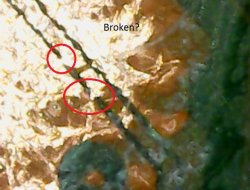
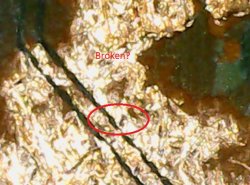
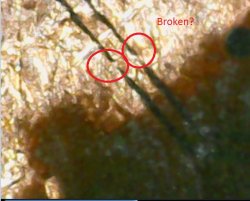
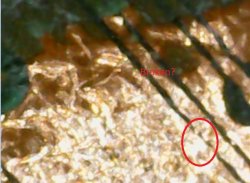
So I found a broken cpu i had and decided to scratch the trace to replicate the issue on my original ps3. It took some forcible scratching to actually break the two traces. I am wondering if the two black lines carry different power and once that small black line is broken then the cpu is no good. I have attached some pictures. Let me know your thoughts. I don't think i can bridge the small black line/trace. It's too small for any tool i have. What are some of my options if any? I am also including two youtube videos I uploaded from the microscope. Do you think my suspicions of the traces being cut is right (based on the photos). Is there any kind of "bridging liquid" that exists? Putting a copper wire between the tiny black lines would prove nearly impossible. Let me know your thoughts please.


Attachments

  • broken 1.JPG
    broken 1.JPG
    99.3 KB · Views: 68
  • broken 2.JPG
    broken 2.JPG
    125.7 KB · Views: 51
  • broken 3.JPG
    broken 3.JPG
    76.7 KB · Views: 55
  • broken 4.JPG
    broken 4.JPG
    98.8 KB · Views: 52
  • broken 5.JPG
    broken 5.JPG
    86.8 KB · Views: 59
This videos shows the reballing process from begining to end...
This one shows it using similar equipment as I linked above, except he's doing a laptop GPU instead...

It works like this:
  1. Preparation: Clean thoroughlt. With a reflow only, there is grime, dust and old flux residue that needs to be removed first. With a reball that doesn't matter, because you are going to clean the surface once the chip is removed. If you thoroughly clean the BGA first, it equates to a longer lasting fix.
    • Tip: To clean the chip thoroughly, use electronics contact cleaner. Hold the MB at an angle and allow the solvent to run underneath the chip through the BGA. Flip the chip 90-degrees and repeat. Do this multiple times to thoroughly clean the grime out. Use compressed air too, to help blow out any particles that may get stuck. Use paper towels or a rag to soak up the solvent as it runs out from under the chip. Finish off with 99% IPA.
    • Cover the motherboard in aluminum foil to reflect the heat back down onto the topside of the motherboard. Try to block airflow from causing drafts underneath the MB, that will make it hard to heat the board and lead to warping.
  2. Drying: Be sure to give the board a 2 hour drying period @100C. Don't go higher to the pressure from steam can popcorn components and delaminate ICs.
  3. Preheat: fter drying, Preheat to 150C and add Amtec flux to the edges of the chip untill it has soaked up as much flux as it can. Let it sit for 3 minutes to activate the flux and reduce oxidized solder/pads. Raise preheater temp to 180C in preparation for the reflow.
  4. Reflow: Turn on hot air station set to 240-250C. Once hot lower it into position about 5cm above the RSX. Watch the topside thermocouple and begin lowering the nozzle until it's 1cm above the RSX. This is to achieve a temperature of about 220C. Once is does, you can start nudging the chip gently. DON'T KNOCK IT. If it moves slightly and bounces back, then it has flowed. The goal here is to reduce the amount of time above the melting point as possible. So as soon as you confirm the chip moves, remove the top heater. Then reduce bottom heater to 150C.
  5. Cooldown: Wait 10 minutes, reduce heat to 120C. Wait 10 minutes, reduce 20C. Wait 10 minutes, reduce 20C...and so on until it gets below 50C. Then turn it off and allow it to cool to room temp.
  6. Clean again, THOROUGHLY! Again only using electronics contact cleaner and finishing off with 99% IPA. Blow off with compressesed air to get any IPA hiding underneath ICs out. Let it dry for a few hours before testing.
 
Last edited:
...I am wondering if the two black lines carry different power and once that small black line is broken then the cpu is no good...
The black lines are the router path. They outline the trace. The trace is the copper. The short is caused when the copper bridges the black gap between them. So what you do is take an exacto knife and cut along the black patch to reconstitute the separation that's supposed to be there.
EDIT:
short.png
 
Last edited:
The black lines are the router path. They outline the trace. The trace is the copper. The short is caused when the copper bridges the black gap between them. So what you do is take an exacto knife and cut along the black patch to reconstitute the separation that's supposed to be there.
EDIT:
View attachment 33502


Thank you rip for the visual. I been doing research on the most possible thinnest blade I can use. Xacto 11 or size 10 scalpel. Anything thinner? I put a needle next to the trace and the needle isn't even small enough.
 
The GND plane next to the trace is wide enough that you could work your way inward toward the edge of the trace. Actually sewing needles might be a good tool for this. They come in many sizes and are cheap. Place the tip as close to the edge of the trace. And gently scrape along the toolpath until the short is gone. You should have finer motor control that way. A dental pick might work too.
 
I need to warn you. The SYSCON only holds 20 error codes and it deletes older ones.
Actually it's 32. It was always up to 32 errors. We thought it was 20 in external mode because we were just counting wrong. Instead of 00 to 19 is 00 to 1F haha.

And people please hold your horses there with the reflows... We can complain all we want about the fake tokin fixes but reflow isn't necessarily repair either. It can be similar fake result but even more destructive.

Yes, sometimes it's just a BGA defect under the RSX. This is why reballing is the valid step forward once you find RSX problems. If and when it fails again, then you will know if your problem was actually on top, and not under the chip.

But "reflow" alone will not help you isolate the problem any further. The thing will be destroyed beyond repair in the end and you still will not be sure why. This is not what we are here for. Might as well do the hairdryer trick or whatever.

Only reballing can guarantee good BGA without the oxidized pads that will never be wetted by just reflow. Just that. It's not magic either, but Nobody would do reballing if it were stupid, considering how difficult it is.

Your choice after all. Things are never so simple.
 

Attachments

  • IMG_20210530_131930.jpg
    IMG_20210530_131930.jpg
    2.8 MB · Views: 79
Last edited:
Actually it's 32. It was always up to 32 errors. We thought it was 20 in external mode because we were just counting wrong. Instead of 00 to 19 is 00 to 1F haha.
I just went and counted them, yup it's 32. Still, it fills up quick and tells the error history of the console, so it's important to back that up before generating more codes.

And people please hold your horses there with the reflows... We can complain all we want about the fake tokin fixes but reflow isn't necessarily repair either. It can be similar fake result but even more destructive.

Yes, sometimes it's just a BGA defect under the RSX. This is why reballing is the valid step forward once you find RSX problems. If and when it fails again, then you will know if your problem was actually on top, and not under the chip.

But "reflow" alone will not help you isolate the problem any further. The thing will be destroyed beyond repair in the end and you still will not be sure why. This is not what we are here for. Might as well do the hairdryer trick or whatever.

Only reballing can guarantee good BGA without the oxidized pads that will never be wetted by just reflow. Just that. It's not magic either, but Nobody would do reballing if it were stupid, considering how difficult it is.

Your choice after all. Things are never so simple.
Ahh! The reflow police!

First, not all reflows are equal. Our estimate of 1year is based on heatgun specials, not a proper reflow. My ghetto setup isn't a proper setup either, but it's better than a heatgun. Escpecially if you thoroughly clean out the dirt, grime, flux residue, and dust that has accumulated under the BGA first. But the biggest factor is the activation time above 150C with flux. Flux is a reducer (opposite of oxidizer), it reduces the oxidation on the old solder balls and pads. It needs a little time to do this, less when hot. So 3 minutes at 150C + a few more getting up to 180 before the reflow is going to help alot...

Except it doesn't benefit from abrasion (scrubbing) you get from multiple cleaning passes with fresh solder and braid. And the solder is old lead free, which is not as good as new leaded. So of course reballing will yield longer lasting results.

@Pacorretaco is correct. A reflow is not as good as as reballing. And even reballing isn't 100%. Reballing doesn't renew the Die or RAM bumps. It doesn't affect the VRM or TOKINs. It doesn't fix blown fuses or shoring caps. You still have to perform proper diagnosis first.

I just rewatched this last night and was impressed with its accuracy...
While it sounds like he's endorsing the tokin fix, if you pay close attention he's really saying we shouldn't latch onto any one repair. When asked about the error, Sony themselves said that the YLOD was a "general error" that needed to be "diagnosed" before the problem can be identified. With what we know now, finally having access to the SYSCON, which SONY had all along, they were absolutely being honest. That's the best way to describe a YLOD. But people didn't want to accept that!

After watching this I read through the comments section and people were going the other way...

'Reballing's a con, and it was the tokins all along...haha!'

They completely lost the point and went 180-degrees to the opposite extreem! I think it say's more about an innate human desire for irreducibly complex problems to reduce to easy solutions...which of course they can't. I guess we latching onto the first explanation that looks easy (tantalum, which aren't! They just look easy.), or places blame on someone else (lead free solder cracks). One easily accepted explanation is a manufacturing defect that places blame on SONY and they should refund us. The other seems to place the fix within our ability and price range. These are perceptions, narratives that enable our EGO, but have little bearing on reality. We will believe anything that seems possable, to avoid admitting to ourselves we're to blame or incompetent.

The truith is that the YLOD is a general hardware failure. You need to diagnose the issue before you can attempt a fix. And that it is a futile effort in the long run anyway, because FC BGA technology is unreliable. Heat cycles will cause a BGA defect eventually. There is no strain relief! The solution is simple. PGA and sockets for hot running chips. That's how PC's have done it for years.

So why are laptops, tablets, and video game consoles stil FCBGA? Planed obsolescence and greed? Maybe that's the answer my ego wants me to latch onto, but it's probably more that they wanted to balance cost and reliability to pay their employees, sharholders, and executives a competitive wage. To remain competitive in the console video game space, which is cut throat to begin with. From that perspective, can you really Blame SONY?

YES! Yes you can! Consumer electronics should not have FCBGA CPU, GPU, or APU's ever! They should all be socketed for reliability. It is a more expensive process, but consumers would gladly pay extra for the option and the only reason not to give them one is greed.

 
The caps you bought have too high an ESR. They should not be more than 9mOhms. To match the tokin array you would need to replace with 12x 4.5mOhm ESR caps. So even at 7 or 9mohms it's higher. Higher ESR means more heat, less noise rejection, and lower lifespan. Those caps may work, but not for long.
I dont know what an ESR is or what 12x4.5mOhm means. Could you link the capacitor for sale that should work better for the ps3? And yeah I'll the syscon thing first.
 
Back
Top