PS3 (Research/Experimental) - NEC/TOKIN Capacitors Replacement - YLOD

Thanks for advising me, yeah, i was writing my post about TLOU at the same time than you was writing yours, but i was looking at the checksums and i was not so sure, i had to check the wiki page and his posts several times because this is a bit unexpected for me, if at some point you see other people reporting unknown thermal configs please advise them to do the same, only takes a few minutes :encouragement:

Please @Pelko run all this commands, and copypaste everything to a .TXT (not sure how long will be, you can post it in pastebin.com)
Code:
> revision
> version

> fantbl get 0
> fantbl get 1
> fantbl get 3

> tshutdown get 0
> tshutdown get 1
> tshutdown get 14

> eepcsum

> r 3300 200

The syscon model should be one of the known ones... is just they programmed it in a different way for some reason, maybe it was refurbished (a CELL replacement or something serious, but not RSX), or maybe is an special edition bundle, or dunno
Hello again guys, I am back again and with my PS3, so here is the log of my Cech-B from japan market :)
https://pastebin.com/5MzDxwCK
Cant wait to see what you will find out
 
Hello again guys, I am back again and with my PS3, so here is the log of my Cech-B from japan market :)
https://pastebin.com/5MzDxwCK
Cant wait to see what you will find out
Thanks i added it in this page, is the first one at top named eepcsum: EADE... and you can compare it with the other named eepcsum: 7115. Both are officials, found in COK-001 motherboard

In the thermal configs there are some bytes partially unknown that can be used to figure if it had some official repair where they replaced CELL, RSX, SouthBridge, etc... You said it had a warranty sticker when you bought it but in the official repair centers they was adding that sticker, and this kind of repair could justify why you have an special thermal config... but this is not the reason because that bytes looks normal

I was also thinking if the previous owner modifyed the syscon EEPROM by UART (bypassing the warranty sticker) but after checking it in detail i dont think this is the reason either, because there are a lot of differences if we compare it with the other thermal config we have for COK-001, and this one is more permisive with heat (so it would be like a downgrade)
In other words, it looks official

Sadly there are no easter eggs in it, but just for curiosity sake if you are interested in it... there are a couple of things i dont like if we compare it with the other official for COK-001
-The temperatures for the thermal shutdowns are higer (also another temprature named "trp" that im not completly sure what means)
-The fan profiles (the lines marked P0, P1, up to P9 for a total of 10 in the output of the command "fantbl") are triggered later... note the first "TempU" for CELL starts at 80ºC (when you did the "fantbl get 0", that 0 is CELL, 1 is RSX, and 3 is SouthBridge)
-The speeds used in the fan profiles are located in low ranges

In resume... that thermal config is going to have a bigger "yet engine" effect, because at the first minutes when you start from ambient temperature the fan is going to spin at low speeds up to 80ºC
At 80ºC or so is when it changes the speed for first time (P1), and in the next minutes is going to speed up a lot because is going to use a new fan speed everytime the temperature increases 1ºC

Right now you have other more important problems to fix (hardware) but if at some point you fix the PS3 i suggest to replace it by the thermal config from the other COK-001
Personally i dont like the other either, but is official and is a bit better than this one

Edit:
Btw, can you confirm that one of the lines in the output from the "eepcsum" command was looking like this ? (before you wrote the comand "EEP SET 3961 01 00")
Code:
Addr:0x000039fe should be 0x1038
I mean... i would like to know that eepcsum before you modifyed the syscon EEPROM, if you dont remember doesnt matters, this is just a detail that doesnt matters much
 
Last edited:
I'm not sure I posted this before, so here it is -- I was cleaning up some old links, and I found this old German site that had has a lot of interesting information. Some of it is known now (like the pin-out for Cell that is on the wiki), and some of it has been posted in this thread (like a number of test points). The main caveat is that there's no english translation in the site itself. I normally use microsoft translator, and it does a pretty good job with the translation.

There are a few things here that I haven't seen elsewhere, though, like the actual values for fuses (https://www.trisaster.de/page/index.php?topic=289)

Here's a list of test points -- https://www.trisaster.de/page/index.php?topic=459

An interesting suggestion that Sony removed the YLOD error itself, or at least the "yellow" part of it, now it just blinks red -- https://www.translatetheweb.com/?fr...s://www.trisaster.de/page/index.php?topic=289

A list of test points to diagnose a bad RSX (this appears to be similar to one that @db260179 recommended early on the syscon thread -- the picture in the thread is actually from my cecha01, but maybe we should use this picture instead) -- https://www.translatetheweb.com/?fr...s://www.trisaster.de/page/index.php?topic=289

There's definitely more stuff in there! Some interesting (a discussion on BGA failures) and crazy (like oven reflow techniques, but with recommended temperatures).
 
I'm not sure I posted this before, so here it is -- I was cleaning up some old links, and I found this old German site that had has a lot of interesting information. Some of it is known now (like the pin-out for Cell that is on the wiki), and some of it has been posted in this thread (like a number of test points). The main caveat is that there's no english translation in the site itself. I normally use microsoft translator, and it does a pretty good job with the translation.

There are a few things here that I haven't seen elsewhere, though, like the actual values for fuses (https://www.trisaster.de/page/index.php?topic=289)

Here's a list of test points -- https://www.trisaster.de/page/index.php?topic=459

An interesting suggestion that Sony removed the YLOD error itself, or at least the "yellow" part of it, now it just blinks red -- https://www.translatetheweb.com/?from=&to=en&ref=TVert_ct&dl=en&rr=HE&a=https://www.trisaster.de/page/index.php?topic=289

A list of test points to diagnose a bad RSX (this appears to be similar to one that @db260179 recommended early on the syscon thread -- the picture in the thread is actually from my cecha01, but maybe we should use this picture instead) -- https://www.translatetheweb.com/?from=&to=en&ref=TVert_ct&dl=en&rr=HE&a=https://www.trisaster.de/page/index.php?topic=289

There's definitely more stuff in there! Some interesting (a discussion on BGA failures) and crazy (like oven reflow techniques, but with recommended temperatures).

Yes, I've posted this in Frankenstein thread before, but it probably got scrolled over often. I think @vyktormvmpay25 had that page saved in his links as well. Useful site indeed, but why not just use google translate? Also nearly all your links lead to the same page with fuses (I assume you meant to put different links on each reference).
 
Last edited:
Yes, I've posted this in Frankenstein thread before, but it probably got scrolled over often. I think @vyktormvmpay25 had that page saved in his links as well. Useful site indeed, but why not just use google translate? Also nearly all your links lead to the same page with fuses (I assume you meant to put different links on each reference).
Oh no! That's very strange... It must be the way the translation site works. Thanks for catching that error
 
The most useful things are the test pad locations and typical voltages measured there. I copied all that to an excel and keep it in a folder with the schematics, RSX & CPU pinouts, etc. They certainly do come in handy.
 
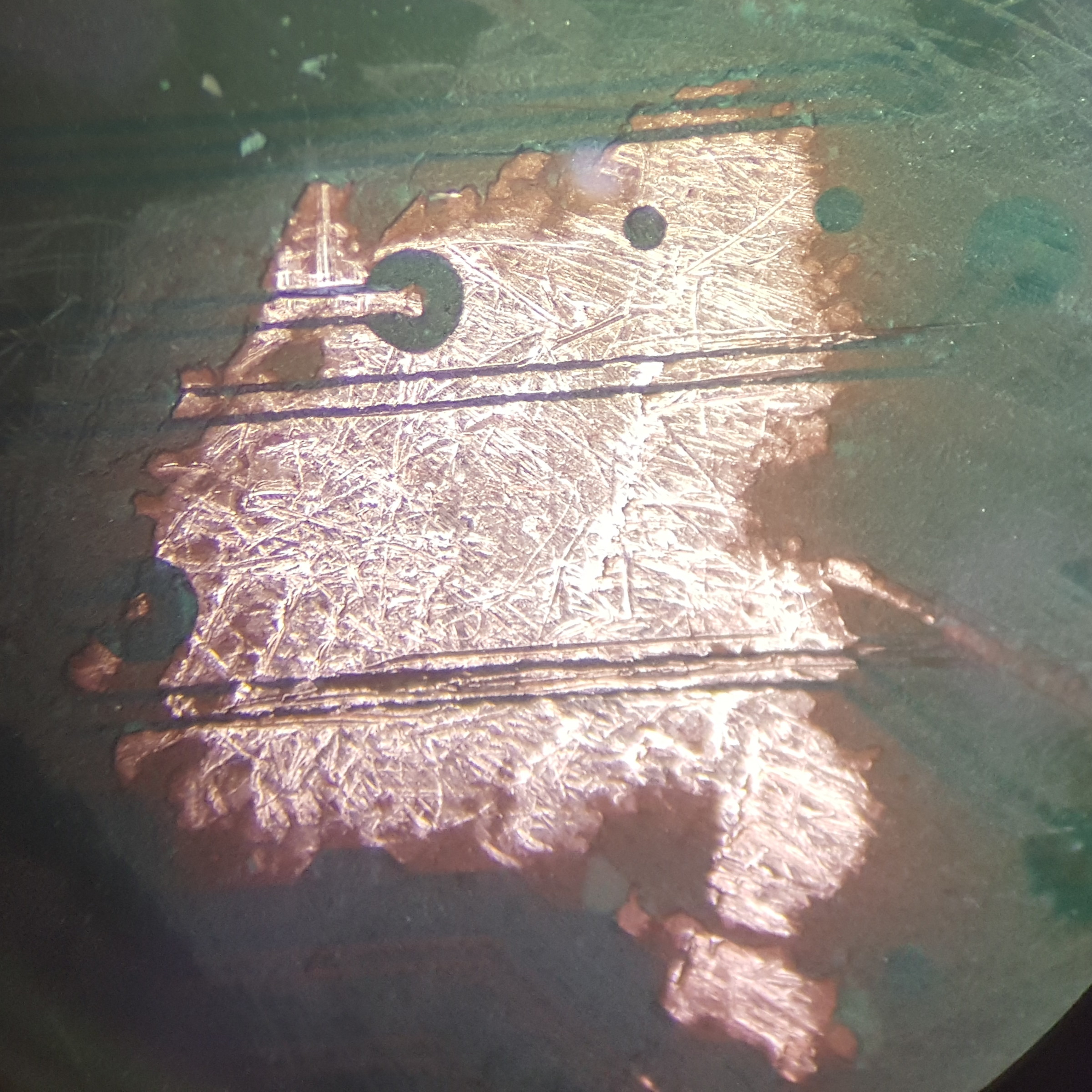
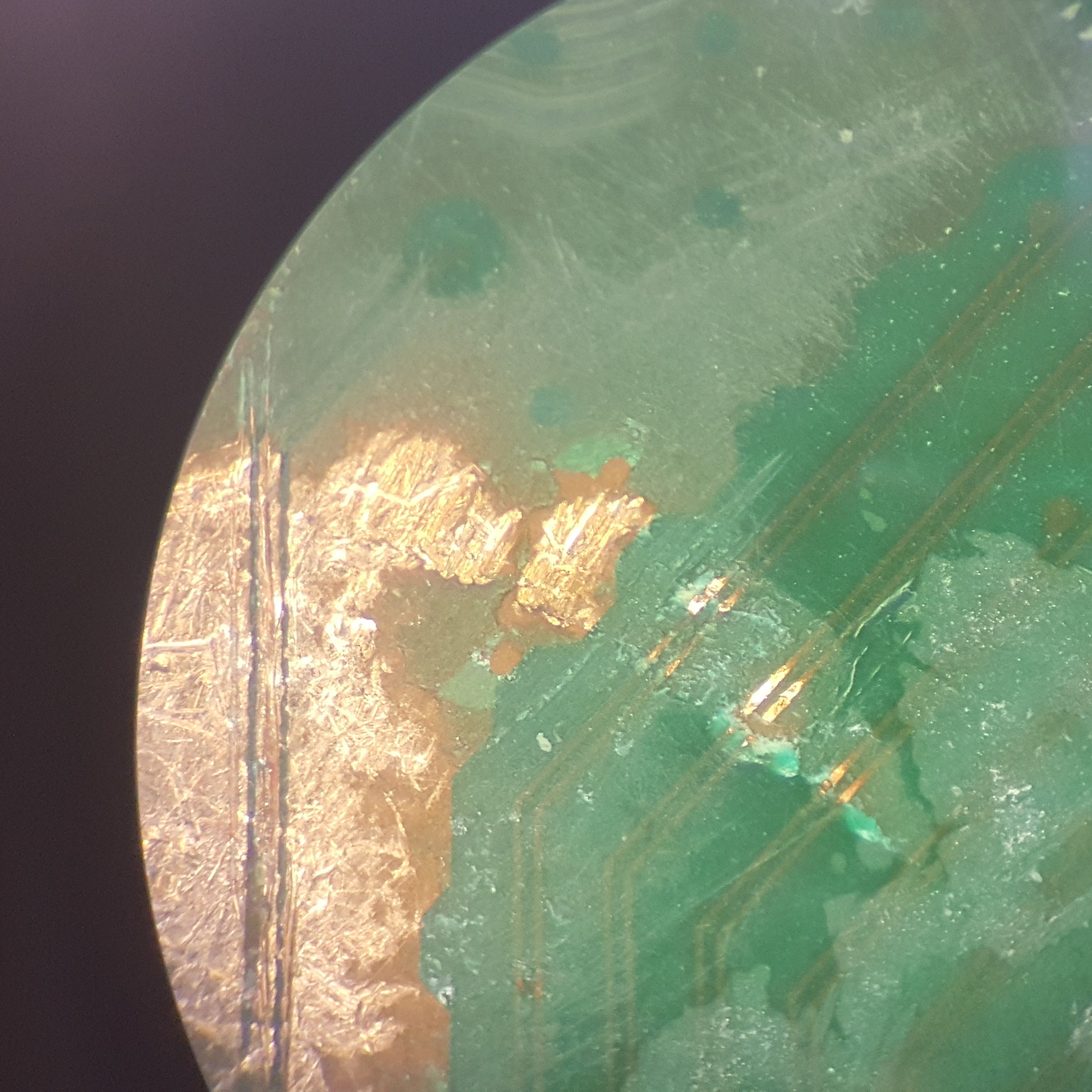
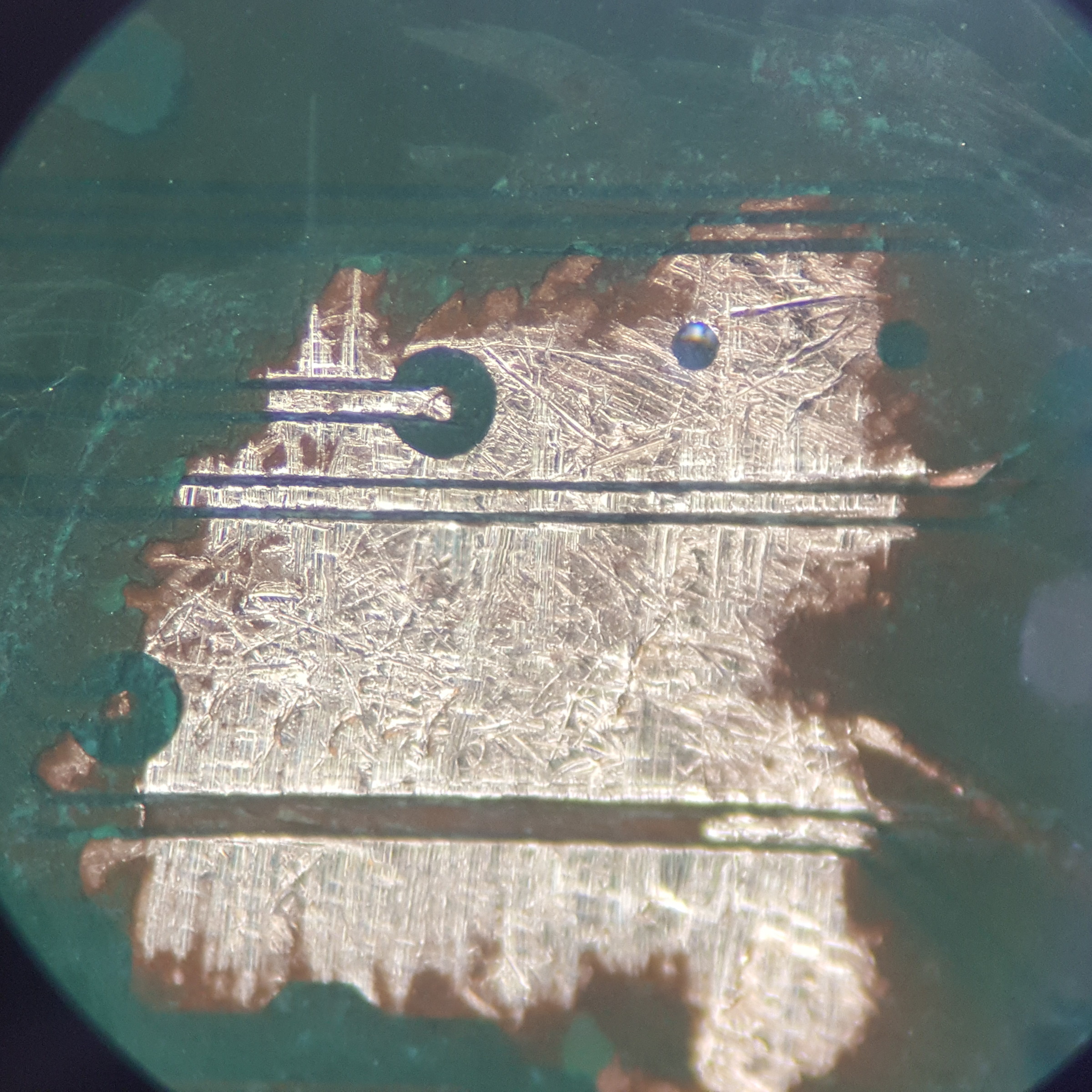
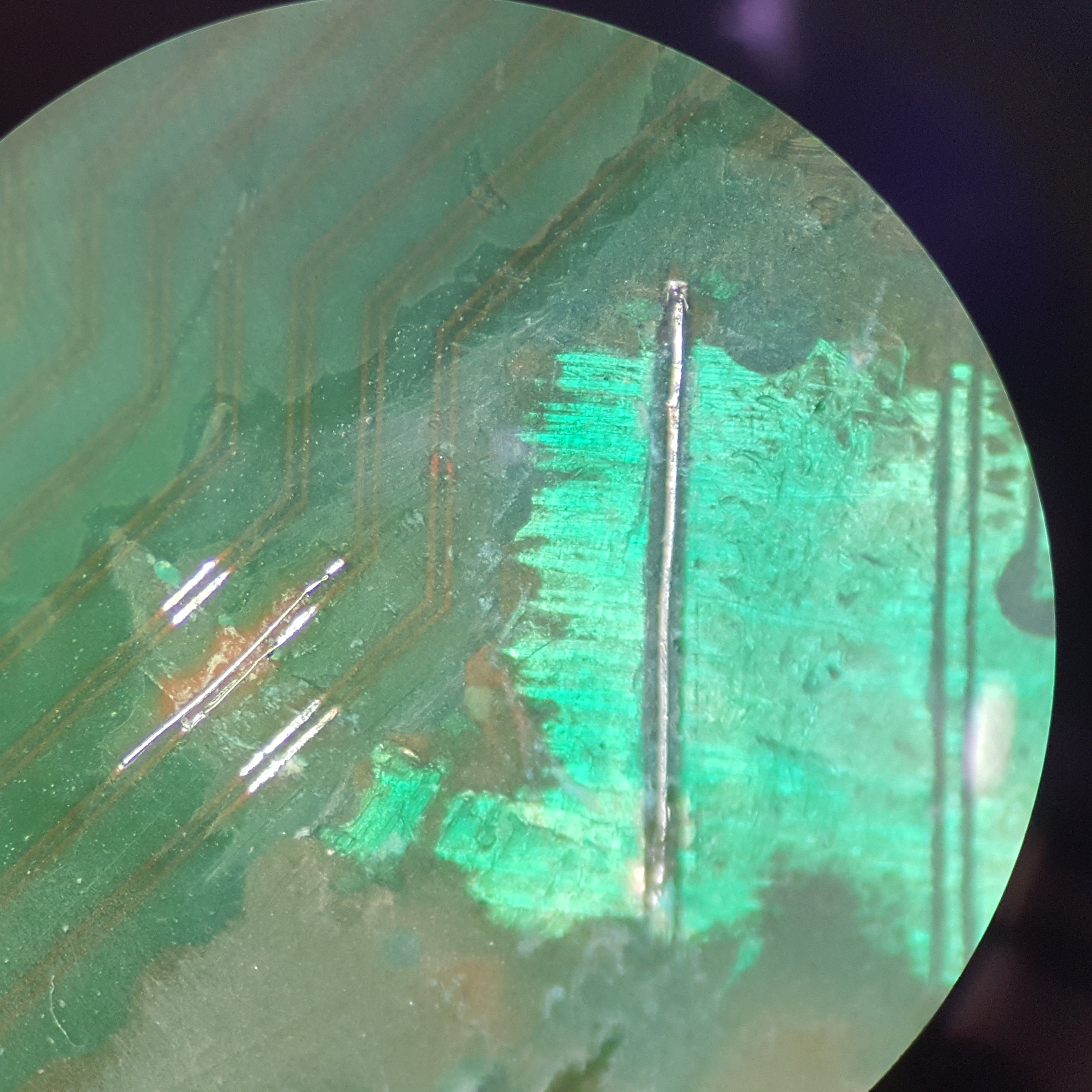
Just finished a CELL scratch repair for @Kleon1876, so it's time to show off!

I call this series "I spend all my time soldering so I forgot engineering stuff, but I'm really good at soldering."

Shorted out traces need cleaned up.
1-before.jpg


2 traces nicked here.
2-before.jpg


1 additional trace had to be removed after cleaning up all the damage. The only trick here is to swap out for a new exacto blade every 30 seconds or so, so you always have that razor sharp pinpoint tip.
3-during.jpg


All done. Masked the whole area around the larger trace then scraped the new mask back off. This made it easier to solder to without shorting anything new out. 0.01 millimeter jumper wires on the little 2 traces. The trick when dealing with damaged traces this small and close together is to stagger the points you'll be soldering to so you don't mess up the old ones each time you tack down a new one. That's why one jumper wire is longer than the other even though the damage was at the same spot.
4-after.jpg


Covered the whole area with some more fresh mask and that's it.
 
Last edited:
Just finished a CELL scratch repair for @Kleon1876, so it's time to show off!

I call this series "I spend all my time soldering so I forgot engineering stuff, but I'm really good at soldering."

Shorted out traces need cleaned up.
1-before.jpg


2 traces nicked here.
2-before.jpg


1 additional trace had to be removed after cleaning up all the damage. The only trick here is to swap out for a new exacto blade every 30 seconds or so, so you always have that razor sharp pinpoint tip.
3-during.jpg


All done. Masked the whole area around the larger trace then scraped the new mask back off. This made it easier to solder to without shorting anything new out. 0.01 millimeter jumper wires on the little 2 traces. The trick when dealing with damaged traces this small and close together is to stagger the points you'll be soldering to so you don't mess up the old ones each time you tack down a new one. That's why one jumper wire is longer than the other even though the damage was at the same spot.
4-after.jpg


Covered the whole area with some more fresh mask and that's it.
@squeept to the rescue! That's some mighty fine work there my man...litterally! This looks so easy when magnified 40x, but I can't even see those tiny traces with the naked eye! And those wires you're working with are thinner than a flea turd.

Behold the master at work, people!

I know that @Kleon1876 had sentimental attachment to this PS3, so I hope this means you got it working?!
 
GND <-> GND = 0.0 ohms (close)
GND <-> Positive NEC Pad (RSX/Cell) = 2.4ohms
GND <-> Positive Board Connector 12v = 2.4ohms
Positive Board Connector 12v <-> Positive RSX Nec Pad = 0.0 ohms (close)
Positive Board Connector 12v <-> Positive CELL Nec Pad = 5.0 ohms ??
Positive NEC Pad RSX <-> Positive NEC Pad CELL = 5.0ohms ??

Cell positive is not "closed" with 12v power connector like RSX.
RSX and CELL positives don't close, is that normal?


I checked all and they are perfect, especially those little ones near the NEC.

Strange is all the positive points of the board are giving 2.4ohms resistance between the ground. As I don´t have another motherboard to test I do not know if this is normal.

Hi Alisson,

i know its a long time but could you fix your issue with the PS3?

Have the same problem with continuity bewtween ground and V_OUT. Is that normal?

Thanks for you response.

red
 
Many many years ago my CECHH died, I did the silly oven trick, it fixed it for 3 minutes, it went back into YLOD and it has sat since. I bought a PS3 slim and have used that until a permanent solution was found.

Fast forward to a few weeks ago and I decided to see if anyone has solved this issue. For some background, I also mod Gameboys (bivert on GBP, screen swaps to IPS, etc), have recapped SNES, installed RGB mods in N64/SNES Jr, recapped GameGear (if you think PS3 fat is bad, these have a near 100% failure rate) repaired Virtual Boy ribbons, and so on. So I felt very confident in doing the PS3 fat recap, this was easy mode in comparison.

I replaced the first two caps, no dice, replaced one full side, no dice. Replaced all with 32x tantalum (plus 16awg stranded copper jumpers) and the PS3 came to life and works perfectly! CECHH saved, woo hoo!

I then found a dead CECHA locally for $50 and recapped that one too, and it worked! But the CECHA was as loud as a helicopter and I was getting overheating prompts. I decided to try my hand at delidding. It didn't go well, the epoxy ripped the memory chip in half.

WAEBfAS.jpg


Welp, pour one out for a very dead CECHA. Unless I send it out for a new RSX install, it's trash.

I then found a dead CECHB locally for $40. I like the all black look, and don't care about the lack of [painfully outdated] WiFi. I delidded it, successfully this time, recapped it, and success. Whisper quiet, runs great. I installed a 500GB hybrid drive too since they're so cheap now.

I used a Fluke multimeter to ohm out connections, make sure I had good connections to the + and GND rails, and to make sure I didn't have any shorts.

9iUoIsX.jpg


GNXQHSQ.jpg


So thanks guys. I knew the community would figure it out eventually. We're living in a golden area of retro renaissance.
 
So as it turns out, a local electronics repair company does BGA swaps, provided the BGA chip is already pre-balled. I may buy a cheap CXD2971BGB RSX on eBay and have them swap it. So maybe the CECHA can be saved after all.
 
Many many years ago my CECHH died, I did the silly oven trick, it fixed it for 3 minutes, it went back into YLOD and it has sat since. I bought a PS3 slim and have used that until a permanent solution was found.

Fast forward to a few weeks ago and I decided to see if anyone has solved this issue. For some background, I also mod Gameboys (bivert on GBP, screen swaps to IPS, etc), have recapped SNES, installed RGB mods in N64/SNES Jr, recapped GameGear (if you think PS3 fat is bad, these have a near 100% failure rate) repaired Virtual Boy ribbons, and so on. So I felt very confident in doing the PS3 fat recap, this was easy mode in comparison.

I replaced the first two caps, no dice, replaced one full side, no dice. Replaced all with 32x tantalum (plus 16awg stranded copper jumpers) and the PS3 came to life and works perfectly! CECHH saved, woo hoo!

I then found a dead CECHA locally for $50 and recapped that one too, and it worked! But the CECHA was as loud as a helicopter and I was getting overheating prompts. I decided to try my hand at delidding. It didn't go well, the epoxy ripped the memory chip in half.

WAEBfAS.jpg


Welp, pour one out for a very dead CECHA. Unless I send it out for a new RSX install, it's trash.

I then found a dead CECHB locally for $40. I like the all black look, and don't care about the lack of [painfully outdated] WiFi. I delidded it, successfully this time, recapped it, and success. Whisper quiet, runs great. I installed a 500GB hybrid drive too since they're so cheap now.

I used a Fluke multimeter to ohm out connections, make sure I had good connections to the + and GND rails, and to make sure I didn't have any shorts.

9iUoIsX.jpg


GNXQHSQ.jpg


So thanks guys. I knew the community would figure it out eventually. We're living in a golden area of retro renaissance.
A few questions if you would please indulge me:
  1. Link to the capacitors you're using (or model number if you have it) For both the H model and B model. Please specify which console they were installed on, if different.
  2. How long ago did you "mod" the H model? How much have you used the console since then? If you please test it again and confirm it's still working, that would be great.
  3. Could you please describe the YLOD for the H model and B models? For example, from PWR on to 3 beeps how long does it take for the YLOD to occur?
    • Warm-Start (Only starts when Warm)
    • Cold-Start (Only starts when Cold)
    • Instant (<1s)
    • Non-Instant (1-10s)
    • Delayed (10s - 5min)
    • Random (Normal stress)
    • Intense (High Stress, same place in certain games)
  4. Have you tried the SYSCON? Would you be willing to do this and post the bringup and errlog? Pretty please!? I would like to confirm your results withe more than, 'I did the tantalum thing and it worked.'
  5. If you're going to have it reballed anyway, then you may as well get a 40nm RSX and use the frankenstein Mod chip to install it...
 
So thanks guys. I knew the community would figure it out eventually. We're living in a golden area of retro renaissance.
i-do-not-think-it-means-what-you-think-it-means.gif.45aa65974f56dc6270f256cffaa3c0a9.gif


How much of this thread have you read? Yo may need to be brought up to speed if you think the tutorial the OP posted is the solution to the YLOD - because in 90% of cases it isn't. And unless you have a very specific type of YLOD and the associated 1002 SYSCON error, the results you posted were most likely false positives and your YLOD will return.

I don't mean to rain on your parade and assume you didn't read the entire thread, but I get that vibe from the context of your post. I also want to warn you against wasting more money and consoles on this. There are only 5.6 million BC PS3's sold. We don't need any more of them destroyed than have already been.
 
A few questions if you would please indulge me:
  1. Link to the capacitors you're using (or model number if you have it) For both the H model and B model. Please specify which console they were installed on, if different.
  2. How long ago did you "mod" the H model? How much have you used the console since then? If you please test it again and confirm it's still working, that would be great.
  3. Could you please describe the YLOD for the H model and B models? For example, from PWR on to 3 beeps how long does it take for the YLOD to occur?
    • Warm-Start (Only starts when Warm)
    • Cold-Start (Only starts when Cold)
    • Instant (<1s)
    • Non-Instant (1-10s)
    • Delayed (10s - 5min)
    • Random (Normal stress)
    • Intense (High Stress, same place in certain games)
  4. Have you tried the SYSCON? Would you be willing to do this and post the bringup and errlog? Pretty please!? I would like to confirm your results withe more than, 'I did the tantalum thing and it worked.'
  5. If you're going to have it reballed anyway, then you may as well get a 40nm RSX and use the frankenstein Mod chip to install it...
  1. F930J477MNCAJ6, same used for all three models, 32x per console
  2. I never modded my "H" model, or any PS3. If you're referring to the recap, both the H and the B were completely dead in the water before the recap (YLOD), and after the recap the H probably has about 8 hours on it. My B model has about 80-100 run hours on it since the recap, with about 50 of those hours being non-stop run in my stifling hot office with Etherium mining. Both systems are still running flawlessly so far.
  3. "Instant" for both the H and the B, I would guess about one second it would yellow light, and then straight to red.
  4. I briefly considered it, but after a quick look did not see any photo instructions of where the solder points are, only text instructions. I'm going to be honest, I was too lazy to hunt around the PCB with a magnifying glass trying to find the terminals. And also, it apparently requires Linux? I haven't used Linux in probably 15 years and fumbling through it for one objective really turned me off the whole idea. If they ever come out with pictorial work instructions and a Windows program, I'll take another look.
    1. My H and B models are currently working flawlessly, would SYSCON be of any benefit at this point? (I'm guessing the answer is yes and the PS3 stores a long history log of errors)
  5. Thanks! I will look into this. I am hesitant of "mods" since I plan to use my active PSN account. I generally only "mod" fifth gen consoles and prior.


How much of this thread have you read? Yo may need to be brought up to speed if you think the tutorial the OP posted is the solution to the YLOD - because in 90% of cases it isn't. And unless you have a very specific type of YLOD and the associated 1002 SYSCON error, the results you posted were most likely false positives and your YLOD will return.

I don't mean to rain on your parade and assume you didn't read the entire thread, but I get that vibe from the context of your post. I also want to warn you against wasting more money and consoles on this. There are only 5.6 million BC PS3's sold. We don't need any more of them destroyed than have already been.

Lol I'm not reading 200+ pages. And I'm not worried about wasting money. Retro gaming is the cheapest hobby I have, so if anything it saves me money because when I'm busy tinkering on electronics I'm not spending money on cars and boats.

What I do know is that I've got about 8 run hours on my H model and 80+ hours on my B model and both are working great so far. Before the recaps, both were instant YLOD upon power up.

I do plan to buy more PS3's and recap them for my personal collection, if I end up making mistakes and creating paperweights in the process, so be it. I'll take my chances.
 
  1. F930J477MNCAJ6, same used for all three models, 32x per console
  2. I never modded my "H" model, or any PS3. If you're referring to the recap, both the H and the B were completely dead in the water before the recap (YLOD), and after the recap the H probably has about 8 hours on it. My B model has about 80-100 run hours on it since the recap, with about 50 of those hours being non-stop run in my stifling hot office with Etherium mining. Both systems are still running flawlessly so far.
  3. "Instant" for both the H and the B, I would guess about one second it would yellow light, and then straight to red.
  4. I briefly considered it, but after a quick look did not see any photo instructions of where the solder points are, only text instructions. I'm going to be honest, I was too lazy to hunt around the PCB with a magnifying glass trying to find the terminals. And also, it apparently requires Linux? I haven't used Linux in probably 15 years and fumbling through it for one objective really turned me off the whole idea. If they ever come out with pictorial work instructions and a Windows program, I'll take another look.
    1. My H and B models are currently working flawlessly, would SYSCON be of any benefit at this point? (I'm guessing the answer is yes and the PS3 stores a long history log of errors)
  5. Thanks! I will look into this. I am hesitant of "mods" since I plan to use my active PSN account. I generally only "mod" fifth gen consoles and prior.


Lol I'm not reading 200+ pages. And I'm not worried about wasting money. Retro gaming is the cheapest hobby I have, so if anything it saves me money because when I'm busy tinkering on electronics I'm not spending money on cars and boats.

What I do know is that I've got about 8 run hours on my H model and 80+ hours on my B model and both are working great so far. Before the recaps, both were instant YLOD upon power up.

I do plan to buy more PS3's and recap them for my personal collection, if I end up making mistakes and creating paperweights in the process, so be it. I'll take my chances.
Thanks for the added info. It helps. First word of warning. Those caps have too high an ESR (300mOhms). The combined ESR of the NEC/TOKINs was 0.375mOhms. Your's is 18.75mOhms (way too high). They won't last as long. The higher the ESR the more heat they generate and shorter their lifespan. This has been covered in detail before.
One more question. Has the B model been turned off for very long? Thermal cycles allow the board to relax. In my experience the board is going to fail again within 2 weeks if used normally, daily and allowed to cool. If however, you've had it etherium mining this whole time the board may not have had a chance to cool and relieve the pressure that's mechanically keeping the thing alive. The only way to know for sure is the SYSCON error codes...

About the SYSCON. The link in my previous post was to my Windows Tutorial. There is a Windows based GUI in that repo too.

Long story short, to catch you up on this thread. Current advice is to first perform the SYSCON and do some basic throubleshooting before assuming it's the VERY rare tokin issue. General consensus among those working on PS3's, in any volume and who are in a postion to know, is that 90% of YLOD are Reballing or RSX/CPU issues. 7% are PSU failure, shorting caps, blown fuses, and other power related ICs. 3% or less is tokins and everything else. The issue is that most of the time replacing the tokins does work! The heat warps the board enough to make it look like a fix and we get happy posts of thanks from users thinking they fixed it, like the one you posted....then it fails again (false positives due to thermomechanical reconnection).

It lasts long enough to make a youtube video that has a satisfying conclusion, but a fix it is not. More like a cheap trick for views! Meanwhile, the rest of us are trying to help the poor saps who thought it was going to be an easy fix and wasted their money just to find out it really did need a reball to begin with. A rude snap back to reality. The first 100 pages were filled with posts debating the merits of rejecting reality. The SYSCON came and pulled this thread out of the mire. Not before many more poor saps got sucked in, including your truely. It keeps happening! Like a herd of cattle stampeding off the edge of a cliff. They follow the cow in fron't of them, ignoring or oblivious to the mooing death cries of the ones falling.

I did an exhaustive analysis of both this thread and the NEC/TOKINs. I showed with PS3#7 that a genuine Nec/Tokin error was a SYSCON 1002 or 3004 and that some capacitors do and do not work. And we've since learned that "BitTraining" errors tell you exactly where the BGA or trace broke. So ruling out a genuine Tokin failure from a BGA defect is actually much cheaper and easier than installing tantalum caps.

And now you are caught up!

The Bottom line:

Do the SYSCON it's cheap, easy, and will give you peace of mind knowing that your PS3's are not going to die abruptly with another rude..Beep...beep...beep! Or at least you'll have a better idea of what went wrong if it does.
 
Thanks for the instructions. I ordered the materials and will pull SYSCON codes later this week from the B and H.

To be clear, I'm not disagreeing that there could be other root causes, there certainly could be. I'm only reporting so far on my 3 out of 3 success. Temporarily minus one A model because of a delid gone wrong. I don't mind throwing parts/money at a problem and learning along the way. Could it break down again? Sure. But now that I know my buddy (same place that's doing the Joycon repairs for Nintendo, and radios for Chrysler) has access to a factory grade BGA rework machines, if I have to install a new RSX or rework my existing, then that's what I'll do next. Not a big deal.

Thanks for the added info. It helps. First word of warning. Those caps have too high an ESR (300mOhms). The combined ESR of the NEC/TOKINs was 0.375mOhms. Your's is 18.75mOhms (way too high). They won't last as long. The higher the ESR the more heat they generate and shorter their lifespan. This has been covered in detail before.
One more question. Has the B model been turned off for very long? Thermal cycles allow the board to relax. In my experience the board is going to fail again within 2 weeks if used normally, daily and allowed to cool. If however, you've had it etherium mining this whole time the board may not have had a chance to cool and relieve the pressure that's mechanically keeping the thing alive.

Thanks, I'll look into alternative caps to swap these back out on the next round of repairs, if the next round of repairs happen. Soldering these caps is extremely easy, so I'm not worried about that. I have a desoldering station and Hakko soldering iron, which make quick work of that job. It almost takes longer to take the PS3 apart and put it back together.

My B model has been turned off a number of times and fully cooled, yes. Only once was it running about 50 hours straight.

I think you misread my post, I have PC's mining Etherium which is causing a high ambient temperature in the room. The PS3 is not mining ETH.
 
Last edited by a moderator:
I then found a dead CECHA locally for $50 and recapped that one too, and it worked! But the CECHA was as loud as a helicopter and I was getting overheating prompts. I decided to try my hand at delidding. It didn't go well, the epoxy ripped the memory chip in half.
Welp, pour one out for a very dead CECHA. Unless I send it out for a new RSX install, it's trash.
A little advice from someone who's also had some painful delidding errors on a few different consoles, but i've also had several successes now after much practice. Don't do the RSX by popping the lid up with a knife. You're risking damage way too much with this technique. Very easy to break solder balls under the RSX also with this technique. You should check out NSC's video's on youtube. You want to use heat and razor blades, and maybe a small rubber mallet. All four corners of where those v-ram chips need to be heated a bit to loosen up (i'd suggest between 160 deg celsius to up to 200 if needed. I usually just do it til it's hot to touch a bit). You can then break the thermal glue starting on one side, very carefully by tapping the razor in between THE TOP of the v-ram chip and the bottom of the heat spreader. The key with this technique is heat and patience and the right tools. Anything else is a recipe for disaster. There is not really a 100% safe way to do this technique I feel like. There's risks no matter what way you go about it. Also be prepared to solder if you knock off a cap. I had to do that the other day after delidding an RSX, but my delid was successful. Luckily everything was fine.

I know the pain. Sorry for your loss. Especially on a 60 gb launch. That one must hurt a lot. Good part about breaking shit though, is you thoroughly learn what doesn't work. I've forced myself in the last 6 months to learn way more than I thought I would, in some instances due to breaking shit initially.
 
A little advice from someone who's also had some painful delidding errors on a few different consoles, but i've also had several successes now after much practice. Don't do the RSX by popping the lid up with a knife. You're risking damage way too much with this technique. Very easy to break solder balls under the RSX also with this technique. You should check out NSC's video's on youtube. You want to use heat and razor blades, and maybe a small rubber mallet. All four corners of where those v-ram chips need to be heated a bit to loosen up (i'd suggest between 160 deg celsius to up to 200 if needed. I usually just do it til it's hot to touch a bit). You can then break the thermal glue starting on one side, very carefully by tapping the razor in between THE TOP of the v-ram chip and the bottom of the heat spreader. The key with this technique is heat and patience and the right tools. Anything else is a recipe for disaster. There is not really a 100% safe way to do this technique I feel like. There's risks no matter what way you go about it. Also be prepared to solder if you knock off a cap. I had to do that the other day after delidding an RSX, but my delid was successful. Luckily everything was fine.

I know the pain. Sorry for your loss. Especially on a 60 gb launch. That one must hurt a lot. Good part about breaking shit though, is you thoroughly learn what doesn't work. I've forced myself in the last 6 months to learn way more than I thought I would, in some instances due to breaking shit initially.

Thanks for the tip, I will look into that. I mentioned above my buddy has access to a factory grade BGA rework machine, so I'm going to throw another RSX on there and revive that A model. Maybe I'll even do the 40nm RSX and mod chip.
 
Back
Top