PS3 (Research/Experimental) - NEC/TOKIN Capacitors Replacement - YLOD

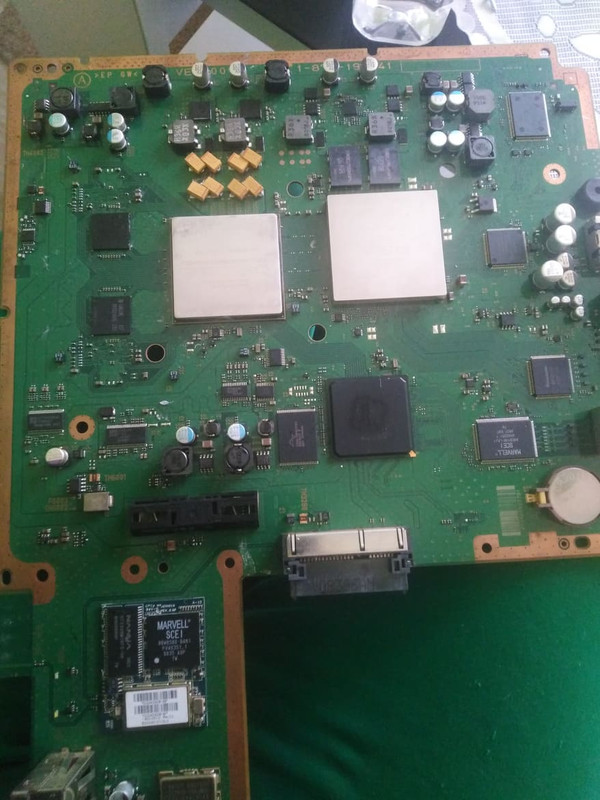
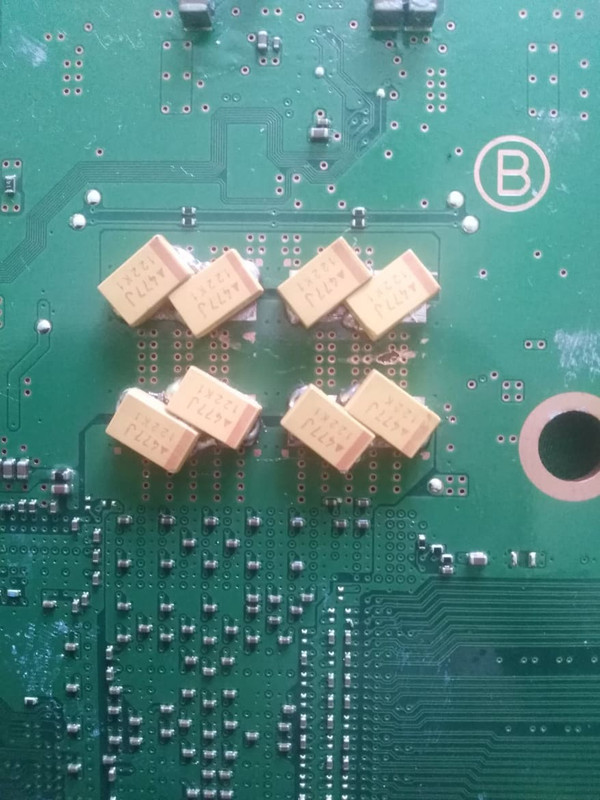
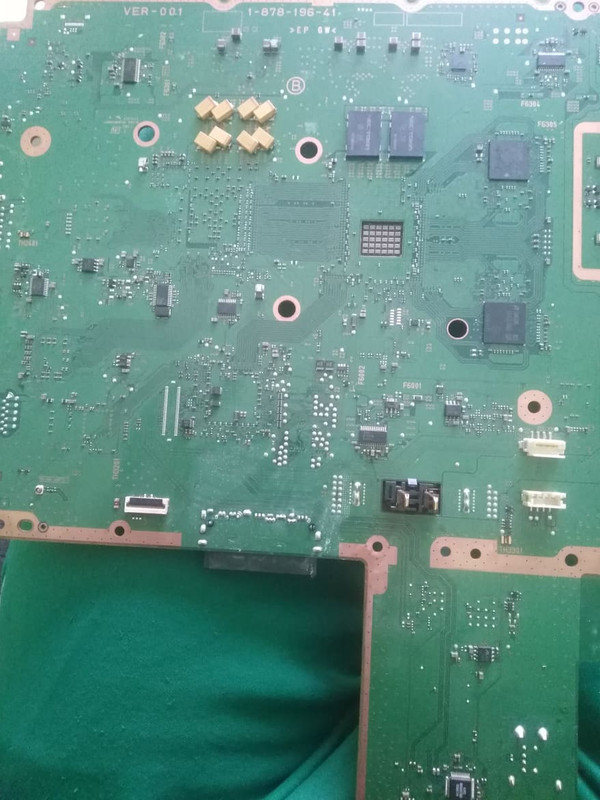
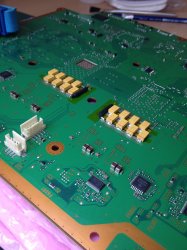
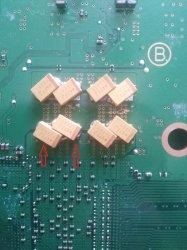
Finally decided to install the tantalizer on two YOLD CECHA01 & 06.
The SYSCON log was extracted https://www.psx-place.com/threads/f...and-error-reporting.30100/page-96#post-314518 and capacitors replaced on the CECHA06 https://www.psx-place.com/threads/r...s-replacement-ylod.25260/page-217#post-313981 back in November 2021, it didn't work back then as I used the wrong ESR value and the RSX itself seemed to be at fault.

CECHA06: installed the 4 tantalizers around the RSX yesterday but there was no improvements.
Green light stays on, fan speed increases at regular intervals until full speed.
I planned to check the syscon once more to confirm the 3004 fault.

CECHA01: installed the 4 tantalizers around the RSX, this repair was weird to say the least as I replaced 1 capacitor then check the YOLD state which would still appear after 10~15 sec. and so on till all 4 capacitors were replaced but no improvement.
I realized that it was another failed attempt as I put the console back together ready for storage, then decided to power it on once more when fully assembled and it worked!
I am not sure if it is a false positive but I have used it extensively throughout the day without any problems.

Some pictures of the tantalizers installed
qnp5nih.jpg

T8imZBR.jpg
 
Finally decided to install the tantalizer on two YOLD CECHA01 & 06.
The SYSCON log was extracted https://www.psx-place.com/threads/f...and-error-reporting.30100/page-96#post-314518 and capacitors replaced on the CECHA06 https://www.psx-place.com/threads/r...s-replacement-ylod.25260/page-217#post-313981 back in November 2021, it didn't work back then as I used the wrong ESR value and the RSX itself seemed to be at fault.

CECHA06: installed the 4 tantalizers around the RSX yesterday but there was no improvements.
Green light stays on, fan speed increases at regular intervals until full speed.
I planned to check the syscon once more to confirm the 3004 fault.

CECHA01: installed the 4 tantalizers around the RSX, this repair was weird to say the least as I replaced 1 capacitor then check the YOLD state which would still appear after 10~15 sec. and so on till all 4 capacitors were replaced but no improvement.
I realized that it was another failed attempt as I put the console back together ready for storage, then decided to power it on once more when fully assembled and it worked!
I am not sure if it is a false positive but I have used it extensively throughout the day without any problems.

Some pictures of the tantalizers installed
qnp5nih.jpg

T8imZBR.jpg

I've ordered some too, just waiting for OSH Park to ship them. @RIP-Felix ...do your Tantalizers still need the bridge wire, isn't there a (+) rail taking the current from one side to the other already designed into the PCB?
 
I read the post, and my problem is in part that described by you.
In my case i always use multiman and ps2 game in iso format (but i think there no difference at the end).
I seem to remember that i checked the temperature settings with webman (they were on auto, i can post a screen shoot this evening).
Unfortunately last day when i turned on my ps3, it shut down right away with the red light blinking (i had kept it off for a few days so the consold was cold).
As i said before, i didn't used the consol for a few years.
Are these first symtoms of ylod or rlod?

Thaks again.
If you can get the console to boot then you can use PS3 Advanced Toolset to dump the errorlog.

Turn off webman and go back to SYSCON fan control. Just to rule that out.
 
Finally decided to install the tantalizer on two YOLD CECHA01 & 06.
The SYSCON log was extracted https://www.psx-place.com/threads/f...and-error-reporting.30100/page-96#post-314518 and capacitors replaced on the CECHA06 https://www.psx-place.com/threads/r...s-replacement-ylod.25260/page-217#post-313981 back in November 2021, it didn't work back then as I used the wrong ESR value and the RSX itself seemed to be at fault.

CECHA06: installed the 4 tantalizers around the RSX yesterday but there was no improvements.
Green light stays on, fan speed increases at regular intervals until full speed.
I planned to check the syscon once more to confirm the 3004 fault.

CECHA01: installed the 4 tantalizers around the RSX, this repair was weird to say the least as I replaced 1 capacitor then check the YOLD state which would still appear after 10~15 sec. and so on till all 4 capacitors were replaced but no improvement.
I realized that it was another failed attempt as I put the console back together ready for storage, then decided to power it on once more when fully assembled and it worked!
I am not sure if it is a false positive but I have used it extensively throughout the day without any problems.

Some pictures of the tantalizers installed
qnp5nih.jpg

T8imZBR.jpg
You do not need the jumper wire. The Tantalizer has it built in.

Please measure resistance at the RSX testpoints. It sounds like one of them may be dead.
 
You do not need the jumper wire. The Tantalizer has it built in.

@Vendest ...you can take off those bridge wires if you want (next time you are working on your PS3 mobo), as RIP-Felix said above, each Tantalizer already has a built-in bridge wire.

EDIT: Also, once you have measured resistance at the RSX testpoints, and/ if hopefully all is well there, then after you could add the MLCCs (they are inexpensive), these will help clean the AC noise even more before the current arrives at the CELL / RSX, and help with faster response times.
 
Last edited:
You do not need the jumper wire. The Tantalizer has it built in.

Please measure resistance at the RSX testpoints. It sounds like one of them may be dead.

Great, I'll make sure to remove the jumpers next time and measure the resistance at the RSX testpoints.

@Vendest ...you can take off those bridge wires if you want (next time you are working on your PS3 mobo), as RIP-Felix said above, each Tantalizer already has a built-in bridge wire.

EDIT: Also, once you have measured resistance at the RSX testpoints, and/ if hopefully all is well there, then after you could add the MLCCs (they are inexpensive), these will help clean the AC noise even more before the current arrives at the CELL / RSX, and help with faster response times.

Could you remind me which post had the information about the recommended MLCCs? iirc the MLCC must be low ESR as well.
 
I read the post, and my problem is in part that described by you.
In my case i always use multiman and ps2 game in iso format (but i think there no difference at the end).
I seem to remember that i checked the temperature settings with webman (they were on auto, i can post a screen shoot this evening).
Unfortunately last day when i turned on my ps3, it shut down right away with the red light blinking (i had kept it off for a few days so the consold was cold).
As i said before, i didn't used the consol for a few years.
Are these first symtoms of ylod or rlod?

Thaks again.
The ylod and rlod are not an indication of a specific thing, as @RIP-Felix said the best you can do now is to get the syscon errors
The syscon is a chip in the PS3 motherboard that keeps a record of the critical errors, everytime your PS3 was shutting down abruptelly it was generating an error with a timestamp, probably your syscon have a bunch cummulated from the past weeks/months
 
The ylod and rlod are not an indication of a specific thing, as @RIP-Felix said the best you can do now is to get the syscon errors
The syscon is a chip in the PS3 motherboard that keeps a record of the critical errors, everytime your PS3 was shutting down abruptelly it was generating an error with a timestamp, probably your syscon have a bunch cummulated from the past weeks/months

Yesterday i tried again to turn on ps3 (after 4 day disconnected from power supply):
- turned on power with switch
- pressed power on button
- after about 5 sec 3 bips and red light blinking
- pressed again power button to stop red light
- pressed again power button tu turn on
- aftre about 10 sec again 3 bips and red light blinking
- pressed again power button to stop red light
- pressed agai power button and finally the consol start sayin me that i had shutted down improperly and started the filesystem check
- after that sterted normally

Than i made a syscon error log copy using the tool found here https://www.psdevwiki.com/ps3/Syscon_Error_Codes#How_to_get_the_syscon_error_log

Firmware Version: 4.84 (build 50696)
Platform ID: CokF10
Product Code: 00 85
Product Sub Code: 00 08
Hardware Config: 4E00FFFF0307BCBF
Syscon Fimware Version: 065D.0000000000000000 (EEPROM: 0000000000000000)
Bringup Count: 2447, Shutdown Count: 2418
Runtime: 121 Days, 21 Hours, 55 Minutes, 20 Seconds
Error Log
01: A0802124 Sun Jan 1 00:00:31 2006
02: A0802124 Sun Jan 1 00:00:31 2006
03: A0801002 Sun Jan 1 00:00:30 2006
04: A0802124 Sun Jan 1 00:00:01 2006
05: A0801002 Sun Jan 1 00:00:00 2006
06: A0802124 Sun Jan 1 19:48:25 2006
07: A0801002 Sun Jan 1 19:48:24 2006
08: A0802124 Sun Jan 1 19:47:44 2006
09: A0802124 Sun Jan 1 19:47:43 2006
10: A0801002 Sun Jan 1 19:47:43 2006
11: A0802124 Sun Jan 1 00:02:44 2006
12: A0802124 Sun Jan 1 00:02:43 2006
13: A0801002 Sun Jan 1 00:02:43 2006
14: A0802124 Sun Jan 1 00:01:11 2006
15: A0802124 Sun Jan 1 00:01:11 2006
16: A0801002 Sun Jan 1 00:01:10 2006
17: A0802124 Sun Jan 1 00:00:23 2006
18: A0801002 Sun Jan 1 00:00:22 2006
19: A0802124 Sun Jan 1 00:00:01 2006
20: A0801002 Sun Jan 1 00:00:00 2006
21: A0802124 Sun Jan 1 01:42:16 2006
22: A0801002 Sun Jan 1 01:42:16 2006
23: A0802022 Sun Jan 1 01:41:52 2006
24: A0802124 Sun Jan 1 01:08:44 2006
25: A0801002 Sun Jan 1 01:08:44 2006
26: A0802022 Sun Jan 1 01:08:16 2006
27: A0802124 Sun Jan 1 00:47:24 2006
28: A0802124 Sun Jan 1 00:47:24 2006
29: A0801002 Sun Jan 1 00:47:23 2006
30: A0802022 Sun Jan 1 00:47:10 2006
31: A0802124 Sun Jan 1 00:42:37 2006
32: FFFFFFFF Fri Dec 31 23:59:59 1999

and made a screenshot of fan settings using webman
84rXy6Z

YZZGWmv


Anyway i would like to change the battery, the thermal pads and thermal grease.
 
Last edited:
Yesterday i tried again to turn on ps3 (after 4 day disconnected from power supply):
- turned on power with switch
- pressed power on button
- after about 5 sec 3 bips and red light blinking
- pressed again power button to stop red light
- pressed again power button tu turn on
- aftre about 10 sec again 3 bips and red light blinking
- pressed again power button to stop red light
- pressed agai power button and finally the consol start sayin me that i had shutted down improperly and started the filesystem check
- after that sterted normally

Than i made a syscon error log copy using the tool found here https://www.psdevwiki.com/ps3/Syscon_Error_Codes#How_to_get_the_syscon_error_log

Firmware Version: 4.84 (build 50696)
Platform ID: CokF10
Product Code: 00 85
Product Sub Code: 00 08
Hardware Config: 4E00FFFF0307BCBF
Syscon Fimware Version: 065D.0000000000000000 (EEPROM: 0000000000000000)
Bringup Count: 2447, Shutdown Count: 2418
Runtime: 121 Days, 21 Hours, 55 Minutes, 20 Seconds
Error Log
01: A0802124 Sun Jan 1 00:00:31 2006
02: A0802124 Sun Jan 1 00:00:31 2006
03: A0801002 Sun Jan 1 00:00:30 2006
04: A0802124 Sun Jan 1 00:00:01 2006
05: A0801002 Sun Jan 1 00:00:00 2006
06: A0802124 Sun Jan 1 19:48:25 2006
07: A0801002 Sun Jan 1 19:48:24 2006
08: A0802124 Sun Jan 1 19:47:44 2006
09: A0802124 Sun Jan 1 19:47:43 2006
10: A0801002 Sun Jan 1 19:47:43 2006
11: A0802124 Sun Jan 1 00:02:44 2006
12: A0802124 Sun Jan 1 00:02:43 2006
13: A0801002 Sun Jan 1 00:02:43 2006
14: A0802124 Sun Jan 1 00:01:11 2006
15: A0802124 Sun Jan 1 00:01:11 2006
16: A0801002 Sun Jan 1 00:01:10 2006
17: A0802124 Sun Jan 1 00:00:23 2006
18: A0801002 Sun Jan 1 00:00:22 2006
19: A0802124 Sun Jan 1 00:00:01 2006
20: A0801002 Sun Jan 1 00:00:00 2006
21: A0802124 Sun Jan 1 01:42:16 2006
22: A0801002 Sun Jan 1 01:42:16 2006
23: A0802022 Sun Jan 1 01:41:52 2006
24: A0802124 Sun Jan 1 01:08:44 2006
25: A0801002 Sun Jan 1 01:08:44 2006
26: A0802022 Sun Jan 1 01:08:16 2006
27: A0802124 Sun Jan 1 00:47:24 2006
28: A0802124 Sun Jan 1 00:47:24 2006
29: A0801002 Sun Jan 1 00:47:23 2006
30: A0802022 Sun Jan 1 00:47:10 2006
31: A0802124 Sun Jan 1 00:42:37 2006
32: FFFFFFFF Fri Dec 31 23:59:59 1999

and made a screenshot of fan settings using webman
84rXy6Z

YZZGWmv


Anyway i would like to change the battery, the thermal pads and thermal grease.

Error Code: 2124 (AV)
This error tends to cause a delayed Yellow Light Of Death (10s - 1min). Sometimes described as a Green Light Of Death (GLOD) or Red Light Of Death (RLOD).
2124 and 2024 errors have been fixed by replacing both the AV and HDMI encoders. One user reported 2024/2124 errors resolved by replacing the HDMI encoder. Another removed the HDMI encoder and tested the console without it. That console primarily filled the errorlog with 2124 errors, but a few 2024's as well. So it is unclear if 2124 is specific to the HDMI Encoder or AV Encoder. It seems it could be either.

Error Code: 1002 (Power RSX)
Components Involved:
RSX (IC2001 on COK-001)
NEC/TOKIN Proadlizers (C6229/C6230/C6231/C6232 on COK-001)
Other nearby components of the power block
This error has been associated with insufficient Filtering on RSX_VDDC power line. There is a range of voltage ripple/noise that will cause this error before it gets so bad it causes an RSX_VDDC Power Failure (3004). YLOD's causing 1002's range in duration from 2 seconds to only occurring during intense games.

https://www.psdevwiki.com/ps3/Syscon_Error_Codes
 
My friend can't get picture on Fat.
ps3 lamp gives GREEN.
Console doesn't turn off itself.
Display reset doesn't work: when it's red > and he press the button, there is no 3 beeps.
 
My friend can't get picture on Fat.
ps3 lamp gives GREEN.
Console doesn't turn off itself.
Display reset doesn't work: when it's red > and he press the button, there is no 3 beeps.

Hi Bake, to help diagnose the problem with more details, if you can, follow this guide:-
https://www.psx-place.com/threads/r...s-replacement-ylod.25260/page-192#post-295119

This will allow you to get the error logs from the Syscon chip, which should give you an idea of the area with the problem(s).
 
Error Code: 2124 (AV)
This error tends to cause a delayed Yellow Light Of Death (10s - 1min). Sometimes described as a Green Light Of Death (GLOD) or Red Light Of Death (RLOD).
2124 and 2024 errors have been fixed by replacing both the AV and HDMI encoders. One user reported 2024/2124 errors resolved by replacing the HDMI encoder. Another removed the HDMI encoder and tested the console without it. That console primarily filled the errorlog with 2124 errors, but a few 2024's as well. So it is unclear if 2124 is specific to the HDMI Encoder or AV Encoder. It seems it could be either.

Error Code: 1002 (Power RSX)
Components Involved:
RSX (IC2001 on COK-001)
NEC/TOKIN Proadlizers (C6229/C6230/C6231/C6232 on COK-001)
Other nearby components of the power block
This error has been associated with insufficient Filtering on RSX_VDDC power line. There is a range of voltage ripple/noise that will cause this error before it gets so bad it causes an RSX_VDDC Power Failure (3004). YLOD's causing 1002's range in duration from 2 seconds to only occurring during intense games.

Is it possible that bad nec tokin cause a bad power supplie to av and hdmi encoder, resulting to a fail (so i get error 2124 and 2022)?
Or the nec aren't the problem for the encoders?
It is strange that i got error on hdmi, because i can see the ps3 on tv with hdmi and with av exit.
Thanks again.
 
Is it possible that bad nec tokin cause a bad power supplie to av and hdmi encoder, resulting to a fail (so i get error 2124 and 2022)?
Or the nec aren't the problem for the encoders?
It is strange that i got error on hdmi, because i can see the ps3 on tv with hdmi and with av exit.
Thanks again.

Hi Gvirus, i'm not sure, maybe @RIP-Felix would know the answer to your question.
 
Guys i "fixed" one dead ps3 by replacing 2 full sets of nec tolkin with tantalum capacitors. PS3 is working ok but i have some problems. When i set a webman fan to a manual fixed value (43%) game start normally, temp are around 60c and after 1,2 minutes console just shutt off without any warning (its not overheat). But when i pick SYSCON fan temps are around 75c (20~30% fan speed)but it works fine and i can play all day. Ps3 is cleaned 99% from dust, new thermal paste..My questions:
1.Im u supposed to connect positive+ of tantalums with a jumper wire (maybe thats the issue of ps3 shutting down)
2.Can i use stranded wire from pc power supply (MAX 12V, 14A) (they seems thick but they are not solid core)
3.If i have nec/tolkin on the other side of the board (right below replaced nec/tolkins) do i need jumper wire

Any help is appreciated.
274657068-338842944674379-6635579341100564056-n.jpg
274658017-1320595028451045-67481321305822860-n.jpg
274681195-325494179635542-6579191793866001450-n.jpg
 
1.Im u supposed to connect positive+ of tantalums with a jumper wire (maybe thats the issue of ps3 shutting down)
2.Can i use stranded wire from pc power supply (MAX 12V, 14A) (they seems thick but they are not solid core)
3.If i have nec/tolkin on the other side of the board (right below replaced nec/tolkins) do i need jumper wire

1) Yes, but only if you removed all the Nec Tokins on both sides (of say RSX, or CELL) ...if on the exact opposite side you have not removed the original Nec Tokins then you don't need a bridge / jumper wire.
2) Should be fine
3) Nope, see (1)

EDIT: You got to be careful that your Tantalums are not shorting, because when soldering the Tans on a diagonal like you have - it's easily done. Also AVX Tans aren't so good because they have higher ESR than ideally wanted.

Here is a photo of an alternative way to soldering them instead of diagonally, first using Kapton tape cover the negative / ground stripes and aim for the ground in the middle, you will need to sand away the masking in that area beforehand. (click on the photos to see bigger images).

PS3_caps_desoldered.JPG PS3_AVX_Photo-2.JPG
 
Last edited:
1) Yes, but only if you removed all the Nec Tokins on both sides (of say RSX, or CELL) ...if on the exact opposite side you have not removed the original Nec Tokins then you don't need a bridge / jumper wire.
2) Should be fine
3) Nope, see (1)

EDIT: You got to be careful that your Tantalums are not shorting, because when soldering the Tans on a diagonal like you have - it's easily done. Also AVX Tans aren't so good because they have higher ESR than ideally wanted.

Here is a photo of an alternative way to soldering them instead of diagonally, first using Kapton tape cover the negative / ground stripes and aim for the ground in the middle, you will need to sand away the masking in that area beforehand. (click on the photos to see bigger images).

View attachment 36487 View attachment 36486
Thanks for your reply. Do you know what could cause a instant turn off during gameplay when Auto & Manual fan control in webman are set. Console do not overheat, but turn off with 3 beeping light. When fan is set to SYSCON console work fine. Maybe i should replace all 4 sets of nec/tolkins?
 
Last edited:
Thanks for your reply. Do you know what could cause a instant turn off during gameplay when Auto & Manual fan control in webman are set. Console do not overheat, but turn off with 3 beeping light. When fan is set to SYSCON console work fine. Maybe i should replace all 4 sets of nec/tolkins?

Hi, i think you could retrieve your SYSCON error logs and that would give you a good idea if it's the NECs, AVXs, Fuses, RSX / CELL, or other issues. Here is the guide by Felix (i highly recommend it):- https://www.psx-place.com/threads/r...s-replacement-ylod.25260/page-192#post-295119

Also, if the CELL / RSX aren't getting enough clean power (when playing games) it could cause a shutdown. Looking at the photos of your AVX Nec Tokin replacement, there are two AVX caps that look like they might be shorting. I put 2 red arrows on your photo below to high-light the ones i mean. Also, AVX caps haven't got the ideal low ESR needed. You could try to re-position all your AVX caps like in the photo i posted above. However, before doing any of that i would recommend retrieving your SYSCON error logs first. It's easy to do even if the guide at first glance might make it seem tricky, it's real simple to do, and will help you identify what the actual problem is.

AVX_f1rew1re_shorts.jpg
 
Hi, i think you could retrieve your SYSCON error logs and that would give you a good idea if it's the NECs, AVXs, Fuses, RSX / CELL, or other issues. Here is the guide by Felix (i highly recommend it):- https://www.psx-place.com/threads/r...s-replacement-ylod.25260/page-192#post-295119

Also, if the CELL / RSX aren't getting enough clean power (when playing games) it could cause a shutdown. Looking at the photos of your AVX Nec Tokin replacement, there are two AVX caps that look like they might be shorting. I put 2 red arrows on your photo below to high-light the ones i mean. Also, AVX caps haven't got the ideal low ESR needed. You could try to re-position all your AVX caps like in the photo i posted above. However, before doing any of that i would recommend retrieving your SYSCON error logs first. It's easy to do even if the guide at first glance might make it seem tricky, it's real simple to do, and will help you identify what the actual problem is.

View attachment 36491
I actually managed to fix the issue by resoldering all tantalum capacitors underside gpu. Played uncharted on 43% fan for 1 hour and no problem so far, so i guess it was either bad connection on one of the tantalum caps or some type of shorting.
 
Back
Top