PS3 (Research/Experimental) - NEC/TOKIN Capacitors Replacement - YLOD

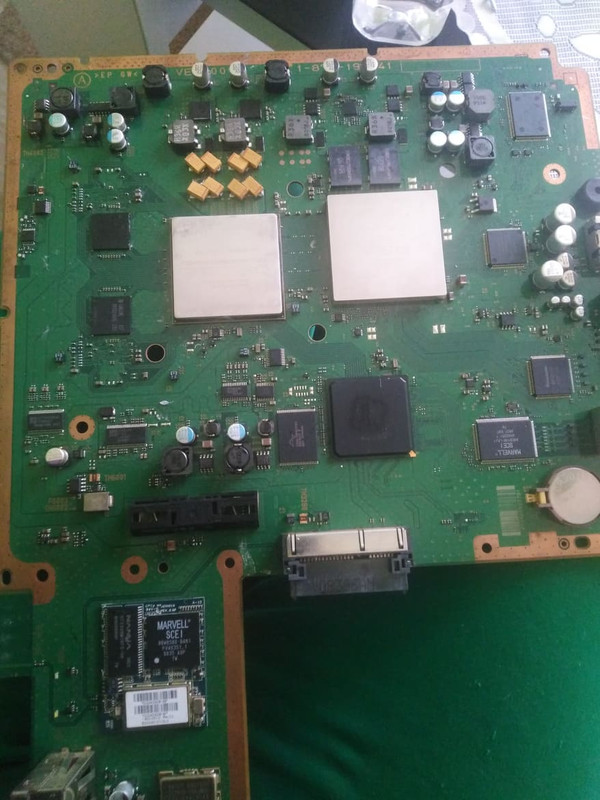
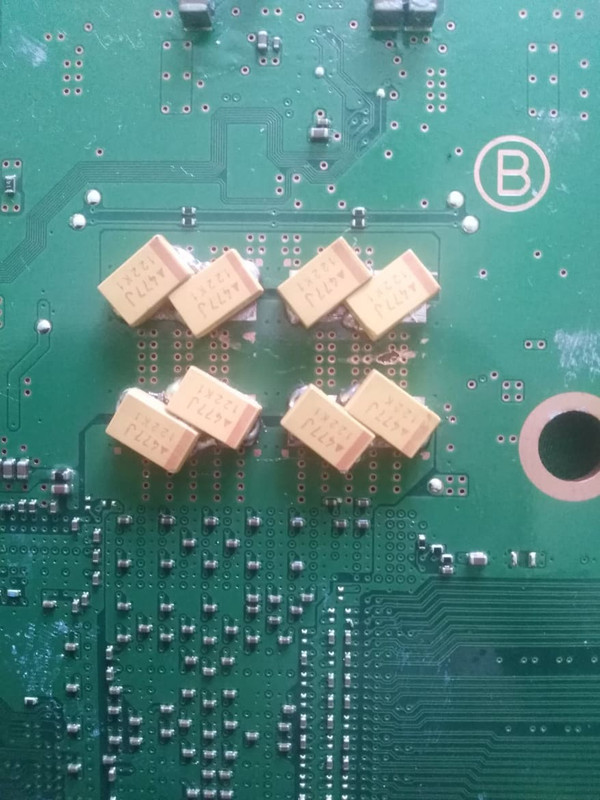
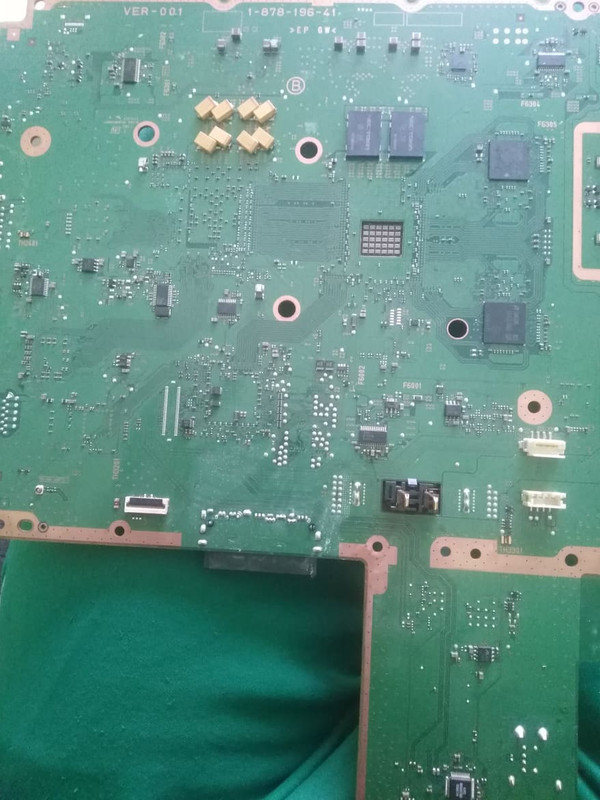
I actually managed to fix the issue by resoldering all tantalum capacitors underside gpu. Played uncharted on 43% fan for 1 hour and no problem so far, so i guess it was either bad connection on one of the tantalum caps or some type of shorting.

:D Ah nice! Well, if ever you decide to change your AVX Tans, you'll want to get these Panasonics instead:- 2R5TPE470M7

Mouser link:- https://www.mouser.com/ProductDetail/Panasonic/2R5TPE470M7?qs=OE1iw1LrrPFssbKV91yTww==

These Panasonic ones are the best for the job:-
470 µF Molded Tantalum Polymer Capacitor,
2.5 V 2917 (7343 Metric) 7mOhm @ 100kHz

They are a little more expensive, but worth every penny :eagerness:
 
A quick update and a question about the CECHA06 that I could not get to work few days ago after installing the tantalizer.
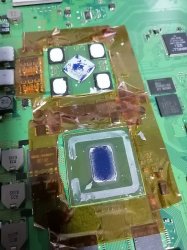
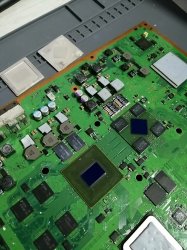
I did delid the Cell and RSX (for the first time), somewhat "reflow" the RSX and applied Arctic MX-4 thermal paste.
The PS3 boots fine now although I have no illusion that it is likely to be a temporary fix.

Delid_1.jpg Delid_2.jpg

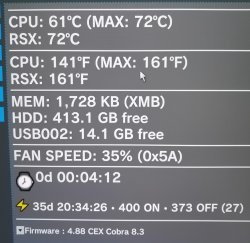
My question is about the temperature that keeps increasing after awhile setting the fan to run at more than 70% a some point (it's loud!). The Ps3 does not shut down but the fan works hard to keep the temp within the max limit.
Is thermal paste supposed to be applied on the 4 corners of the RSX as well? Or I must have missed something.

Temp.jpg
 
A quick update and a question about the CECHA06 that I could not get to work few days ago after installing the tantalizer.
I did delid the Cell and RSX (for the first time), somewhat "reflow" the RSX and applied Arctic MX-4 thermal paste.
The PS3 boots fine now although I have no illusion that it is likely to be a temporary fix.

View attachment 36493 View attachment 36494

My question is about the temperature that keeps increasing after awhile setting the fan to run at more than 70% a some point (it's loud!). The Ps3 does not shut down but the fan works hard to keep the temp within the max limit.
Is thermal paste supposed to be applied on the 4 corners of the RSX as well? Or I must have missed something.

View attachment 36495

When you put the IHS (lid) back on the RSX and CELL, what did you use to attach the IHS back into place again?

EDIT: Did you use a Thermal Adhesive Epoxy?
Like these:-
https://www.mouser.com/c/thermal-management/thermal-interface-products/?q=Thermal Epoxy
 
Last edited:
Is it possible that bad nec tokin cause a bad power supplie to av and hdmi encoder, resulting to a fail (so i get error 2124 and 2022)?
Or the nec aren't the problem for the encoders?
It is strange that i got error on hdmi, because i can see the ps3 on tv with hdmi and with av exit.
Thanks again.
They thend to be a red herring, yes. Filter noise can trigger them. They often disappeat after the recap. Ignore the HDMI/DVE errors for now Fix the RSX filter issue and see if they remain.
 
Guys i "fixed" one dead ps3 by replacing 2 full sets of nec tolkin with tantalum capacitors. PS3 is working ok but i have some problems. When i set a webman fan to a manual fixed value (43%) game start normally, temp are around 60c and after 1,2 minutes console just shutt off without any warning (its not overheat). But when i pick SYSCON fan temps are around 75c (20~30% fan speed)but it works fine and i can play all day. Ps3 is cleaned 99% from dust, new thermal paste..My questions:
1.Im u supposed to connect positive+ of tantalums with a jumper wire (maybe thats the issue of ps3 shutting down)
2.Can i use stranded wire from pc power supply (MAX 12V, 14A) (they seems thick but they are not solid core)
3.If i have nec/tolkin on the other side of the board (right below replaced nec/tolkins) do i need jumper wire

Any help is appreciated.
274657068-338842944674379-6635579341100564056-n.jpg
274658017-1320595028451045-67481321305822860-n.jpg
274681195-325494179635542-6579191793866001450-n.jpg
Be sure to post SYSCON errorlogs before working on a console. You will have no idea whether or not you "fixed" this console for at least 2 weeks of thermal cycles. A positive result after replacing the tokins is understandably exciting, but it's totally meaningless.

Also those yellow AVX caps are cancer. Excise them quick, before they infect and kill the RSX...dead. I'm not kidding!
 
A quick update and a question about the CECHA06 that I could not get to work few days ago after installing the tantalizer.
I did delid the Cell and RSX (for the first time), somewhat "reflow" the RSX and applied Arctic MX-4 thermal paste.
The PS3 boots fine now although I have no illusion that it is likely to be a temporary fix.

View attachment 36493 View attachment 36494

My question is about the temperature that keeps increasing after awhile setting the fan to run at more than 70% a some point (it's loud!). The Ps3 does not shut down but the fan works hard to keep the temp within the max limit.
Is thermal paste supposed to be applied on the 4 corners of the RSX as well? Or I must have missed something.

View attachment 36495
Which chip was getting hot, requiring the fan to speed up? You didn't say.

Did you scrape the old thermal adhesive off the RSX? If you didn't then it could cause a gap between the RSX die and IHS after replacing it. To answer your question, yes the VRAM needs to be epoxied back on after delidding (which isn't necessary BTW. IDK why people keep delidding the RSX, I really don't).

Same with the CPU. You need to glue it back on afterwards. Otherwise the package will warp more with every thermal cycle and it'll have a BGA/bumps failure much faster than it otherwise would.
 
@RIP-Felix The RSX gets hot, I removed the old thermal adhesive on the RSX as well as the glue on the CPU.
I applied regular thermal paste on the RSX die but none on the VRAM. Same for the CPU die, I did not glue it back.
I will get the thermal Adhesive Epoxy as recommended by @Workz_777 and start again.
Any recommendations on which type of glue to get for the CPU?
Just to confirm my understanding is correct, thermal adhesive epoxy must be applied on both the RSX VRAM+die and CPU's die?
 
They thend to be a red herring, yes. Filter noise can trigger them. They often disappeat after the recap. Ignore the HDMI/DVE errors for now Fix the RSX filter issue and see if they remain.

Thank you RIP-Felix.
I bought various new tantalium caps, so when they arrive (don't now when) i will do the replacement and test the ps3.
 
@RIP-Felix The RSX gets hot, I removed the old thermal adhesive on the RSX as well as the glue on the CPU.
I applied regular thermal paste on the RSX die but none on the VRAM. Same for the CPU die, I did not glue it back.
I will get the thermal Adhesive Epoxy as recommended by @Workz_777 and start again.
Any recommendations on which type of glue to get for the CPU?
Just to confirm my understanding is correct, thermal adhesive epoxy must be applied on both the RSX VRAM+die and CPU's die?

Maybe others here can recommend a good Thermal Adhesive Epoxy, here is one i think is a good price and easy to use:-
https://www.mouser.com/ProductDetail/MG-Chemicals/8329TFS-25ML?qs=YCa/AAYMW01BCAmtNaQPHQ==

Here is its datasheet:-
https://www.mouser.com/datasheet/2/265/tds_8329tfs_2parts-1288103.pdf

I think you can use it for both the CELL die and the RSX die + VRAMs
 
@RIP-Felix The RSX gets hot, I removed the old thermal adhesive on the RSX as well as the glue on the CPU.
I applied regular thermal paste on the RSX die but none on the VRAM. Same for the CPU die, I did not glue it back.
I will get the thermal Adhesive Epoxy as recommended by @Workz_777 and start again.
Any recommendations on which type of glue to get for the CPU?
Just to confirm my understanding is correct, thermal adhesive epoxy must be applied on both the RSX VRAM+die and CPU's die?
First of all, you need to carefully plan this choice.

For CPU/RSX die use thermal paste (not glue). Something like MX-4 or MX-5.

The CPU's old silicone should be carefully removed, using a plastic razor blade. Then you should use silicone (such as JB weld gasket maker) to put it back on. Be sure to leave an air gap in the same place as before.

The RSX is harder. The 4 ram modules need a Thermal Epoxy, but you don't want to use one with a high CTE. It needs to be as close to 25 as possable. This minimizes thermal stresses. I posted a link to one I bought not too long ago. It's a one part epoxy and takes a while to set (requires a burn in period to cure). I suspect it will cure with use as the RSX gets hot. That's better anyway, cuz it lets the thermal paste squeeze and the IHS/RSX settle into a relaxed position together.

I'd suggest placing the IHS' onto the heatsink first and clamping them in place to get a really good/thin contact. This way the TIM will not ooze and cause the IHS to move. Then add the paste to the dies. Add thermal epoxy to the RSX ram. Add a very thin bead of silicone to the raised edge of the CPU IHS. Then carefully place the MB into the RF shield and lower like hinge in place. Clamp it down using 1 turn on each screw to add even pressure as they tighten, until fully screwed in.

Assemble and immediately start the burn in. Get it hot for maybe 1hr monitoring temps for anomalies. Then turn off and leave it for 2 hours to fully cool. Then start it up again and do a 2 hour burn in test with a hard to render game. Something like, GTA 5, or Uncharted. Anything that takes full advantahe of all the CELL's SPE cores will push a lot of heat. We want the themal paste to get thin and for the Thermal adhesive to cure. Both occuring at the same time. That will lock them together in the optimal position for lasting results.
Maybe others here can recommend a good Thermal Adhesive Epoxy, here is one i think is a good price and easy to use:-
https://www.mouser.com/ProductDetail/MG-Chemicals/8329TFS-25ML?qs=YCa/AAYMW01BCAmtNaQPHQ==

Here is its datasheet:-
https://www.mouser.com/datasheet/2/265/tds_8329tfs_2parts-1288103.pdf

I think you can use it for both the CELL die and the RSX die + VRAMs

Careful, that came out wrong!
 
First of all, you need to carefully plan this choice.

For CPU/RSX die use thermal paste (not glue). Something like MX-4 or MX-5.

The CPU's old silicone should be carefully removed, using a plastic razor blade. Then you should use silicone (such as JB weld gasket maker) to put it back on. Be sure to leave an air gap in the same place as before.

The RSX is harder. The 4 ram modules need a Thermal Epoxy, but you don't want to use one with a high CTE. It needs to be as close to 25 as possable. This minimizes thermal stresses. I posted a link to one I bought not too long ago. It's a one part epoxy and takes a while to set (requires a burn in period to cure). I suspect it will cure with use as the RSX gets hot. That's better anyway, cuz it lets the thermal paste squeeze and the IHS/RSX settle into a relaxed position together.

I'd suggest placing the IHS' onto the heatsink first and clamping them in place to get a really good/thin contact. This way the TIM will not ooze and cause the IHS to move. Then add the paste to the dies. Add thermal epoxy to the RSX ram. Add a very thin bead of silicone to the raised edge of the CPU IHS. Then carefully place the MB into the RF shield and lower like hinge in place. Clamp it down using 1 turn on each screw to add even pressure as they tighten, until fully screwed in.

Assemble and immediately start the burn in. Get it hot for maybe 1hr monitoring temps for anomalies. Then turn off and leave it for 2 hours to fully cool. Then start it up again and do a 2 hour burn in test with a hard to render game. Something like, GTA 5, or Uncharted. Anything that takes full advantahe of all the CELL's SPE cores will push a lot of heat. We want the themal paste to get thin and for the Thermal adhesive to cure. Both occuring at the same time. That will lock them together in the optimal position for lasting results.


Careful, that came out wrong!

@RIP-Felix ...please could you post a link to the Thermal Epoxy you got before. I would also like to get the right type, not that i plan on de-lidding, but would be good to have around if ever there was a need later.
 
@RIP-Felix ...please could you post a link to the Thermal Epoxy you got before. I would also like to get the right type, not that i plan on de-lidding, but would be good to have around if ever there was a need later.
Here's the post I talk about finding one that fit's the bill.

What I meant by the RSX is harder, is that the stuff SONY used is unknown to us and we have playing catch up ever since. The principals are pretty strait forward though. Find a thermal epoxy with a CTE as close to 25 as possible, then use that. I bought MG chemicals 9460TC, but have yet to use it. So I don't know how well the burn-in cures it yet.

Still some trial and error in the selection of RSX thermal epoxy. However, I have never seen a 1201 error (RSX overheat). Not once in the hundreds of pages posted on this forum! IMO the RSX never needs delided at all. At this point I'm ready to say the idea that the RSX is over heating is a myth! But if you must delid it, then be sure to glue the IHS back on using a decent thermal epoxy.
 
Here's the post I talk about finding one that fit's the bill.

What I meant by the RSX is harder, is that the stuff SONY used is unknown to us and we have playing catch up ever since. The principals are pretty strait forward though. Find a thermal epoxy with a CTE as close to 25 as possible, then use that. I bought MG chemicals 9460TC, but have yet to use it. So I don't know how well the burn-in cures it yet.

Still some trial and error in the selection of RSX thermal epoxy. However, I have never seen a 1201 error (RSX overheat). Not once in the hundreds of pages posted on this forum! IMO the RSX never needs delided at all. At this point I'm ready to say the idea that the RSX is over heating is a myth! But if you must delid it, then be sure to glue the IHS back on using a decent thermal epoxy.

Many thanks Felix :encouragement:
 
Thanks @RIP-Felix for providing so much information, this repair/refurbishment is getting costly but I think it is worth it when it comes to PS3 BC with hope to keep it for years to come.
 
Hi,
I have a working a European CECHC04 and I decided to change the capacitors before she suffers from YLOD. Some questions.

1) I have to change all of them (4 nec/tokin) or it is just fine to change only one or two of them?
2) What are the pros and cons?
 
Hi,
I have a working a European CECHC04 and I decided to change the capacitors before she suffers from YLOD. Some questions.

1) I have to change all of them (4 nec/tokin) or it is just fine to change only one or two of them?
2) What are the pros and cons?

Hi friend, there is saying:- "don't fix something until it needs fixing". The NEC Tokin capacitors are very good at what they do, and there is no need to change them, unless they stop working.

YLODs aren't just a quick fix with NEC Tokins replaced with some tantalums, it can be much more complicated than that. Also, once you take your NECs out - you can never get them back again, they are obsolete components, and the best we can find is "new old stock" which, 99% of the time, aren't new at all and are really pulled from old devices (like laptops, etc).

The first thing to do if your PS3 has a YLOD is to retrieve the PS3 SYSCON error logs, these error logs can help you identify if the problem is related to the NEC Tokins, or the RSX, or the CELL, or Fuses, or a many number of other issues. I recommend this guide by Felix:- https://www.psx-place.com/threads/r...s-replacement-ylod.25260/page-192#post-295119

This is the starting point when experiencing a YLOD > SYSCON error logs (it will save you time + money)

Replacing the NECs when the NECs are not the issue, can cause other problems that weren't there before. I'll give you an example, when one of my PS3 YLOD (almost 2 years ago), i came here and changed the NECs, 2 then 4 then all 8 of them, still YLOD so i decided to Reflow the RSX - still YLOD but i had overheated my RSX and popcorned it during reflow. Since then we now check the SYSCON error logs - so i did that recently on this dead PS3 and the error report indicated a dead fuse, i checked that fuse and sure enough it was blown - but it's too late now because i have to replace the RSX, if only i had got that PS3's Syscon error report first, it would have just been a 5A 32V fuse which cost less than $1.
 
Hi there!

I just finished obtaining SYSCON error codes for my YLOD BC PS3. I'm not sure if it will be fixable (probably not easily based on what I've been seeing) but at the very least I wanted to pass on the information in case it helps the community understand the errors better and develop the repair methods. Please see below.

Model: CECHA01
Motherboard: C0K-001

Code:
Microsoft Windows [Version 10.0.19043.1586]
(c) Microsoft Corporation. All rights reserved.

C:\Users\User\Desktop\PS3 Repair\ps3syscon-master>python ps3_syscon_uart_script.py COM4 CXRF
>$ AUTH
Auth successful
>$ bringup
bringup
[SSM] state: 0000 -> 0101
Bringup Mode #0 (0xFF)
[SSM] ssmCb_OnStartingBePowOn() called.
[SSM] First Boot.
[SSM] Bringup mode : syspm_stat=00000000/00000000
[POWSEQ] PowerSeq_Setup called.
[SSM] state: 0101 -> 0201
[POWSEQ] AV Backend Setup
[SSM] state: 0201 -> 0102
[SSM] state: 0102 -> 0202
[SSM] state: 0202 -> 0103
[SSM] state: 0103 -> 0203
[SSM] ssmCb_BeforeBeOn() called.
[SSM] state: 0203 -> 0104
Psbd_SbTransMode_Half:0x20e2
>$
[POWERSEQ] Error : BitTraining BE:RRAC:RX1:GLOBAL1:RX_STATUS
[SSM] state: 0104 -> 0304
[SSM] ssmCb_AfterBeOn2() called.
[SSM] PowSeq Fail : Detected !
[SSM] state: 0304 -> 0700
[POWSEQ] AV Backend Letup
[SSM] Shutdown mode : syspm_stat=00000000/00000000
Wait WmMcCom_DeadEvent timeout
[ERROR]: 0xa0403034
[POWSEQ] PowerSeq_Letup called.
[SSM] state: 0700 -> 0600
(PowerOff State) (Fatal)

[mullion]$
>$

>$ becount
becount
Bringup : 3281 times
Shutdown: 3238 times
Power-on: 168day 15hour 07min 55sec
[mullion]$
>$

>$ errlog
errlog
ofst[  0]:err_code:0xa0403034, clock:0xffffffff
ofst[  4]:err_code:0xa0403034, clock:0x0ba6268c  2006/03/12 00:23:40
ofst[  8]:err_code:0xa0403034, clock:0x0ba62697  2006/03/12 00:23:51
ofst[ 12]:err_code:0xa0403034, clock:0x0ba626a1  2006/03/12 00:24:01
ofst[ 16]:err_code:0xa0403034, clock:0x0ba626ad  2006/03/12 00:24:13
ofst[ 20]:err_code:0xa0403034, clock:0x0ba626ba  2006/03/12 00:24:26
ofst[ 24]:err_code:0xa0403034, clock:0x0ba9edc9  2006/03/14 21:10:33
ofst[ 28]:err_code:0xa0403034, clock:0x0ba9edd7  2006/03/14 21:10:47
ofst[ 32]:err_code:0xa0403034, clock:0x0ba9ede2  2006/03/14 21:10:58
ofst[ 36]:err_code:0xa0403034, clock:0x0ba9edfc  2006/03/14 21:11:24
ofst[ 40]:err_code:0xa0403034, clock:0x0ba9edff  2006/03/14 21:11:27
ofst[ 44]:err_code:0xa0403034, clock:0x0ba9ee07  2006/03/14 21:11:35
ofst[ 48]:err_code:0xa0403034, clock:0x0ba9ee11  2006/03/14 21:11:45
ofst[ 52]:err_code:0xa0403034, clock:0x0ba9ee19  2006/03/14 21:11:53
ofst[ 56]:err_code:0xa0403034, clock:0x0ba9ee21  2006/03/14 21:12:01
ofst[ 60]:err_code:0xa0403034, clock:0x0ba9ee27  2006/03/14 21:12:07
ofst[ 64]:err_code:0xa0403034, clock:0x0ba9ee34  2006/03/14 21:12:20
ofst[ 68]:err_code:0xa0403034, clock:0x0ba9ee43  2006/03/14 21:12:35
ofst[ 72]:err_code:0xa0403034, clock:0x0ba9ee54  2006/03/14 21:12:52
ofst[ 76]:err_code:0xa0403034, clock:0x0baa9649  2006/03/15 09:09:29
ofst[ 80]:err_code:0xa0403034, clock:0x0baa9659  2006/03/15 09:09:45
ofst[ 84]:err_code:0xa0403034, clock:0x0baa9665  2006/03/15 09:09:57
ofst[ 88]:err_code:0xa0403034, clock:0x0bab7e0d  2006/03/16 01:38:21
ofst[ 92]:err_code:0xa0403034, clock:0x0bab7e16  2006/03/16 01:38:30
ofst[ 96]:err_code:0xa0403034, clock:0x0bae0021  2006/03/17 23:17:53
ofst[100]:err_code:0xa0403034, clock:0x0baf4f37  2006/03/18 23:07:35
ofst[104]:err_code:0xa0403034, clock:0x1da22358  2015/10/03 05:25:44
ofst[108]:err_code:0xa0403034, clock:0x1da2236f  2015/10/03 05:26:07
ofst[112]:err_code:0xa0403034, clock:0x1e4edc67  2016/02/11 05:45:11
ofst[116]:err_code:0xa0403034, clock:0x1e4edc77  2016/02/11 05:45:27
ofst[120]:err_code:0xa0403034, clock:0x1e514caa  2016/02/13 02:08:42
ofst[124]:err_code:0xa0403034, clock:0xffffffff
[mullion]$
>$

Thank you for the tutorial RIP-Felix! I'm definitely standing on the shoulders of giants with this stuff.
Unfortunately it looks like all the error codes are 3034. So I'm assuming the best next step to try to repair this one would be to reball the RSX? I would definitely need to get someone professional to do that for me though. Anything else to consider? Based on the becount should I still try to repair it that way?

As for the history of this console, I don't know much. I purchased it off eBay for cheap hoping to be able to fix it. It does not appear any repair attempts were made before I got it however the warranty sticker and cover for the screw underneath it were missing. It still did not look like a full teardown was done though.

Thanks in advance for any help and thanks to the community for making this sort of thing possible!
 
Hi there!

I just finished obtaining SYSCON error codes for my YLOD BC PS3. I'm not sure if it will be fixable (probably not easily based on what I've been seeing) but at the very least I wanted to pass on the information in case it helps the community understand the errors better and develop the repair methods. Please see below.

Model: CECHA01
Motherboard: C0K-001

Code:
Microsoft Windows [Version 10.0.19043.1586]
(c) Microsoft Corporation. All rights reserved.

C:\Users\User\Desktop\PS3 Repair\ps3syscon-master>python ps3_syscon_uart_script.py COM4 CXRF
>$ AUTH
Auth successful
>$ bringup
bringup
[SSM] state: 0000 -> 0101
Bringup Mode #0 (0xFF)
[SSM] ssmCb_OnStartingBePowOn() called.
[SSM] First Boot.
[SSM] Bringup mode : syspm_stat=00000000/00000000
[POWSEQ] PowerSeq_Setup called.
[SSM] state: 0101 -> 0201
[POWSEQ] AV Backend Setup
[SSM] state: 0201 -> 0102
[SSM] state: 0102 -> 0202
[SSM] state: 0202 -> 0103
[SSM] state: 0103 -> 0203
[SSM] ssmCb_BeforeBeOn() called.
[SSM] state: 0203 -> 0104
Psbd_SbTransMode_Half:0x20e2
>$
[POWERSEQ] Error : BitTraining BE:RRAC:RX1:GLOBAL1:RX_STATUS
[SSM] state: 0104 -> 0304
[SSM] ssmCb_AfterBeOn2() called.
[SSM] PowSeq Fail : Detected !
[SSM] state: 0304 -> 0700
[POWSEQ] AV Backend Letup
[SSM] Shutdown mode : syspm_stat=00000000/00000000
Wait WmMcCom_DeadEvent timeout
[ERROR]: 0xa0403034
[POWSEQ] PowerSeq_Letup called.
[SSM] state: 0700 -> 0600
(PowerOff State) (Fatal)

[mullion]$
>$

>$ becount
becount
Bringup : 3281 times
Shutdown: 3238 times
Power-on: 168day 15hour 07min 55sec
[mullion]$
>$

>$ errlog
errlog
ofst[  0]:err_code:0xa0403034, clock:0xffffffff
ofst[  4]:err_code:0xa0403034, clock:0x0ba6268c  2006/03/12 00:23:40
ofst[  8]:err_code:0xa0403034, clock:0x0ba62697  2006/03/12 00:23:51
ofst[ 12]:err_code:0xa0403034, clock:0x0ba626a1  2006/03/12 00:24:01
ofst[ 16]:err_code:0xa0403034, clock:0x0ba626ad  2006/03/12 00:24:13
ofst[ 20]:err_code:0xa0403034, clock:0x0ba626ba  2006/03/12 00:24:26
ofst[ 24]:err_code:0xa0403034, clock:0x0ba9edc9  2006/03/14 21:10:33
ofst[ 28]:err_code:0xa0403034, clock:0x0ba9edd7  2006/03/14 21:10:47
ofst[ 32]:err_code:0xa0403034, clock:0x0ba9ede2  2006/03/14 21:10:58
ofst[ 36]:err_code:0xa0403034, clock:0x0ba9edfc  2006/03/14 21:11:24
ofst[ 40]:err_code:0xa0403034, clock:0x0ba9edff  2006/03/14 21:11:27
ofst[ 44]:err_code:0xa0403034, clock:0x0ba9ee07  2006/03/14 21:11:35
ofst[ 48]:err_code:0xa0403034, clock:0x0ba9ee11  2006/03/14 21:11:45
ofst[ 52]:err_code:0xa0403034, clock:0x0ba9ee19  2006/03/14 21:11:53
ofst[ 56]:err_code:0xa0403034, clock:0x0ba9ee21  2006/03/14 21:12:01
ofst[ 60]:err_code:0xa0403034, clock:0x0ba9ee27  2006/03/14 21:12:07
ofst[ 64]:err_code:0xa0403034, clock:0x0ba9ee34  2006/03/14 21:12:20
ofst[ 68]:err_code:0xa0403034, clock:0x0ba9ee43  2006/03/14 21:12:35
ofst[ 72]:err_code:0xa0403034, clock:0x0ba9ee54  2006/03/14 21:12:52
ofst[ 76]:err_code:0xa0403034, clock:0x0baa9649  2006/03/15 09:09:29
ofst[ 80]:err_code:0xa0403034, clock:0x0baa9659  2006/03/15 09:09:45
ofst[ 84]:err_code:0xa0403034, clock:0x0baa9665  2006/03/15 09:09:57
ofst[ 88]:err_code:0xa0403034, clock:0x0bab7e0d  2006/03/16 01:38:21
ofst[ 92]:err_code:0xa0403034, clock:0x0bab7e16  2006/03/16 01:38:30
ofst[ 96]:err_code:0xa0403034, clock:0x0bae0021  2006/03/17 23:17:53
ofst[100]:err_code:0xa0403034, clock:0x0baf4f37  2006/03/18 23:07:35
ofst[104]:err_code:0xa0403034, clock:0x1da22358  2015/10/03 05:25:44
ofst[108]:err_code:0xa0403034, clock:0x1da2236f  2015/10/03 05:26:07
ofst[112]:err_code:0xa0403034, clock:0x1e4edc67  2016/02/11 05:45:11
ofst[116]:err_code:0xa0403034, clock:0x1e4edc77  2016/02/11 05:45:27
ofst[120]:err_code:0xa0403034, clock:0x1e514caa  2016/02/13 02:08:42
ofst[124]:err_code:0xa0403034, clock:0xffffffff
[mullion]$
>$

Thank you for the tutorial RIP-Felix! I'm definitely standing on the shoulders of giants with this stuff.
Unfortunately it looks like all the error codes are 3034. So I'm assuming the best next step to try to repair this one would be to reball the RSX? I would definitely need to get someone professional to do that for me though. Anything else to consider? Based on the becount should I still try to repair it that way?

As for the history of this console, I don't know much. I purchased it off eBay for cheap hoping to be able to fix it. It does not appear any repair attempts were made before I got it however the warranty sticker and cover for the screw underneath it were missing. It still did not look like a full teardown was done though.

Thanks in advance for any help and thanks to the community for making this sort of thing possible!
Yeah, reball is the correct next step forward for repair. Sorry.
 
First of all, you need to carefully plan this choice.

For CPU/RSX die use thermal paste (not glue). Something like MX-4 or MX-5.

The CPU's old silicone should be carefully removed, using a plastic razor blade. Then you should use silicone (such as JB weld gasket maker) to put it back on. Be sure to leave an air gap in the same place as before.

The RSX is harder. The 4 ram modules need a Thermal Epoxy, but you don't want to use one with a high CTE. It needs to be as close to 25 as possable. This minimizes thermal stresses. I posted a link to one I bought not too long ago. It's a one part epoxy and takes a while to set (requires a burn in period to cure). I suspect it will cure with use as the RSX gets hot. That's better anyway, cuz it lets the thermal paste squeeze and the IHS/RSX settle into a relaxed position together.

I'd suggest placing the IHS' onto the heatsink first and clamping them in place to get a really good/thin contact. This way the TIM will not ooze and cause the IHS to move. Then add the paste to the dies. Add thermal epoxy to the RSX ram. Add a very thin bead of silicone to the raised edge of the CPU IHS. Then carefully place the MB into the RF shield and lower like hinge in place. Clamp it down using 1 turn on each screw to add even pressure as they tighten, until fully screwed in.

Assemble and immediately start the burn in. Get it hot for maybe 1hr monitoring temps for anomalies. Then turn off and leave it for 2 hours to fully cool. Then start it up again and do a 2 hour burn in test with a hard to render game. Something like, GTA 5, or Uncharted. Anything that takes full advantahe of all the CELL's SPE cores will push a lot of heat. We want the themal paste to get thin and for the Thermal adhesive to cure. Both occuring at the same time. That will lock them together in the optimal position for lasting results.


Careful, that came out wrong!
Would you be able to link some delidding tools as mine is giving me bad luck this year 4 bc ps3 killed by delidding so far annoyed af and last year everything was perfect this year just isnt my year i guess aha so yeha link me to some of them plastic razor blades that seems like a good idea as they shouldn't scratch the cpu like metal ones cheers
 
Back
Top