PS3 (Research/Experimental) - NEC/TOKIN Capacitors Replacement - YLOD

I want to ask a question, when l got my first sem-001 ps3 it has a broken cell and today I bought a dia-002 motherboard ps3 with A0061002 and A0093003 errors and because they are mostly nec issues I want to replace them.
Can I use the Nec tokıns from my sem-001 motherboard and how can I harvest them without breaking them up on my sem-001 ?
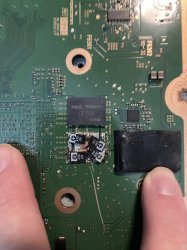
Again, I'm not going to pretend to be an expert, but removing the NEC/TOKINs was difficult for me. I don't think I could possibly remove them in a way that they could be reused. You're definitely better off replacing them as far as I know.
 
Here is a pic of how I replaced my NEC/TOKINs
 

Attachments

  • IMG_3525.jpeg
    IMG_3525.jpeg
    1.3 MB · Views: 615
H

How did you ripped off fhe nec's on the motherboard?
I used a flathead screwdriver to pry it off the board. I used sharp knives to get the rest off the board. Once the positive and negative poles are exposed, I soldered the new caps in, like in my picture.
 
I ordered sone 470uf 6.3v caps from Aliexpress when they came i will give it a try thanks for helping
I used a flathead screwdriver to pry it off the board. I used sharp knives to get the rest off the board. Once the positive and negative poles are exposed, I soldered the new caps in, like in my picture.
 
I ordered sone 470uf 6.3v caps from Aliexpress when they came i will give it a try thanks for helping
Sure thing. Like I said, someone else here could probably be more helpful, but I didn't get a reply when I asked for help. The 470uf caps are more of a fat model thing, so as long as it's a fat model, it should help your situation. Let everyone know the results here!
 
Sure thing. Like I said, someone else here could probably be more helpful, but I didn't get a reply when I asked for help. The 470uf caps are more of a fat model thing, so as long as it's a fat model, it should help your situation. Let everyone know the results here!
Where did you start chancing the nec's from the top side or the bottom? And how do you know you chanced the correct one ore the wrong one?
 
Where did you start chancing the nec's from the top side or the bottom? And how do you know you chanced the correct one ore the wrong one?
The 1002 error is RSX related, so I made sure to remove a NEC/TOKIN that was for the RSX. I replaced one of the NEC/TOKINs on the underside of the board, like opposite the IHSs. I don't think there is a way to tell which one to replace
 
Hi everyone, I hope you don't mind if I ask a general question here. I have a feeling that now is the best time to try and find myself a PS3 for personal use. One that will last.
I don't have any experience with the CECH21xx slim models. I've read that you can get it to give you syscon diagnostic codes through the led for the power button. That sounds absolutely awesome to me, and so I'm thinking of looking for a clean one of this model. Does anyone have experience with this model? Are they generally reliable? Does the LED diagnostics mode work well?
Thank you!
 
As an addition to my previous comment, I have come across my first problem with my slim 2501A (over 500 days on it til now)

I have a USB to UART adaptor and jumper wires shipping to me soon. However, in the meantime, I decided to give the LED diagnostic thing a try! I got the following code:
GRGR/RRRR/RRRR/RRRR
Which is 5FFF right? Is there anything that I can do? This happened suddenly after installing a new CFW.

I'll try to get real syscon codes right from the board when the stuff I need arrives. I can't make heads or tails of this at all. Does anyone have any ideas?
 
Last edited:
errlog
ofst[ 96]:err_code:0xffffffff, clock:0xffffffff
ofst[100]:err_code:0xa0002120, clock:0xffffffff
ofst[104]:err_code:0xa0801002, clock:0xffffffff
ofst[108]:err_code:0xa0002120, clock:0xffffffff
ofst[112]:err_code:0xa0231002, clock:0xffffffff
ofst[116]:err_code:0xa0302203, clock:0xffffffff
ofst[120]:err_code:0xa0002120, clock:0xffffffff
ofst[124]:err_code:0xa0101001, clock:0xffffffff
ofst[ 0]:err_code:0xa0202120, clock:0xffffffff
ofst[ 4]:err_code:0xa0202120, clock:0xffffffff
ofst[ 8]:err_code:0xa0202120, clock:0xffffffff
ofst[ 12]:err_code:0xa0202120, clock:0xffffffff
ofst[ 16]:err_code:0xa0202120, clock:0xffffffff
ofst[ 20]:err_code:0xa0202120, clock:0xffffffff
ofst[ 24]:err_code:0xa0202120, clock:0xffffffff
ofst[ 28]:err_code:0xa0202120, clock:0xffffffff
ofst[ 32]:err_code:0xa0202120, clock:0xffffffff
ofst[ 36]:err_code:0xa0202120, clock:0xffffffff
ofst[ 40]:err_code:0xa0231002, clock:0xffffffff
ofst[ 44]:err_code:0xa0302203, clock:0xffffffff
ofst[ 48]:err_code:0xa0002120, clock:0xffffffff
ofst[ 52]:err_code:0xa0101001, clock:0xffffffff
ofst[ 56]:err_code:0xa0202120, clock:0xffffffff
ofst[ 60]:err_code:0xa0202120, clock:0xffffffff
ofst[ 64]:err_code:0xa0202120, clock:0xffffffff
ofst[ 68]:err_code:0xa0202120, clock:0xffffffff
ofst[ 72]:err_code:0xa0202120, clock:0xffffffff
ofst[ 76]:err_code:0xa0202120, clock:0xffffffff
ofst[ 80]:err_code:0xa0202120, clock:0xffffffff
ofst[ 84]:err_code:0xa0202120, clock:0xffffffff
ofst[ 88]:err_code:0xa0202120, clock:0xffffffff
ofst[ 92]:err_code:0xa0202120, clock:0xffffffff
[mullion]$

> shutdown
[ERROR]: 0xa0202120
[ERROR]: 0xa0202120
[ERROR]: 0xa0202120
[ERROR]: 0xa0202120
[ERROR]: 0xa0202120
[ERROR]: 0xa0202120
[ERROR]: 0xa0202120
[ERROR]: 0xa0202120
[ERROR]: 0xa0202120
[SSM] *** Power Fail RS ***
[SSM] state: 0201 -> 0700
[POWSEQ] AV Backend Letup
[SSM] Shutdown mode : syspm_stat=00000000/00000000
[ERROR]: 0xa0202120
[POWSEQ] PowerSeq_Letup called.
[SSM] state: 0700 -> 0600
(PowerOff State) (Fatal)
shutdown
[SSM] state: 0600 -> 0000
[SSM] Error state is cleared.
(PowerOff State)


POWER Button released
[SERV NVS] READ CMD
[SSM] *** Power Fail RS ***
[SSM] state: 0400 -> 0700
[POWSEQ] AV Backend Letup
[SSM] ssmCb_AfterBeOn() called.
[SSM] Shutdown mode : syspm_stat=00000000/00000000
[ERROR]: 0xa0801002
[POWSEQ] PowerSeq_Letup called.
[SSM] state: 0700 -> 0600
(PowerOff State) (Fatal)
[ERROR]: 0xa0002120
shutdown
[SSM] state: 0600 -> 0000
[SSM] Error state is cleared.
(PowerOff State)
this error says hdmi but has ylod and the fuse are ok can someone give me tips please

 
Last edited:
As an addition to my previous comment, I have come across my first problem with my slim 2501A (over 500 days on it til now)

I have a USB to UART adaptor and jumper wires shipping to me soon. However, in the meantime, I decided to give the LED diagnostic thing a try! I got the following code:
GRGR/RRRR/RRRR/RRRR
Which is 5FFF right? Is there anything that I can do? This happened suddenly after installing a new CFW.

I'll try to get real syscon codes right from the board when the stuff I need arrives. I can't make heads or tails of this at all. Does anyone have any ideas?
5FFF is sherwood only code that appears to either be related to the CPU (like BGA or dead) OR a messed up CFW installation. In your case, since it started right after installing CFW, I would wager that's the issue. So a soft brick.
 
errlog
ofst[ 96]:err_code:0xffffffff, clock:0xffffffff
ofst[100]:err_code:0xa0002120, clock:0xffffffff
ofst[104]:err_code:0xa0801002, clock:0xffffffff
ofst[108]:err_code:0xa0002120, clock:0xffffffff
ofst[112]:err_code:0xa0231002, clock:0xffffffff
ofst[116]:err_code:0xa0302203, clock:0xffffffff
ofst[120]:err_code:0xa0002120, clock:0xffffffff
ofst[124]:err_code:0xa0101001, clock:0xffffffff
ofst[ 0]:err_code:0xa0202120, clock:0xffffffff
ofst[ 4]:err_code:0xa0202120, clock:0xffffffff
ofst[ 8]:err_code:0xa0202120, clock:0xffffffff
ofst[ 12]:err_code:0xa0202120, clock:0xffffffff
ofst[ 16]:err_code:0xa0202120, clock:0xffffffff
ofst[ 20]:err_code:0xa0202120, clock:0xffffffff
ofst[ 24]:err_code:0xa0202120, clock:0xffffffff
ofst[ 28]:err_code:0xa0202120, clock:0xffffffff
ofst[ 32]:err_code:0xa0202120, clock:0xffffffff
ofst[ 36]:err_code:0xa0202120, clock:0xffffffff
ofst[ 40]:err_code:0xa0231002, clock:0xffffffff
ofst[ 44]:err_code:0xa0302203, clock:0xffffffff
ofst[ 48]:err_code:0xa0002120, clock:0xffffffff
ofst[ 52]:err_code:0xa0101001, clock:0xffffffff
ofst[ 56]:err_code:0xa0202120, clock:0xffffffff
ofst[ 60]:err_code:0xa0202120, clock:0xffffffff
ofst[ 64]:err_code:0xa0202120, clock:0xffffffff
ofst[ 68]:err_code:0xa0202120, clock:0xffffffff
ofst[ 72]:err_code:0xa0202120, clock:0xffffffff
ofst[ 76]:err_code:0xa0202120, clock:0xffffffff
ofst[ 80]:err_code:0xa0202120, clock:0xffffffff
ofst[ 84]:err_code:0xa0202120, clock:0xffffffff
ofst[ 88]:err_code:0xa0202120, clock:0xffffffff
ofst[ 92]:err_code:0xa0202120, clock:0xffffffff
[mullion]$

> shutdown
[ERROR]: 0xa0202120
[ERROR]: 0xa0202120
[ERROR]: 0xa0202120
[ERROR]: 0xa0202120
[ERROR]: 0xa0202120
[ERROR]: 0xa0202120
[ERROR]: 0xa0202120
[ERROR]: 0xa0202120
[ERROR]: 0xa0202120
[SSM] *** Power Fail RS ***
[SSM] state: 0201 -> 0700
[POWSEQ] AV Backend Letup
[SSM] Shutdown mode : syspm_stat=00000000/00000000
[ERROR]: 0xa0202120
[POWSEQ] PowerSeq_Letup called.
[SSM] state: 0700 -> 0600
(PowerOff State) (Fatal)
shutdown
[SSM] state: 0600 -> 0000
[SSM] Error state is cleared.
(PowerOff State)


POWER Button released
[SERV NVS] READ CMD
[SSM] *** Power Fail RS ***
[SSM] state: 0400 -> 0700
[POWSEQ] AV Backend Letup
[SSM] ssmCb_AfterBeOn() called.
[SSM] Shutdown mode : syspm_stat=00000000/00000000
[ERROR]: 0xa0801002
[POWSEQ] PowerSeq_Letup called.
[SSM] state: 0700 -> 0600
(PowerOff State) (Fatal)
[ERROR]: 0xa0002120
shutdown
[SSM] state: 0600 -> 0000
[SSM] Error state is cleared.
(PowerOff State)
this error says hdmi but has ylod and the fuse are ok can someone give me tips please

2120 isn't diagnostic on it's own. the 1002 is most likely your issue. Check your soldering, the caps you used to replace tokins (assuming you did) and be sure that is good before moving onto another diagnosis.
 
PS3 Syscon Error

VER-001

Standby red light After power on Green light Yellow light Red light Automatically shut down

===================================
ERR 00: 00000000 A0802124 FFFFFFFF
ERR 01: 00000000 A0802124 FFFFFFFF
ERR 02: 00000000 A0801002 FFFFFFFF
ERR 03: 00000000 A0402124 FFFFFFFF
ERR 04: 00000000 A0403034 FFFFFFFF
ERR 05: 00000000 A0404102 FFFFFFFF
ERR 06: 00000000 A0401002 FFFFFFFF
ERR 07: 00000000 A0402124 FFFFFFFF
ERR 08: 00000000 A0403034 FFFFFFFF
ERR 09: 00000000 A0404003 FFFFFFFF
ERR 10: 00000000 A0112124 FFFFFFFF
ERR 11: 00000000 A0112124 FFFFFFFF
ERR 12: 00000000 A0112124 FFFFFFFF
ERR 13: 00000000 A0112024 FFFFFFFF
ERR 14: 00000000 A0112124 FFFFFFFF
ERR 15: 00000000 A0112024 FFFFFFFF
ERR 16: 00000000 A0112124 FFFFFFFF
ERR 17: 00000000 A0112124 FFFFFFFF
ERR 18: 00000000 A0112024 FFFFFFFF
ERR 19: 00000000 A0112124 FFFFFFFF
===================================

So can you please provide us with more details about the previous work history of this console?

You say it's a VER-001, but do not say what model PS3 it is. And the codes show 3034, which is rare for a 65nm model. Which makes me think it may not be a VER-001. But if it is, I would be very interested to hear how it happened as 65nm GPUs are reliable. So, is there drop damage, flux residue, was it sealed, have the NEC/Tokins been tampered with? Was it full of dust?
 
[
2120 isn't diagnostic on it's own. the 1002 is most likely your issue. Check your soldering, the caps you used to replace tokins (assuming you did) and be sure that is good before moving onto another diagnosis.
I didn't replace yet the tokins i soldered some tantalums in parallel with tokins the old and burned tokins are still there but still shuts of when i try play gran turismo 6 and don't play ps2 games has no_ps2 error but i will replace with tokins with other news tokins tantalum aren't the best for replace i think because of ESR. when the console arrived to my hand didn't work and now is capable play some games not to heavy like GT6 or TLOU
 
These are a good deal RN. Notice they are Aluminum polymer, not tantalum. Have the same 2000hr rating. 2v is fine. ESR is 6mOhms, sufficiently low.

I don't recommend trying to replace tokins with tokins.
 
These are a good deal RN. Notice they are Aluminum polymer, not tantalum. Have the same 2000hr rating. 2v is fine. ESR is 6mOhms, sufficiently low.

I don't recommend trying to replace tokins with tokins.
ok nice, thanks for the recommendation but these are 330uf this vaule aren't for the slims ? i though 470uf are for the fat ps3
 
Replace each...
  • 1000uF tokin with 3x 330uF polymer caps = 990uF. Honestly, 3x 470uF would be fine.
  • 1200uF tokin with 4x 330uF (1320uF) or 3x 470uF (1410uF).
 
5FFF is sherwood only code that appears to either be related to the CPU (like BGA or dead) OR a messed up CFW installation. In your case, since it started right after installing CFW, I would wager that's the issue. So a soft brick.
Is there anything I can do about a soft brick? Also, the CFW installed fine, and went back to the menu. I turned it off, and then the next time I started it up, it stays on for about a minute then shuts off.

Also, my UART adaptor came in the mail today, and I just pulled codes for the first time. This is what I got including a boot and shutdown:

Code:
# CODE     CLOCK
# A0805FFF FFFFFFFF
# A0805FFF FFFFFFFF
# A0805FFF FFFFFFFF
# A0805FFF FFFFFFFF
# A0805FFF FFFFFFFF
# A0805FFF FFFFFFFF
# A0805FFF FFFFFFFF
# A0805FFF FFFFFFFF
# A0805FFF FFFFFFFF
# A0805FFF FFFFFFFF
# A0801200 FFFFFFFF
# A0801200 FFFFFFFF
# A0801200 FFFFFFFF
# A0801200 FFFFFFFF
# A0805FFF FFFFFFFF
# A0805FFF FFFFFFFF
# A0805FFF FFFFFFFF
# A0805FFF FFFFFFFF
# A0805FFF FFFFFFFF
# A0805FFF FFFFFFFF
# A0805FFF FFFFFFFF
# A0805FFF FFFFFFFF
# A0805FFF FFFFFFFF
# A0805FFF FFFFFFFF
# A0805FFF FFFFFFFF
# A0805FFF FFFFFFFF
# A0805FFF FFFFFFFF
# A0805FFF FFFFFFFF
# A0805FFF FFFFFFFF
# A0805FFF FFFFFFFF
# A0805FFF FFFFFFFF

Press Ctrl+C to exit
>$ shutdown
00000000
# [SSM] PS0 ok.
# [SSM] PS1 ok.
# [SSM] PS2 ok.
# [SSM] PS3 ok.
# [SSM] PS4 ok.
# (PowerOn State)
#!
#!Boot Loader SE Version 3.4.0
#!(Build ID: 3932,45679,
#!Build Date: 2010-06-07_23:08:10)
#!
#!Copyright(C) 2010 Sony Computer Entertainment Inc.All Rights Reserved.
#!
#![ERROR]: 0xb0002001 (FATAL) XDR Link not initilized.
#!ITC_DUMP
#!0000
#!0000
#!0000
#!0000
#!0000
#!0000
#!0000
#!0000
#!0000
#!0000
#!0000
#!0000
#!0000
#!0000
#!0000
#!0000
#!0000
#!0000
#!0000
#!0000
#!0000
#!0000
#!0000
#!0000
#!0000
#!0000
#!0000
#!0000
#!0000
#!0000
#!0000
#!0000
#!0000
#!0000
#!0000
#!0000
#!0000
#!0000
#!0000
#!0000
#!0000
#!0000
#!0000
#!0000
#!0000
#!0000
#!0000
#!0000
#!0000
#!0000
#!0000
#!0000
#!0000
#!0000
#!0000
#!0000
#!0000
#!0000
#!0000
#!0000
#!0000
#!0000
#!0000
#!0000
#!0000
#!0000
#!0000
#!0000
#!0000
#!0000
#!0000
#!0000
#!0000
#!0000
#!0000
#!0000
#!0000
#!0000
#!0000
#!0000
#!0000
#!0000
#!0000
#!0000
#!0000
#!0000
#!0000
#!0000
#!0000
#!0000
#!0000
#!0000
#!0000
#!0000
#!0000
#!0000
#!0000
#!0000
#!0000
#!0000
#!0000
#!0000
#!0000
#!0000
#!0000
#!0000
#!0000
#!0000
#!0000
#!0000
#!0000
#!0000
#!0000
#!0000
#!0000
#!0000
#!0000
#!0000
#!0000
#!0000
#!0000
#!0000
#!0000
#!0000
#!0000
#!0000
#!0000
#!0000
#!0000
#!0000
#!0000
#!0000
#!0000
#!0000
#!0000
#!0000
#!0000
#!0000
#!0000
#!0000
#!0000
#!0000
#!0000
#!0000
#!0000
#!0000
#!0000
#!0000
#!0000
#!0000
#!0000
#!0000
#!0000
#!0000
#!0000
#!0000
#!0000
#!0000
#!0000
#!0000
#!0000
#!0000
#!0000
#!0000
#!0000
#!0000
#!0000
#!0000
#!0000
#!0000
#!0000
#!0000
#!0000
#!0000
#!0000
#!0000
#!0000
#!0000
#!0000
#!0000
#!0000
#!0000
#!0000
#!0000
#!0000
#!0000
#!0000
#!0000
#!0000
#!0000
#!0000
#!0000
#!0000
#!0000
#!0000
#!0000
#!0000
#!0000
#!0000
#!0000
#!0000
#!0000
#!0000
#!0000
#!0000
#!0000
#!0000
#!0000
#!0000
#!0000
#!0000
#!0000
#!0000
#!0000
#!0000
#!0000
#!0000
#!0000
#!0000
#!0000
#!0000
#!0000
#!0000
#!0000
#!0000
#!0000
#!0000
#!0000
#!0000
#!0000
#!0000
#!0000
#!0000
#!0000
#!0000
#!0000
#!0000
#!0000
#!0000
#!0000
#!0000
#!0000
#!0000
#!0000
#!0000
#!0000
#!0000
#!0000
#!0000
#!0000
#!0000
#!0000
#!0000
#!0000
#!0000
#!0000
#!0000
#!0000
#!0000
#!0000
#!0000
#!0000
#!0000
#!0000
#!0000
#!0000
#!0000
#!0000
#!0000
#!0000
#!0000
#!0000
#!0000
#!0000
#!0000
#!0000
#!0000
#!0000
#!0000
#!0000
#!0000
#!0000
#!0000
#!0000
#!0000
#!0000
#!0000
#!0000
#!
#!PTC_DUMP
#!0000
#!0000
#!0a4b
#!0ab7
#!0000
#!0000
#!0a03
#!0a6d
#!0000
#!0000
#!09f8
#!0a5e
#!0000
#!0000
#!0a0e
#!0a73
#!0000
#!0000
#!0000
#!0000
#!0000
#!0000
#!0a38
#!0a9f
#!0000
#!0000
#!0a35
#!0a9b
#!0000
# [SSM] Shutdown Start.
#!0000
#!0a4d
#!0ab7
#!0000
#!0000
#!0000
#!0000
 
Back
Top