
PS3 (Research/Experimental) - NEC/TOKIN Capacitors Replacement - YLOD

If the FW install went fine and it rebooted into XMB, then it shouldn't be that. The bringup log was helpful...

"XDR Link not initilized"

That's the connection between the CPU and Memory. This can be CPU or XDR (RAM) BGA or one died.

If you have a thermal camera, you can see if they all heat up or if one doesnt. You could try replacing the one that doesnt 1st. If that doesnt work or if they all heat up, then you'll need to reball the CPU. And if that doesnt work, then it's hosed.

A couple of questions...
  1. Did you notice any drop damage?
  2. Did you attempt a CPU delid or the "eraser mod"
  3. can you run syscon command "r 800 8". That'll retrieve the uptime.
 
If the FW install went fine and it rebooted into XMB, then it shouldn't be that. The bringup log was helpful...

"XDR Link not initilized"

That's the connection between the CPU and Memory. This can be CPU or XDR (RAM) BGA or one died.

If you have a thermal camera, you can see if they all heat up or if one doesnt. You could try replacing the one that doesnt 1st. If that doesnt work or if they all heat up, then you'll need to reball the CPU. And if that doesnt work, then it's hosed.

A couple of questions...
  1. Did you notice any drop damage?
  2. Did you attempt a CPU delid or the "eraser mod"
  3. can you run syscon command "r 800 8". That'll retrieve the uptime.
Firstly, thank you so much for replying and trying to help. I'm very new to this level of repair. I don't have a rework station (yet), or a thermal camera, and I have a lot to learn. Where exactly is the XDR?
I did not notice any drop damage with this unit. In fact, it was in spectacular shape when I got it. It seemed as though it was never taken apart before. Warranty sticker was still on (however, I know how easily it can be taken off and put back on) and runtime was around 531 days. I checked the uptime using webman mod while it was working. This is what I got as a return when I ran your command "r 800 8":
Code:
Auth successful
Press Ctrl+C to exit
>$ r 800 8
00000000
# +0 +1 +2 +3 +4 +5 +6 +7 +8 +9 +A +B +C +D +E +F
# -----------------------------------------------
# 0B C5 0B A3 02 BC E8 27

As far as your second question, once I realized that 5FFF could be a CPU problem, then I delidded the CPU to check for damage. It was a very clean and easy delid. I looked with a magnifying glass to check if I knocked off any small surface-mounted components. Everything was good.
 
Here is a picture of the motherboard:
https://imgur.com/a/8iQbQoL

I also wanted to note that I find the length of time that the system is on before crashing is unusual. I just timed it for the first time. Once I press the power button, it's green and running with fan going, for a full 42 seconds before going dark.
 
Last edited:
Screenshot_20240227-063041_Firefox.jpg
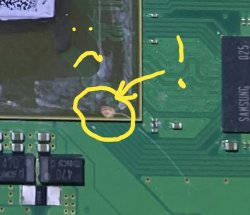
That, is most likely the problem right there. The exposed copper is right above the traces that go to an XDR module, which cant be coincidence.

This is why you never delid from the corner
 
View attachment 42447
That, is most likely the problem right there. The exposed copper is right above the traces that go to an XDR module, which cant be coincidence.

This is why you never delid from the corner
Respectfully, I'm not sure that is the problem. I have other systems running that look way worse. Furthermore, I delidded AFTER the issues started.

Is there anything I can do? Anything at all I can try?

EDIT: You could be right. Someone could have tried to delid before it got to me. I just can't explain why it worked for about a week before randomly stopping. Also, anytime I've seen a YLOD with a messed up delid it's been a "fast ylod" not like this where it's over 40 seconds.

This is one of my first delids, and definitely the gnarliest looking. But this system is still working with no problem: https://imgur.com/a/DawQGfO
 
Last edited:
the systems you see working with scratch substait. could also be that the scratch is either didnt cut traces or is not on the traces. but for the look of the things the scratch is not on the traces @RIP-Felix look closer i think the scratch is not on the traces. its either miss the trace or barely hit it. its close btw
 
Warranty sticker was still on... I delidded the CPU to check for damage. It was a very clean and easy delid. I looked with a magnifying glass to check if I knocked off any small surface-mounted components.
TBH, it looks like there are some SMDs that may have gotten knocked by the slip of the tool and an attempt was made to solder them back. One is slighly crooked and shiner.

If the console was sealed, then how could anyone have attempted a delid before you? The likelyhood of the warranty sticker being peeled off without any visable damage is low, and for a slim even less likely. There's no incentive for deciept, slims are cheap.

Your wording about deliding to check for damage is odd. You say it was clean, when the picture clearly shows it wasnt. Just saying that some of your statments don't add up. It makes me question if you can be trusted about when the 5FFF started. You say after the delid it worked. If that's true, then the traces probabky werent nicked. But those SMDs could be involved in a delayed issue. Or BGA defect can certainly cause a delayed YLOD.

We're not here to judge. We're here to help. But we've spun in circles chasing our tails when people were trying to hide their mistakes before. NOT saying you are. Just saying, when people do that it wastes everyone's time and makes it harder to learn the true causes of failures. And it makes it hard to trust what they say.

I've made delidding mistakes and I probably will again. It's nothing to be ashamed of. We're not SONY, we're learning. And mistakes are how you learn. I'm not going to berate you for it.

Is there anything I can do? Anything at all I can try?
If the CPU traces are nicked, then you'll have to repair them, but they are very small and microsoldering like that is difficult.

For a slim, it's not worth it.

Now, you can try pressing on the CPU (firm, but not hard) to see if it reaponds to pressure. If it does, that would confirm a BGA defect, possably caused by the stress of the delid.

In that case, it wouldn't be worth attempting to fix. The GPU is more valuble for a frankenstein mod.
 
the systems you see working with scratch substait. could also be that the scratch is either didnt cut traces or is not on the traces. but for the look of the things the scratch is not on the traces @RIP-Felix look closer i think the scratch is not on the traces. its either miss the trace or barely hit it. its close btw
I agree, that it doesn't look good. Upon farther inspection, the
TBH, it looks like there are some SMDs that may have gotten knocked by the slip of the tool and an attempt was made to solder them back. One is slighly crooked and shiner.

If the console was sealed, then how could anyone have attempted a delid before you? The likelyhood of the warranty sticker being peeled off without any visable damage is low, and for a slim even less likely. There's no incentive for deciept, slims are cheap.

Your wording about deliding to check for damage is odd. You say it was clean, when the picture clearly shows it wasnt. Just saying that some of your statments don't add up. It makes me question if you can be trusted about when the 5FFF started. You say after the delid it worked. If that's true, then the traces probabky werent nicked. But those SMDs could be involved in a delayed issue. Or BGA defect can certainly cause a delayed YLOD.

We're not here to judge. We're here to help. But we've spun in circles chasing our tails when people were trying to hide their mistakes before. NOT saying you are. Just saying, when people do that it wastes everyone's time and makes it harder to learn the true causes of failures. And it makes it hard to trust what they say.

I've made delidding mistakes and I probably will again. It's nothing to be ashamed of. We're not SONY, we're learning. And mistakes are how you learn. I'm not going to berate you for it.


If the CPU traces are nicked, then you'll have to repair them, but they are very small and microsoldering like that is difficult.

For a slim, it's not worth it.

Now, you can try pressing on the CPU (firm, but not hard) to see if it reaponds to pressure. If it does, that would confirm a BGA defect, possably caused by the stress of the delid.

In that case, it wouldn't be worth attempting to fix. The GPU is more valuble for a frankenstein mod.
I want to clarify a few things.
1. There was a warranty sticker on the system before I opened it up, and it was in great shape when I opened it. With over 500 days of use on it, I would think that someone probably opened it before me. It's easy to use a heat gun on a warranty sticker to take it off and reapply it.
2. I said the delid was "clean" meaning without issue.
3. If I said that the system worked AFTER I delidded it, then that was not true. I remember saying that I delidded AFTER the issue started happening, and the system worked BEFORE the delid. I did post a picture of another system that I have, with bad scratches on the substrate, and I said THAT system worked after the delid. Different system.
4. I don't have any reason to waste anyone's time. If the general consensus is that the system is screwed, then so be it.
5. I have tried to put pressure on the CPU, and no luck.

Can you point me toward the SMDs that look like they may have been knocked off?
Thanks

EDIT: To further clarify about the delidding: I don't have the experience that you guys have. I'm trying so hard to learn. When you first told me the 5FFF was CPU related (on youtube, idk if you remember) what am I supposed to try? I can change out broken components, I can delid, but I don't have a rework station or anything. So when I said, I delidded to look for damage, I was just out of options. I inspected the board at the time, and didn't see anything bad, so the only place I couldn't see was under the IHS.
I apologize if I wasted anyone's time. I just want to learn
 
Last edited:
I must have misread it then.

If you post a closer picture of the scuff on the CPU It would be easier to see how bad it is. And those SMDs nearby
 
I apologize if I wasted anyone's time. I just want to learn
My bad. You're fine. It's just so often something simple that people have already ruled out when they shouldn't have. I ran into this so much in the early days, with people in denial (myslef included), that I got some flashbacks.
 
My bad. You're fine. It's just so often something simple that people have already ruled out when they shouldn't have. I ran into this so much in the early days, with people in denial (myslef included), that I got some flashbacks.
I completely understand. I'm sure a lot of people just won't take the extra steps to try to help themselves.
Here are the new pics I just took. I did 2 with the flash on and one without it just in case:
https://imgur.com/a/ug3HKoQ

I will say one thing regarding that knick in the corner of the CPU: Feeling it with my finger, it is not as deep as it seems. Again, I've had way nastier looking delids that still work. I personally can't find anything surface mounted that looks bad, but if you see something, please point it out to me.

As a last resort, I am thinking of hitting it with a heat gun to do a "ghetto" "reball". Unfortunately, I don't have the equipment to take the GPU off and use it for another system.
 
Screenshot_20240228-211323_Firefox.jpg
Looks like a trace that burries down through the interposer was knicked. If you applu a bit of IPA and then take a picture, it helps to see through the white abrasion. If it it what I think, I dont think that can be repaired. If it was a clean cut across a trace you can microsolder. But at the via where it goes down that's much trickier.

A reflow shouldn't help. If it does it wont last long. You should sell it for the GPU that is known good.
 
View attachment 42466 Looks like a trace that burries down through the interposer was knicked. If you applu a bit of IPA and then take a picture, it helps to see through the white abrasion. If it it what I think, I dont think that can be repaired. If it was a clean cut across a trace you can microsolder. But at the via where it goes down that's much trickier.

A reflow shouldn't help. If it does it wont last long. You should sell it for the GPU that is known good.
I see what you mean. It isn't my best work doing a delid. But I swear I didn't delid until after I found out it was a CPU issue. The system ran great for about a week. I installed new CFW on it, ran for a few minutes, then 5FFF. Once I found out what 5FFF was from you, I delidded (which I now realize doesn't make any sense)

I don't know what to think about this one. I'd gladly own up to it if the delid was the problem. It's clearly not a very pretty delid.
Anyway, I guess it's gone.
Does anyone want a 40nm RSX?
 
I mean, it's possable it's not as deep as it looks. Can't see through the scuff with that image, so it "might" be fine. I'll admit at this point I'm just looking for excuses to harvest an RSX without feeling like a technomancer (killing the living to repair the dead) and 5FFF is a good one.

It just looks too coincidental to not be the cause of the XDR no init.
 
Last edited:
I mean, it's possable it's not as deep as it looks. Can't see through the scuff with that image, so it "might" be fine. I'll admit at this point I'm just looking for excuses to harvest an RSX without feeling like a technomancer (killing the living to repair the dead) and 5FFF is a good one.

It just looks too coincidental to not be the cause of the XDR no init.
It really isn't that deep. But I checked the six other slim motherboards I have on hand right now, and none of them are knicked in that particular spot. So that could be something. Still doesn't make sense... since I delidded after the issue started.

Honestly, whatever the issue is, it's probably beyond my capabilities. I wish I had the ability to remove the RSX from this motherboard, because I have another slim (same model) with a damaged RSX.

I'd be more than happy to send you a bunch of motherboards with good RSXs. I'll have to see what I have

EDIT: I sent you DM about the boards
 
Last edited:
Hi,

I'm new here, not familiar at all with intimate PS3 things, and I'm writing from France : please forgive my poor English ;).

My PS3 is a second generation fat model, without PS2 compatibility, model CECHH04. It was bought new when launched in France, never opened, hacked or modified. Mostly used in vertical position to watch Bluray, and play a few games but not that much. It is clean, no shock, almost no dust when I opened it.

The YLOD hapenned while the console was simply switched on to recharge the controllers : no application/game was running, just the "desktop". Since, it doesn't boot anymore : only the YLOD and the 3 beeps.

A big thanks to RIP-Felix for his extensive videos, explanations and deep study about the subject !! :eagerness:

I have connected an FT232 adaptor to my mother board and querried the SYSCON in external and internal modes.

Here are the logs I get :

Code:
> errlog
errlog
ofst[ 28]:err_code:0xffffffff, clock:0x119c37cb  2009/05/12 13:36:11
ofst[ 32]:err_code:0xa08014ff, clock:0x134a8803  2010/04/03 23:13:07
ofst[ 36]:err_code:0xa0801001, clock:0x134a8803  2010/04/03 23:13:07
ofst[ 40]:err_code:0xa08014ff, clock:0x1466b053  2010/11/05 12:08:51
ofst[ 44]:err_code:0xa0801001, clock:0x1466b053  2010/11/05 12:08:51
ofst[ 48]:err_code:0xa0801001, clock:0x151fb0a7  2011/03/25 19:59:35
ofst[ 52]:err_code:0xa0801701, clock:0x168799a3  2011/12/23 19:57:23
ofst[ 56]:err_code:0xa0801001, clock:0x168799a3  2011/12/23 19:57:23
ofst[ 60]:err_code:0xa0801701, clock:0x2d426fe3  2024/01/23 12:38:59
ofst[ 64]:err_code:0xa08014ff, clock:0x2d426fe3  2024/01/23 12:38:59
ofst[ 68]:err_code:0xa0404401, clock:0x2d42852b  2024/01/23 14:09:47
ofst[ 72]:err_code:0xa0403034, clock:0x2d42852b  2024/01/23 14:09:47
ofst[ 76]:err_code:0xa0404401, clock:0x2d428555  2024/01/23 14:10:29
ofst[ 80]:err_code:0xa0403034, clock:0x2d428555  2024/01/23 14:10:29
ofst[ 84]:err_code:0xa0404401, clock:0x2d428566  2024/01/23 14:10:46
ofst[ 88]:err_code:0xa0403034, clock:0x2d428566  2024/01/23 14:10:46
ofst[ 92]:err_code:0xa0404401, clock:0x2d42861a  2024/01/23 14:13:46
ofst[ 96]:err_code:0xa0403034, clock:0x2d42861a  2024/01/23 14:13:46
ofst[100]:err_code:0xa0404401, clock:0x2d4288b9  2024/01/23 14:24:57
ofst[104]:err_code:0xa0403034, clock:0x2d4288b9  2024/01/23 14:24:57
ofst[108]:err_code:0xa0404401, clock:0x2d4289b4  2024/01/23 14:29:08
ofst[112]:err_code:0xa0403034, clock:0x2d4289b4  2024/01/23 14:29:08
ofst[116]:err_code:0xa0404401, clock:0x2d4289c1  2024/01/23 14:29:21
ofst[120]:err_code:0xa0403034, clock:0x2d4289c1  2024/01/23 14:29:21
ofst[124]:err_code:0xa0404401, clock:0x2d4289c8  2024/01/23 14:29:28
ofst[  0]:err_code:0xa0403034, clock:0x2d4289c8  2024/01/23 14:29:28
ofst[  4]:err_code:0xa0404401, clock:0x2d42aeb3  2024/01/23 17:06:59
ofst[  8]:err_code:0xa0403034, clock:0x2d42aeb3  2024/01/23 17:06:59
ofst[ 12]:err_code:0xa0404401, clock:0x2d430c99  2024/01/23 23:47:37
ofst[ 16]:err_code:0xa0403034, clock:0x2d430c99  2024/01/23 23:47:37
ofst[ 20]:err_code:0xa0404401, clock:0x2d77a1e8  2024/03/03 21:02:32
ofst[ 24]:err_code:0xa0403034, clock:0x2d77a1e8  2024/03/03 21:02:32
[mullion]$
> becount
becount
Bringup : 825 times
Shutdown: 816 times
Power-on: 70day 08hour 20min 21sec
[mullion]$

As far as I've understood, errors 3034 and 4401 are related to BGA/bump issues on the CELL or GPU.

Do you confirm there's nothing I can do about it (because a reballing/reflow would possibly extend its life a little bit, but nothing sure and nothing that would last) ? I have some skills in electronics, a hot air station, but I'm not at all an expert in BGA stuffs ;) !

It had run less than 2000 hours, so I imagine that NEC/TOKIN capacitors cannot be responsible.

I hate to not be able to repair something broken, but this model is not especially rare, so I imagine my best solution is to buy a second hand PS3 Slim, isn't it ?

Thanks in advance for your help and advices :).
 
you have tokin issue on cell side error 1001
then 2 other issues on cpu side that maybe caused by tokins not working properly 14ff 1701 those 2 issues indicates that cell is not working properly
i would start by replace tokins and since cpu tokins need change why not also on rsx
 
Hi,

you have tokin issue on cell side error 1001
then 2 other issues on cpu side that maybe caused by tokins not working properly 14ff 1701 those 2 issues indicates that cell is not working properly
i would start by replace tokins and since cpu tokins need change why not also on rsx

Thanks for your answer and suggestion ! :eagerness:

The errors 1001 and 14FF/1701 occured in 2010 and 2011 ! Since, the PS3 had been running like a charm for 12 years : should I really take into account those errors, or consider them as a false alarm, too old for meaning something today ?

Yesterday evening, after I posted my first message, I did more querries to SYSCON, asking for a bringup and eepcsum :

Code:
> bringup
bringup
[SSM] state: 0000 -> 0101
Bringup Mode #0 (0xFF)
[SSM] ssmCb_OnStartingBePowOn() called.
[SSM] First Boot.
[SSM] Bringup mode : syspm_stat=00000000/00000000
[POWSEQ] PowerSeq_Setup called.
[SSM] state: 0101 -> 0201
[POWSEQ] AV Backend Setup
[SSM] state: 0201 -> 0102
[SSM] state: 0102 -> 0202
[SSM] state: 0202 -> 0103
[SSM] state: 0103 -> 0203
[SSM] ssmCb_BeforeBeOn() called.
[SSM] state: 0203 -> 0104
Psbd_SbTransMode_Half:0x20e7
> eepcsum
[POWERSEQ] Error : BitTraining BE:RRAC:RX0:GLOBAL1:RX_STATUS
[SSM] state: 0104 -> 0304
[SSM] ssmCb_AfterBeOn2() called.
[SSM] PowSeq Fail : Detected !
[SSM] state: 0304 -> 0700
[POWSEQ] AV Backend Letup
[SSM] Shutdown mode : syspm_stat=00000000/00000000
[ERROR]: 0xa0404401
[ERROR]: 0xa0403034
[POWSEQ] PowerSeq_Letup called.
[SSM] state: 0700 -> 0600
(PowerOff State) (Fatal)
eepcsum
Addr:0x000032fe should be 0x56c7
Addr:0x000034fe should be 0x980c
Addr:0x000039fe should be 0x7360
Addr:0x00003dfe should be 0x00ff
Addr:0x00003ffe should be 0x00ff
>

I'm not able to analysis those extra data : does it ring a bell to somebody ?

Thanks for your help :).
 
Back
Top