
You are using an out of date browser. It may not display this or other websites correctly.
You should upgrade or use an alternative browser.
You should upgrade or use an alternative browser.
PS3 (Research/Experimental) - NEC/TOKIN Capacitors Replacement - YLOD
- Thread starter Naked_Snake1995
- Start date
truemaster
Member
the newer errors 3034 4401 is a failed bittrain i would swap gpu first


RIP-Felix
Senior Member
1001 is not diagnostic. It will occur when there is an unexpected shutdown. Like Flipping the PWR rocker while console is on or when YLOD occurs suddonly. They are common in cases of GPU failure. The other codes, 1601/1701 and especially 3034 are diagnostic and the 1001 should be ignored until after the GPU is replaced.
As for the DIA-001 MB revision, it's not worth the effort. A slim can be had for cheaper than the cost of a replacment GPU. So for that model it's a death sentence.
Now, I would say they are a good place for working 90nm RSX's that are removed from franked consoles. They may not be worth frankensteining, but they can live again with the piles of good 90s we have nothing else to do with.
As for the DIA-001 MB revision, it's not worth the effort. A slim can be had for cheaper than the cost of a replacment GPU. So for that model it's a death sentence.
Now, I would say they are a good place for working 90nm RSX's that are removed from franked consoles. They may not be worth frankensteining, but they can live again with the piles of good 90s we have nothing else to do with.


OneFix
Member
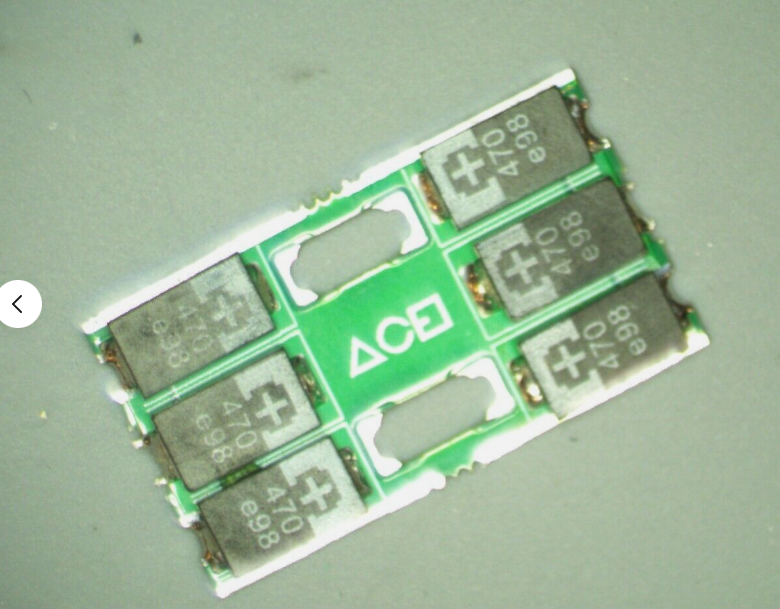
Thanks for the fast reply!look at the pad on the MB. PS3 doesnt use via in pad technology, which means any pad that doesnt have a copper trace connected to a plane or via, is no connect and you can ingore it. If it does have a via, it'll need repaired.

santorfo
Member
I got a cheap (listed for parts) PS3 Slim CECH-3004B. It powers on, no fan noise, no output, green light, stays on forever until I try to power it off and it doesn't respond and eventually goes off randomly.
After checking the SYSCON, this was the output of errlog:
Wiki says
Is there any point trying to fix this? I've never replaced a chip like the encoders and since it could be either of the HDMI/AV ones, unless there's a way of being certain which one it, I wouldn't even know which one to replace...
After checking the SYSCON, this was the output of errlog:
Code:
>$ errlog
00000000
# CODE     CLOCK
# A0902024 1AB0E0A1
# A0802124 1AB0E0A1
# A0802024 1AB0E081
# A0802024 1AB0E080
# A0802124 1AB0E079
# A0802024 1AB0E078
# A0112024 1AB0E076
# A0002024 1AB0E075
# A0A02024 1AB0E075
# A0A02124 1AB0E074
# A0A02024 1AB0E074
# A0A02124 1AB0E073
# A0A02024 1AB0E073
# A0A02024 1AB0E072
# A0A02024 1AB0E072
# A0A02024 1AB0E071
# A0A02024 1AB0E071
# A0A02024 1AB0E070
# A0A02024 1AB0E070
# A0A02024 1AB0E06F
# A0A02024 1AB0E06F
# A0A02024 1AB0E06E
# A0A02024 1AB0E06E
# A0A02124 1AB0E06D
# A0A02124 1AB0E06D
# A0A02124 1AB0E06C
# A0A02124 1AB0E06C
# A0A02124 1AB0E06B
# A0A02124 1AB0E06B
# A0A02124 1AB0E06A
# A0A02124 1AB0E06A
Wiki says
2124 and 2024 errors have been fixed by replacing both the AV and HDMI encoders. One user reported 2024/2124 errors resolved by replacing the HDMI encoder. Another removed the HDMI encoder and tested the console without it. That console primarily filled the errorlog with 2124 errors, but a few 2024's as well. So it is unclear if 2124 is specific to the HDMI Encoder or AV Encoder. It seems it could be either.
Is there any point trying to fix this? I've never replaced a chip like the encoders and since it could be either of the HDMI/AV ones, unless there's a way of being certain which one it, I wouldn't even know which one to replace...

Raidmax
Member
Agreed. I wouldn't bother with fixing a 3000 series console either honestly. They're the point where Sony just went downhill on the cheap alley, with the subsequent superslims' build quality being a hallmark of that decision. On the positive side, they make for a good 40nm RSX harvest season.
RIP-Felix
Senior Member
It could also be the bluetooth/wifi board. I think I had a similar set of errors on a KTE-001 (3001a). I harvested the RSX, since they're not worth the trouble. Not jailbreakable (fully) and are fairly cheap to replace. Worth more to me for the RSX, which I just installed on a COK-001 sucessfully the other day. So it already saved a more desirable model.
overall good trade
overall good trade

Gus21
Member
I would harvest the RSX TBH
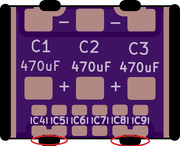
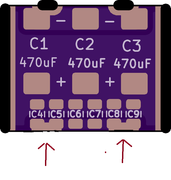
Hello RIP-Felix, could you modify the Gerber File, removing 2 Castellated holes. Since for me these 2 Castellated holes are not useful, because I don't solder on the board and the PS3 works normally, in addition to reducing the manufacturing cost of the Tantalizer.
I have circled in red where I would like these 2 Castellated holes to be removed.
The Gerber File is attached below for download.
Thanks.
Attachments
Last edited:
RIP-Felix
Senior Member
2 reasons. One tantalizer replaces 1 tokin. Easier to think of them as a single cap. The second reason is because COK and later models do not share the same footprint. NonBC phats have narrower rails and I didnt want to force a specific spacing. I know the tokin's footprint and wanted to make a replacment with the same or slightly smaller one. I think it looks better.
This was you can replace just 1 cap with a tantalizer. Although I dont reccomend mixing capacitor types. So if you replace 1 it's best to replace them all. Still, you "could" just replace 1.
Technically, this makes it possable to use for other devices that only contain 1 tokin, like that Toshiba A300 laptop.
This was you can replace just 1 cap with a tantalizer. Although I dont reccomend mixing capacitor types. So if you replace 1 it's best to replace them all. Still, you "could" just replace 1.
Technically, this makes it possable to use for other devices that only contain 1 tokin, like that Toshiba A300 laptop.
hello,
after watching felix's videos about the ylod i recalled an issue my CECHA ps3 had last december. fan started spinning up a lot and the screen started having green artifacting while playing sonic 06 (of all things lol.) i shut down the ps3 and tried playing it again later, same result but while playing a ps1 game. i used ps3toolset to check the SYSCON and there are a bunch of 2022 error codes. can post a screenshot if needed
looking at the wiki it seems to be a gpu problem, i was wondering if its worth going through with a gpu replacement if the only errors in the syscon are 2022? would it be better to keep running the ps3 and see if any more errors are logged?
thanks in advance
after watching felix's videos about the ylod i recalled an issue my CECHA ps3 had last december. fan started spinning up a lot and the screen started having green artifacting while playing sonic 06 (of all things lol.) i shut down the ps3 and tried playing it again later, same result but while playing a ps1 game. i used ps3toolset to check the SYSCON and there are a bunch of 2022 error codes. can post a screenshot if needed
looking at the wiki it seems to be a gpu problem, i was wondering if its worth going through with a gpu replacement if the only errors in the syscon are 2022? would it be better to keep running the ps3 and see if any more errors are logged?
thanks in advance
I've just repaired my console it's a CECH-C03 with all the advice I've been reading in this thread, thanks all.
the console would shut down whilst trying to play cod black ops 2 with a flashing red light, which created an error A0801001, the console had never give a YLOD
i tagged on 2 470ohm capacitors to the nec tokin on the cell/b and now it plays the game without turning off.
I wanted to post a photo, but it seems I don't have permission
the console would shut down whilst trying to play cod black ops 2 with a flashing red light, which created an error A0801001, the console had never give a YLOD
i tagged on 2 470ohm capacitors to the nec tokin on the cell/b and now it plays the game without turning off.
I wanted to post a photo, but it seems I don't have permission
RIP-Felix
Senior Member
A screenshot of the uptime and errorlog would be helpful, yes.hello,
after watching felix's videos about the ylod i recalled an issue my CECHA ps3 had last december. fan started spinning up a lot and the screen started having green artifacting while playing sonic 06 (of all things lol.) i shut down the ps3 and tried playing it again later, same result but while playing a ps1 game. i used ps3toolset to check the SYSCON and there are a bunch of 2022 error codes. can post a screenshot if needed
looking at the wiki it seems to be a gpu problem, i was wondering if its worth going through with a gpu replacement if the only errors in the syscon are 2022? would it be better to keep running the ps3 and see if any more errors are logged?
thanks in advance
2022 could be DVE or HDMI transmitter. But usually it will give multiple errors each time you boot. Perhaps not when it first begins. The green artifacting can just be from a dodgy HDMI cable or connection. I would first try cleaning the port and using another cable to see if you can reproduce the issue.
Pay attention to the fan. Be sure if that sysmptom is accurate, and not normal fan ramping up. If it's clearly way louder than it should be, that sounds like thermal panic and you would normally see A0801103 A0801200 or something similar. But if the only codes are 2022, that's a strange observation and I'm not sure what to make of it.
I do know there are thermal fuses attached to the AV and HDMI ports, but I forget off the top of my head what behavior/errors they caused when failing. Maybe related.
Now, green artifacting. Flashes of green frames. Pixelated purple, red, green squares. Slotches of white flashing textures...etc...are all possable with a GPU or VRAM failure. So when I hear green artifacting my GPU failure warning siren begins blaring. Especially on a console with a defective 90nm RSX.
But I dont want to jump to conclusions. Your symptoms are atypical.
Similar threads
-
 PS3 Interesting PS3 Errors (1802, 1701, 1601) and Capacitor Replacement
- Started by Cheshire UK
- Replies: 2
-
PS3 CECHA00 with several SYSCON errors (3004, 1001,1002, 2120,3011)
- Started by LSL
- Replies: 7
-
PS3 A0801002 after 4 nec/tokin replacement (maybe Felix or anyone help me)
- Started by Swhalegod
- Replies: 3
-
Hello newcomer to the ps3 modding scene, needing help with syscon diagnostic
- Started by ascendantprime
- Replies: 13