

So to explain a little bit more about how scenes work once you have them extracted from the SDAT/BAR. It's a bit of a tangled web.
1. The .SCENE file has list of resources at the top. This is the first place to start when trying to see what files are required for a scene to work. Or if trying to learn about how it all works in general. This is the first file that is loaded when a scene is clicked on.
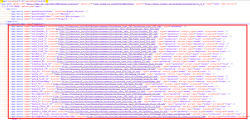
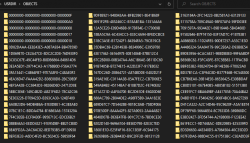
2. Further down in the same .SCENE file you will see all the different items used by the scene. These items can be anything from video screens, to furniture, to minigames, basically any item that is interactive in any way (except for screens), So like even a chair, is classed as a "minigame". All minigames have a UUID, Here is an example of some UUIDs for minigames in the SCENE file further down. Each UUID corresponds to a folder in the USRDIR/OBJECTS/ Folder.
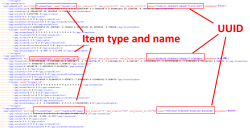
3. So lets say you are having an issue with a particular interactive item in a scene, you first go to the SCENE file, find out what the UUID is of that item. It's normally easy enough it figure it out from the name and type. Then once you have the UUID you can go to the USRDIR/OBJECTS folder, and look for a folder that matches that UUID.
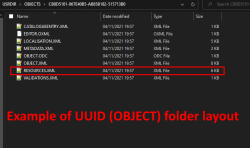
4. Once in there you will see a few files, normally between 3 and 10 files approx per UUID folder. Next important file here if you are debugging an issue is the RESOURCES.XML, this has links to any textures, lua files, effects or whatever that that object requires. Also the OBJECT.ODC file here is like an SDC file for OBJECTS (SDC is for SCENES), its basically a descriptor file a bit like PARAM.SFO, name of object, link to thumbnail etc.
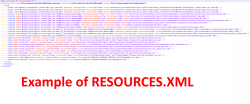
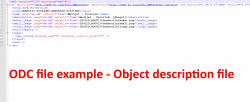
5. Something important to note here, we currently can not use any LUA based minigames/objects/UUIDs compiled with HDK 1.3.5 or higher. If you look in the RESOURCES.XML for an object and you see the items listed say "protected="true", then chances are that item will not work fully with the developer build, as the LUA files are encrypted and compressed. You can also see which HDK version a scene was compiled with at the very top of the SCENE file, and also at the top of the ODC file, see image above. (not all UUIDs have an ODC file)
Remember Destination Home have cracked this encryption so we know it is possible at least. I think maybe using the retail client to load the encrypted item, then dumping the LUA from RAM might be easy enough when the time comes. For now there are enough scenes created with earlier HDKs to be working on.
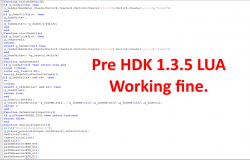
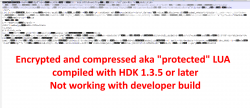
We do have some examples of the exact same files encrypted and not encrypted (my guess).. This is where we have multiple versions of the same scene from before and after the change, So maybe we can use that fact to help crack it. idk.
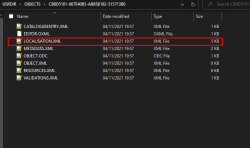
6. The LUA files linked here in the RESOURCES.XML, the older ones that we can read and load, often will link back to the LOCALISATION.XML in the items UUID folder for text strings, just in case anyone is ever wondering where it is getting them from as its not always clear.
That's all for now
1. The .SCENE file has list of resources at the top. This is the first place to start when trying to see what files are required for a scene to work. Or if trying to learn about how it all works in general. This is the first file that is loaded when a scene is clicked on.
2. Further down in the same .SCENE file you will see all the different items used by the scene. These items can be anything from video screens, to furniture, to minigames, basically any item that is interactive in any way (except for screens), So like even a chair, is classed as a "minigame". All minigames have a UUID, Here is an example of some UUIDs for minigames in the SCENE file further down. Each UUID corresponds to a folder in the USRDIR/OBJECTS/ Folder.
3. So lets say you are having an issue with a particular interactive item in a scene, you first go to the SCENE file, find out what the UUID is of that item. It's normally easy enough it figure it out from the name and type. Then once you have the UUID you can go to the USRDIR/OBJECTS folder, and look for a folder that matches that UUID.
4. Once in there you will see a few files, normally between 3 and 10 files approx per UUID folder. Next important file here if you are debugging an issue is the RESOURCES.XML, this has links to any textures, lua files, effects or whatever that that object requires. Also the OBJECT.ODC file here is like an SDC file for OBJECTS (SDC is for SCENES), its basically a descriptor file a bit like PARAM.SFO, name of object, link to thumbnail etc.
5. Something important to note here, we currently can not use any LUA based minigames/objects/UUIDs compiled with HDK 1.3.5 or higher. If you look in the RESOURCES.XML for an object and you see the items listed say "protected="true", then chances are that item will not work fully with the developer build, as the LUA files are encrypted and compressed. You can also see which HDK version a scene was compiled with at the very top of the SCENE file, and also at the top of the ODC file, see image above. (not all UUIDs have an ODC file)
Remember Destination Home have cracked this encryption so we know it is possible at least. I think maybe using the retail client to load the encrypted item, then dumping the LUA from RAM might be easy enough when the time comes. For now there are enough scenes created with earlier HDKs to be working on.
We do have some examples of the exact same files encrypted and not encrypted (my guess).. This is where we have multiple versions of the same scene from before and after the change, So maybe we can use that fact to help crack it. idk.
6. The LUA files linked here in the RESOURCES.XML, the older ones that we can read and load, often will link back to the LOCALISATION.XML in the items UUID folder for text strings, just in case anyone is ever wondering where it is getting them from as its not always clear.
That's all for now
Last edited:





