PS3 [RESEARCH] Playstation Home Developer Build - Information for fixing and modding stuff

So to explain a little bit more about how scenes work once you have them extracted from the SDAT/BAR. It's a bit of a tangled web.

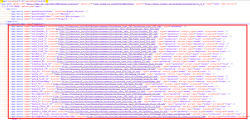
1. The .SCENE file has list of resources at the top. This is the first place to start when trying to see what files are required for a scene to work. Or if trying to learn about how it all works in general. This is the first file that is loaded when a scene is clicked on.
upload_2022-8-16_13-7-23.png

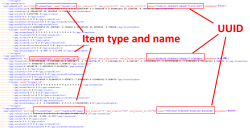
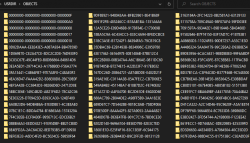
2. Further down in the same .SCENE file you will see all the different items used by the scene. These items can be anything from video screens, to furniture, to minigames, basically any item that is interactive in any way (except for screens), So like even a chair, is classed as a "minigame". All minigames have a UUID, Here is an example of some UUIDs for minigames in the SCENE file further down. Each UUID corresponds to a folder in the USRDIR/OBJECTS/ Folder.
upload_2022-8-16_1-14-12.png


3. So lets say you are having an issue with a particular interactive item in a scene, you first go to the SCENE file, find out what the UUID is of that item. It's normally easy enough it figure it out from the name and type. Then once you have the UUID you can go to the USRDIR/OBJECTS folder, and look for a folder that matches that UUID.
upload_2022-8-16_1-17-16.png

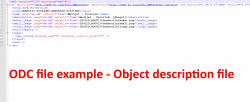
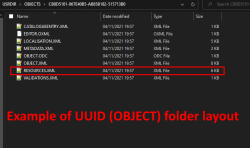
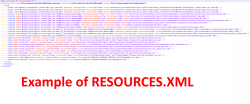
4. Once in there you will see a few files, normally between 3 and 10 files approx per UUID folder. Next important file here if you are debugging an issue is the RESOURCES.XML, this has links to any textures, lua files, effects or whatever that that object requires. Also the OBJECT.ODC file here is like an SDC file for OBJECTS (SDC is for SCENES), its basically a descriptor file a bit like PARAM.SFO, name of object, link to thumbnail etc.
upload_2022-8-16_1-28-51.png upload_2022-8-16_1-29-59.pngupload_2022-8-16_1-50-53.png

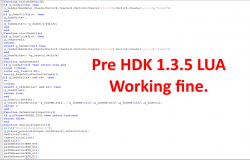
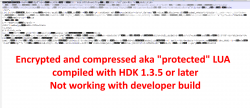
5. Something important to note here, we currently can not use any LUA based minigames/objects/UUIDs compiled with HDK 1.3.5 or higher. If you look in the RESOURCES.XML for an object and you see the items listed say "protected="true", then chances are that item will not work fully with the developer build, as the LUA files are encrypted and compressed. You can also see which HDK version a scene was compiled with at the very top of the SCENE file, and also at the top of the ODC file, see image above. (not all UUIDs have an ODC file)


Remember Destination Home have cracked this encryption so we know it is possible at least. I think maybe using the retail client to load the encrypted item, then dumping the LUA from RAM might be easy enough when the time comes. For now there are enough scenes created with earlier HDKs to be working on.
upload_2022-8-16_1-39-44.png upload_2022-8-16_1-43-40.png

We do have some examples of the exact same files encrypted and not encrypted (my guess).. This is where we have multiple versions of the same scene from before and after the change, So maybe we can use that fact to help crack it. idk.

6. The LUA files linked here in the RESOURCES.XML, the older ones that we can read and load, often will link back to the LOCALISATION.XML in the items UUID folder for text strings, just in case anyone is ever wondering where it is getting them from as its not always clear.
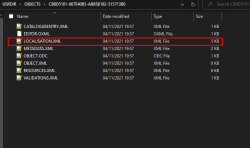
upload_2022-8-16_1-59-42.png

That's all for now :)
 
Last edited:
Thanks for posting that, I have been wondering about the folder structure. And your idea was to move each of these folders into its own folder, then link the new "sub folder " back into the navigator, right? Dont we have to know the uuid (or whatever the unique scene identifier) is?

Also, in the .scene file, in the toc element, each of the entries has the folder name preceded by a # sign — does that indicate that the referenced folder is a subfolder, relative to the location of the .scene file? Does that make sense?
 
Thanks for posting that, I have been wondering about the folder structure. And your idea was to move each of these folders into its own folder, then link the new "sub folder " back into the navigator, right? Dont we have to know the uuid (or whatever the unique scene identifier) is?
Its mainly only the scene resources in the USRDIR/SETTINGS and USRDIR/SCRIPTS/ that are having major issues with conflicts so those are what needs moving to unique folders mainly, but of course its nice to move as much stuff to one folder as possible so that scenes are more self contained and less chances of issues down the line. ..

The UUID folders in USRDIR/OBJECTS/ must stay there as that folder is scanned at app start up to see what UUIDs are available.

There ARE some conflicts with UUIDs for minigames, but those are solved in a different way. Lets say we end up with 2 UUID folders called CB8D5101-067E40B5-AB85B182-515713B0 with different contents that are called by different scenes. It is rare enough but does happen that a UUID has been reused. In that case we can just edit the name of one of the folders to be say CB8D5101-067E40B5-AB85B182-515713B1, then you need to edit the ODC file in that UUID folder (if it exists), to match the folder name. Then edit the UUID lower down in the SCENE file to suit.

So we can change and create new UUIDs easily enough, they just need to be changed in the right places, first the SCENE file, then the folder name, and the ODC file.

It's basically just a big web of paths that starts with the SCENE file then spreads out, we can run almost any file from any location by editing these paths, Except for UUID folders which must all run from USRDIR/OBJECTS/XXXXXXXX-XXXXXXXX-XXXXXXXX-XXXXXXXX.

Also, in the .scene file, in the toc element, each of the entries has the folder name preceded by a # sign — does that indicate that the referenced folder is a subfolder, relative to the location of the .scene file? Does that make sense?
It does make sense but its not actually like that.

This little bit at the very very top with these 4 lines, Seems to be the same in every scene and so far I have not found it relates to anything important. There are no folders that match any of these names. Its the paths below that (and the UUIDs further down) that decide where each resource is kept.

upload_2022-8-16_11-22-38.png


More research needed, and maybe something in the HDK documents about it, but for now these seem to be of no interest.
 
For now to get around all the file conflict issues between different scenes easily, I have made a little script that lets me run one scene at a time from a unique content ID. This means I can have multiple different scenes running alongside each other on the XMB, I can mod each one individually, fix bugs etc while being certain there are no file conflicts.

Quick run through of how to go from PS Home SDAT to standalone pkg. In this video I named the app folders STEP 1, STEP 2, and STEP 3 .


NOTE: A normal scene like an apartment that has no minigames, is contained in just one SDAT. IF a scene has minigames there will be separate SDATs for each minigame, So for a scene with minigames you need to extract and map all the relevant SDATs first in STEP 1 and STEP 2, then put them into to the main folder before building the pkg in STEP 3.

The leaked Destination Home apps called "Home Tool" and "GazUnbar" are attached here (All credits to them and who ever leaked them). I did ask Nagato a while back and I was told all versions are now public. I can not find much public info on how to use them or download links so attaching them here in case anyone is looking for them.

I'm still working on the script, and it will be a work in progress for a while. If any modders or more advanced users here want to help me test it and perfect it, let me know. But its not really noob proof yet. The answers to the questions it asks are used to create the SDC file, PARAM.SFO and the package.

Here are 2 standalone minigame pkgs made using the process in the video.

Siren Lounge - Ward of Despair Minigame (164MB) DOWNLOAD

upload_2022-8-19_18-42-53.png


Audi - Vertical Run Minigame (147MB) DOWNLOAD

upload_2022-8-19_18-43-47.png

I plan to create BAR files for each scene with all the relevant files included. This will get around the file conflict issues in a better way. More to come on that soon.
 

Attachments

Last edited:
For now to get around all the file conflict issues between different scenes easily, I have made a little script that lets me run one scene at a time from a unique content ID. This means I can have multiple different scenes running alongside each other on the XMB, I can mod each one individually, fix bugs etc while being certain there are no file conflicts.

Quick run through of how to go from PS Home SDAT to standalone pkg. In this video I named the app folders STEP 1, STEP 2, and STEP 3 .


NOTE: A normal scene like an apartment that has no minigames, is contained in just one SDAT. IF a scene has minigames there will be separate SDATs for each minigame, So for a scene with minigames you need to extract and map all the relevant SDATs first in STEP 1 and STEP 2, then put them into to the main folder before building the pkg in STEP 3.

The leaked Destination Home apps called "Home Tool" and "GazUnbar" are attached here (All credits to them and who ever leaked them). I did ask Nagato a while back and I was told all versions are now public. I can not find much public info on how to use them or download links so attaching them here in case anyone is looking for them.

I'm still working on the script, and it will be a work in progress for a while. If any modders or more advanced users here want to help me test it and perfect it, let me know. But its not really noob proof yet. The answers to the questions it asks are used to create the SDC file, PARAM.SFO and the package.

Here are 2 standalone minigame pkgs made using the process in the video.

Siren Lounge - Ward of Despair Minigame (147MB) DOWNLOAD

View attachment 38294


Audi - Vertical Run Minigame (164MB) DOWNLOAD

View attachment 38295

I plan to create BAR files for each scene with all the relevant files included. This will get around the file conflict issues in a better way. More to come on that soon.
Why do I keep getting notifications for this?
 
Just tested out the Audi mini game. Everything worked perfectly! I'm also amazed that I was able to use the avatar editor and decorate my space all within a 148mb file.

I know you mentioned that the full file would be about 20GB, but do you still have any plans to release it? I'd much prefer to have the complete thing and 20GB is not a problem for me and many others
 
hey do you have the 20gb content? cause i want to install that too.
It's up to 30GB now, but I'm not releasing it, too much hassle.. Every single person who tried it had loads of issues trying to install it, and I can opt be arsed dealing with that. If someone really want to , they can use the information i have posted here to take the files released by DH and create a pkg.
 
It's up to 30GB now, but I'm not releasing it, too much hassle.. Every single person who tried it had loads of issues trying to install it, and I can opt be arsed dealing with that. If someone really want to , they can use the information i have posted here to take the files released by DH and create a pkg.
Damn.....now I'm just sad.
 
Made some nice progress with modifying system config files. It's a bit tricky to create them, but now I can create HEX patches that will change things that are not meant to be changed

For example here I set the allowed CACHE size to 100GB, and if it does get to 100GB it will get trimmed to 99.99GB.:

upload_2022-8-20_11-21-50.png
 
Here is a smaller version of Audi Vertical Run game made using a few little tricks.

I included the default apartment in those original downloads, but if we remove it we can save about 20MB, and then we can compress the rest of the files for the scene + minigame files into the basic apartment BAR. which I have renamed to SCENE_RESOURCES.BAR to be more generic. We can also leave out the Character viewer BAR too. Then I disabled in game TV screens and deleted the 14MB MP4 resource +images. The result is a much smaller pkg.

Audi Vertical Run Minigame LITE (70MB) DOWNLOAD

The larger version is the most moddable and best for people who want to extract it to see how it all works, and have everything working like the screens and Harbour Apartment.. and these smaller ones are best for people who just want to play the game with smallest file size and least amount of files possible, there is no noticeable difference if you just want to play the game.

The interesting thing is, there is still like 37MB of extra stuff in there that could be stripped out in theory without changing anything related to the driving game. These minigames will probably work at approx 35MB each soon enough. Not bad really Considering you get, third person room to walk around and a mini driving game.

So everything seen here in this video could work at 33MB or even less.. it's impressive really, and we have full SDK and all docs to make our own spaces and minigames if we wanted to.


Great, let me sure when you have some free time. I can share tools with you, and go through exactly what I am doing from start to finish.
Ok, I have the files now, all unzipped. Everything you'd mentioned so far makes so much more sense, now that I can see the real thing!

Anyway, it is another way to distribute this 20GB too, I will share an XML shortly with some testers, that xml will allow the offline version to download and install from the XMB. It is a little bit slow downloading 20GB on the PS3 from dropbox, but it saves the user needing FTP set up, or NTFS set up, or copying large files, and it saves them needing 20GB free space on their PC. Basically all they need is the ability to get one xml onto dev_flash and 40GB of free space on the PS3 (20GB for the pkg and 20GB for it to extract to). I will not be able to make the XML public as its just downloading from a basic personal Dropbox account.
I have some ideas to address that... What XML did you change, the xmb one? I was able to add the folding@home icon back (thanks to you and @LuanTeles ), so I'm guessing it's the same principle here?
 
Back
Top