PS4 [Research]PS2 emulator configuration on PS4

Thrillville [SLES-54517]
emu=primal

txt:
Code:
--gs-uprender=2x2
--gs-upscale=EdgeSmooth
--host-display-mode=full
--ps2-lang=system
--vu1-mpg-cycles=750
--vu1-jalr-cache-policy=newprog
--safe-area-min=0.9
--gs-optimize=60fps

Lua:
Code:
apiRequest(1.1)

local eeObj  = getEEObject()
local emuObj = getEmuObject()

local patcher   = function()
--disable interlace,graphics,fog by Juano V
eeObj.WriteMem32(0x006D07C8, 0x0)
eeObj.WriteMem32(0x006D0718, 0x0)
eeObj.WriteMem32(0x006D071C, 0x0)
eeObj.WriteMem32(0x006CF5B0, 0x0)
eeObj.WriteMem32(0x006D070C, 0x0)
eeObj.WriteMem32(0x006D077C, 0x0)
eeObj.WriteMem32(0x006D0770, 0x0)
emuObj.ThrottleMax()
end
emuObj.AddVsyncHook(patcher)
 
Hi, my question might sound dumb, but i wanted to know if i can use the Burnout 3 patch (SLES-52584) for my version of Burnout 3 (SLES-52585) ? there's a strip of colour each time i play it that i want to get rid of...
I thank you in advance for your answer
 
Also new ps2 emu
PS2-emu.jpg

Release: 06/11/2024
 
Grand Theft Auto - San Andreas [SLES-52541]
emu=gta sa

-
I managed to fix the ghosting of gta sa(still not fixed in pcsx2. i think) and vice city stories,
it no longer needs autoflush, and I also got rid of the annoying vertical lines.


txt:
Code:
--ps2-lang=system
--gs-uprender=2x2
--gs-upscale=EdgeSmooth
--host-display-mode=full
--vu1-clamp-range=0x04a,0x069
--gs-use-deferred-l2h=0
--cop2-no-clamping=1
--ee-hook=0x34dee8,FastForwardClock
--ee-hook=0x00245ee0,FastForwardClock
Lua:
Code:
apiRequest(0.6)

local eeObj  = getEEObject()
local emuObj = getEmuObject()

local patcher = function()
--graphics fix (bloom/ghosting) by Juano V
eeObj.WriteMem32(0x00668DE8,0x0)
eeObj.WriteMem32(0x00668D5C,0x0)
eeObj.WriteMem32(0x00668D60,0x0)
--fix vertical lines
eeObj.WriteMem32(0x006681E4,0x0)
end
emuObj.AddVsyncHook(patcher)

Grand Theft Auto - Vice City Stories [SLES-54622]:
https://www.psx-place.com/threads/r...nfiguration-on-ps4.16131/page-177#post-342924


Last edited:
New to ps4 jb, which tools do you advice to convert ps1/ps2/ps3/psp/ps4 images to pkg format to be used on ps4? I mean to best and the smartest tool now in 2024.
 
New to ps4 jb, which tools do you advice to convert ps1/ps2/ps3/psp/ps4 images to pkg format to be used on ps4? I mean to best and the smartest tool now in 2024.
Prefer jabu tools, also someone like use tools from Markus00095! And sometime i prefer build manually with old Fpkg tools!
 
Last edited:
Grand Theft Auto - Liberty City Stories [SLES-54135] - Remove filter
add to lua:
Code:
--remove filter by Juano V
eeObj.WriteMem32(0x003D76B8,0x0)
eeObj.WriteMem32(0x003D105C,0x0)
eeObj.WriteMem32(0x003D1050,0x0)
 
Hey, can someone send me redfaction emu? I wanted to try Gun with it, but i can't find it, so i would be very grateful ;)
 
Last edited:
World Soccer Winning Eleven 5 Final Evolution (SLPM-62113)

CONFIG TXT

--iop-cycle-scalar=1.6 #fix opening game speed
--vu0-no-clamping=0
--vu1-no-clamping=0
--vu0-di-bits=0
--vu1-di-bits=0
--host-gamepads=2

LUA

-- World Soccer Winning Eleven 5 Final Evolution NTSC-J (SLPM-62113)
-- emu used=JakX v2

apiRequest(1.0)

local gpr = require("ee-gpr-alias")
local eeObj = getEEObject()
local emuObj = getEmuObject()

local patcher = function()

-- Unlocked Secret Teams and Players
eeObj.WriteMem32(0x211F1D10,0x000000FF)
eeObj.WriteMem32(0x211F1D14,0xFFFFFFFF)
eeObj.WriteMem32(0x211F1D18,0x003FFFFF)

end

emuObj.AddVsyncHook(patcher)
 
Def Jam™ Fight for N.Y.® NTSC (4 Player fix)

CLI
Code:
--gs-uprender=2x2
--gs-upscale=EdgeSmooth

--host-display-mode=16:9

--iop-cycle-scalar=1.0

--ee-cycle-scalar=1.7

--mtap1=always
--mtap2=always
LUA
Code:
-- Def Jam: Fight for NY (SLUS-21004)
-- Multi-Tap fix by Kozarovv
-- Widescreen Patch
-- ported to PS4 Lua by Stayhye
-- emu used=aofa

apiRequest(0.1)

local eeObj    = getEEObject()
local emuObj    = getEmuObject()

local WS = function()
--16:9
eeObj.WriteMem32(0x00361a34,0x10a20016)
eeObj.WriteMem32(0x00361a64,0x3c013fab)
eeObj.WriteMem32(0x00361a68,0x44810800)
eeObj.WriteMem32(0x00361a6c,0x46010002)
eeObj.WriteMem32(0x00361a70,0xe4c00000)
eeObj.WriteMem32(0x00361a74,0x46010842)
eeObj.WriteMem32(0x00361a78,0xe4e10000)
eeObj.WriteMem32(0x00361a7c,0xc480001c)
eeObj.WriteMem32(0x00361a80,0xe5000000)
eeObj.WriteMem32(0x00361a84,0xc4810024)
eeObj.WriteMem32(0x00361a88,0x03e00008)
eeObj.WriteMem32(0x00361a8c,0xe5210000)
eeObj.WriteMem32(0x00361a90,0xc4800010)
eeObj.WriteMem32(0x00361a94,0x3c013fab)
eeObj.WriteMem32(0x00361a98,0x44810800)
eeObj.WriteMem32(0x00361a9c,0x00000000) -- optional zoom for cutscenes
eeObj.WriteMem32(0x00361a9c,0x46010002) -- optional zoom for cutscenes
eeObj.WriteMem32(0x00361aa0,0x46010842)
eeObj.WriteMem32(0x00361aa4,0xe4c00000)
eeObj.WriteMem32(0x00361aa8,0xe4e10000)
eeObj.WriteMem32(0x00361aac,0x3c013e80)
eeObj.WriteMem32(0x00361ab0,0x44811800)
eeObj.WriteMem32(0x00361ab4,0xc4820024)
eeObj.WriteMem32(0x00361ab8,0x3c013f00)
eeObj.WriteMem32(0x00361abc,0x44810000)
eeObj.WriteMem32(0x00361ac0,0x46031082)
eeObj.WriteMem32(0x00361ac4,0xc481001c)
eeObj.WriteMem32(0x00361ac8,0x46001002)
eeObj.WriteMem32(0x00361acc,0xe5010000)
eeObj.WriteMem32(0x00361ad0,0xc4800024)
eeObj.WriteMem32(0x00361ad4,0x03e00008)
eeObj.WriteMem32(0x00361ad8,0xe5200000)

--Access All Gear by Code Master
eeObj.WriteMem32(0x200C0220,0x240300FF)
eeObj.WriteMem32(0x200C0224,0x080D85B3)
eeObj.WriteMem32(0x200C0228,0xA0430000)
eeObj.WriteMem32(0x203616C8,0x08030088)

--Access All Moves by Code Master
eeObj.WriteMem32(0x200C0230,0x240200FF)
eeObj.WriteMem32(0x200C0234,0x080D852F)
eeObj.WriteMem32(0x200C0238,0xA0620000)
eeObj.WriteMem32(0x203614B8,0x0803008C)
--general
eeObj.Vu1MpgCycles(600)
emuObj.ThrottleMax()
end

emuObj.AddVsyncHook(WS)

local mtap_fix = function()
-- Force controllers detection
eeObj.WriteMem32(0x32F3EC,0x00000000)
-- Manually count to 8...
eeObj.WriteMem32(0x1EADFC,0x24100000)
eeObj.WriteMem32(0x1EAE04,0x26100001)
-- Rearrange controllers from port 2 to 1
eeObj.WriteMem32(0x0fff00,0x10040007)
eeObj.WriteMem32(0x0fff04,0x28b90003)
eeObj.WriteMem32(0x0fff08,0x54190001)
eeObj.WriteMem32(0x0fff0c,0x24a50001)
eeObj.WriteMem32(0x0fff10,0x54190001)
eeObj.WriteMem32(0x0fff14,0x24040000)
eeObj.WriteMem32(0x0fff18,0x080CBBD0)
eeObj.WriteMem32(0x0fff1c,0x00000000)
eeObj.WriteMem32(0x0fff20,0x54050001)
eeObj.WriteMem32(0x0fff24,0x24040001)
eeObj.WriteMem32(0x0fff28,0x54050001)
eeObj.WriteMem32(0x0fff2c,0x24a5ffff)
eeObj.WriteMem32(0x0fff30,0x080CBBD0)
eeObj.WriteMem32(0x0fff34,0x00000000)
eeObj.WriteMem32(0x32F36C,0x0c03ffc0)
end

emuObj.AddVsyncHook(mtap_fix)

4 player working. All thanks to Kozarovv for his multi-tap patches. Tested quite a bit, works great.

I was testing Def Jam Fight For NY and it is working good, but I notice sometimes there are vertical lines appearing in the game, like its a VSYNC problem. I am using AOFA emulator and I build the fpkg using PS2-FPKG v0.6 (v0.7 did not work). The problem is noticeable if you pay close attention to the game enough. It's not that major but I was wondering if there is any fix for it?

EDIT: Also the game runs at 30 FPS i think. Is there any 60 FPS uncap for the game similar to how Xbox looks like? NVM the framerate, it is 60 fps
 
Last edited:
I was testing Def Jam Fight For NY and it is working good, but I notice sometimes there are vertical lines appearing in the game, like its a VSYNC problem. I am using AOFA emulator and I build the fpkg using PS2-FPKG v0.6 (v0.7 did not work). The problem is noticeable if you pay close attention to the game enough. It's not that major but I was wondering if there is any fix for it?

EDIT: Also the game runs at 30 FPS i think. Is there any 60 FPS uncap for the game similar to how Xbox looks like? NVM the framerate, it is 60 fps

try --host-vsync=1 and/or --gs-kernel-cl-up="up2x2skipinterp" in CLI/TXT
 
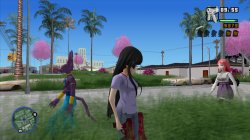
Grand Theft Auto Anime Legend (Mod) (v2.2)

TXT.
Code:
--host-display-mode=16:9
--vu1-no-clamping=0

--vu0-const-prop=0
--vu1-const-prop=0

--cdvd-sector-read-cycles=2000

--gs-ignore-rect-correction=1

--host-gamepads=2

LUA.
Code:
-- Grand Theft Auto Anime Legend (Mod) (v2.2) (KYON-20946)
-- emu used=Red Faction

local gpr = require("ee-gpr-alias")

apiRequest(0.1)

local eeObj = getEEObject()
local emuObj = getEmuObject()

local CheckInputs = function()

local pad_bits = emuObj.GetPad()

local UP    = pad_bits &  0x0010
local DOWN    = pad_bits &  0x0040
local LEFT    = pad_bits &  0x0080
local RIGHT    = pad_bits &  0x0020
local Triangle  = pad_bits &  0x1000
local Cross    = pad_bits &  0x4000
local Square    = pad_bits &  0x8000
local Circle  = pad_bits &  0x2000
local L1    = pad_bits &  0x0400
local L2    = pad_bits &  0x0100
local L3    = pad_bits &  0x0002
local R1    = pad_bits &  0x0800
local R2    = pad_bits &  0x0200
local R3    = pad_bits &  0x0004
local Select  = pad_bits &  0x0001
local Start    = pad_bits &  0x0008

if (DOWN ~= 0 and R1 ~= 0) then
-- Max Health
eeObj.WriteMem32(0x208021C0,0x44B00000)
end

if (LEFT ~= 0 and L1 ~= 0) then
-- Max Wanted Level
eeObj.WriteMem32(0x2027BED8,0x00000000)
end

if (UP ~= 0 and L1 ~= 0) then
-- Weather Is Always Hot
eeObj.WriteMem32(0x2066BD24,0x00000000)
eeObj.WriteMem32(0x2066BD28,0x00000000)
eeObj.WriteMem32(0x2066BD2C,0x00000000)
end

if (DOWN ~= 0 and L1 ~= 0) then
-- Weather Is Always Stormy
eeObj.WriteMem32(0x2066BD24,0x00000010)
eeObj.WriteMem32(0x2066BD28,0x00000010)
eeObj.WriteMem32(0x2066BD2C,0x00000010)
end

end

emuObj.AddVsyncHook(CheckInputs)

local patcher = function()


end

emuObj.AddVsyncHook(patcher)

Grand Theft Auto Anime Legend PS2toPS4 Test (Old)


Grand Theft Auto Anime Legend. Short GamePlay (New)
VIDEO

Grand Theft Auto Anime Legend. Explosions & Effects!
VIDEO
 

Attachments

  • 01.jpg
    01.jpg
    994.6 KB · Views: 39
  • 02.jpg
    02.jpg
    868 KB · Views: 43
  • 03.jpg
    03.jpg
    696.2 KB · Views: 36
  • 04.jpg
    04.jpg
    1 MB · Views: 39
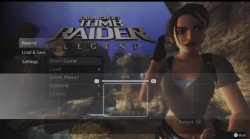
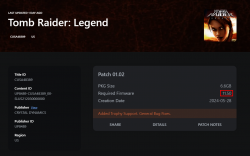
they already released the new ps2 games on ps plus.

this is similar to emu where using right now.
ps1hd and psphd
-save/loadstate
-rewind
-still 480p (but i think we can scale it higher than this, like psp and psx)

i guess we will have the same folder structure.
 

Attachments

  • IMG_20240611_194224.jpg
    IMG_20240611_194224.jpg
    158.7 KB · Views: 59
  • IMG_20240611_194405.jpg
    IMG_20240611_194405.jpg
    221.6 KB · Views: 53
they already released the new ps2 games on ps plus.

this is similar to emu where using right now.
ps1hd and psphd
-save/loadstate
-rewind
-still 480p (but i think we can scale it higher than this, like psp and psx)

i guess we will have the same folder structure.
Will be good if new emus not encrypted as new Saturn emu (Bust - A - Move), or we can have nothing then!
 
on ps4 the enhancement option (savestate/loadstate, rewind) is turned off but you can turn it on. maybe because it will affect fps. since it will add more job to the cpu of ps4 because it will literally record your game every second.

good news, on psp/psx emu i found the option to limit the rewind for how long it will record (tested). meaning we can use this on ps2 to turn off the rewind only, so we can still use savestate/loadstate without affecting the fps because of the rewind.
 

Attachments

  • IMG_20240611_194405.jpg
    IMG_20240611_194405.jpg
    221.6 KB · Views: 60

Similar threads

Back
Top