PS3HEN resigning Eboots to hen but goes back to xmb.

larry12222

Member
im trying to make a eboot work for HEN but when i launch the app it goes straight back to the xmb.. but i used a different eboot and it loads into the app.

i was renaming some stuff inside the eboots but after i resign them they dont work.

iv used:
Ta Resigner
E/S/S/S/E resigner
Eboot resigner v1.98
PS3 Tools

im been looking for older versions of the same tools but the links are dead.

If anyone wants to check it out.
Working Eboot: https://tinyurl.com/yrep757z - works on HEN
Eboot 4.20+: https://tinyurl.com/42rk88re - Black screen
Eboot 3.55: https://tinyurl.com/2p9mtdsm - Goes back to XMB

thanks for any help :)
 
Last edited:
Maybe it's only system selfs that can't be resigned? Iirc, ps3tools can easily resign an eboot by right clicking it and selecting to resign in the context menu. That's assuming the elf isn't corrupted.
 
upload_2024-9-8_8-14-43.png


to make the options appear in the context menu, I think you need to open ps3 content id as administrator, and leave it on as "open as administrator." then, you can create packages from folders, extract packages, resign, etc.

edit: if you're on windows 11, it may be under more options when right-clicking.
 
View attachment 44211

to make the options appear in the context menu, I think you need to open ps3 content id as administrator, and leave it on as "open as administrator." then, you can create packages from folders, extract packages, resign, etc.

edit: if you're on windows 11, it may be under more options when right-clicking.
i got it working the context menu thing but nothing works. idk what it could be.
 
really? I just tested extracting the elf. it worked fine. if it's a pkg, you may need the rap file in scetool's rap folder. if you have the rap key, put it in a hex editor to create the rap (paste+insert), then rename it after the content id. you've just made the rap. that's what I did. I don't condone piracy, but I used a means to get the god link and rap information for this example. very easy.

upload_2024-9-8_8-53-9.png

upload_2024-9-8_8-54-41.png
 
really? I just tested extracting the elf. it worked fine. if it's a pkg, you may need the rap file in scetool's rap folder. if you have the rap key, put it in a hex editor to create the rap (paste+insert), then rename it after the content id. you've just made the rap. that's what I did. I don't condone piracy, but I used a means to get the god link and rap information for this example. very easy.

View attachment 44212
View attachment 44213
im trying to get a eboot work on hen, few yrs back i used essse resigner a older version because i think it supoorted 3.40 and eboots that are on 3.40 seem to run on hen but 3.55 it wont.
 
Last edited:
well, you shouldn't be able to read this if it's encrypted and compressed. I know edats can be, but that's usually with the watermark of the edat app itself, not physically changing it. this looks like it's been physically changed.
 
well, you shouldn't be able to read this if it's encrypted and compressed. I know edats can be, but that's usually with the watermark of the edat app itself, not physically changing it. this looks like it's been physically changed.
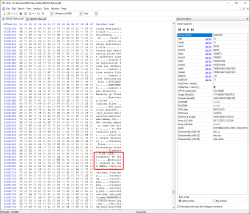
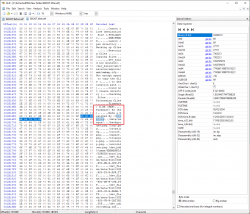
is there a different way to edit the eboot. this is what im trying to change.
 

Attachments

  • Before.png
    Before.png
    188.1 KB · Views: 25
  • After.png
    After.png
    192.4 KB · Views: 24
The eboot just needs signed with 3.55 keys to work on HEN. If its still not working, post what eboot you are trying to resign. ESSSE resigner should work fine. Same for sprx. You can try compression and no compression, but both should work.

If you want to use the debug mode of HEN, under HFW Tools -> Development you can use a tool like socat to get a debug log and see where the problem is.

EDIT: I see you posted the eboot.

EDIT2: This thread has an explanation also https://www.psx-place.com/threads/guide-properly-sign-sprx-and-eboot-for-hen.24449/

EDIT3: Here is the command for socat you can try if you want using debug mode in HEN
socat -lu stdout udp-recv:18194,reuseaddr | tee socat.txt
 
Last edited:

Similar threads

Back
Top