PS3 RetroArch 1.7.1 Extended Version

Great work, @STLcardsWS ! :)

No automatic detection..
You know how SuperGrafx is seperate from mendafen_PCe_fast core.

In the future (if an automatic detection can not be done easier) might be worth exploring in making those individual emu's..
(something to note for the future) as it would save having to do some of those steps

Yeah, I'm agree.
 
Lutro (lua engine) has some issues
Games download from RetroArch itself fine and are located then in Downloads (in load content)

I tried two games so far. tetris (the blocks fell insanely fast)
Then on the Platformer one i died and it froze the PS3 (but speed was not correct, not real slow but sluggish)

Seems like some of the functions are not 100%
 
@Ezio I also noticed that there are problems with saving settings, eg shader for the core and the game, does not always remember and does not save the settings.
 
o2em_libretro_ps3
failed on Odyseey 2 roms, have Bios in system folder (blackscreens)
have bios in game and failed to load content message appeared and did not black screen

O2EM is working for me, but there is no way to get past the Select Game screen. Maybe you have a bad BIOS, or you tried to load a European game with only a US BIOS?

BlueMSX works, but certain keyboard keys that are supposed to be mapped to the controller aren't.

fMSX gives non-frozen black screen with same game (Metal Gear 2: Solid Snake) that works with BlueMSX. (all BIOS files present)

Can't seem to do anything with P-UAE (yes, I did quick menu->options->use analog and controls->retropad w/analog)

EDIT - never mind, you have to press Select to get into mouse mode. Still can't get a game to run - I select a kickstart ROM and floppy from the in-game menu, but it just crashes upon pressing OK. (BIOS and game work under standalone PS# Amiga emu) RetroArch menu is jittery, running @ 50 FPS for some reason.

DOSBox start screen has weird green lines on it. No way to type commands - the RetroArch PS3 OSK has never worked AFAIK, and you can supposedly map keys to controller buttons (quick menu-> controls), but that's not working. Some games fail to load, others go back to the start screen with this...

Z:\MOUNT C /dev_hdd0/ROMS/dos/a10

...but nothing happens.

BIOS notes

Gambatte - BIOS for Game Boy and Game Boy Color optional

Genesis Plus GX - BIOS for Master System, Game Gear, and Genesis/MegaDrive optional
Sonic and Knuckles ROM and upmem ROM optional (for Lock-On support)
Game Genie and Pro Action Replay ROMs optional

Handy - BIOS optional

Mednafen PC Engine Fast/SuperGrafx - BIOS needed for CD and Games Express games (seperate ones)

Mednafen PC-FX - BIOS required

Nestopia - NstDatabase.xml required (not really a BIOS, though)

VBA Next - BIOS optional
 
Last edited:
They did because @thehero_ (is a good guy and reported) and he is a member here as well and I am sure read through comments and then even tested himself. Not all sites do that......


I did and seen the same issues i have seen in the past on some of these cores . That why i knew before even launching there would be issues. Then i launched and my suspicions were confirmed..


If you feel the same why should i not say it? I know your wanting to do alot of good here and i believe you are and have done so much good already, (THANK YOU!!!!!) No doubt you want this to be as polished as possible. I do as well, so that why i like to see it handled a bit differently so that we do not add more confusion on a port that badly needs to be stable and we only get to being stable by using cores that actually work well. (many new ps3 user;s and i doubt anyone is going back to use the older more polished release) (like i suggested in the past an add-on package for these PoC cores is a much better approach and in itself educate the user better without even having to explain it or rely on others to explain it. when you see "RetroArch PoC Cores Addon.pkg" its kind of self explanatory. Also more user's are wanting a build that just has the working cores/play full speed then the PoC testing builds.

My goal is the same as yours, we are just seeing a different path for it.


I been around a long time, and i know how news and word flows. So that goes into my thinking as well

No this release was not bad whatsoever, what was bad was just some of the dialog missing (which adds to the confusion). user's are going to have issues with some cores .

I am more then happy to help in anyway i can.
I would also like to get alot operation details going for the PS3 as well. (something that has always been missing) Bios requirements and all.
Thank you @STLcardsWS :) .I have tested the @Ezio version and some improvements there. But some freeze of some cores blocks the console and the emulator. However, I thank @Ezio for the excellent job that continues to offer us
 
Various people offered to test in this forum just the other day prior to release . :)

this was not presented as a testing build. it was presented as moreless a stable release with now 44 cores included. (that were tested) That is what other places are going to report as that is the message that was being relayed

Just so many incomplete / non functional RetroArch PS3 builds out there already. The scene deserves a stable release and if testing is the purpose here , its needs to be labeled as such. because otherwise you start to see exactly what was detailed appear in the news at places

example
https://translate.google.com/transl...retroarch-1-7-1-extended-version/&prev=search
(which i think is going to just setup a user for some disappointing experiences and frustrations)

I know the intentions are GOOD, and i think the release is great but i think it could of been handled a bit differently to avoid some confusion.
Nobody here is confused. People are reporting their experiences. That is helpful to the development. Please stop discouraging devs by badgering them with this.
 
Nobody here is confused. People are reporting their experiences. That is helpful to the development. Please stop discouraging devs by badgering them with this.

"Stop discouraging devs"
I seriously doubt that either @Ezio or @Zar would say that i am discouraging them . I believe they know and realize that my comments are to make the project the best it can be and not to discourage their efforts..
 
Which SNES core is it that has been included in this RetroArch that can play Far East of Eden?
snes9x core, this is the patch used. https://github.com/libretro/snes9x/commit/a739d68a1717153855fa0ba19ab8ab82b6412a32

One minor regression in Prosystem - the patch that was uploaded about a month ago to fix the Double Dragon sprite and color hack RC7b appears to be missing here, as it's back to being non-playable. It black screens, but you can get back to the Retro Arch menu with R3+L3.

Patch described here: https://github.com/libretro/prosystem-libretro/commit/18160812ef76c3069a2b9b08923e5167a36cc171

maybe your RA/prosystem source needs to be re-downloaded from Github.

Yeah, you're right. I just checked, I need to update my source for that core.
 
Still can't get DOSBox to run. I tried loading the conf from the standalone PS3 DOSBox, which I have set up to enable Gravis Ultrasound emulation,mount a few drives, and run a file manger program. Upon loading, the Ultrasound apparently initializes (it says "SET ULTRA=C:\ULTRASND"), but the mounting fails ("Drive C does not exist !").

All 3 SNES9x cores are running (5+ games tested for each), but the 2005 version is not full speed. No sign of the save-state/rewind/audio bug(s). Have not yet tested the Far East of Eden game yet.

IIRC, @STLcardsWS had an ancient build (like pre-1.0) of the Jaguar core that was full-speed, but had a blue tint to the graphics. Perhaps there is hope for this core ?
 
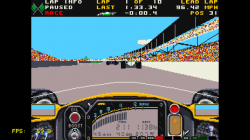
Figured out how to run games with P-UAE. Behold!

RetroArch PS3.png


Download the attached example file, and open it in a text editor (Notepad is fine). Look at the following entries...

1. floppy0=/dev_hdd0/ROMS/amiga/Indianapolis 500 - The Simulation.adf

Edit this to point at your floppy(s) - I would play it safe and use the full path. (Use floppy1, floppy2, and floppy3 for the 2nd, 3rd, and 4th disks in multi-disk games, and change nr_floppies to 3 or 4.) It should also be possible to use a hard drive image (remove the "#" in front of hardfile).

2. kickstart_rom_file=/dev_hdd0/ROMS/amiga/bios/KICK13.ROM

According to the core's readme, a kickstart ROM (BIOS) is required, not sure if this is correct, though. Leave that entry blank if you don't have one.

4. ntsc= true

Change to false if you're in a PAL country.

Save the file as plain text, and rename it to something more descriptive than "example" - but make sure to give it an extension of .uae

Now load the file in RetroArch, and, if you did it right, it should work.

You can change other options in the file if you know what you're doing. Changing options in the GUI only affect that session - clicking on Save Config doesn't seem to work. Saving and loading states (GUI->Misc) doesn't work either.

In the example game, I got full-speed performance at max detail setting (after tweaking some settings), while in the standalone PS3 port it only ran full speed at the lowest setting.

 

Attachments

Figured out how to run games with P-UAE. Behold!

View attachment 11494


Download the attached example file, and open it in a text editor (Notepad is fine). Look at the following entries...

1. floppy0=/dev_hdd0/ROMS/amiga/Indianapolis 500 - The Simulation.adf

Edit this to point at your floppy(s) - I would play it safe and use the full path. (Use floppy1, floppy2, and floppy3 for the 2nd, 3rd, and 4th disks in multi-disk games, and change nr_floppies to 3 or 4.) It should also be possible to use a hard drive image (remove the "#" in front of hardfile).

2. kickstart_rom_file=/dev_hdd0/ROMS/amiga/bios/KICK13.ROM

According to the core's readme, a kickstart ROM (BIOS) is required, not sure if this is correct, though. Leave that entry blank if you don't have one.

4. ntsc= true

Change to false if you're in a PAL country.

Save the file as plain text, and rename it to something more descriptive than "example" - but make sure to give it an extension of .uae

Now load the file in RetroArch, and, if you did it right, it should work.

You can change other options in the file if you know what you're doing. Changing options in the GUI only affect that session - clicking on Save Config doesn't seem to work. Saving and loading states (GUI->Misc) doesn't work either.

In the example game, I got full-speed performance at max detail setting (after tweaking some settings), while in the standalone PS3 port it only ran full speed at the lowest setting.
I made according to this instruction but also ps3 freez after pressing OK
 
Back
Top