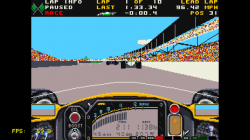
Figured out how to run games with P-UAE. Behold!
View attachment 11494
Download the attached example file, and open it in a text editor (Notepad is fine). Look at the following entries...
1. floppy0=/dev_hdd0/ROMS/amiga/Indianapolis 500 - The Simulation.adf
Edit this to point at your floppy(s) - I would play it safe and use the full path. (Use floppy1, floppy2, and floppy3 for the 2nd, 3rd, and 4th disks in multi-disk games, and change nr_floppies to 3 or 4.) It should also be possible to use a hard drive image (remove the "#" in front of hardfile).
2. kickstart_rom_file=/dev_hdd0/ROMS/amiga/bios/KICK13.ROM
According to the core's readme, a kickstart ROM (BIOS) is required, not sure if this is correct, though. Leave that entry blank if you don't have one.
4. ntsc= true
Change to false if you're in a PAL country.
Save the file as plain text, and rename it to something more descriptive than "example" - but make sure to give it an extension of .uae
Now load the file in RetroArch, and, if you did it right, it should work.
You can change other options in the file if you know what you're doing. Changing options in the GUI only affect that session - clicking on Save Config doesn't seem to work. Saving and loading states (GUI->Misc) doesn't work either.
In the example game, I got full-speed performance at max detail setting (after tweaking some settings), while in the standalone PS3 port it only ran full speed at the lowest setting.



 with BIOS