PS2 [Testers Needed] OPL internal exfat 2TB+ HDD and multi-BDM devices

For those with HHD issues check this youtube link below, he explains a few issues and fixes. Formatted as exfat through external HHD caddy did not work in opl, instead plug it directly into motherboard, as some hhd to usb connectors/caddies have issues.

 
I just get a blank screen when I load games. Seems to be the result of turning on theme sounds in OPL. Deleting the config files fixes the problem until I turn the setting back on. Can change many other OPL settings and games will load fine but tuning on sounds all ways results in a black screen when loading games.

Original network adapter moded for SATA.
4tb drive
1.2.0.1-beta
OPL config on MC
SCPH-50002
 
SCPH-30003 R
No hard drive or network adapter
MX4SIO

I have all BDM on auto and usb on, iLink off and MX4SIO on. Start page to BDM

If I don't have a usb stick in the ps2 it only gives me a black screen. If I have a usb stock on it Will work and I can the access the MX4SIO.

It also gives me error 400 no hard disk detected even though all options are off apart from BDM

I can not set usb to off under the options it's set to on the only ones I can toggle are iLink and MX4SIO. Not sure if it's normal and you need a usb inserted to use the MX4SIO

I have tried 2 games with the MX4SIO

Alan Hansens sport challenge, the audio skips when he talks, tried mode 1 same issue.

Friends the trivia game - froze after splash screens l, tried mode 1 worked but froze in game.

I have not tried these games on my old hard drive set up, as I got these just to test the MX4SIO and new OPL.

I have a 3TB on the way
 
hey I am sorry if this question was answered already. I haven't read through all 7 pages.

can I also store the ART, CFG, VMC etc folders on the root of the HDD? Or just CD/DVD?
 
@TnA I never used MX4SIO, USB or Firewire. on Internal HDD I always needed an OPL partition with these folders. Do I still need the partition or can I put these folders into the root folder?
 
SCPH-50001
OPL v1.2.0.1 Beta
Using a Gamestar's HDD adapter
OPL Config on MC

I had tried multiple games using this custom build and they have all worked great except for two games:
Splinter Cell, Chaos Theory (SLUS_211.37/NTSC US)
Obscure (SLES-52508/PAL)

Splinter Cell just crash with a black screen, tried to use mode 1, mode 2 and even the mode that disables fmv without any different result.
Obscure crash OPL all together after the loading screen (when it shows the obscure at the bottom right), throwing me into the memcard screen, also tried enabling different modes but all of them didn't worked.

I also tried to use the debug build to see if there was a way to check for an error message but I kinda don't know how to use it tbh.
 
Hooboy, this was rough going for me. I didn't want to crack my case open and hook my 1tb Seagate direct so I dug out my Kingston SNA-DC/U enclosure and prepped it for GPT and ExFat at to test this out. Like a moron, I blew 2 hours installing all my games from a backup instead of just a few games because I was really hoping I could replace my 640GB with HDD-OSD 2.0 with this. My experience was pretty horrendous. It took forever to get my HDD detected, and once detected, it took over 30 minutes with the spinning icon for my games list to show up. From there art work was slow loading and while every game I tested worked fine, it took over 3 minutes to get passed "saving config", and the game loading. After an IGR, it takes over 1 minutes for this build of OPL to load. Just very very slow and sluggish, and my Kingston SNA-DC defaulted to formatting this drive with a 512k sector size and that was a definite factor. Then when I went to reinstall the previous drive, I ran OPL ExFat by mistake and it never booted. Just chewed on the HDD and after 20 minutes, I put a stop to it. Launched the lastest mainline beta and all was well. Alas, that's all the testing I can do - I've done packed up my PS2, PS3, and Xbox 360. I need to put everything in storage and be out of this apartment in 2 weeks ... Gotta spend the weekend packing up and finding shelter somewhere ...

 
Hooboy, this was rough going for me. I didn't want to crack my case open and hook my 1tb Seagate direct so I dug out my Kingston SNA-DC/U enclosure and prepped it for GPT and ExFat at to test this out. Like a moron, I blew 2 hours installing all my games from a backup instead of just a few games because I was really hoping I could replace my 640GB with HDD-OSD 2.0 with this. My experience was pretty horrendous. It took forever to get my HDD detected, and once detected, it took over 30 minutes with the spinning icon for my games list to show up. From there art work was slow loading and while every game I tested worked fine, it took over 3 minutes to get passed "saving config", and the game loading. After an IGR, it takes over 1 minutes for this build of OPL to load. Just very very slow and sluggish, and my Kingston SNA-DC defaulted to formatting this drive with a 512k sector size and that was a definite factor. Then when I went to reinstall the previous drive, I ran OPL ExFat by mistake and it never booted. Just chewed on the HDD and after 20 minutes, I put a stop to it. Launched the lastest mainline beta and all was well. Alas, that's all the testing I can do - I've done packed up my PS2, PS3, and Xbox 360. I need to put everything in storage and be out of this apartment in 2 weeks ... Gotta spend the weekend packing up and finding shelter somewhere ...

i've seen several mentions of long loading times, i too had the issue with an old drive i grabbed (read my experience on page 2 or 3). then i bought a brand new drive off of amazon, and it has been night and day. filled it up with 5tb of games, and it first-loaded in like 7 minutes, and at each subsequent boot takes about 15 seconds to load. config load for each games is about 4 seconds.

not sure why a brand new drive would behave any better than a used drive thats been formatted, but that was my result. i wonder if doing a full format instead of a quick format would make any difference on previously used drives??
 
i've seen several mentions of long loading times, i too had the issue with an old drive i grabbed (read my experience on page 2 or 3). then i bought a brand new drive off of amazon, and it has been night and day. filled it up with 5tb of games, and it first-loaded in like 7 minutes, and at each subsequent boot takes about 15 seconds to load. config load for each games is about 4 seconds.

not sure why a brand new drive would behave any better than a used drive thats been formatted, but that was my result. i wonder if doing a full format instead of a quick format would make any difference on previously used drives??
Do you still have the HDD that was running slow? Could you get the SMART status for the drive? If you're on windows you can use CrystalDiskInfo to get the SMART status of the drive. If you could send me either a picture of the SMART status or save it to a text file and send me that, it would be a huge help.

@grimdoomer Could You add also support for no partition table, just fs from LBA0 to end?
Not sure why you would want that, but my changes to bdm should already be able to mount that if you're using exfat. It will only work if the fs starts at LBA 0 on the device.
 
i've seen several mentions of long loading times, i too had the issue with an old drive i grabbed (read my experience on page 2 or 3). then i bought a brand new drive off of amazon, and it has been night and day. filled it up with 5tb of games, and it first-loaded in like 7 minutes, and at each subsequent boot takes about 15 seconds to load. config load for each games is about 4 seconds.

not sure why a brand new drive would behave any better than a used drive thats been formatted, but that was my result. i wonder if doing a full format instead of a quick format would make any difference on previously used drives??

My 1TB Seagate is a 5400rpm laptop drive with SMR. It used to be in my PS4 but the firmware kept getting junked when I filled it past 75% so I put it in my Kingston SNA-DC and ran a battery of SMART tests. It passed every one except for one test that I attributed to Kingston SNA-DC since it's SATA 3GB and USB 2.0 and doesn't handle the full ATA command specs. Just enough to make it operational. I also suspect the 512k sector size was too much for the drive but I manually selected that for compatibility sake since I didn't want to leave it up to the Kingston SNA-DC's controller or Windows defaults, but perhaps I should have. With the drive using SMR anyway, the APA partitioning scheme and PFS file system might be better fit for it. Eventually, the PS2 will get a 1TB SSD ... or I might pluck the 500gb Samsung from my Linux box and test it again since that would give 300mbs a sec write speed on Windows when I drag and drop ISOs ...
 
@grimdoomer great work. tried a 500gb hdd and a 240gb ssd and both work fine. any chance of adding bin/cue support for the cd based ps2 games? having to convert them to iso is a pita

btw im curious about the fmcb workaround macho nacho mentions in his video
 
@grimdoomer any chance of adding bin/cue support for the cd based ps2 games? having to convert them to iso is a pita

I bit that bullet a long time ago. Mounted all my BIN/CUE files in a virtual device and ripped them as ISO because convertors don't always work, especially on certain mixed mode discs. It was a pain in the ass that took most of an afternoon but it got done.

EDIT: Giving this another whirl today with the 1TB Seagate in MBR mode and ExFat with the default cluster size, which should be 128k. Only installed 8 ISOs. Will edit this later ...

EDIT 2: SUCCESS!!!!!! :chuncky:

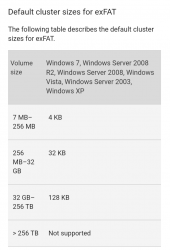
EDIT 3: Attached is a screenshot from Microsoft showing the default cluster size it imposes for ExFat depending on drive capacity. Use this as a general guide...
 

Attachments

  • Screenshot_20230416-165355.png
    Screenshot_20230416-165355.png
    105.4 KB · Views: 135
Last edited:

Similar threads

Back
Top