PS2 [Testers Needed] OPL internal exfat 2TB+ HDD and multi-BDM devices

Funny, I just found your post on reddit.
Anyway, I'll just repeat my answers on there:
psx-comBINe or BinMerger
Want to use the GUI ones? CDMage. Don't worry, CDMage works with PS2 bin/cue images too.


EDIT:
It appears you need the beta of CDmage. This one: CDmage1-02-1B5, and not this one CDmage1-01-5.
How many people have made that error. :/

Thanks for pointing that out to me BloodRaynare. :)

Hi,

I'm looking at CDmage now, usually you just open the cue file and select "Save As" to merge the mulit-bin files.
But, when I open PS2 multi-bin games, there's no "Save As" option.

Really strange, perhaps CDmage has become too old and will no longer work?
 
One other issue I've found with GD's OPL is the triangle button on the games list doesn't work.
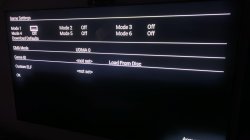
This button is to change the modes on problem games such as: Jak 3 (USA) if mode is not set to 1,3, & 6 it doesn't go past the Dolby logo.
Not being able to set the mode on GD's OPL, makes this game and many others unplayable.
This and the original problem I had of having no in-game-reset makes GD's OPL really bad.

I'm thinking about changing to another version of OPL at least then I can avoid these problems.
This version: https://github.com/ps2homebrew/Open-PS2-Loader
Seems to be supported by a lot of people here on PSX-Place.
But, I'm curious if there's a way to bypass the 2TB HDD limit. Maybe through SMB or by some other means.
Maybe even by switching over HDDs.
 
Last edited:
  • SMB is not affected by the 2TiB limit.
  • APA also has a 2TiB limit ITSELF, AFAIR!
  • 2 internal storage device support seems to be possible as well!
 
  • SMB is not affected by the 2TiB limit.
  • APA also has a 2TiB limit ITSELF, AFAIR!
  • 2 internal storage device support seems to be possible as well!
Can you link a good tutorial for setting up an SMB for PS2?
 
Progress has been made.

I was reading some of the earlier posts in this topic.
I read from pages 1-6 and picked up on something; the triangle button on the games list to get into the specific games settings was working for them.

This made me think; what's the difference? And I tried an earlier version of GD's OPL and sure enough, now the triangle button works.
Enabling me to change the modes (Mode 1,3, & 6 to ON) for the Jak & Daxter games and the other ones which were not working properly. Now, even the FMV on FF12 is working correctly. :D
This means; the only problem that exists now with GD's OPL is the IGR not working as it should (for me at least). Which, might have a hardware work-around in the form of the SCPH-10420 PS2 PlayStation 2 DVD Remote. I'm still waiting to test that. (EDIT: It arrived and it works 100%.)

People should be warned: don't download the latest beta: v1.2.0.6-1996-Beta
But download the 2nd most recent one: v1.2.0.5-1991-beta
Here: https://github.com/grimdoomer/Open-PS2-Loader/releases/tag/v1.2.0.5-1991-Beta

Also, this may give some insight about why GrimDoomer ceased updates:
It got too complex and when he was updating stuff, other things that were functioning fine were getting broken.
 
Last edited:
Progress has been made.

I was reading some of the earlier posts in this topic.
I read from pages 1-6 and picked up on something; the triangle button on the games list to get into the specific games settings was working for them.

This made me think; what's the difference? And I tried an earlier version of GD's OPL and sure enough, now the triangle button works.
Enabling me to change the modes (Mode 1,3, & 6 to ON) for the Jak & Daxter games and the other ones which were not working properly. Now, even the FMV on FF12 is working correctly. :D
This means; the only problem that exists now with GD's OPL is the IGR not working as it should (for me at least). Which, might have a hardware work-around in the form of the SCPH-10420 PS2 PlayStation 2 DVD Remote. I'm still waiting to test that.

People should be warned: don't download the latest beta: v1.2.0.6-1996-Beta
But download the 2nd most recent one: v1.2.0.5-1991-beta
Here: https://github.com/grimdoomer/Open-PS2-Loader/releases/tag/v1.2.0.5-1991-Beta

Also, this may give some insight about why GrimDoomer ceased updates:
It got too complex and when he was updating stuff, other things that were functioning fine were getting broken.

Here is my compatibility list. I didnt finish it yet, but some day maybe I will. I have checked over 400 games with OPL 1.2.0.6-1996. Hope it will help some people and save them some time.
 

Attachments

Here is my compatibility list. I didnt finish it yet, but some day maybe I will. I have checked over 400 games with OPL 1.2.0.6-1996. Hope it will help some people and save them some time.

So the OPL v1.2.0.6-1996 Beta you are using is the latest GrimDoomer variant?
Also, maybe you can help me with something.

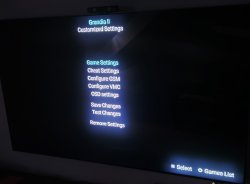
I'm getting a black screen on loading up Grandia II. I have tried all the different modes and nothing seems to work.
I did notice earlier in this thread:
March 24th: GrimDoomer:
New build uploaded, this version fixes the following issues:
  • Fixed missing support for LBA28 drives
  • Fixed issues with renaming games
  • Fixed loading issues with Grandia II
But, for me using v1.2.0.5-1991-Beta Grandia II still doesn't load.
It makes me wonder if this was something that got broken after an update?
 
So the OPL v1.2.0.6-1996 Beta you are using is the latest GrimDoomer variant?
Also, maybe you can help me with something.

I'm getting a black screen on loading up Grandia II. I have tried all the different modes and nothing seems to work.
I did notice earlier in this thread:
March 24th: GrimDoomer:
New build uploaded, this version fixes the following issues:
  • Fixed missing support for LBA28 drives
  • Fixed issues with renaming games
  • Fixed loading issues with Grandia II
But, for me using v1.2.0.5-1991-Beta Grandia II still doesn't load.
It makes me wonder if this was something that got broken after an update?

Its GrimDoomer's OPL thread, so yeah, I'm using his build v1.2.0.6-1996.
Did you checked my settings? For me workaround was setting UDMA to 0

I'm using HDD Western Digital Blue 3,5' 4TB 5400rpm WD40EZAX
Not oryginal network adapter from Amazon
PS2 8mb oryginal memory card
PS2 64mb non oryginal memory card
PS2 128mb non oryginal memory card
Free MCboot 1.966
GD OPL build v1.2.0.6-1996
Dont remember my PS2 version, I will check it and update it here.

I have noticed that some games have issues like slowdowns, freezes or even not load if you use non oryginal memory cards (e.g. many EA games).

There are some games that freeze after using IGR shortcut to exit from game. Some games like Final Fantasy X uses IGR shortcut button combination to go back to games menu so you need to use Mode 6 if you want to use this controls in game.

If your game doesnt work, "Mode 1" fixes alot of issues so it is the first try.

If you have so many problems, maybe you did something wrong when formatting HDD. Grimmdoomer whrite something about confusing "sector size" with "cluster size" or "Allocation unit size" when formatting their HDDs in change log to 1.2.0.6 build on his GitHub. That could cause issues with playing games
https://github.com/grimdoomer/Open-PS2-Loader/releases
 
Last edited:
Its GrimDoomer's OPL thread, so yeah, I'm using his build v1.2.0.6-1996.
Did you checked my settings? For me workaround was setting UDMA to 0

I'm using HDD Western Digital Blue 3,5' 4TB 5400rpm WD40EZAX
Not oryginal network adapter from Amazon
PS2 8mb oryginal memory card
PS2 64mb non oryginal memory card
PS2 128mb non oryginal memory card
Free MCboot 1.966
GD OPL build v1.2.0.6-1996
Dont remember my PS2 version, I will check it and update it here.

I have noticed that some games have issues like slowdowns, freezes or even not load if you use non oryginal memory cards (e.g. many EA games).

There are some games that freeze after using IGR shortcut to exit from game. Some games like Final Fantasy X uses IGR shortcut button combination to go back to games menu so you need to use Mode 6 if you want to use this controls in game.

If your game doesnt work, "Mode 1" fixes alot of issues so it is the first try.

If you have so many problems, maybe you did something wrong when formatting HDD. Grimmdoomer whrite something about confusing "sector size" with "cluster size" or "Allocation unit size" when formatting their HDDs in change log to 1.2.0.6 build on his GitHub. That could cause issues with playing games
https://github.com/grimdoomer/Open-PS2-Loader/releases

A question: Using OPL v1.2.0.6-1996 (the latest Beta) are you able to press triangle to open game options and change the game Modes?
Because, I used OPL v1.2.0.6-1996 and I wasn't able to do that.

"For me workaround was setting UDMA to 0"
Yes, I checked your settings and tried that but it didn't work for me.
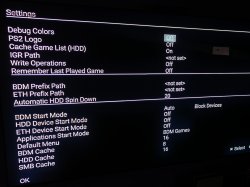
Here is a pic of my settings, are they the same as yours?
My OPL Settings.JPG
 
Last edited:
A question: Using OPL v1.2.0.6-1996 (the latest Beta) are you able to press triangle to open game options and change the game Modes?
Because, I used OPL v1.2.0.6-1996 and I wasn't able to do that.

"For me workaround was setting UDMA to 0"
Yes, I checked your settings and tried that but it didn't work for me.
Here is a pic of my settings, are they the same as yours? View attachment 43469

At first, game options didnt work for me but after conected my hdd to pc and adding some games it worked. Dont know if i set something in opl menager to enable it, I remamber that i changed game names to modern style.
Today i have checked Grandia 2 and it works for me with my settings.
 

Attachments

  • IMG20240622145737.jpg
    IMG20240622145737.jpg
    1.1 MB · Views: 137
  • IMG_20240622_155021.jpg
    IMG_20240622_155021.jpg
    1.4 MB · Views: 809
  • IMG_20240622_160401.jpg
    IMG_20240622_160401.jpg
    1.7 MB · Views: 458
At first, game options didnt work for me but after conected my hdd to pc and adding some games it worked. Dont know if i set something in opl menager to enable it, I remamber that i changed game names to modern style.
Today i have checked Grandia 2 and it works for me with my settings.
Hey thanks for the response,
The fix of changing DMA Mode to UDMA 0 worked for me and now I can load Grandia II. :)
I don't know why it wasn't working for me before.
Also, even with changing it to UDMA 0, it's still temperamental. It will sometimes load and sometimes not load.

I notice from your pics that in your OPL Settings you have: HDD Device Start Mode set to Off.
When I set mine to off games do not load on the list.
Very strange.
Just a further question for you: The in game reset (L1+R1+L2+R2+ START + SELECT) is working fine for you?

"At first, game options didnt work for me but after conected my hdd to pc and adding some games it worked. Dont know if i set something in opl menager to enable it, I remamber that i changed game names to modern style."
Interesting, I might try that and see.

Someone told me I should try GrimDoomer's HDDTester_v1.0 (https://github.com/GrimBrew/PS2HDDTester) and use it to test my SSD to see if I have set it up right.
I did this and all the checks passed.
Here's a pic of the info screen from the HDD Tester:
DSC01358.JPG
 
Last edited:
  • Like
Reactions: TnA
I have confirmed there's something different about the SSD I am using that is causing a lot of problems. I found this out by using an old PS3 320GB HDD that I had laying around and comparing it with the same settings on my SSD. The old 320 HDD was functioning normally in regards to the IGR & the SSD was bugging out.
The "Samsung SSD 870 QVO 8TB" is basically incompatible with the GrimDoomer fork.
And that is, in my opinion the best SSD/HDD to use.

In any case, I'm looking at other options to play PS2 games right now.
Perhaps even using a modchip to play backups. I don't think I will be coming back to GD's fork in the future.
 
Hope I'm not pooping the party. Is this project dead or the author will continue developing? I'm quite interested in using this to play my PS2 library and I'm worrying about potential issues.
 
I have confirmed there's something different about the SSD I am using that is causing a lot of problems. I found this out by using an old PS3 320GB HDD that I had laying around and comparing it with the same settings on my SSD. The old 320 HDD was functioning normally in regards to the IGR & the SSD was bugging out.
The "Samsung SSD 870 QVO 8TB" is basically incompatible with the GrimDoomer fork.
And that is, in my opinion the best SSD/HDD to use.

In any case, I'm looking at other options to play PS2 games right now.
Perhaps even using a modchip to play backups. I don't think I will be coming back to GD's fork in the future.

I don't see a problem to use different HDD if your SDD not working correct. Maybe Samsung 870 is the best SSD/HDD but it looks like it is not a best to use with this fork. If you want use other methods to play backups, I have a very good experiance with Swap Magic discs, you dont need to modify your console with it. But whole point of using HDD mods is to preserve your console laser life and modchips may kill it faster then normal use. Your choice.

Hope I'm not pooping the party. Is this project dead or the author will continue developing? I'm quite interested in using this to play my PS2 library and I'm worrying about potential issues.
I think that project is dead, fork's author dont answer to any contact try. I post to him on gmail, X, this forum and github and no answer since 6 months. It is sad because this project has great potential.
 
Last edited by a moderator:
Hi, I was wondering if anybody found a solution to have both this fork and PS1 games? Maybe through partitioning the HDD?
 
Glad I ran into this thread! Thanks everyone for contributing. I spent the most of yesterday trying to get 2 games to work on GrimDoomer's OPL build v1.2.0.6-1996. I also went back to the two prior versions and had no luck. Eventually I got things working on version OPL.v1.2.0.5-1991.
The games I was trying:
Neo Contra (SLUS_209.61)
Silpheed: The Lost Planet (SLUS_200.85)
Both games worked fine on the regular OPL release.
A big issue I had was not being able to save the game settings. It would show a message "Error writing settings!".
It turns out that the CFG folder on my 5 GB Hitachi exFAT HDD was corrupt. Earlier I had copied a lot of config files which I downloaded, into the CFG folder. Maybe this caused the corruption. To fix it, I connected the drive to my laptop via USB, opened a command prompt in Windows (search for CMD, then open by right clicking and using "Run as Administrator"). Run the command Chkdsk D: /f (Change D: to whatever letter your drive is assigned to)
After doing this, I was able to delete the CFG folder and it's contents, then I recreated the folder manually (Although OPL would have probably automatically created it).
The above steps fixed the "Error writing settings!" for me.

Neo Contra:
This game was hanging after showing the Konami logo. On some instances, it would not even get that far.
By setting DMA Mode to "UDMA 0", and turning on Mode 1, Mode 2 and Mode 6 worked.

Silpheed: The Lost Planet:
This game loaded and got as far as letting you type in your name. Then it would hang while loading the next part.
By setting DMA Mode to "UDMA 0", and turning on Mode 1, I got this to work.
I will continue going through games and report any more that I can fix.

Hope this info is helpful to someone.
 
Hi all,

I'm using GrimDoomer's latest build of OPL (1.2.0-1996), and am trying to get my hard drive/games to show up in OPL.

I'm using a Seagate Barracuda ES 500GB SATA drive, initialised as GPT with an EXFAT filesystem. I have confirmed the sector size is 512
I have two folders on the root of the volume, as CD and DVD, with most of my ISOs of games in the DVD folder.
I am using the original PS2 network/HDD adapter, but with a replacement SATA interface board rather than IDE.

When connecting to the PS2, the drive spins up, and if I go into HDDManager it knows a drive is connected but obviously can't tell it's been formatted.
If I go into OPL and set HDD and BLK devices to auto and restart, I get no errors saying a drive isn't connected, but when looking for games in the list it finds nothing.

I'm at a bit of a loss as to what else to check given the drive seems to be detected by the PS2, but OPL is not seeing anything on the file system?

Any guidance would be appreciated.

Thanks
Eds
 

Similar threads

Back
Top