benfrost94
Member
.
Sent from my MotoG3 using Tapatalk
Sent from my MotoG3 using Tapatalk


Try it. Only 1 report so far and they say it doesn't work for signing up to psn, but maybe they did not use correct files or signing up is different than singing in.Will this work on 4.82 seeing tho how a new update came out?
Sure willTry it. Only 1 report so far and they say it doesn't work for signing up to psn, but maybe they did not use correct files or signing up is different than singing in.
Can I use this method also for OFW 4.82? Because now I can't update my trophies thanks to the 4.83 firmwarepin it for some time so people can sign in before it gets patched
I am getting the same error. Please help!I'm getting error 80028EA6.
file has been deleted from server plz helpSure will
https://mega.nz/#!zZB3FbRS!JfwlNdTFGKdK_ARQhkb_YPOg-7jDzpw3IU3oIwCmc3Yfile has been deleted from server plz help

This is a network error and not PSN error. it could be the program is not running correctly. or the config files are outdated..I am getting the same error. Please help!


Thanks for trying!After editing some files. it worked. but asked for update.. eeehhh [emoji31]
تم الإرسال من D6503 باستخدام Tapatalk
Yes. the same link
Thanks for the report, I was fairly sure it would work.It is working.
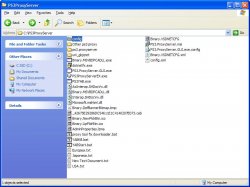
Just download the archive, and extract it to C:\PS3ProxyServer\
Run PS3.ProxyServer.GUI.exe as admin, set your IP address, tick PS3 Mode and hit Start.
Set the same IP in your PS3 proxy settings, leave everything else as Auto.
No need to update any file. (config.xml or -country-.txt)
Doing the same thing you said, gives this error...It is working.
Just download the archive, and extract it to C:\PS3ProxyServer\
Run PS3.ProxyServer.GUI.exe as admin, set your IP address, tick PS3 Mode and hit Start.
Set the same IP in your PS3 proxy settings, leave everything else as Auto.
No need to update any file. (config.xml or -country-.txt)

No magic at all. It's just a proxy server. It must work.EDIT: I don't know what magic you did. but it didn't work for me. lol
I do type the ip in both.. if the ip is wrong or proxy not running. this error message takes time.. but if the ip is correct. this error message comes too quick. 0.50 sec, or something..No magic at all. It's just a proxy server. It must work.
Make sure you typed in the correct IP and port in both the PC program and the PS3 proxy settings.
Yes. i did that. stillMake sure, all your extracted files are in C:\PS3ProxyServer\, and not C:\ps3.proxyserver\ as you'll find in the archive.