PS3 [TUTORIAL] How to split a large PKG file for OFW

in every NPXX_? folder USRDIR PARAM.SFO ICON.0 must be there in all the folders
in the NPXXXXX_1 must be LICDIR TROPDIR USRDIR ICON0 PARAM.SFO PIC1.PNG PIC2.PNG PIC0.PNG ...... and inside USRDIR must be EBOOT.BIN and you have bunch of files calculate from there and there and see if the size exceed 4GB then calculate the diffrence taking for example 5GBtake a 1.01gb from the first folder to the second USRDIR folder the first folder will be 3.99gb now done
and do the same to th othher if exceed 4gb then move the files to the NPXXX_3 ............

Did u make any changes in param.sfo in NPXXX_2 i mean cat to game data (GD) or keep it disk game blue ray???


Sent from my iPhone using Tapatalk
 
Hi guys.
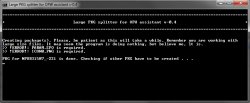
I'm trying to split a 6 gb pkg with the split assitant 0.4, but when it tries to repack it just creates hundreds of 100 kb pkgs and the logs say that "Illegal Package: PARAM.SFO and ICON0.PNG are required." What is the solution?
Have you tried both the programs montcer split and Aldo's tools

Sent from my Lenovo K33a42 using Tapatalk
 
iirc, you need to open pkg_view, then click associate with pkg files if that's what you mean.

already do that, and still the menu not appear

Screenshot_1.png
 
you may have to install ps3tools. some of the options in that window won't appear unless you open the appropriate app. maybe try the content id app. open it to see if that option then appears.
 
you may have to install ps3tools. some of the options in that window won't appear unless you open the appropriate app. maybe try the content id app. open it to see if that option then appears.

ofcourse i am install ps3tools, and i place it on C:\Program Files (x86), also i try to place it on C:\Users\<name> but the result still same.

and i have run PKG_ContentID and PkgView Application with administrative privileges, but the option menu still not appear
 
ofcourse i am install ps3tools, and i place it on C:\Program Files (x86), also i try to place it on C:\Users\<name> but the result still same.

and i have run PKG_ContentID and PkgView Application with administrative privileges, but the option menu still not appear
Did you install Aldo's tools

Sent from my Lenovo K33a42 using Tapatalk
 
that is ps3tools. ;)

@thomy_orke , that option won't appear unless you right click an actual pkg.

edit: oh, I almost forgot, but you may need the registry tools for making a pkg. now, that one only appears over a folder.
 
Did you install Aldo's tools

Sent from my Lenovo K33a42 using Tapatalk

aldo's tools? what kind of tool is that? did u mean ps3 tools from aldo?

that is ps3tools. ;)

@thomy_orke , that option won't appear unless you right click an actual pkg.

edit: oh, I almost forgot, but you may need the registry tools for making a pkg. now, that one only appears over a folder.

can u specify the name of the registry tools?
 
in mine, you get this error:

Log:
Illegal Package: PARAM.SFO and ICON0.PNG are required.
Package Configuration:
ContentID = 000000-NPUB31507_00-1GAME00000000000
Klicensee = 0x00000000000000000000000000000000
DRMType = Free
ContentType = GameData
InstallDirectory = NPUB31507
PackageVersion = 01.00
# QA_Digest : 0xD93C3A6C5697C625B98E7C046F1DD37A
# Packaged by : MODDED V1.0 - Original Rev. 9998 !!ONLY FOR INTERNAL USE!!
# !!!CAUTION!!! : This package was created using informal options.
# !!!CAUTION!!! : Please check intents and confirm to technical support.
Allocating disk space for the package: 102,400 bytes.
Generate Package : "000000-NPUB31507_00-1GAME00000000000.pkg"
 

Attachments

  • Sem-Título-1.jpg
    Sem-Título-1.jpg
    74 KB · Views: 423
in mine, you get this error:

Log:
Illegal Package: PARAM.SFO and ICON0.PNG are required.
Package Configuration:
ContentID = 000000-NPUB31507_00-1GAME00000000000
Klicensee = 0x00000000000000000000000000000000
DRMType = Free
ContentType = GameData
InstallDirectory = NPUB31507
PackageVersion = 01.00
# QA_Digest : 0xD93C3A6C5697C625B98E7C046F1DD37A
# Packaged by : MODDED V1.0 - Original Rev. 9998 !!ONLY FOR INTERNAL USE!!
# !!!CAUTION!!! : This package was created using informal options.
# !!!CAUTION!!! : Please check intents and confirm to technical support.
Allocating disk space for the package: 102,400 bytes.
Generate Package : "000000-NPUB31507_00-1GAME00000000000.pkg"
Are you using PKG or game folder

Sent from my Lenovo K33a42 using Tapatalk
 
in mine, you get this error:

Log:
Illegal Package: PARAM.SFO and ICON0.PNG are required.
Package Configuration:
ContentID = 000000-NPUB31507_00-1GAME00000000000
Klicensee = 0x00000000000000000000000000000000
DRMType = Free
ContentType = GameData
InstallDirectory = NPUB31507
PackageVersion = 01.00
# QA_Digest : 0xD93C3A6C5697C625B98E7C046F1DD37A
# Packaged by : MODDED V1.0 - Original Rev. 9998 !!ONLY FOR INTERNAL USE!!
# !!!CAUTION!!! : This package was created using informal options.
# !!!CAUTION!!! : Please check intents and confirm to technical support.
Allocating disk space for the package: 102,400 bytes.
Generate Package : "000000-NPUB31507_00-1GAME00000000000.pkg"
I am not sure why it does that, I haven't used that tool for a very long time. @aldostools can probably explain it in details.

In the meantime, if the splitter did half the job by producing a properly splitted file or folder tree, you could try adding the 2 files manually (reuse the same files as on disc or in original pkg but if files come from a disc, edit param.sfo with param.sfo editor to choose HG category & change the gameid to reflect NPxxxxxxx for the PSN package instead of BLxxxxxxx or BCxxxxxxx or whatever on a disc) to repackage properly. You don't necessarily need the splitter to repackage, if it fails for whatever reason like user error or whatever, you can also create the pkg yourself using Aldo's tools or TrueAncestor Pkg Repacker.
With Aldo's tools, if you use default parameters, all you need to do is right click on a folder that contains a param.sfo & choose "Make PKG" in the context menu.
 
Last edited:
I am not sure why it does that, I haven't used that tool for a very long time. @aldostools can probably explain it in details.

In the meantime, if the splitter did half the job by producing a properly splitted file or folder tree, you could try adding the 2 files manually (reuse the same files as on disc or in original pkg but if files come from a disc, edit param.sfo with param.sfo editor to choose HG category & change the gameid to reflect NPxxxxxxx for the PSN package instead of BLxxxxxxx or BCxxxxxxx or whatever on a disc) to repackage properly. You don't necessarily need the splitter to repackage, if it fails for whatever reason like user error or whatever, you can also create the pkg yourself using Aldo's tools or TrueAncestor Pkg Repacker.
With Aldo's tools, if you use default /parameters, all you need to do is right click on a folder that contains a param.sfo & choose "Make PKG" in the context menu.
I understood ,this pkg I made from game folder already reassigned with idps + dat + rap if I install this game straight it works, like dragon crown I did the same way the pkg and installed, but this game is less than 2 gigas do not need split the file. I'll check and change this param.sfo . thank you for the explanation.
 
Back
Top