PS3 Unable to correctly install HFW on my PS3 Super Slim

minkione104

Forum Noob
Hello fellas,
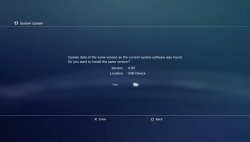
I recently got a brand new boxed PS3 Super Slim. I correctly installed HFW and PS3HEN. I also ordered a new SSD because the ancient HDD was terribly slow. I installed it, but I was forced to reinstall HFW from Recovery Mode. I copied hfw to my USB pendrive, booted to recovery and plugged my USB drive. When I click on update software, it detects the PUP file, but instead of showing "HFW 4.92 (hybrid and exploitable)" it simply says 4.92. the Terms and conditions screen is the PS3Xploit one. It installs smoothly but obviously hfw is not installed and PS3HEN installer fails, no matter what I rty. Thanks fellas
 
Check your PUP file MD5 sum.
It should be:
D9E8FB1AC0303C514656A0AF48BCD3E7.

While installing HFW you will only see:
IMG_20250527_005311.jpg

If the installation of HEN does not work properly maybe you are doing something wrong?
E.g. you did not delete cookies, etc?
 
Hi sir, thanks for the answer. I checked the MD5 checksum and is correct. Last time I installed HFW I got like hybrid and exploitable at the moment of the update. Yes, I deleted them cookies, deleted cache and search history , added ps3hen installer to bookmarks and set the home page to about:blank. Thanks

Oh, and I cannot install HFW from XMB, it says no applicable data was found.
 
Last edited by a moderator:
Make sure you copy this one to USB and rename as PS3UPDAT.PUP

https://www.ps3xploit.me/firmware/hfw/HFW_4.92.1_PS3UPDAT.PUP

You dont have to delete cookies or cache anymore. Just set exploit page as home page and it will work as long as hfw installed.

Install in recovery and make sure the md5 matches once on USB, as stated above.

D9E8FB1AC0303C514656A0AF48BCD3E7

If you have ofw installed, you will get a NAN error on exploit page when trying to install hen.

Edit: The installer will fail sometimes, but using the auto installer set to homepage works almost every time.
 
Make sure you copy this one to USB and rename as PS3UPDAT.PUP

https://www.ps3xploit.me/firmware/hfw/HFW_4.92.1_PS3UPDAT.PUP

You dont have to delete cookies or cache anymore. Just set exploit page as home page and it will work as long as hfw installed.

Install in recovery and make sure the md5 matches once on USB, as stated above.

D9E8FB1AC0303C514656A0AF48BCD3E7

If you have ofw installed, you will get a NAN error on exploit page when trying to install hen.

Edit: The installer will fail sometimes, but using the auto installer set to homepage works almost every time.
Hi, yes md5 is correct. When I try the Auto Installer it says something along the lines of "Xtra data no found" and a bunch of random lines.
 
Pay no attention to the debug output in browser. It will show its progress as its going.

Just set auto installer page to homepage and reopen browser. It will work.
 
Back
Top