webMAN Classics Maker

PS3 webMan Classics Maker: Launch ISOs straight from XMB 3.0.0-beta3

By the way, when you're running PS2 buzz games normally from webman or optical drive you can use the buzzers? Thanks![/QUOTE]


My PS3 say CECHL04 on the sticker, this is a PAL system, not sure if that has anything to do with it?

This isn't the backwards compatible version, so to boot PS2 ISO's I'm running Rebug with webMAN Mod on a regular basis. But I sold this one to a friend who wanted the Buzz! games for his kids. Now the buzzers have been checked on a real PS2, and they work fine there. I've also tested them on a backward compatible PS3, and they work if I run Buzz! of an original disc. But not so far when I run the Buzz! games from ISO's.
 
@gerart123
My PS3 say CECHL04 on the sticker, this is a PAL system, not sure if that has anything to do with it?
I hate to be the barer of bad news but you have a 3rd generation fat model (CECHL) which does not have real PS2 hardware BC (backwards compatibility)
Only the following models have BC hardware to some extent [MODEL - PS2_EMULATOR]:
  • [CECHA - PS2_EMU]
  • [CECHB - PS2_EMU]
  • [CECHC - PS2_GXEMU]
  • [CECHE - PS2_GXEMU]
  • [Other - PS2_NETEMU]
In other words: your CECHL you wont be able to play any PS2 games that need USB peripherals such as the PS2 Buzz, PS2 SingStar or the PS2 Guitar Hero series.
In fact the game might boot (using software emulator: PS2_NETEMU) but no controller inputs will be read from the USB ports.

It's nice that you have a PS2 to cover these games with though :encouragement:
 
Last edited:
@gerart123

I hate to be the barer of bad news but you have a 3rd generation fat model (CECHL) which does not have real PS2 hardware BC (backwards compatibility)
Only the following models have BC hardware to some extent [MODEL - PS2_EMULATOR]:
  • [CECHA - PS2_EMU]
  • [CECHB - PS2_EMU]
  • [CECHC - PS2_GXEMU]
  • [CECHE - PS2_GXEMU]
  • [Other - PS2_NETEMU]


In other words: your CECHL you wont be able to play any PS2 games that need USB peripherals such as the PS2 Buzz, PS2 SingStar or the PS2 Guitar Hero series.
In fact the game might boot (using software emulator: PS2_NETEMU) but no controller inputs will be read from the USB ports.

It's nice that you have a PS2 to cover these games with though :encouragement:


Ah damn :/

Oh well, thanks for helping me out though! :)
 
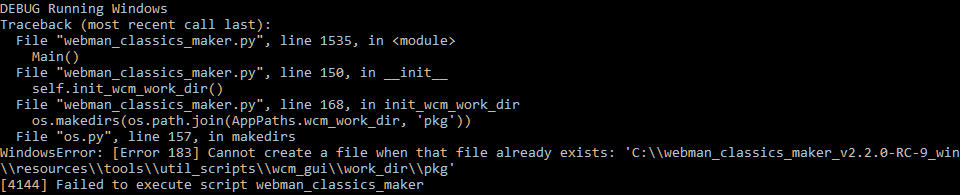
Hello. I'm having issues on launching Webman Classics Maker in Windows 10. It closes itself shortly after launching with this message that can be seen for barely a second before it dissapears.

lrmy911x95cvmkbzg.jpg


When i attempted to run this on another PC, i had the same results, but with a different error that i didn't got a screenshot of, but it said something like "cannot create a file when it already exists".

Is there a way to fix any of those 2 errors?
 
Hello. I'm having issues on launching Webman Classics Maker in Windows 10. It closes itself shortly after launching with this message that can be seen for barely a second before it dissapears.

lrmy911x95cvmkbzg.jpg


When i attempted to run this on another PC, i had the same results, but with a different error that i didn't got a screenshot of, but it said something like "cannot create a file when it already exists".

Is there a way to fix any of those 2 errors?
Hi. What version are you running, is the latest "RC9"?

EDIT: saw RC-9 in your output.
 
Last edited:
The double slash in the path is normal ? C:\\webman_etc....
It looks like the kind of thing that used a regular expression but it was taken literally
 
I know, what i meant is it should not be displayed as a double backslah in the output window
Is only double internally in the code, but not when the path is displayed to the user (like in that error message of the screenshot, thats what called my attention)
I think it might be a result of using the os.path lib, from my experience it should however not be the issue, but I've seen stranger things =)

@Agravaile I haven't heard from you for a while which in many cases means the issue got solved in some way. If so, I'd love to hear what you did to solve it.
 
Hi Jacobsson,

Firstly thanks for this contribution to the PS3 dev community. Looking to use this to make XMB pkgs linking games stored in hdd/PS2ISO folder.

Unfortunately Aldos 'Retro XMB Creator' doesn't support this or PS2 games currently.

Having a few problems getting it to work though, the problems im having are as follows....

--1st Issue--

I was unable to get the latest version (webman_classics_maker_v2.2.0-RC-9_win) to work (launch). Despite installing python 2.7.15 x64 and installing 'pip install pillow' and 'pip install pyinstaller'

Looks like im having the same issue as https://www.psx-place.com/attachments/cmd_innc9t2py6-png.27910/

--2nd Issue--

I managed to get 'webman_classics_maker_v2.0.2_win64' and 'webman_classics_maker_v2.0.2_win' to launch however, when trying to change background pictures nothing happens. I click through to select the .png and nothing happens (at least nothing on the main UI).

Is there anything i'm doing wrong or can do to resolve these issues?

P.S. i'm using Windows 10 x64 system.

Thanks
 
Hi Jacobsson,

Firstly thanks for this contribution to the PS3 dev community. Looking to use this to make XMB pkgs linking games stored in hdd/PS2ISO folder.

Unfortunately Aldos 'Retro XMB Creator' doesn't support this or PS2 games currently.

Having a few problems getting it to work though, the problems im having are as follows....

--1st Issue--

I was unable to get the latest version (webman_classics_maker_v2.2.0-RC-9_win) to work (launch). Despite installing python 2.7.15 x64 and installing 'pip install pillow' and 'pip install pyinstaller'

Looks like im having the same issue as https://www.psx-place.com/attachments/cmd_innc9t2py6-png.27910/

--2nd Issue--

I managed to get 'webman_classics_maker_v2.0.2_win64' and 'webman_classics_maker_v2.0.2_win' to launch however, when trying to change background pictures nothing happens. I click through to select the .png and nothing happens (at least nothing on the main UI).

Is there anything i'm doing wrong or can do to resolve these issues?

P.S. i'm using Windows 10 x64 system.

Thanks
Aldo's tools has PS2 Classics GUI which does sort of the same thing. I use it, it works great, and even selects the correct config file for games that need them. However it's meant more for OFW/HEN because it encrypts the ISO's. This appears to do basically the same thing but without the encryption so that it works on CFW's PS2Emu.

Also for the .png files, make sure the extension is capitalized like .PNG.

Sent from my LM-Q720 using Tapatalk
 
Last edited:
Aldo's tools has PS2 Classics GUI which does sort of the same thing. I use it, it works great, and even selects the correct config file for games that need them. However it's meant more for OFW/HEN because it encrypts the ISO's. This appears to do basically the same thing but without the encryption so that it works on CFW's PS2Emu.

Also for the .png files, make sure the extension is capitalized like .PNG.

Sent from my LM-Q720 using Tapatalk

Thanks RealWelder

Is there a tool that guy hasnt made...! Haha.

I tied changing the png to PNG but it made no difference with Webman classics maker.

With regards to PS2 Classics GUI, how up to date are the config files? Im currently using the PS2 Config.pkg from Aldos Git Hub, which seems to be the most up to date.

If i create a PS2 Classics GUI pkg, which PS2 Config files will it use, the ones I made it with or the ones I installed on my PS3.
 
Thanks RealWelder

Is there a tool that guy hasnt made...! Haha.

I tied changing the png to PNG but it made no difference with Webman classics maker.

With regards to PS2 Classics GUI, how up to date are the config files? Im currently using the PS2 Config.pkg from Aldos Git Hub, which seems to be the most up to date.

If i create a PS2 Classics GUI pkg, which PS2 Config files will it use, the ones I made it with or the ones I installed on my PS3.
I'm not positive on how up to date they are, but there's a bunch of them, even duplicates. I'm using PS2 Classics GUI 2.2.3. It has original configs and custom configs. I'm able to play Need for Speed Underground II and Tony Hawk 4, where they had problems before without the configs. If you could provide a link to the files you have, I could compare them.

Sent from my LM-Q720 using Tapatalk
 
I think it might be a result of using the os.path lib, from my experience it should however not be the issue, but I've seen stranger things =)

@Agravaile I haven't heard from you for a while which in many cases means the issue got solved in some way. If so, I'd love to hear what you did to solve it.

Hello! Sorry for taking so long to reply! No, i haven't solved it yet. Well, not entirely. I am able to use this program, but only it's older version which is 2.0.2 i think, which works nicely in my case. But with trying again the latest release, it's still the same. Yes, i've tried to use the very latest one, but still, unable to launch. I'm not sure if it's important to use the latest one, but older version works fine for me, and i use only for making PS3 ISO's shortcuts.

The only thing that seems off for me, is that whenever i try to launch the game from downloads folder in my XMB, if the ISO is not mounted, it launches the game automatically fine, if it was mounted before (for example, i quit the game, and enter it again) it takes me to the disc. but doesn't launch automatically until i press X on my own. But i guess the same thing happens in the latest version. It would be nice if the whole process of mounting the ISO and taking you to the game would be hidden behind a black screen. Oh, and as previous comment mentioned, the ICON0 and PIC1 also can't be changed, even if you do, after installing PKG it doesn't change anything, so the only way i could do it, is to replace them with a file manager.

So, to sum it up, the older version works, and i could say i'm happy with it, but it would be great if the latest version would work too with the image replacement fixed, and if it's possible, of course, have the shortcuts work automatically and taking you straight to the game, not just mounting ISO's and waiting for you to press X. As well as support for GAMES folder, but that you already know, since i see a lot of people already asking for this.

Other than that, i've been looking for something like this for a while now, thanks for your work!
 
Last edited:
this did absolutely nothing. I ran the newest version and my result was like post #224, so I did as he did and went back to version 2.0.2 and that one actually loaded a window. There's no directory for NTFS and there's no way to edit the path to the iso on an external NTFS drive. I have PSX and PS2 games in bin.enc format on the internal hdd and when I loaded the path for those games and hit fetch, nothing happened. I have the correct IP address listed.
 
I'm on the same boat of the other two guys here. I double click webman_classic_maker.exe, a command line window appears, then suddenly closes and nothing happens. I downloaded the latest release to date: v2.2.0-RC-9. I'm on Windows 10, 64bit, version 20H2.

I was actually attempting to try out the tool and whatnot. Anyway, thanks!
 
Hello,
little question. When i rename a PS3 ISO to W (first letter), can i then download and apply game updates ?
Or will i have to update the game first and then set the letter to W?
 
Hello,
little question. When i rename a PS3 ISO to W (first letter), can i then download and apply game updates ?
Or will i have to update the game first and then set the letter to W?
It should still update normally because the PS3 reads the game name and information from the param.sfo, disc_sfb, and LIC.DAT.

Sent from my LM-Q720 using Tapatalk
 
It should still update normally because the PS3 reads the game name and information from the param.sfo, disc_sfb, and LIC.DAT.

Sent from my LM-Q720 using Tapatalk

Thx, and when i install DLCs? I just rename them to "W" after renaming and updating the maingame?
Or do i have to install them first?
 

Similar threads

Back
Top