webMAN MOD

PS3 webMAN MOD - General Information Thread 1.47.48q

Thx 4 answer... but this leads me to another problem related to that:
1. Assume i've tagged a game with [online]-tag and enabled "Mount last played game at system start"
2. Restart System -> game mounts -> syscalls are disabled by PSNPatch -> i can play the mounted game... but i can not mount another game because of the disabled syscall 8

Workarounds i've found:
A) Unmount game -> Restart system -> no game is mounted on systemstart and therefore syscalls are not disabled -> mount another game
B) Disable "Mount last played game at system start"

Both of which is not ideal.
How's about not to process the [online]-tag for the auto-mount-game ?... or even better...
Is it somehow possible to process the [online]-tag only when the game is started by user ? (Then user would have the chance to change the auto-mounted-online-tagged game because syscalls are still intact)

Regards
Rudi

I still defend that the best approach is to disable syscalls only when connecting to psn (afterall, it is just a question of pressing the key combo when the login screen appears).
:)
 
I still defend that the best approach is to disable syscalls only when connecting to psn (afterall, it is just a question of pressing the key combo when the login screen appears).
:)
Sometimes i guess i must be the only one who don't like combos... and that's may be because i always hated beat'm'ups :bitchfight:
 
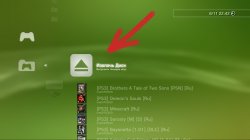
Guys, how disable "Eject Disc" button inside "My Games" menu?

screenshot_2015_11_06_22_42_13.jpg
 
:rolleyes:
May be add enable-disable option? Mmm...?
I'm not saw this botton before full removove and reinstall wM. You added this recently?
 
:rolleyes:
May be add enable-disable option? Mmm...?
I'm not saw this botton before full removove and reinstall wM. You added this recently?

No... it has been there since deank developed webman... it only appears if you select the option Disable grouping of content in "webMAN Games"
 
I'm not use this function because:
1. If mount new game - current unmount automaticaly :)
2. We can use wM combo (Select+ O)
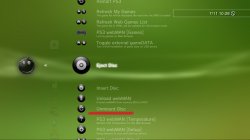
3. This functions also present inside 'wM Tools' (see screenshot)
screenshot_2015_11_07_10_28_45.jpg

May be Aldo can do ability to choice (on/off) for this button :confused:

[MENTION=89]aldostools[/MENTION]
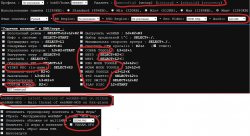
Could you add new variables for this options in LANG-files ?

wm_setup.jpg
 
Last edited:
How work covers local priority between next covers paths if COVERS_PATH not specified:

1. mM covers (dev_hdd0/game/BLES80608/USRDIR/covers & covers_retro/);
2. IrisMAN cover (what folder? maybe dev_hdd0/GAME[S,Z]/covers ?);
3. stealthMAN & mM SingStar (what folder?);
4. dev_hdd0/GAME[S,Z]/covers
???
Thx
Sorry for more questions and 'wishes'. I'm author of biggest russian wM guide and must test most features before write about it
 
hi

xmb screenshot working with non cobra plugin? because i tried many times and only popup show up, screenshot is not saved to file

-
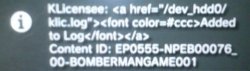
i have display bug in popup when i dump klic - GET /klic.ps3?log, popup:

2qbc1e8.jpg

-
dump klic from custom combo (R2 + [ ])

GET /klic.ps3?log - working

GET /klic.ps3 - not working nothing happens

-
i try to record video in game (4 different low quality games like 1942 Joint Strike) SELECT+R3 but nothing happens. From custom combo (GET /videorec.ps3) - PS -> R2 + [ ] popup show up, small file is saved in /dev_hdd0/VIDEO/... 1-2 MB and system freeze or video is recorded but system freeze when i tried to stop recording PS -> R2 + [ ]. Both recorded files are corrupted.

weird thing is if i set custom combo GET /videorec.ps3 can't save settings in webman - system always freeze

Edit:

can't change default video record settings M4HD 720p AAC 64K in webman settings - settings are not saved - audio and video

regards
 
Last edited:
Idea which I'm not sure if its possible.
When listing games from the xmb, is there a button or key combination to skip to games starting with the next letter?
For example R2 to jump to games starting with A, B, C etc.
 
hi

xmb screenshot working with non cobra plugin? because i tried many times and only popup show up, screenshot is not saved to file

-
i have display bug in popup when i dump klic - GET /klic.ps3?log, popup:

View attachment 4200

-
dump klic from custom combo (R2 + [ ])

GET /klic.ps3?log - working

GET /klic.ps3 - not working nothing happens

-
i try to record video in game (4 different low quality games like 1942 Joint Strike in 2 formats M4HD 720p) SELECT+R3 but nothing happens. From custom combo (GET /videorec.ps3) - PS -> R2 + [ ] popup show up, small file is saved in /dev_hdd0/VIDEO/... 1-2 MB and system freeze or video is recorded but system freeze when i tried to stop recording PS -> R2 + [ ].

weird thing is if i set custom combo GET /videorec.ps3 can't save settings in webman - system always freeze

Edit:

can't change default video record settings M4HD 720p AAC 64K in webman settings - settings are not saved - audio and video

regards

I've fixed the displayed garbage on the klic's notification message.
You can download the new build: http://aldostools.org/temp/test/webftp_server.sprx

I couldn't reproduce your other issue about saving the audio/video settings.

Idea which I'm not sure if its possible.
When listing games from the xmb, is there a button or key combination to skip to games starting with the next letter?
For example R2 to jump to games starting with A, B, C etc.

I experimented with this idea... and although I managed to make the xmb jump to the game starting with the next letter, the lagging reading the buttons was so bad that I discarded the code.
 
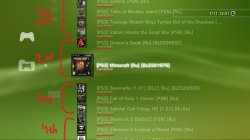
Why some games sorts not by common list? Maybe wM use not file-names for sorting ?

View attachment 4194

Because XML sorts the games using the first 6 characters of the name (vanilla edition uses first 4 characters).

As all your games start with the prefix "[PS3] " (which is exactly 6 characters), the relevant characters are excluded from the array used for sorting.

How work covers local priority between next covers paths if COVERS_PATH not specified:

1. mM covers (dev_hdd0/game/BLES80608/USRDIR/covers & covers_retro/);
2. IrisMAN cover (what folder? maybe dev_hdd0/GAME[S,Z]/covers ?);
3. stealthMAN & mM SingStar (what folder?);
4. dev_hdd0/GAME[S,Z]/covers
???
Thx
Sorry for more questions and 'wishes'. I'm author of biggest russian wM guide and must test most features before write about it

COVERS_PATH can be a the path of a local folder or a template of a network path (http)

If it's a local path, COVERS_PATH has priority over the other paths. If it's a network path, the other local paths (mM & IRISMAN covers paths) have priority and the network path is the last used.

The sequence of search when multiMAN covers are enabled is:
0- /dev_hdd0/game/BLES80608/USRDIR/covers_retro/psx/ (if the title id starts with 'S': e.g. SLES_xxx.xx)
1- /dev_hdd0/game/BLES80608/USRDIR/covers
2- /dev_hdd0/tmp/game_repo/main/covers
3- /dev_hdd0/game/NPEA00374/USRDIR/covers
4- /dev_hdd0/GAMES/covers
5- /dev_hdd0/GAMEZ/covers
6- /dev_hdd0/tmp/wmtmp
7- name of the iso + .png / .PNG / .jpg (in the same folder of the iso)
8- default cover (depending of the content type: PS3/PS2/PSX/PSP/BD/DVD)
 
Some tags typically used are: [BLxSxxxxx] to include the title id in the name, [auto] to auto play, [gd] to auto enable gameDATA, [online] to auto-disable syscalls, [raw] to force use raw_iso.sprx in ntfs.
[MENTION=89]aldostools[/MENTION]
1. Where are list of all tags ?
2. [gd] is simple toggle gameDATA between int/ext drive or use external drive's always ?
3. What is reason to use raw_iso.sprx with ntfs-drives?
 
Last edited:
[MENTION=89]aldostools[/MENTION]
1. Where are list of all tags ?
2. [gd] is simple toggle gameDATA between int/ext drive or use external drive's always ?
3. What is reason to use raw_iso.sprx with ntfs-drives?

1. https://github.com/Matsumot0/webMAN-MOD/blob/master/include/_mount.h
2. [gd] = use external usb drive always (it doesn't toggle)
3. raw_iso.sprx is optional. webMAN already has integrated it's own raw_iso thread.
The difference is that the external raw_iso.sprx was developed by Estwald for Iris and has other more features (like support for [BDFILE], multi-disc for psx and others that I don't remember)

It's needed only for fake isos created by IRISMAN for files stored in ntfs devices ( .ntfs[BDFILE] ) or when the user wants to use it instead the internal raw_iso, by adding the [raw] tag to the file name of the iso.
 
I couldn't reproduce your other issue about saving the audio/video settings.
that's mean video record settings save fine on your system? because i tried many times (i remove webman config file, uninstall and install fresh webman) but still video settings after restart are default: Video: M4HD 720p Audio: AAC 64K

new settings (Video: MPEG4 368p Audio: AAC 128K):
aew83o.jpg

save. and after restart:
2wf25qd.jpg

and like i mentioned earlier, video record won't start when i press SELECT + R3. VIDEO REC (in-game) of course is selected in settings

regards
 
that's mean video record settings save fine on your system? because i tried many times (i remove webman config file, uninstall and install fresh webman) but still video settings after restart are default: Video: M4HD 720p Audio: AAC 64K

new settings (Video: MPEG4 368p Audio: AAC 128K):
View attachment 4209

save. and after restart:
View attachment 4210

and like i mentioned earlier, video record won't start when i press SELECT + R3. VIDEO REC (in-game) of course is selected in settings

regards

It's really weird... I tested it on Chrome on the PC and on the PS3 browser (4.46 webkit mode) and it saved fine on both browsers.
 
It's needed only for fake isos created by IRISMAN for files stored in ntfs devices ( .ntfs[BDFILE] ) or when the user wants to use it instead the internal raw_iso, by adding the [raw] tag to the file name of the iso.
Understand. Where to download the latest version of this raw_iso.sprx? It must be placed in a folder /dev_hdd0/plugins, right ?
 
Back
Top