Thanks again for the reply. I found a way to get them to show in webman. I just used multiman to convert the folders into isos and placed them in DVDISO and now they mount as data discsI use 4.46 Rogero Cobra 7.2... and I didn't get any freeze using stacks of 32KB. Anyway I have increased the stack size from 32KB to 64KB. Maybe on rebug the threads need a larger stack.
http://aldostools.org/temp/test/webMAN_MOD_1.43.20_Updater.pkg
http://aldostools.org/temp/test/webMAN_MOD_1.43.20.rar
To avoid reinstalling the CFW, disable webMAN with Rebug Toolbox and install webMAN on hdd0.
You can try using the build above to see if it still freeze on your console...
You need to mount the folders using the File Manager (or configure a combo). webMAN does not detect these folders, only preNTFS detects the folders MOVIES and VIDEO on ntfs/ext drives.

- Forums
- PlayStation 3 (PS3)
- PS3 Homebrew
- PS3 Homebrew Apps / Plugins / Emulators
- PS3 Plugins (sprx)
- webMAN MOD
You are using an out of date browser. It may not display this or other websites correctly.
You should upgrade or use an alternative browser.
You should upgrade or use an alternative browser.

PS3 webMAN MOD - General Information Thread 1.47.48q
- Thread starter STLcardsWS
- Start date
To avoid reinstalling the CFW, disable webMAN with Rebug Toolbox and install webMAN on hdd0.
I ll try that. Thanks.
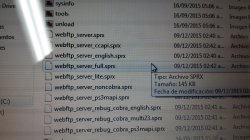
Btw, which of these versions must copy to plugins folders ? (always install via pkg updater, or manually copying only the webftp_server.sprx file that you upload as test build )
Attachments
Last edited:

It depends what you want.I ll try that. Thanks.
Btw, which of these versions must copy to plugins folders ? (always install via pkg updater, or manually copying only the webftp_server.sprx file that you upload as test build )
Assuming you are using a Rebug CFW with cobra enabled.
Use the full version if you want most features including local ps3netsrv, otherwise choose one of the Rebug specific releases.
If you look inside the source rar file, you will find a flags folder. In it are the corresponding flag.h files for each webftp_server.sprx. Open the flag.h you are interested in with your favourite text editor to find out exactly which features are enabled in that particular version. .
Sent with Tapatalk
Last edited:

Btw, which of these versions must copy to plugins folders ?
As bguerville said it depends of what features you want... I normally use webftp_server_full.sprx because it has almost all the features enabled and it is the build that I normally test... the others builds are reduced versions with smaller memory footprint... although the memory usage is almost the same in all the builds.
___
I have updated again the binaries and source code of webMAN MOD 1.43.20...
After several hours tweaking the algorithm of ps3netsvr on PS3 (adding buffers, adding delays, optimizing code, etc.) I have managed to make PS3 ISOs run smoothly :dancepine:
In my tests the videos of LittleBigPlanet 3 (multi-part ISO) now play without lag and the game starts in ~10 seconds... also Vampire Resurrection loads in ~5 seconds.
Previously these games took almost 1 minute or more to load. PSX ISOs also run a bit better, but still lag a bit on FMVs.
bin: http://aldostools.org/temp/test/webMAN_MOD_1.43.20_Updater.pkg
src: http://aldostools.org/temp/test/webMAN_MOD_1.43.20.rar
Last edited:
As bguerville said it depends of what features you want... I normally use webftp_server_full.sprx because it has almost all the features enabled and it is build that I normally test... the others builds are reduced versions with smaller memory footprint... although the memory usage is almost the same in all the builds.
___
I have updated again the binaries and source code of webMAN MOD 1.43.20...
After several hours tweaking the algorithm of ps3netsvr on PS3 (adding buffers, adding delays, optimizing code, etc.) I have managed to make PS3 ISOs run smoothly :dancepine:
In my tests the videos of LittleBigPlanet 3 (multi-part ISO) now play without lag and the game starts in ~10 seconds... also Vampire Resurrection loads in ~5 seconds.
Previously these games took almost 1 minute or more to load.
bin: http://aldostools.org/temp/test/webMAN_MOD_1.43.20_Updater.pkg
src: http://aldostools.org/temp/test/webMAN_MOD_1.43.20.rar
Have you modified ps3netsrv too or just the new local implementation?
Sent with Tapatalk
Have you modified ps3netsrv too or just the new local implementation?
Sent with Tapatalk
Only ps3netsvr module of webMAN MOD (include/netserver.h)
Last edited:
Problem solved! Thanks for your hard work.As bguerville said it depends of what features you want... I normally use webftp_server_full.sprx because it has almost all the features enabled and it is the build that I normally test... the others builds are reduced versions with smaller memory footprint... although the memory usage is almost the same in all the builds.
___
I have updated again the binaries and source code of webMAN MOD 1.43.20...
After several hours tweaking the algorithm of ps3netsvr on PS3 (adding buffers, adding delays, optimizing code, etc.) I have managed to make PS3 ISOs run smoothly :dancepine:
In my tests the videos of LittleBigPlanet 3 (multi-part ISO) now play without lag and the game starts in ~10 seconds... also Vampire Resurrection loads in ~5 seconds.
Previously these games took almost 1 minute or more to load. PSX ISOs also run a bit better, but still lag a bit on FMVs.
bin: http://aldostools.org/temp/test/webMAN_MOD_1.43.20_Updater.pkg
src: http://aldostools.org/temp/test/webMAN_MOD_1.43.20.rar

One last question.
Only i need to replace webftp_server.sprx / wm_vsh_menu.sprx files to update properly everytime?


XeCuTioNR
Member
I just updated to 1.43.20 and mygames.xml keeps getting corrupted. I've set the plugin to MAX+, deleted the corrupted XML file (which still produces) even after deletion & going to the web-browser to 127.0.0.1 and manually refreshing there, and not via the webman menu shortcuts.
I'm running HABIB v4.76 COBRA v1.
I'm running HABIB v4.76 COBRA v1.
Last edited:
I just updated to 1.43.20 and mygames.xml keeps getting corrupted. I've set the plugin to MAX+, deleted the corrupted XML file (which still produces) even after deletion & going to the web-browser to 127.0.0.1 and manually refreshing there, and not via the webman menu shortcuts.
I'm running HABIB v4.76 COBRA v1.
You say the xml file gets corrupted but in what way? Have you tried opening it with your browser to see what is inside?
Have you checked if the problem still comes up with only one game on internal hdd?
Have you tried manually replacing webftp_server.sprx by an earlier version to see if your issue is version based or not?
Sent with Tapatalk
XeCuTioNR
Member
You say the xml file gets corrupted but in what way? Have you tried opening it with your browser to see what is inside?
Have you checked if the problem still comes up with only one game on internal hdd?
Have you tried manually replacing webftp_server.sprx by an earlier version to see if your issue is version based or not?
Sent with Tapatalk
If I disable the category filter in webman, rescan after deleting the old mygames.xml, it will display all of my games (minus them being in category folders) but if I reenable the category filter, it mucks up the file again with games miscounted and disorganized (having the spinning arrows in the first several entries and still having PSX games in the PS3 type folder for example). I hope this helps & makes sense.
XeCuTioNR If the problem persists, please upload the .xml and your wmconfig.bin as a zip and send me a PM with the link, that way I can check what's your issue...
We must know exactly what gets corrupted to find out why. Without a proper look at the xml file it's difficult to help.If I disable the category filter in webman, rescan after deleting the old mygames.xml, it will display all of my games (minus them being in category folders) but if I reenable the category filter, it mucks up the file again with games miscounted and disorganized (having the spinning arrows in the first several entries and still having PSX games in the PS3 type folder for example). I hope this helps & makes sense.
Sent with Tapatalk
XeCuTioNR
Member
XeCuTioNR If the problem persists, please upload the .xml and your wmconfig.bin as a zip and send me a PM with the link, that way I can check what's your issue...
Do I need to set it back to category mode then send you the XML file? Or just send it like it is? (as in no category mode and just one big list)
Do I need to set it back to category mode then send you the XML file? Or just send it like it is? (as in no category mode and just one big list)
send both xml... and indicate in which file is the error.

Turranius
Member
I compiled the x64 and x86 versions for linux from 1.43.20. The x86 version should, in theory, work for rasberry pi as well. Not sure if there was any difference in the source from 1.43.18 which I did last. If not, its the same binary =)
http://grandis.nu/downloads/ps3netsrv1.43.20.zip
ps3netsrv32.1.43.20: ELF 32-bit LSB executable, Intel 80386, version 1 (SYSV), dynamically linked, interpreter /lib/ld-linux.so.2, for GNU/Linux 2.6.32, BuildID[sha1]=933cb5381419f0cb77a1eef215e7dcc5ae0c02c2, not stripped
ps3netsrv64.1.43.20: ELF 64-bit LSB executable, x86-64, version 1 (SYSV), dynamically linked (uses shared libs), for GNU/Linux 2.6.32, BuildID[sha1]=0x695df64332b5dff3cee928624f0c15385101b4bd, not stripped
Last edited:
I compiled the x64 and x86 versions for linux from 1.43.20. The x86 version should, in theory, work for rasberry pi as well. Not sure if there was any difference in the source from 1.43.18 which I did last. If not, its the same binary =)
http://grandis.nu/downloads/ps3netsrv1.43.20.zip
ps3netsrv32.1.43.20: ELF 32-bit LSB executable, Intel 80386, version 1 (SYSV), dynamically linked, interpreter /lib/ld-linux.so.2, for GNU/Linux 2.6.32, BuildID[sha1]=933cb5381419f0cb77a1eef215e7dcc5ae0c02c2, not stripped
ps3netsrv64.1.43.20: ELF 64-bit LSB executable, x86-64, version 1 (SYSV), dynamically linked (uses shared libs), for GNU/Linux 2.6.32, BuildID[sha1]=0x695df64332b5dff3cee928624f0c15385101b4bd, not stripped
Nice! Thank you.
BTW I have updated the Win32 port of ps3netsvr :
From now the content from different drives will be shared as merged folders. e.g. C:\SHARE\PS3ISO will be listed together with E:\PS3ISO, F:\PS3ISO, X:\PS3ISO, etc.
So a single connection will serve all the drives attached. There is no need to setup multiple servers (/net0, /net1, /net2, etc.) to share the external drives connected to the PC.
Note: If you get a dialog like "device is not ready (retry, abort, cancel)", configure the whitelist on the ps3netsvr GUI and it will detect the drive letters that should be ignored.
I've included the old version that doesn't merge the folders of all the drives, in case it cause problems. Just delete ps3netsrv.exe and rename ps3netsrv_old.exe as ps3netsrv.exe
bin: http://aldostools.org/temp/test/ps3netsrv.rar
src: http://aldostools.org/temp/test/ps3netsrv_src.zip (includes the binaries for linux & raspberry)
Last edited:
XeCuTioNR
Member
send both xml... and indicate in which file is the error.
I will grab both XMLs & wmconfig.bin (I assuming theres two of those as well) ASAP.
You assume right. ☺I will grab both XMLs & wmconfig.bin (I assuming theres two of those as well) ASAP.
Rule of thumb: in doubt, always send as many relevant files & as much info as poss & a few notes to explain the issue in a simple way with all the steps to get there.
You could even have posted it here so other guys knowledgeable enough could try to piece the problem up too....
Good luck.
Sent with Tapatalk
How can I share ISO games with ps3 over local network from my NAS server (qnap-ts251)?
Now I use webMAN on PS3 + PS3 NET Server GUI on PC to share ISO games with ps3 over local network.
May be PS3 NET Server available for linux, or can I use webMAN + one of protocols (ftp, smb...?) to share ISO games with ps3 over local network (for I can run ISO images without copy them manually to PS3) ?
Now I use webMAN on PS3 + PS3 NET Server GUI on PC to share ISO games with ps3 over local network.
May be PS3 NET Server available for linux, or can I use webMAN + one of protocols (ftp, smb...?) to share ISO games with ps3 over local network (for I can run ISO images without copy them manually to PS3) ?
Similar threads
-

-

-

-
MPS5 {Modded Warefare} Overview & Setup of etaWEN v2.2B from LigthingMods
- Started by MODDED WARFARE
- Replies: 1