PS3 webMAN MOD - Web Commands

Last edited:
You can try installing the latest build from Brewology, Github or use the XMB online updater.

The new web command is /ps3_icons.ps3 with the same syntax of /lines.ps3 (and the others VSH resources)

FYI various preview images in your package don't match with the rcos in the sub-folder


Thanks aldo, i will try it

Oh I thought it might happen, I used bulk rename tool to make it easier for you to test it and then I added more files and just in last minute the preview images.

Just in case i will check the original files. thanks for the info.
 
Thanks aldo, i will try it

Oh I thought it might happen, I used bulk rename tool to make it easier for you to test it and then I added more files and just in last minute the preview images.

Just in case i will check the original files. thanks for the info.

I think the issue was that I had the randomizer enabled and the icon changes every time that the XMB reloaded.
 
I tested it before upload it here and it worked fine on my system using 4.88 Evilnat Cobra 8.3.
Maybe you didn't install the sprx correctly and you're still using a previous build.

Try download & installing the version currently available in Github, Brewology or through the online updater via webMAN menu on XMB

The following launchers are blocked when the system starts and they are unlocked when PSPISO is mounted through webMAN MOD.
/dev_hdd0/game/PSPM66820 <= PSP Minis
/dev_hdd0/game/PSPC66820 <= PSP Remasters

You can try installing the launchers from my Github that are the ones that I use (practically the same than yours except they don't include the lambda.db which is an encrypted ISO containing the PSP emulator for 4.00 (needed by Cobra 3.55 to improve the PSP compatibility).

Aldo I installed newest build wmm and it doesn't work properly. In addition, I can't reinstall psp launcher, ps3 says when trying to install pkg with psp launcher it says no USB access
 
Aldo I installed newest build wmm and it doesn't work properly. In addition, I can't reinstall psp launcher, ps3 says when trying to install pkg with psp launcher it says no USB access

If the PSP launcher is installed, there is not need to reinstall it.

You can disable the lock with this web command: http://0/remap.ps3

Another way to unlock the PSP launchers is mounting a PSP game then reinstall.

FYI The lock is performed only on the PSP launchers that exist when the plugin is loaded:
Code:
static void lock_psp_launchers(void)
{
    if(file_exists(HDD0_GAME_DIR PSP_LAUNCHER_MINIS_ID))
        sys_map_path(HDD0_GAME_DIR PSP_LAUNCHER_MINIS_ID, SYSMAP_EMPTY_DIR);
    if(file_exists(HDD0_GAME_DIR PSP_LAUNCHER_REMASTERS_ID))
        sys_map_path(HDD0_GAME_DIR PSP_LAUNCHER_REMASTERS_ID, SYSMAP_EMPTY_DIR);
}
 
If the PSP launcher is installed, there is not need to reinstall it.

You can disable the lock with this web command: http://0/remap.ps3

Another way to unlock the PSP launchers is mounting a PSP game then reinstall.

FYI The lock is performed only on the PSP launchers that exist when the plugin is loaded:
Code:
static void lock_psp_launchers(void)
{
    if(file_exists(HDD0_GAME_DIR PSP_LAUNCHER_MINIS_ID))
        sys_map_path(HDD0_GAME_DIR PSP_LAUNCHER_MINIS_ID, SYSMAP_EMPTY_DIR);
    if(file_exists(HDD0_GAME_DIR PSP_LAUNCHER_REMASTERS_ID))
        sys_map_path(HDD0_GAME_DIR PSP_LAUNCHER_REMASTERS_ID, SYSMAP_EMPTY_DIR);
}
Actually works I was confused by the badly displayed psp launcher icon. It can be fixed? this is another bug when psp launcher is empty it does not show icon0 only shows icon0 if the game is mountened.
 
Actually works I was confused by the badly displayed psp launcher icon. It can be fixed? this is another bug when psp launcher is empty it does not show icon0 only shows icon0 if the game is mountened.

When the psp launchers are locked their folders are currently redirected to an empty folder in /dev_flash

That's the reason why you get broken icon and the error when you try to run the the psp launcher.

It could be fixed easily redirecting the folders to another folder containing an ICON0.
But I prefer to see the broken icon, because it serves as indicator that the psp launcher is not working.
 
Is it possible to use the command (select+L2+R2+R3) for unload webman and record gameplay in the last version? Because it's not working for me.
 
Is it possible to use the command (select+L2+R2+R3) for unload webman and record gameplay in the last version? Because it's not working for me.

The combo SELECT+R3+L2+R2 has 2 functions:

In XMB it will do a webMAN config reset & restart.
In-game it will load the video_rec plugin & unload webMAN plugin.

Are you doing it from in-game?
 
The combo SELECT+R3+L2+R2 has 2 functions:

In XMB it will do a webMAN config reset & restart.
In-game it will load the video_rec plugin & unload webMAN plugin.

Are you doing it from in-game?

Yes, the other commands about video recording work in game but not that one (unload webman and record)
 
Yes, the other commands about video recording work in game but not that one (unload webman and record)

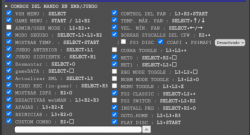
There are 4 combos related to video recording. They require to have the "VIDEO REC (in-game)" check marked in the shortcut section of /setup.ps3
// SELECT+R3+L2+R2 = Record video with video_rec plugin (IN-GAME ONLY)
// SELECT+R3+L2 = Select video rec setting
// SELECT+R3+R2 = Change value of video rec setting
// SELECT+R3 = Toggle Record Video

The VIDEO REC is disabled by default. The user must enable it and save the settings before be able to use the combo.
 
There are 4 combos related to video recording. They require to have the "VIDEO REC (in-game)" check marked in the shortcut section of /setup.ps3
// SELECT+R3+L2+R2 = Record video with video_rec plugin (IN-GAME ONLY)
// SELECT+R3+L2 = Select video rec setting
// SELECT+R3+R2 = Change value of video rec setting
// SELECT+R3 = Toggle Record Video

The VIDEO REC is disabled by default. The user must enable it and save the settings before be able to use the combo.

I have VIDEO REC (in-game) check and the only command that is not working it's SELECT+R3+L2+R2 in game.
 

Attachments

  • Capture+_2021-06-24-19-34-39.png
    Capture+_2021-06-24-19-34-39.png
    126.3 KB · Views: 24
Hi, how to avoid the "PSN disable" warning if I'm using PSNPatch to remove syscalls and spoof IDPS?
 
I have VIDEO REC (in-game) check and the only command that is not working it's SELECT+R3+L2+R2 in game.

I checked again the feature and the combo SELECT+R3+L2+R2 was not working in-game as you mentioned.

I just fixed this issue and uploaded a new build. You can get the update from Github / Brewology / XMB online updater

Hi, how to avoid the "PSN disable" warning if I'm using PSNPatch to remove syscalls and spoof IDPS?

Delete /dev_hdd0/tmp/wm_res/npsignin_plugin.rco and reboot.
 
I checked again the feature and the combo SELECT+R3+L2+R2 was not working in-game as you mentioned.

I just fixed this issue and uploaded a new build. You can get the update from Github / Brewology / XMB online updater


Delete /dev_hdd0/tmp/wm_res/npsignin_plugin.rco and reboot.

I think i have an error, the command now work but no matter how many times i changed the configuration when i unload webman for record it show me that my configuration it's "M4HD 720p @ 5000K" and "recording error". I want to change to M4HD 368p, i changed it from webman mod menu and from in game xmb but like i said when i unload webman my configuration change.
 
I think i have an error, the command now work but no matter how many times i changed the configuration when i unload webman for record it show me that my configuration it's "M4HD 720p @ 5000K" and "recording error". I want to change to M4HD 368p, i changed it from webman mod menu and from in game xmb but like i said when i unload webman my configuration change.

The configuration in /setup.ps3 only works for the internal video recorder.

The external video_rec.sprx uses these combos when you press PS button in-game:
R3 = start/stop recording (by default bg memory container is used)
L2+R3 = start recording using app memory container

L2+L3 = change video format
R2+L3 = change audio format
L2+R2+L3 = select the default audio/video format
 
The configuration in /setup.ps3 only works for the internal video recorder.

The external video_rec.sprx uses these combos when you press PS button in-game:
R3 = start/stop recording (by default bg memory container is used)
L2+R3 = start recording using app memory container

L2+L3 = change video format
R2+L3 = change audio format
L2+R2+L3 = select the default audio/video format

Ah i didn't know those commands when i have time i will check again, btw which configuration i should use like the mysis poc plugin? I mean i remember it has 3 options for recording, the one i was using was M4HD 368p, AAC 96k i don't remember the "video biltrate" (i don't remember the spelling), so i don't know if you remember the configuration that plugin was using, because the other freeze my ps3.
 
Ah i didn't know those commands when i have time i will check again, btw which configuration i should use like the mysis poc plugin? I mean i remember it has 3 options for recording, the one i was using was M4HD 368p, AAC 96k i don't remember the "video biltrate" (i don't remember the spelling), so i don't know if you remember the configuration that plugin was using, because the other freeze my ps3.

video_rec.sprx is a different plugin based on the original mysis poc plugin.
 
Hi, PSP games run with hdd and usb but not ps3netserver. PSP launchers remain locked. And this is a big problem for me, since all psp games are on ps3netserver
 
Back
Top