XMB Package Downloader (XMBPD)

PS3 XMB Package Downloader - An XMB MOD that intergrates a Homebrew Store on the XMB v0.70

Hey not sure if this is a bug or what not but it is kinda interesting what happens and figured maybe it might help but the section is a WIP
https://youtu.be/XYjvlVvod_g

That is strange, I cant reproduce that here. So basically now all apps you install are coming up under downloads in the official downloader section? Must be something conflicting with this because it works fine on a freshly formatted ps3 with rebug 4.78.1 installed. I suppose we can see if more people notice same bug and try to narrow it down. I can always remove that section as it was just for the singstar icon really for now (don't know if anyone even cares about singstar)..
 
That is strange, I cant reproduce that here. So basically now all apps you install are coming up under downloads in the official downloader section? Must be something conflicting with this because it works fine on a freshly formatted ps3 with rebug 4.78.1 installed. I suppose we can see if more people notice same bug and try to narrow it down. I can always remove that section as it was just for the singstar icon really for now (don't know if anyone even cares about singstar)..
it looks as if he is installing priority packages, and if singstar is involved with that option that probably has something to do with it, also there a few singstar replacement pkgs of popular home brew out there too
 
Brunolee Updates Tools (XMB Mod Manager / Custom Gameboot and more) Plus a new XMB PKG Maker - PSX Place

Try the XMB Prioirty PKG from the link above. Or there are premade ones on brewology for mulitMAN and IRISMAN premade. I asked him to make then and he released that tool shortly thereafter.


Edit

Here they are premade for IRISMAN & multiMAN


IRISMAN v3.50.10 by various - PS3 Brewology - PS3 PSP WII XBOX - Homebrew News, Saved Games, Downloads, and More!
multiMAN v04.78.00 by deank - PS3 Brewology - PS3 PSP WII XBOX - Homebrew News, Saved Games, Downloads, and More!
 
Last edited:
I installed this it shows up on the xmb but no links are there im on the latest rebug with cobra enabled and cannot work out where I went wrong. Any help would be apriciated

Did you get sorted?

it looks as if he is installing priority packages, and if singstar is involved with that option that probably has something to do with it, also there a few singstar replacement pkgs of popular home brew out there too

Ok I see, you are probably right, going to have to figure out the code that only lists single xil items, I think it could solve this issue (also then we can have separate subcategories of homebrew with the downloader maybe)

Brunolee Updates Tools (XMB Mod Manager / Custom Gameboot and more) Plus a new XMB PKG Maker - PSX Place

Try the XMB Prioirty PKG from the link above. Or there are premade ones on brewology for mulitMAN and IRISMAN premade. I asked him to make then and he released that tool shortly thereafter.


Edit

Here they are premade for IRISMAN & multiMAN

Ill have a play around with them later but its probably going to be hard to keep it working perfect for everyone with so many XMB mods available, a lot of them are editing the same files. Some people will have to choose between this and some other mods realistically. I must see how those mods interact with the game xml files / xil game files (if they do) because it might help with this too even I cant solve the issue you are having.

This will tidy things up for you temporarily if you want, use the updated version of the dev_hdd0/game/XMBPKGDLR/USRDIR/XMB_package_downloader.xml from this update:

Download XMBPD v0.10.03


The only difference in this version is I have removed the link to the xil game xml so now the Official Package Downloader category will always be empty even if you have xmls there (so just use v0.10.02 if your not having any problems). Also I applied the fix to one of the png filenames since v0.10.02 as noticed by [MENTION=16840]0_obeWAN[/MENTION] .

Will have a bigger update coming soon where homebrew updates will automatically become available via XMBPD without the end user having to update anything on their end.

EDIT: [MENTION=22901]mysis[/MENTION] maybe you can help me with this : do you know much about the xil://localhost/item? reference (@sandungas mentioned it) and what it expects after it to only list a single item. I know how the xil://localhost/list?t=music one works as it lists all items but not sure about this, "mname""or content ID maybe but in what format I don't know
 
Last edited:
No I took multiman priority off but still the same the folders are there but no links. I honestly don't know what I am doing wrong
 
[MENTION=22544]DeViL303[/MENTION]

My little freeze doesn't come from your mod for shure:)

Probleme solved I don't know why psnpatch.sprx start 2 times on slot 2 and 4 and gives me little freeze at boot
 
No I took multiman priority off but still the same the folders are there but no links. I honestly don't know what I am doing wrong

Id say start again with the xil2 files, the root of this problem is in the files you installed to dev_hdd/tmp/explore/xil2/music/gb/./............. , the other files are fine.

1. Rename the gb folder to something else while testing, have your internet enabled while logged into the gb user account locally. Wait a while, reboot a few times maybe, sometimes takes a while for it to update off $ony (you don't need to be signed into PSN).
2. Then once you have a new gb folder there (it will just appear after a while and the files will appear a while later), go in again and replace the 3 files individually , each file will be in a separate folder that has a name that looks like 3456354667546.

Then it should be working hopefully.

Also like I said before you must be using the same gb (in your case) user account for it to show up.
 
Last edited:
[MENTION=22544]DeViL303[/MENTION]

My little freeze doesn't come from your mod for shure:)

Probleme solved I don't know why psnpatch.sprx start 2 times on slot 2 and 4 and gives me little freeze at boot


OK that's good to hear, Thanks, was a little worried there.
 
Id say start again, the root of this problem is in the files you installed to dev_hdd/tmp/explore/xil2/music/gb/.............. , the other files are fine.

1. Rename the gb folder to something else while testing, have your internet enabled. wait a while, reboot a few times maybe, sometimes takes a while for it to update off sony.
2. Then once you have a new gb folder there (it will just appear after a while and the files will appear a while later), go in again and replace the 3 files individually , each file will be in a separate folder that has a name that looks like 3456354667546.

Then it should be working hopefully.
Yeah that worked brilliant thanks for your help.
 
Have an update nearly ready with 35 homebrews included now, just needs some testing. Also now when a new update is out for a homebrew users can just go back to XMBPD and download the same app again to update it.

Few other cosmetic changes coming too. Ive added a link in the about section which shows you the version numbers of all included homebrew for reference so users know what pkg version they are installing exactly.
 
[MENTION=22544]DeViL303[/MENTION]

My little freeze doesn't come from your mod for shure:)

Probleme solved I don't know why psnpatch.sprx start 2 times on slot 2 and 4 and gives me little freeze at boot

lol, I've had webMAN MOD loading in twice before, super freezing issues
 
The latest webman mod gives me an error and will not download but all the rest seem to be working fine. Very nice feature to the xmb.
 
The latest webman mod gives me an error and will not download but all the rest seem to be working fine. Very nice feature to the xmb.
sorry about that, I believe he's in the process of updating links, I can guarantee it'll bee working in the next update
 
The latest webman mod gives me an error and will not download but all the rest seem to be working fine. Very nice feature to the xmb.

You spotted that one quick. :) There was a small issue with that file so I pulled it, aldostools has updated it now and the new version of XMBPD will have it included and working.

EDIT:
ricardo18 I just found that webMAN.xml was not included in the latest updater. You can re-download the updater 1.43.26 from my website


In future versions if this happen I will just be able to swap the file and the user can just download the new version from within XMBPD.
 
Er, I seem to have a soon to be problem, I put the folder in the root (dev_hdd0), replaced the xil2 files, but i don't seem to find the dev_blind folder in which I'm supposed to replaced the 3 last files, since there's a chance of flash, I prefer to ask some help before doing anything stupid

Where/What is this dev_blind folder I'm supposed to have ? If this is a major problem, is there a way to skip this or to cancel everything I did ?O_o

EDIT : I may have found the "problem" : the path i'm supposed to swap the last 3 files seems to be in dev_flash, but I before doing anything I'm asking for a confirmation
 
Last edited:
Er, I seem to have a soon to be problem, I put the folder in the root (dev_hdd0), replaced the xil2 files, but i don't seem to find the dev_blind folder in which I'm supposed to replaced the 3 last files, since there's a chance of flash, I prefer to ask some help before doing anything stupid

Where/What is this dev_blind folder I'm supposed to have ? If this is a major problem, is there a way to skip this or to cancel everything I did ?O_o

EDIT : I may have found the "problem" : the path i'm supposed to swap the last 3 files seems to be in dev_flash, but I before doing anything I'm asking for a confirmation

yes the path is actually dev_flash, but you will have to mount it as dev_blind so you have write access, otherwise the copy will not work. you can use multiman, go to settings in multiman (xmb view) , and then go to the bottom or near the bottom you will see "write access to dev flash" , enable it and then you can copy the 3 files to dev_blind. Once you reboot the option will automatically switch back to disabled for safety.

If you did want to cancel everything you just did before writing to dev_flash(dev_blind) then all you need to do is delete the XMBPKGDLR folder and delete the 3 files you copied to the xil2 folder and they will download again off sony.

EDIT: By the way, the XMBPKGDLR folder is NOT meant to go in root, but in dev_hdd0/game/
 
Last edited:
Thanks a lot, didn't know about the blind/flash thingie. I did install it and turned off the PS3 out of relief, I'll test this later today :)

Great. Ive added a quick note to the OP now to explain dev_blind. If you can get back to us and let us know if its working, bug reports, ideas and feedback appreciated.
 
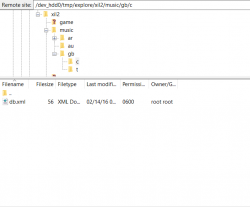
Hey, when I go into /dev_hdd0/tmp/explore/xil2/music/gb/c there are no other folders, only an xml file.


Capture.PNG
 
Back
Top