PS3 4.88.2 Evilnat Cobra (8.3) Custom FirmWare (CFW-CEX) Released

UPDATE 4.88.2: PS3 Developer @Evilnat has updated and released 4.88.2 Evilnat (Cobra 8.3) CFW , there is a number of new options like an added File manager, Option to toggle Cobra version, and various other new options detailed in the changlog provided below. Also the developer has provided a number of fixes and improvements, View all the details of 4.88.2 release of this latest CFW by @Evilnat

.Original release (4.88.1) Developer @Evilnat (creator of releases like SEN Enabler and PAUD Unpacker) has created and released 4.88 EVILNAT's COBRA CFW, following the success of 4.87 Evilnat's CFW, the developer provides another trusted CFW release that provides the Cobra Payload and all the features it brings (note: MAMBA is an alternative to the Cobra Payload, Cobra is included in firmware's where as MAMBA is typically injected in a Standard CEX CFW via a homebrew app. See all the details of this CFW Release below

Also Included are: noBD / noBT / noBD & noBT CFW Builds (for damaged console's to make them usable again)
-STLcardsWS​


CFW Evilnat.png

  • 4.88.2 EVILNAT (COBRA 8.3)

    Changelog
    • Fixed memory leak in LV2 kernel while Cobra is enabled
    • Added option to dump ERK (eid_root_key) through xai_plugin (from flatz's EID root key dumper)
    • Added option to dump LV2 through xai_plugin
    • Added option to dump LV1 through xai_plugin
    • Added File Manager in xai_plugin (by DeViL303)
    • Added option to toggle Cobra version, release (default in CFW) and debug (get debug logs through socat)
    • Manual FAN speed now works with Cobra disabled too
    • Added system to block login in on PSN/SEN while CFW syscalls are enabled (by DeViL303)
    • Added sort games by name and date options (by aldostools)
    • xai_plugin translated to Brazilian (thanks to jcorrea and LuanTeles)
    • xai_plugin translated to Polish (thanks to KcrPLo and Agrippa)
    • xai_plugin translated to Italian (thanks to Sheireen)
    • xai_plugin translated to Chinese Traditional/Simplified (thanks to xiaoyang)
    • xai_plugin translated to Spanish

    Features
    • Made out of 4.88 OFW
    • Made manually without automatic tools
    • SEN/PSN enabled
    • Disabled deletion of unsigned act.dat and .rif files
    • Allowed unsigned act.dat and .rif files
    • Allowed running of unsigned applications
    • Compatibility with FSELF
    • C00 demo unlocker
    • Disabled LIC.EDAT license check
    • Can be installed over 3.55 OFW
    • Can be installed over +3.56 OFW (bguerville Toolset)
    • Can be installed over any CFW CEX
    • COBRA 8.3 added and enabled as default
    • Full PS2 Games Compatibility
    • Possibility of Downgrade from any CFW with active QA Flags
    • QA Flags active if previously enabled
    • Disabled Epilepsy Message on Boot
    • Compatibility with PSX games in ISO
    • Compatibility with PSP games in ISO
    • Compatibility with PS2 games in ISO
    • Compatibility with PS3 games in ISO/JB folder format
    • Compatibility with ReactPSN
    • Display of Temperatures in XMB In-Game on PS2 Games
    • RSOD Screen Bypass
    • BSOD Screen Bypass
    • PS3_GAME/app_home
    • XMB In-Game Screenshot
    • Added Package Manager
    • CoreOS Hash Check patched to prevent Brick on non-dehashed Downgradate consoles
    • Patched to remove LV2 Protection
    • Peek and Poke (LV2)
    • Peek and Poke (LV1)
    • CINAVIA protection disabled
    • Option to sort games by name and date

    Cobra 8.3
    • Failsafe Cobra stage2 (by bguerville/aldo)
    • Restore CFW Syscalls without reboot just entering to 'Settings > System Update' on XMB (by aldo)
    • Integrated Dynamic Control FAN (to control fan when webMAN is unloaded) (by aldo/Evilnat)
    • Support Photo GUI integration with webMAN MOD (mount games from 'Photo' column) (by aldo/DeViL303)
    • Get/Set FAN speed (by aldo)
    • Enable/disable features: Photo GUI, Restore Syscalls (by aldo)
    • Opcode to create CFW Syscalls (6, 7, 8, 9, 10, 11, 15, 35) (by aldo)
    • Opcode to set fake accountID (by Evilnat)
    • Opcode to activate account (act.dat) (by Evilnat)
    • Opcode to create license (RIF) (by Evilnat)
    • Updated ps3mapi_load_process_modules to load custom modules and system modules (by haxxxen)
    • Added ps3mapi_get_process_module_info
    • Increased from 24 to 32 the max number of map paths (by aldo)
    • Added sm_get_temperature patch in kernel (by Evilnat)
    • Added sm_get_fan_policy patch in kernel (by Evilnat)
    • Added sm_set_fan_policy patch in kernel (by Evilnat)
    • Fixed Control FAN payload, avoids loading previous mode (by Evilnat)
    • Disable stage2.bin while Recovery Menu is loaded (by haxxxen)
    • Fixed max FAN speed after shutdown (by Evilnat)
    • Improved Habib's QA flags code imported by aldostools (by Evilnat)
    • Fixed black screen in CFW2OFW converted games (by Evilnat)
    • Added sm_ring_buzzer with single_beep, double_beep and triple_beep (by Evilnat)
    • Skip license creation (rif) if it already exists (by aldo)
    • Added cellFsMkdir symbol (by Evilnat)
    • Added constant FAN Speed while a PS2 ISO is launched (by Evilnat)
    • Check/Disable/Enable QA Flags (by Evilnat)
    • Creation of act.dat while launching a PSN game (by Evilnat)
    • Convert someones's else savedata to your own savedata (by Evilnat)
    • Block Log In on PSN/SEN when CFW syscalls are enabled (by DeViL303)

    Tested in:
    • CECH-2000A
    • CECH-2000B
    • CECH-2001A
    • CECH-2002B
    • CECH-2004A
    • CECH-2012A
    • CECH-2104B
    • CECH-2500A
    • CECH-2501A
    • CECH-2504A
    • CECH-2511A
    • CECH-2511B
    • CECH-L04
    • CECHA01
    • CECHE01
    • CECHB01
    • CECHC04
    • CECHG01
    • CECHP01

    Improvements xai plugin


    These options are in Network tab under [★ Custom Firmware Tools] option:

    Power Options
    • Turn Off: Turns off the PS3
    • Hard Reboot: Reboots the PS3 completely
    • Soft Reboot: Reboots the PS3 softly
    • Reboot LV2: Reboots the LV2

    File Manager
    • Internal Hard Disk Drive 0: Manage PS3 files in /dev_hdd0
    • Internal Hard Disk Drive 1: Manage PS3 cached files in /dev_hdd1
    • USB Mass Storage Devices: Manage files on your USB devices
    • Internal Flash Memory: Manage PS3 internal flash files
    • Optical Disc: Manage optical discs
    • Memory Cards: Manage memory cards

    Basic Tools
    • FAN Speed: Shows current FAN speed
    • PS3 Temperature: Shows current CPU and RSX temperature
    • Show IDPS: Shows current IDPS
    • Show PSID: Shows current PSID
    • Toggle Coldboot: Toggles between custom/original coldboot.raf
    • Toggle System Version: Toggles between custom/original system version in "System Information"

    Basic Tools > xRegistry Tools

    • Backup xRegistry.sys: Creates a backup of xRegistry.sys to /dev_usb or /dev_hdd0
    • Button Assignment: Switches O and X buttons

    Cobra Tools
    • Cobra Information: Shows current Cobra information
    • Check Syscall 8: Checks Cobra's Syscall 8 status
    • Create Syscalls: Create syscalls 6, 7, 8, 9, 10, 11, 15 and 35
    • Allow Restore Syscalls: Allows restoring syscalls through "System Update"
    • Skip license creation: Skips overwriting license file (RIF) if it already exists
    • Toggle Cobra Version: Toggles between release and debug versions (reboot is required)
    • Toggle Cobra: Enables or disables Cobra (reboot is required)

    Cobra Tools > FAN Tools
    • Control FAN Mode: DISABLED: Disables Cobra's Control FAN
    • Control FAN Mode: SYSCON: Allows the PS3's SYSCON to control FAN speed
    • Control FAN Mode: MAX: Set Cobra FAN speed to 0xFF

    Cobra Tools > QA Tools
    • Check QA Flags: Check if QA flags are enabled or disabled
    • Enable QA Flags: Enables QA Flags
    • Disable QA Flags: Disables QA Flags

    Cobra Tools > FAN Tools > Dynamic FAN Control
    • Maximum temperature: 60°C: Sets the fan speed dynamically to keep the system at a maximum temperature of 60°C
    • Maximum Temperature: 65°C: Sets the fan speed dynamically to keep the system at a maximum temperature of 65°C
    • Maximum Temperature: 70°C: Sets the fan speed dynamically to keep the system at a maximum temperature of 70°C
    • Maximum Temperature: 75°C: Sets the fan speed dynamically to keep the system at a maximum temperature of 75°C

    WARNING: Some PS3 cannot reach/stay some option temperatures, use with caution

    Cobra Tools > FAN Tools > Manual Speed
    • Manual Speed: 40%: Sets the fan speed statically at 40% (0x67)
    • Manual Speed: 45%: Sets the fan speed statically at 45% (0x75)
    • Manual Speed: 50%: Sets the fan speed statically at 50% (0x80)
    • Manual Speed: 55%: Sets the fan speed statically at 55% (0x8E)
    • Manual Speed: 60%: Sets the fan speed statically at 60% (0x9B)
    • Manual Speed: 65%: Sets the fan speed statically at 65% (0xA8)
    • Manual Speed: 70%: Sets the fan speed statically at 70% (0xB5)
    • Manual Speed: 75%: Sets the fan speed statically at 75% (0xC0)
    • Manual Speed: 80%: Sets the fan speed statically at 80% (0xCE)
    • Manual Speed: 85%: Sets the fan speed statically at 85% (0xDA)
    • Manual Speed: 90%: Sets the fan speed statically at 90% (0xE7)
    • Manual Speed: 95%: Sets the fan speed statically at 95% (0xF4)

    WARNING: The chosen speed will be static, it will not be changed at any time automatically

    Cobra Tools > FAN Tools > PS2 FAN

    • PS2 Fan Mode: DISABLED: Disables Control FAN on PS2 game
    • PS2 Fan Mode: SYSCON: Allows the PS3's SYSCON to control FAN speed on PS2 game
    • PS2 Fan Mode: 40%: Sets FAN speed to 0x66 on PS2 game
    • PS2 Fan Mode: 50%: Sets FAN speed to 0x80 on PS2 game
    • PS2 Fan Mode: 60%: Sets FAN speed to 0x9A on PS2 game
    • PS2 Fan Mode: 70%: Sets FAN speed to 0xB4 on PS2 game
    • PS2 Fan Mode: 80%: Sets FAN speed to 0xCE on PS2 game
    • PS2 Fan Mode: 90%: Sets FAN speed to 0xE8 on PS2 game

    WARNING: There is no Control FAN in a PS2 game, select with caution

    PSN Tools
    • Disable Syscalls: Disables syscalls and remove history files
    • Show accountID: Shows current user's accountID
    • Create accountID: Creates a fake accountID for current user's in xRegistry
    • Overwrite accountID: Overwrites current user's accountID with a fake one in xRegistry
    • Activate account: Creates act.dat file in the current local account
    • Create license: Creates RIF licenses from RAP files from "x:\exdata"
    • Backup activation file: Creates a backup of act.dat to /dev_usb or /dev_hdd0
    • Disable account: Deletes current user's activation file act.dat permanently
    • Convert savedata: Converts savedata from "/dev_usbXXX/PS3/SAVEDATA" to your own savedata

    Dump Tools
    • View Log: http://localhost/dev_hdd0/tmp/cfw_settings.log (webMAN MOD is required for this function)
    • Clean Log File: Resets /dev_hdd0/tmp/cfw_settings.log file
    • Dump IDPS: Saves IDPS to log file
    • Dump PSID: Saves PSID to log file
    • Dump LV2: Dumps LV2 to /dev_usb or /dev_hdd0/tmp
    • Dump LV1: Dumps LV1 to /dev_usb or /dev_hdd0/tmp
    • Dump ERK: Dumps eid_root_key to /dev_usb or /dev_hdd0/tmp
    • Log KLicense usage: Saves filename and klicensee to log file
    • Log Secure File ID usage: Writes save data name and file ID key to log file
    • Dump Disc Hash Key: Retrieves disc hash key from an ORIGINAL game disc

    Service Tools
    • Display Applicable Version: Displays minimum downgrade version
    • Check File System: Reboots and allows you to check and repair filesystem
    • Rebuild Database: Reboots with Database rebuilding flag set
    • Toggle Recovery Mode: Reboot to Recovery Mode (Not supported on NAND models!)

    Service Tools > Advanced Service Tools
    • RSOD fix: Re-initialize VTRM-Region to attempt to fix RSOD
    • Toggle Factory Service Mode: Enter/Exit Factory Service Mode (DON'T INSTALL CFW ON FSM)
    • Remarry Bluray Drive: Requires: Enter to FSM and copy "eid_root_key" to /dev_usb
    • Load LV2 kernel: Loads lv2_kernel.self file from /dev_usb000 or /dev_flash


    Savegames conversion tutorial

    WARNING: This option will overwrite your current savedata in dev_usbXXX, use it with caution

    • Download someone else's savegame for your game of your choice
    • Put the savedata in your pendrive in "X:\PS3\SAVEDATA" (pendrive must be in FAT32)
    • Put in the pendrive in the PS3
    • Select Network Tab > [★ Custom Firmware Tools] > PSN Tools > Convert Savedata
    • Wait until the conversion finishes
    • Once finished, copy your converted savedata throught XMB "Saved Data Utility (PS3)"
    • Launch your game and load your new savedata


    Creation of act.dat tutorial

    WARNING: The accountID is linked to savedata and trophies, so, if your current user already have a valid accountID and you overwrite it, you will be unable to use your trophies and savedata on that account until you restore the original accountID in xRegistry.sys.


    I recommend to use an empty account without trophies and savedata or an account without accountID.


    To create a fake act.dat, Cobra 8.3 must be enabled, and your PS3 must have at least one account with a valid accountID and launch a game that requires a RIF/RAP license file.

    Cobra will search a valid accountID in all existing accounts and create act.dat while the game is launched through the XMB. If no accountID is found, act.dat will not be created.

    You can create a fake accountID (like reactPSN), to do this go to Network > ★ Custom Firmware Tools > PSN Tools and choose between "Create accountID" or "Overwrite accountID" (Be careful about the last option because if you already have a fake/real accountID it will be overwritten). It is recommended to use these options in an account that does not have an ID. The PS3 will restart if everything went well.

    The tutorial would be the following:
    • Download your purchased PSN game from PS Store
    • Put game RAP file in "X:\exdata" or "/dev_hdd0/exdata"
    • Launch your purchased PSN game
    • Cobra will check if any of your PS3 accounts have accountID
    • Faked act.dat will be created while the game is launching

    If none of your accounts have a valid accountID you will need to create it. To do this log into the local PS3 account where you want to create the accountID. You can see if your current local account has an accountID choosing Network Tab > [★ Custom Firmware Tools] > PSN Tools > Show accountID.

    To create a faked act.dat do the following:
    • Make sure Cobra 8.3 is enabled
    • Select Network Tab > [★ Custom Firmware Tools] > PSN Tools > Create accountID
    • Select Network Tab > [★ Custom Firmware Tools] > PSN Tools > Activate account
    • Launch your purchased PSN game
    • Faked act.dat will be created while the game is launching

    Now you have a faked act.dat and your local account is activated. The act.dat file works for every local account, you only need one file for all accounts.


    Block PSN log in

    This method is developed by @DeViL303, it will only work with Cobra enabled, Cobra will block log in on PSN/SEN while the CFW syscalls are enabled, to enable it again you need to disable CFW syscalls completely (you can do it with webMAN MOD, psnpatch, SEN Enabler, etc…).

    If you want to disable this feature, simply delete /dev_flash/vsh/resource/npsignin_plugin.lck


    Translations


    Final Words

    I hope that the CFW is working fine and without issues for everyone, but if you see any issue, please let me know in my twitter and I will try to fix it as soon as possible: @xXEvilnatXx

    Cobra 8.3 and xai_plugin source code can be found in my Github repository:


    Credits and Acknowledgment

    Credits to Team Rebug, Team Cobra, @mysis, @Joonie, @habib, @aldostools, @haxxxen, @DeViL303, @zecoxao, @3141card, @Berion, @kakaroto, @KW, @naehrwert, @flatz, @Dean, @Rogero, @Estwald and anyone who has contributed to the PS3 scene.

    Thanks to @DeViL303, @Berion, @Brandon Stump, @jcorrea, @nhie07, @NSC-Modz, @LuanTeles, @thejavigames, @raidriar, @xiaoyang, @Zwei, @haxxxen, @RetroFan_90, @SpyroMancer, @patricksouza472, @MrYadro, @CFW-Us3r, @Andrio, @KcrPLo, Nur Rakhmadi Rajab, @Lwiz, @Sheireen, @TheWizWiki and all who helped me testing the CFW 4.88.

    If I forgot someone, I apologize, there are many people in the PS3 scene and you are many people who
    have helped me to test the CFW.


Download: MEGA FOLDER WITH ALL CFW VERSION

Download: CFW EVILNAT 4.88.2 COBRA 8.3 [CEX]
MD5: 3202971E05140F24E52B36D5C443AD35

Download: CFW EVILNAT 4.88.2 COBRA 8.3 [CEX] [noBD]

MD5: 80029DC0FBD238DAF8ED45BCDFD04CD6

Download:CFW EVILNAT 4.88.2 COBRA 8.3 [CEX] [noBT]
MD5: 360569FE808B1815BD05258C8496003F

Download: CFW EVILNAT 4.88.2 COBRA 8.3 [CEX] [noBD] [noBT]
MD5: D8BB1F47B77F1737F974308B935F81B6
 
Last edited by a moderator:
"""everything is working fine else, except when you leave the console idle for long enough,
the screen turns black and it locks up completely. """

---> exactly the same.


+ this cfw hard crash console randomly when updating games.

this is really not trusty cfw. no offence to the job done, just factual.

i recommand to downgrade to something better.
 
Errors are not reproducible, all is random.

i launched mlb 16 and idle for 5min time to check something online on computer and the console bipped 3 short times and instant shutdown herself. followed with red blinking after until i press power to totally turn led off. 1st time ever the console it happened. NEVER DID THIS BEFORE.

this firmware is unstable in ways i'm unable to help.

Aldo, thank you, but you already made a list of issues and we still do not have any revision from him for what you underlined. in page 112 of the thread.

really sad because the way the tools were available to fake on xmb any psn account was genius.

Life is give and take :/
 
Last edited:
GRRRRRRRRRRRR

Please, give me the modified command line from this one
Code:
socat udp-recv:18194 stdout

to write a .log file (i am on windows)

and if possible, display in same time than recording to file, so i can check the recording is active
 
Last edited:
ok, update: your socat is pointless with this command
Code:
 socat udp-recv:18194 stdout

console makes reproducible crash on mlb16, ird rebuilt :

MLB The Show 16 - [BCUS 01089]
size: 23 275 503 616 bytes
md5 of iso : 486B1588810A3E28305795026F07B323
game updated from internet at 1st launch, then full 10gb data on HDD installed.


Now i got an entry point of the trigger,
1) simply launch the game and let it run from main menu, no button pressed.
2) console ends couple minutes later instant shut down, red blinking. regular, faster than 1 pulse/Sec..

3) pressing power normally does nothing. have to stay 1 full sec, to ear 1 bip, that terminate the console so red led becomes permanently on.

4) another simple press will turn console on again.

5) on restart console requests HDD scan.
* disk is SSD 120gb 840 samsung - ( console never crashed on overflow 4.85 ) drive is healthy

the log end with this informations:


[...]
open_path /dev_hdd0/tmp/wm_request
open_path /dev_hdd0/game/BCUS01089_R/USRDIR/HeadFaceCacheFile
open_path /dev_hdd0/game/BCUS01089_R/USRDIR/MLBPS3_GD.WAD
open_path /dev_hdd0/tmp/wm_request
open_path /dev_hdd0/game/BCUS01089_R/USRDIR/MLBPS3_GD.WAD
open_path /dev_hdd0/game/BCUS01089_R/USRDIR/PXP_SAVE.BIN
open_path /dev_hdd0/game/BCUS01089_R/USRDIR/PA_SAVE.BIN
open_path /dev_bdvd/PS3_GAME/USRDIR/SNDPS3/SOUND/CROWD_REACTIONS.SKX
open_path /dev_hdd1/replays
open_path /dev_hdd0/game/BCUS01089/USRDIR/PATCH_GD.WAD

which is just a behavior of readen files, nothing about the system by itself?
if you have more tools for me to test...


console is not heating, i completed GT6 last month and past 2 months i did last of us.
i've done the cleaning job when i get it, range 30-40% fan on webman, average 68°.
tested couple minutes ago at constant 50% fan, T° = 55°, and BAAAM instant power off.
so this is not heat related.

from this point i don't see what else it can be. all what remain is downgrade to rebug 86 lite or 84.2 or overflow 85 then check, but i'm pretty sure it will fix the crash.

common point of my earlier GT6 freezes and the mlb 16 instant off is the fact that there is no input from the gamepad at all ( rest on table ) and console is idling.

--- model 2004B; which have not been tested on the list :p hihihi
webman mod version 1.47.36 full
 
Last edited:
There is always an expectation that something will not work 100% bug free in a hobby community. There is always going to be a bug somewhere or with something. Happens all the time. If you expect something to always run 100% in every scenario and for every setup you are expecting way to much. Billion dollar companies have trouble with this, my educated guess would say a hobby developer would have some difficulty covering every scenario to create a 100% bug free environment

What's great about most of these dev's here is that you can politely report something and when they have time. they are usually more then willing to try and find the issue. Especially if its something that has been reported by many. But they also have lives and are not on stand by to provide a fix. There is 1,000's of variables and without you even knowing i would not throw shade at something, Keep in mind a revision or a fix is not a right its a privilege and that is something the user's must understand in the community more.. Its a community of idea's , not a service or a product..
 
Last edited:
@solomonbyte if the system is crashing without a kernel error or some other error log, it will be hard to identify the cause.

If your system is more stable using Rebug, then use that CFW until a fix is found (which could never happen due the cause of these shutdowns is still unknown).
 
Like I said before it would be perfectly normal to experience unexpected issues given the number of new features & new code introduced in this CFW, it would have been a miracle otherwise.

Technically speaking, there can be many sources of problems in any CFW, configuration/setup specificities, conflicts between specific apps or custom mods, unofficial game repacks etc...

Now assuming those things are not the problem and that the hardware is not malfunctioning (hdds are known to be a very common source of issues but other hardware parts are also critical) or not officially supported (hdd > 1.5Tb, ssd..), we can basically divide the remaining potential CFW issues in 4 categories according to their origin.

1. Patches in firmware files (self/sprx) if one or more of them is found to be source of problems (quite possible with certain patches, Nat knows what he is doing but in some cases patches can have unforeseen consequences), it should eventually be identified & fixed but in the meantime there is not much a user can do except provide error reports with as much details & socat debug output as possible.

2. Cobra, one of the most probable cause of issue I suppose, not just because by nature, it is a sensitive part of the CFW but also because I think Nat added a fair amount of new code in it.

However it should be easy enough to disable Cobra (using CFW Tools or manually renaming stage2.bin to stage2.bin.bak in /dev_flash/sys & rebooting is enough) & then you could try to use Mamba (current or older version) instead.
Use the Mamba Loader to test Mamba & if everything works well, install the Mamba Autoloader & Mamba will load automatically at boot time.
If Mamba solves your problem, don't forget to report a Cobra related problem with appropriate details in this thread.

3. xai_plugin related problems are not the most likely because xai_plugin should only be running when CFW Tools xmb items are used in theory but anyway, if ever xai_plugin crashes when you use it, you should get a lv2 crash output in the socat log, post it here.

4. Apps (wMM, sMan or other resident plugins), an app could have problems dealing with the new features of this CFW & may need updated. Turn off all resident plugins (rename /dev_hdd0/boot_plugins.txt) & reboot, see if you still get crashes. Like for xai_plugin, a resident plugin crash should be logged to socat, post it here.

All reports are welcome & helpful as long as they include enough details to investigate and even if they don't seem to be addressed right away however Nat has not been around for some time now, we hope he is alright & just busy with life. He may or he may not be back & interested to update his work, but either way, nobody should rely on him alone to sort out all the issues that may be reported about his CFW release.

CFWs have always been experimental, a slow accumulation of patches & custom source code, a kind of long term project with multiple contributors.
This CFW Cobra source & xai_plugin source have both been released on github, and if Nat is unavailable, it is up to others to take up the flag & do their part, improve existing code, fix errors, and if anyone with a hardware flasher wants to build a better custom firmware, everything needed is at their disposal, tools, data, info, source code & extra help can be found among our members, all in all, making a CFW has never been easier than it is today & ironically there are fewer made than ever.
 
Last edited:
And btw for those users wanting to post their socat output to report an issue, here is a possible socat command to log the broadcasted data to a file (named "cobra_dbg.log" for the purpose of this example) rather than to the terminal display (stdout).
Code:
socat -u UDP-RECV:18194 CREATE:cobra_dbg.log
On Windows, you can just copy this command into a new batch file (.bat) in the socat folder & double click the batch file when you wish to start logging.
 
Last edited:
new informations:

rebug 4.86.1 / webman mod 1.47.36 / SSD/ game updated / game data installed : Crash

evilnat 4.88.2 / webman mod 1.47.36 /SSD / game updated / game data installed : Crash
evilnat 4.88.2 / webman mod 1.47.36 /HDD / game updated / game data installed : Crash

evilnat 4.88.2 / webman mod 1.47.36 /SSD / game v1.0 / game data installed : Crash

if crash not happen from the " press start " to demo loading on v1.0 , and the demo plays along for long time, quitting the demo, reverting to game menu and letting the demo loading again will trigger the crash.

i joined a log of ssd version crash. nothing special except the last call is not data from HDD/SSD but ISO :

open_path /dev_bdvd/PS3_GAME/USRDIR/MLBPS3_ROM.WAD

i just don't know what happen on this particular game but i'm pretty sure there is something wrong. i will start test with no webman, it is last common factor known to me.

it is not overheat, nor drives, not network, not ps3netserver ( i got gui issue on win10 but still hosting files and whole process works fine, so i do not think about this, otherwise i would happen on all games.

i don't know.

but I Apologize to Evilnat suspicion since other firmware gives same result.
beg for your pardon on that point.

i Also Thanks Bguerville for the command line. I could not find exemple on google and the -h is very poorly explained for amateurs.

--------

i am unloading webman from memory and copying iso to internal to use multiman / irisman /managunz and try something else.

will also try to off cobra & try mamba ( i never used, dunno yet how to proceed, learning on the fly )
 

Attachments

Last edited:
rebug 4.86.1 / webman mod 1.47.36 / SSD/ game updated / game data installed : Crash
evilnat 4.88.2 / webman mod 1.47.36 /SSD / game updated / game data installed : Crash
evilnat 4.88.2 / webman mod 1.47.36 /HDD / game updated / game data installed : Crash

evilnat 4.88.2 / webman mod 1.47.36 /SSD / game v1.0 / game data installed : Crash

if crash not happen from the " press start " to demo loeading, and the demo play along for any time, quitting the demo with game pad, reverting to game menu and letting the demo loeading again will trigger the crash

It could be a memory conflict (maybe the game demand too much memory or maybe an incorrect setting in webMAN MOD).

I suggest to disable all background VSH plugins and mount the game using IRISMAN, multiMAN or ManaGunZ, to determine if the issue is caused by webMAN MOD or any other plugin.

In addition to the 4 categories mentioned by @bguerville, the customizations can be another source of frequent problems:
- Some themes (p3t) cause random bugs
- Non-official fonts may cause random crash
- Large amount games generate big XMLs that consume more memory than the allowed.
- Big images used for icons cause issues.

I'm not saying that it's your case. I'm only adding other possible causes of freeze/shutdowns/black screens that frequently are overseen.
 
i edited my message, i think i am trying to do what you suggested. i dont have technical lexical

but

- Large amount games generate big XMLs that consume more memory than the allowed.

hmmmmmmmmmmmmmmm

i cannot deny that. i am in a kind of extreme situation on that point. the console keep xml gamelist on ram when playing a game ? i tought it was a file reading on menu only and that was not residual. serious hint here.
 
Last edited:
If the game files are all legit & the issue persists even without wMM loaded (using whatever other backup manager to mount it), you might want to narrow the range of possibilities, it might be worth trying that game with Managunz or Irisman, after disabling Cobra & rebooting.
To do this test, you should not really need to install Mamba separately, Irisman & Managunz should have some mamba based payloads included for iso mounting afaik.
And unless you are curious to test, I think you should only need to install Mamba system wide if you find that Cobra is the culprit..
 
new tests:

evilnat 4.88.2 / webman mod unloaded / multiman mounted / SSD / game 1.0/ game data installed : Crash

then :

cobra disabled, rebooted, then disabling webman from memory crash console.
trying to uninstall webman mod while cobra disabled also crash console

evilnat 4.88.2 / webman mod uninstalled / cobra OFF / managunz 1.4 / SSD / game 1.0/ game data installed : crash
evilnat 4.88.2 / webman mod uninstalled / cobra OFF / irisman 4.88 / SSD / game 1.0/ game data installed : crash

mounting internal iso with irisman or managunz will display on cobra info in the xmb v8.4. both cobra based ?
 
Last edited:
new tests:

evilnat 4.88.2 / webman mod unloaded / multiman mounted / SSD / game 1.0/ game data installed : Crash

then :

cobra disabled, rebooted, then disabling webman from memory crash console.
trying to uninstall webman mod while cobra disabled also crash console

evilnat 4.88.2 / webman mod uninstalled / cobra OFF / managunz 1.4 / SSD / game 1.0/ game data installed : crash
evilnat 4.88.2 / webman mod uninstalled / cobra OFF / irisman 4.88 / SSD / game 1.0/ game data installed : crash

mounting internal iso with irisman or managunz will display on cobra info in the xmb v8.4. both cobra based ?
Couldn't hurt plugging in the HDD into a pc and checking the health with Crystal disk or something just to eliminate that as a potential issue for your crashes.

I can only speak to my experience with this firmware, and for me once the freezes started to occur in the XMB on Evilnat 4.88, it did not matter what firmware I downgraded to, the freezing issues would persist until I re-formatted the HDD at that point.
 
i have filmed with phone the led of the console.

console turn off fan and the led is yellow for 200-300ms then the bip occur while going red.

i checked file written on drive, all md5 are ok. so the hardware general failure must be really hardware and have nothing to do with any cfw related.

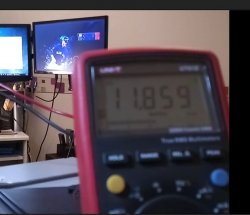
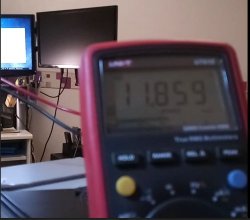
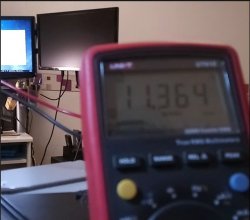
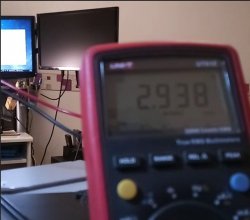
the last element is that console is like 10 years old, and just like a computer, some games will keep PSU 12v line in the standard, above 11.4v. but some will draw and the reel power cannot be read with the shitty software sold with mobo, we must use fast numerical multimeter with min-max function to see the dip and in my case my computer psu was going 11.0 and crash occured with 10.9v. with the min value.

i suspect the console to behave the same. it must be electrical.
many post here i discover talk about same phenomen :


https://www.psx-place.com/threads/ps3-shuts-off-and-red-light-starts-blinking.20983/page-2
https://www.psx-place.com/threads/cecha-ps3-ylod-saga.20826/page-2#post-140116
https://www.psx-place.com/threads/p...y-beep-or-light-on-cut-off-electricity.13604/

i will rip the case and start electrical checks to confirm my theory.
 
to be precise on what happen with the console, if i play the game, there is no crash at from MLB 16. the gag is the console will proceed to general hardware failure security with the shutdown blinking but the game itself playing is ok.


the moment is very fast, but i extracted 4 pics, showing the game loading a demo at 11.859v
the console stop emitting display output, meaning the problem already happened somewhere and the voltage is still 11.859. THEN i have a fast step to 11.364, then other measures are lower because of dischargin psu.

measure is taken at output of PSU.

so many people on youtube having this issue. it must be electrical.

the difference with a classic YLOD is that YLOD wont allow power resume. for me, i just have a 1 fast press to terminate powering off process, then another simple power press make console fresh again as if nothing never happened, excepted warning about hdd cause system halt but it never corrupt drive anyway.

i am stopping report here i'll transfer to Ylod forum section.
 

Attachments

  • 001.jpg
    001.jpg
    53.9 KB · Views: 35
  • 002.jpg
    002.jpg
    51.2 KB · Views: 37
  • 003.jpg
    003.jpg
    49.2 KB · Views: 38
  • 004.jpg
    004.jpg
    48.4 KB · Views: 37

Featured content

Trending content

Back
Top