PS3 Fault finding YLOD with the SYSCON - First steps and Error reporting

I have a DYN-001 which shuts down randomly (green led > delayed and quick yellow led > 3 beeps > red blinking) it can do immediately or last an hour or two, I've already tried other power supplies, so I want to see the syscon error log before I go into the NEC-TOKIN replacement endeavor.

I have set up Python 2, the respective modules (serial and crypto), and a RS232 to USB adapter, I'm using this one: Belkin F5U109, I've tried with the computer integrated serial port as well.
F5U109.jpg


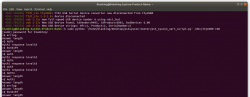
When I run any command I only get this, either with the adapter or the motherboard's serial port:

b3JAvWZ.png


What I'm doing wrong?
 
WRONG serial lead, this is a 5v rs232, will destroy your syscon - you need a USB ttl 3.3v lead!

If you have a multimeter test the RX and TX points again and see if they are 3.3v coming out, if not then im afraid your serial lead has killed the syscon uart.

I have a DYN-001 which shuts down randomly (green led > delayed and quick yellow led > 3 beeps > red blinking) it can do immediately or last an hour or two, I've already tried other power supplies, so I want to see the syscon error log before I go into the NEC-TOKIN replacement endeavor.

I have set up Python 2, the respective modules (serial and crypto), and a RS232 to USB adapter, I'm using this one: Belkin F5U109, I've tried with the computer integrated serial port as well.
F5U109.jpg


When I run any command I only get this, either with the adapter or the motherboard's serial port:

b3JAvWZ.png


What I'm doing wrong?

So, my advice is get use to linux - ubuntu 20.04 will be fine.

Get use to the command line and familiar with typing commands, then come back to this syscon. Its best to have an understanding than just get frustrated and give up.

Watch youtube videos, loads of videos for beginners.

Once you are confident, then the next part is follow the guide, and then post screen shots of your issues.


Honestly at this point I don't even know anymore, the more I research and try to learn how to do simple things that I need to do this the more I want to pull my hair out. The internet is of little to no help and given that literally no one around me knows anything about computers or even what Linux or Ubuntu are I'm stuck on my own.

I've looked up beginner guides to command lists and yet nothing seems to work for me. As of now I've got Linux mint working on my laptop and python working at its base. Thats as far as I've gotten in HOURS of messing with this and I can't tell you how many times I've just wanted to say screw it and just not deal with it again. But I keep coming back because I want to fix the few consoles I've got that being able to mess with the syscon output would help me repair them much easier instead of just making wild guesses.

Sent from my SM-G965U using Tapatalk
 
Last edited by a moderator:
Well, it outputs 5V so I guess my journey is done, at least with this one.

Will get a TTL in the future and come back with another set of boards I have laying around.
 
Well, it outputs 5V so I guess my journey is done, at least with this one.

Will get a TTL in the future and come back with another set of boards I have laying around.

Not neceassarly, check the points on the motherboard and see if they are outputting 3.3.v the RX,TX and DIAG pin on the motherboard
 
Now no matter what I do I get SyntaxError: invalid syntax

Am I correct in assuming I need pycrypto and pyserial?

Sent from my SM-G965U using Tapatalk
Ok so I got pyserial and pycrypto going after restarting my whole system. For some reason nothing I did would take [emoji2369]

Sent from my SM-G965U using Tapatalk
 
Python can be fickle... I wonder if we could simplify things by creating a docker container with all the required components.
 
Hi, i got a cok-01 console (cechb from japan) and it has a really short ylod like 1/2 second no one has tampered with the system but for my fault the RX connector on the mb is busted (i forgot to lower the soldering iron and the pad lifted) so to be sure i added a 470uf capacitor on both the chip but still ylod. What should i check next?
 
Hi, i got a cok-01 console (cechb from japan) and it has a really short ylod like 1/2 second no one has tampered with the system but for my fault the RX connector on the mb is busted (i forgot to lower the soldering iron and the pad lifted) so to be sure i added a 470uf capacitor on both the chip but still ylod. What should i check next?
You can try to trace where the lifted pad went to but otherwise you're done.
 
You can try to trace where the lifted pad went to but otherwise you're done.
yes i know but the trace ends up under a chip then I lose it. I was talking about finding the cause by myself maybe checking the board for voltage and resistence around chips.

UPDATE: ok i found it in the service manual
 
Last edited:
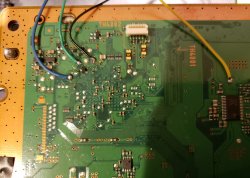
Hi, I have a dead cecha01, I've soldered everything correctly from what I can tell, but still getting the auth error right at the start. No clue what is going wrong but it sucks. I'm using ubuntu 20.04, python 2.7, and minicom.
 
Hello everybody!
Thanks for this information "Errors Log Codes". My PS3 Phat is brick with YLOD.
Now I was able to understand what my error code "A0801701" means is "BE Attention".

What does this mean, who knows? Sorry for bad translation on English!
Thanks! to all!​
 
Last edited:
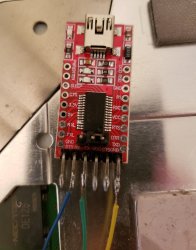
I just keep getting the same errors over and over no matter what I try, "Answer length" and "Auth1 response invalid" I'm using a CECHA01 that has a GLOD, ubuntu, and python 2. As far as I can tell all my wiring/soldering is fine and the wires are protected under electrical tape when the metal plate is back on. Any ideas? I saw a suggestion saying to switch Rx and Tx wires but as far as I can tell they're both already on the correct points.
Screenshot from 2020-11-11 01-17-36.png 20201110_234612.jpg 20201111_010720.jpg
 
I just keep getting the same errors over and over no matter what I try, "Answer length" and "Auth1 response invalid" I'm using a CECHA01 that has a GLOD, ubuntu, and python 2. As far as I can tell all my wiring/soldering is fine and the wires are protected under electrical tape when the metal plate is back on. Any ideas? I saw a suggestion saying to switch Rx and Tx wires but as far as I can tell they're both already on the correct points.
View attachment 28646 View attachment 28647 View attachment 28648
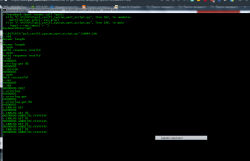
Hi. Maybe this sequence of commands (see image) will help you get a response from the console. I have a PS3 CECHG console with YLOD.
 

Attachments

  • загружено.png
    загружено.png
    128.2 KB · Views: 134
Ok, im back on and trying things again. Its been super busy here lately. Has anyone gotten things to where its all sort of a one shot deal with everything being in one file? Python is fickle and with my current schedule I no longer have time to fight with it. At this point I'm almost willing to pay someone to find out what's wrong with this console lol

Sent from my SM-G965U using Tapatalk
 
Hiya, new to all this, trying to diagnose a CECH C console with a COK-001 board.

First, I think, from my research, that the picture in the guide for this board is wrong - I think that the outer copper strip is ground rather than 3v3. Can anyone confirm?

Secondly, having trouble with the python script. Using VS Code on Win 10 64. In the Problems tab at the bottom, I am getting the errors

"unresolved import 'Crypto.Cipher'",
undefined variable 'raw-input'
undefined variable 'xrange'
undefined variable 'long'

In the Script3.py file, I only get the top two errors.

I've tried to install pycrypto, but that's throwing up errors

warning: GMP or MPIR library not found; Not building Crypto.PublicKey._fastmath.
building 'Crypto.Random.OSRNG.winrandom' extension
error: Microsoft Visual C++ 9.0 is required. Get it from http://aka.ms/vcpython27
----------------------------------------
ERROR: Command errored out with exit status 1: 'c:\python27\python.exe' -u -c 'import sys, setuptools, tokenize; sys.argv[0] = '"'"'c:\\users\\user\\appdata\\local\\temp\\pip-install-ulzyb6\\pycrypto\\setup.py'"'"'; __file__='"'"'c:\\users\\user\\appdata\\local\\temp\\pip-install-ulzyb6\\pycrypto\\setup.py'"'"';f=getattr(tokenize, '"'"'open'"'"', open)(__file__);code=f.read().replace('"'"'\r\n'"'"', '"'"'\n'"'"');f.close();exec(compile(code, __file__, '"'"'exec'"'"'))' install --record 'c:\users\user\appdata\local\temp\pip-record-wnlgi_\install-record.txt' --single-version-externally-managed --compile --install-headers 'c:\python27\Include\pycrypto' Check the logs for full command output.

So I've used pycryptodome which has installed fine.

Any suggestions please?

Using Python 2.7.18 as I gather that 3 is troublesome.
 
On standby do you see any 3v3 on motherboard? or try removing battery?
Maybe part with Rx Tx reverse?
I'm not really sure what you mean by that.
Ok, im back on and trying things again. Its been super busy here lately. Has anyone gotten things to where its all sort of a one shot deal with everything being in one file? Python is fickle and with my current schedule I no longer have time to fight with it. At this point I'm almost willing to pay someone to find out what's wrong with this console lol

Sent from my SM-G965U using Tapatalk
Still the same state so far, I'm still trying to make my guide but I can't resolve my current issue.

Hiya, new to all this, trying to diagnose a CECH C console with a COK-001 board.

First, I think, from my research, that the picture in the guide for this board is wrong - I think that the outer copper strip is ground rather than 3v3. Can anyone confirm?

Secondly, having trouble with the python script. Using VS Code on Win 10 64. In the Problems tab at the bottom, I am getting the errors

"unresolved import 'Crypto.Cipher'",
undefined variable 'raw-input'
undefined variable 'xrange'
undefined variable 'long'

In the Script3.py file, I only get the top two errors.

I've tried to install pycrypto, but that's throwing up errors

warning: GMP or MPIR library not found; Not building Crypto.PublicKey._fastmath.
building 'Crypto.Random.OSRNG.winrandom' extension
error: Microsoft Visual C++ 9.0 is required. Get it from http://aka.ms/vcpython27
----------------------------------------
ERROR: Command errored out with exit status 1: 'c:\python27\python.exe' -u -c 'import sys, setuptools, tokenize; sys.argv[0] = '"'"'c:\\users\\user\\appdata\\local\\temp\\pip-install-ulzyb6\\pycrypto\\setup.py'"'"'; __file__='"'"'c:\\users\\user\\appdata\\local\\temp\\pip-install-ulzyb6\\pycrypto\\setup.py'"'"';f=getattr(tokenize, '"'"'open'"'"', open)(__file__);code=f.read().replace('"'"'\r\n'"'"', '"'"'\n'"'"');f.close();exec(compile(code, __file__, '"'"'exec'"'"'))' install --record 'c:\users\user\appdata\local\temp\pip-record-wnlgi_\install-record.txt' --single-version-externally-managed --compile --install-headers 'c:\python27\Include\pycrypto' Check the logs for full command output.

So I've used pycryptodome which has installed fine.

Any suggestions please?

Using Python 2.7.18 as I gather that 3 is troublesome.
I'm not sure about the other errors but I can confirm that the copper strip around the edge is the ground plane.
 
Take some measurements with multimeter around syscon, see any 3,3 voltage on it? When power on track also rx/Tx with multimeter see voltage for short period?
Also have you tried to swap Rx with Tx?
 
Last edited:

Similar threads

Back
Top