PS3 Fault finding YLOD with the SYSCON - First steps and Error reporting

5-jpeg.35646
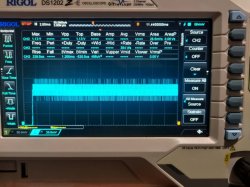
Just noticed this image, perhaps you edited it in after I read the post earlier. Anyway the CPU noise look great in that capture. If I had seen that image from the beginning I would say it's clearly the RSX tokins and that the CPU's are fine.

...but I'm still concerned about that capture where the CPU flatlined at 900mV. Makes me wonder if it had VDDC, but is not able to conduct any work (like a clock generator for it's PLL, the PLL voltage itself, etc.) But I would expect to see a different error and shorter YLOD. So maybe that picture was just a fluke? Or captured on some other part of the timeline besides the "target plateou" that I asked you to take the measurement (second to last one indicated by the white line in my earlier post)?
 
RSX tokins certainly have the bad waveform.

One thing I do know is that bad CPU tokins can affect RSX tokin ripple, but as bad as that looks and with your errors, it's clear all the tokins need to go!

Before I get concerned about your voltage levels, what model PS3 is that again? They are low for 90nm Cell/RSX. Perhaps it's normal for 65/40nm models. IDK, I don't work on them.

The CPU voltage reading being that flat does concern me. I think we should do some probing (carefully not to short any pins). Fill out the following voltage test worksheet using the jumper locations guide. It's a lot of work but will help rule out other possible issues.

Also, what is the resistance of the CPU and RSX tokins to GND?


This is a PS3 FAT VER-001.

Probes resistance: 0.3 Ohm

CPU NEC-GND resistance: 5 Ohm

RSX NEC-GND resistance: 3.5 Ohm

Felix, I will do these measurements, but perhaps... do you have this schematic in PDF in a test-searchable format?
 
This is a PS3 FAT VER-001.

Probes resistance: 0.3 Ohm

CPU NEC-GND resistance: 5 Ohm

RSX NEC-GND resistance: 3.5 Ohm

Felix, I will do these measurements, but perhaps... do you have this schematic in PDF in a test-searchable format?

As a comparison, I have a SEM-001 with (I think) faulty RSX chip (goes into artifacts and shuts down after ~30min of work).

CPU NEC-GND resistance: 4.3 Ohm
RSX NEC-GND resistance: 1.8 Ohm


Aaand some probing from SEM-001 (cold start, working)...

sem001_1.jpeg

sem001_2.jpeg
sem001_3.jpeg
 
Last edited:
Just noticed this image, perhaps you edited it in after I read the post earlier. Anyway the CPU noise look great in that capture. If I had seen that image from the beginning I would say it's clearly the RSX tokins and that the CPU's are fine.

...but I'm still concerned about that capture where the CPU flatlined at 900mV. Makes me wonder if it had VDDC, but is not able to conduct any work (like a clock generator for it's PLL, the PLL voltage itself, etc.) But I would expect to see a different error and shorter YLOD. So maybe that picture was just a fluke? Or captured on some other part of the timeline besides the "target plateou" that I asked you to take the measurement (second to last one indicated by the white line in my earlier post)?


I'm not yet an expert with using this new digital scope, so I might have set sth wrong.
How do I set the trigger mode so that I capture precisely what I want from start to the shut-off state.
When I have auto or normal - I see the signal, but when I choose single... then it does not show anything, even though the trigger is set to 100mV.

I'd appreciate some guidance :)


On the other hand... you might be right.
The capture in the photo might be made too late. I mean, later than mentioned 300ms.

I noticed that after few seconds, the VDDC drops below 1V (VER-001 and SEM-001).
 
This is a PS3 FAT VER-001.

Probes resistance: 0.3 Ohm

CPU NEC-GND resistance: 5 Ohm

RSX NEC-GND resistance: 3.5 Ohm

Felix, I will do these measurements, but perhaps... do you have this schematic in PDF in a test-searchable format?
@vyktormvmpay25 hosts them on his private file pile. You can DL them there, but SEM-001 is the latest model we have service manuals for. The rest have never been found/released from SONY's hoard.

Unusually high ohm readings could indicate an open fault or increasing resistance preceding a BGA failure. Low resistance can indicate internal shorting, which is what happens when the DIE wears out (accumulated electromigration and/or heat damage). The resistance you measured on the CPU would be a little high if we were talking about 90nm Cell/RSX, but these readings are okay for the 65nm CELL/RSX in your VER-001. It also explains your voltage readings. Those chips don't need as much as the 90nm.

@vyktormvmpay25 works with those models alot and posts ohm reading that high. So that's a good sign the BGA is solid. We would expect that from the more reliable 65nm chips. Great, one less thing to worry about.

About the BGA. Just be careful when you replace the tokins not to heat the board unevenly, if you need to add heat at all. Hot air wands will flex the board and greatly stress the BGA. I suspect many of the genuine tokin failures became BGA failures because of this! So I recommend manual Tokin removal with an X-acto chisel Tip.
31BWucFkeiL._AC_.jpg

It gets under the edge nicely, giving you great control of the cutting force. You can rock back and forth gently cutting the solder between contact and rail. Just brace your hands working the tokin off slowly without slipping. That's very important. At a certain point the solder starts to peel and the force needed is smaller, if you have too much force behind your arm when that happens your muscles will spring the knife forward (slipping), taking out everything in its path before you can counteract. We've seen alot of knocked off resistors/caps from that. So beware!
 
I'm not yet an expert with using this new digital scope, so I might have set sth wrong.
How do I set the trigger mode so that I capture precisely what I want from start to the shut-off state.
When I have auto or normal - I see the signal, but when I choose single... then it does not show anything, even though the trigger is set to 100mV.

I'd appreciate some guidance :)


On the other hand... you might be right.
The capture in the photo might be made too late. I mean, later than mentioned 300ms.

I noticed that after few seconds, the VDDC drops below 1V (VER-001 and SEM-001).
So hit the menu button under the trigger knob. Then set the trigger to CH2 (RSX). The RSX recieves PWR sooner and has higher voltage level, so it's better to trigger off of. Then select CH2. Then increase the trigger level to about 0.8v. 100mv is too low and can trigger too soon. if it's too high, it may not trigger at all. So try lowering it. I find anything between 0.5v and 1v usually works.

Be sure that you are setting the trigger to +0.8v not -0.8v. And I have noticed that sometimes the trigger fails to capture in single mode despite having it set correct. Buggy, I guess? When that happens, I just zoom back out and where I can see the full voltage rise and trigger it there. Then zoom back in a few steps at a time, incrementally closing in on the area I'm interested in. Each time adjusting the horiz./vert. position and the trigger level until it works. If you zoom in all the way all at once, it's easy to get lost. Oscilloscopes are like voltage microscopes, there's a lot of room to get lost. So it's better to zoom in one lens at a time so you can keep everything in focus and not get lost,

For just tokin noise, you can set the scope to AC coupling and then the noise will be centered at 0V and always in view. The only problem doing that is there could be lag during the transitions, causing you to miss something during a voltage level change.
 
Yes those values for his ver001 board are good ic both cpu and rsx. After reball both if is the case (didn't read entire discussion), you should get some values for both after board is on room temperature.
 
It's just syscon uart output. Before bringup, type "hdmi vbs ffffffff", that will turn on all the verbose ouput for hdmi. Then bringup will show those hdmi debug messages.
So that makes me wonder what other verbose commands there are.
  • DVE?
  • BD?
  • SB?
  • Bringup?
That HDMI verbose was very helpful to me in figuring out what is being done during each step increase in the Power On Sequence. I am especially interested in the first 10 steps. I have been piecing it together by what errors occur at certain step numbers, and cross referencing it with the SSM state in the bringup log. The verbose log is the missing link!

But I need more than just the HDMI part of it.
 
I didn't test to many things just portscan while off and on few more things but on debug side I'm kind lost , if there is no fatal error with board working I dont pay to much attention unless something later will came up with game test.
 
I did the same when I realised I need live probing to find the real issue. But the length of cable and tilty mainboard bothered me. Not to mention a powerlet that dangling outside the PSU. So I 3d printed an adaptor for PSU and made some extension wires. Now I feel much faster every time I setup a probing session
I modified mine a bit to make use of the space under the PSU. Nothing special, just added some ridges to guide a simple tray. The tray delaminated in the cold weather we've been having (couldn't get the enclosure temp high enough for ABS). So I had to super glue it. Looks bad but it just has to work.
PSU Mount 1.jpg
PSU Mount 2.jpg
PSU Mount 3.jpg
20220305_221059.jpg
 
Last edited:
I didn't test to many things just portscan while off and on few more things but on debug side I'm kind lost , if there is no fatal error with board working I dont pay to much attention unless something later will came up with game test.
I think there are alot of clues in the logs that we are overlooking. Or perhaps in verbose log if we were to enable it. That's a new one for me, so IDK.
 
@vyktormvmpay25 hosts them on his private file pile. You can DL them there, but SEM-001 is the latest model we have service manuals for. The rest have never been found/released from SONY's hoard.

Unusually high ohm readings could indicate an open fault or increasing resistance preceding a BGA failure. Low resistance can indicate internal shorting, which is what happens when the DIE wears out (accumulated electromigration and/or heat damage). The resistance you measured on the CPU would be a little high if we were talking about 90nm Cell/RSX, but these readings are okay for the 65nm CELL/RSX in your VER-001. It also explains your voltage readings. Those chips don't need as much as the 90nm.

@vyktormvmpay25 works with those models alot and posts ohm reading that high. So that's a good sign the BGA is solid. We would expect that from the more reliable 65nm chips. Great, one less thing to worry about.

About the BGA. Just be careful when you replace the tokins not to heat the board unevenly, if you need to add heat at all. Hot air wands will flex the board and greatly stress the BGA. I suspect many of the genuine tokin failures became BGA failures because of this! So I recommend manual Tokin removal with an X-acto chisel Tip.
31BWucFkeiL._AC_.jpg

It gets under the edge nicely, giving you great control of the cutting force. You can rock back and forth gently cutting the solder between contact and rail. Just brace your hands working the tokin off slowly without slipping. That's very important. At a certain point the solder starts to peel and the force needed is smaller, if you have too much force behind your arm when that happens your muscles will spring the knife forward (slipping), taking out everything in its path before you can counteract. We've seen alot of knocked off resistors/caps from that. So beware!


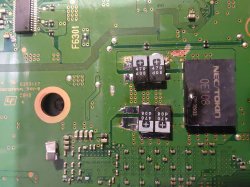
Allright, so I replaced one RSX NEC/Tokin with 4x 470uF tantalum caps. (Ignore the slightly burnt surface from the other tokin).

tantal1.jpeg

I decided to give it a shot before proceeding with next ones...

after_tantal.jpeg


And the log...


>$ bringup
00000000
# [SSM] Bringup Start.
# [SSM] PS0 ok.
# [SSM] PS1 ok.
# [SSM] PS2 ok.

>$
F0000003
# [SSM] PS3 ok.
# [SSM] PS4 ok.
# (PowerOn State)
OK 00000000
#!
#!Boot Loader SE Version 2.5.0
#!(Build ID: 3318,35708,
#!Build Date: 2008-10-11_00:31:58)
#!
#!Copyright(C) 2008 Sony Computer Entertainment Inc.All Rights Reserved.
#!
#![INFO]: Connecting to Debug Device (SB UART)
# [UCMD] Unknown command.

>$ errlog
00000000
# CODE CLOCK
# FFFFFFFF FFFFFFFF
# FFFFFFFF FFFFFFFF
# FFFFFFFF FFFFFFFF
# FFFFFFFF FFFFFFFF
# FFFFFFFF FFFFFFFF
# FFFFFFFF FFFFFFFF
# FFFFFFFF FFFFFFFF
# FFFFFFFF FFFFFFFF
# FFFFFFFF FFFFFFFF
# FFFFFFFF FFFFFFFF
# FFFFFFFF FFFFFFFF
# FFFFFFFF FFFFFFFF
# FFFFFFFF FFFFFFFF
# FFFFFFFF FFFFFFFF
# FFFFFFFF FFFFFFFF
# FFFFFFFF FFFFFFFF
# FFFFFFFF FFFFFFFF
# FFFFFFFF FFFFFFFF
# FFFFFFFF FFFFFFFF
# FFFFFFFF FFFFFFFF
# FFFFFFFF FFFFFFFF
# FFFFFFFF FFFFFFFF
# FFFFFFFF FFFFFFFF
# FFFFFFFF FFFFFFFF
# FFFFFFFF FFFFFFFF
# FFFFFFFF FFFFFFFF
# FFFFFFFF FFFFFFFF
# FFFFFFFF FFFFFFFF
# FFFFFFFF FFFFFFFF
# FFFFFFFF FFFFFFFF
# FFFFFFFF FFFFFFFF

>$ powerstate
00000000
# ATA :ON
# PCI :OFF
# PCIex:OFF
# RSX :ON
# GDDR :ON
# XDR :ON
# EURUS:ON
# SB :ON

>$ shutdown
00000000
# [SSM] Shutdown Start.
# [SSM] Shutdown ok.
# (PowerOff State)


The console stays on on Green light so...
I decided to insert the HDD and check if it works.

First trying with HDMI... FAIL.
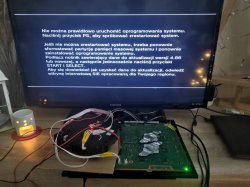
Console does not go to the service menu, but maybe it is because the firmware is missing on HDD (clean disk inserted).
I switched to component and it finally gave me a GUI.

after_tantal_component.jpeg

The OFW installation will of course fail at the moment, as the BD and WIFI logic boards ain't connected.
I will see if the HDMI works once I get the OFW properly installed.

 
I'm interested to understand those SSM PS0, PS1, PS2, PS3, PS4,. When all those are OK up to cpu and communication to rsx is fine, if it stops there " # (PowerOn State)
OK 00000000" right after all those psu it is a nand/nor problem corruption/bad flash, if goes further with no errors but still glod that is kind of rsx ram fail and rsx must be exchanged.
Another thing comes in my mind to test bringup while tristate is to gnd, not sure if much will boot after all psu are checked.
Glad more people came with those tests.
Happy New Year!
 
Last edited:
Allright, so I replaced one RSX NEC/Tokin with 4x 470uF tantalum caps. (Ignore the slightly burnt surface from the other tokin).

View attachment 35676

I decided to give it a shot before proceeding with next ones...

View attachment 35677


And the log...


>$ bringup
00000000
# [SSM] Bringup Start.
# [SSM] PS0 ok.
# [SSM] PS1 ok.
# [SSM] PS2 ok.

>$
F0000003
# [SSM] PS3 ok.
# [SSM] PS4 ok.
# (PowerOn State)
OK 00000000
#!
#!Boot Loader SE Version 2.5.0
#!(Build ID: 3318,35708,
#!Build Date: 2008-10-11_00:31:58)
#!
#!Copyright(C) 2008 Sony Computer Entertainment Inc.All Rights Reserved.
#!
#![INFO]: Connecting to Debug Device (SB UART)
# [UCMD] Unknown command.

>$ errlog
00000000
# CODE CLOCK
# FFFFFFFF FFFFFFFF
# FFFFFFFF FFFFFFFF
# FFFFFFFF FFFFFFFF
# FFFFFFFF FFFFFFFF
# FFFFFFFF FFFFFFFF
# FFFFFFFF FFFFFFFF
# FFFFFFFF FFFFFFFF
# FFFFFFFF FFFFFFFF
# FFFFFFFF FFFFFFFF
# FFFFFFFF FFFFFFFF
# FFFFFFFF FFFFFFFF
# FFFFFFFF FFFFFFFF
# FFFFFFFF FFFFFFFF
# FFFFFFFF FFFFFFFF
# FFFFFFFF FFFFFFFF
# FFFFFFFF FFFFFFFF
# FFFFFFFF FFFFFFFF
# FFFFFFFF FFFFFFFF
# FFFFFFFF FFFFFFFF
# FFFFFFFF FFFFFFFF
# FFFFFFFF FFFFFFFF
# FFFFFFFF FFFFFFFF
# FFFFFFFF FFFFFFFF
# FFFFFFFF FFFFFFFF
# FFFFFFFF FFFFFFFF
# FFFFFFFF FFFFFFFF
# FFFFFFFF FFFFFFFF
# FFFFFFFF FFFFFFFF
# FFFFFFFF FFFFFFFF
# FFFFFFFF FFFFFFFF
# FFFFFFFF FFFFFFFF

>$ powerstate
00000000
# ATA :ON
# PCI :OFF
# PCIex:OFF
# RSX :ON
# GDDR :ON
# XDR :ON
# EURUS:ON
# SB :ON

>$ shutdown
00000000
# [SSM] Shutdown Start.
# [SSM] Shutdown ok.
# (PowerOff State)


The console stays on on Green light so...
I decided to insert the HDD and check if it works.

First trying with HDMI... FAIL.
Console does not go to the service menu, but maybe it is because the firmware is missing on HDD (clean disk inserted).
I switched to component and it finally gave me a GUI.

View attachment 35678

The OFW installation will of course fail at the moment, as the BD and WIFI logic boards ain't connected.
I will see if the HDMI works once I get the OFW properly installed.


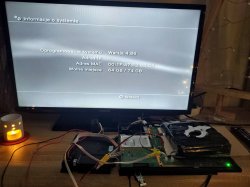
OFW installation went successful.
after_tantal_component_ofw.jpeg


However...

PS3 only works on Component output.
Service Menu also shows on Component output only.

Since the syscon errlog is clear from errors...
I assume it will not help us with diagnosing whether the Panasonic IC is working properly or not?

HDMI port seems ok - no physical damage, but I'll check the pins and make some measurements...
 
Just use hdmi commands (can't advise as not used to much, I've did just swap after measurements input/output resistance, 5v line to ic and 3v3 line if something strange, filters, diodes tied to it, more hardware then software debugging).
If nothing strange it is possible that corner of rsx (where thermal ic near) not making good connection to enable hdmi ic properly?
From here I'm pretty sure you sort it.
Just remember if you manage to get images on screen on any port means rsx is in good state.
Usually if isn't fatal errors, syscon won't block unit to work in my opinion only those errors are worst case recording, remember "special glod" isn't fatal error with rsx ram fail. Just my opinion after testing bunch of 8 or 9 cases during one year.
By rsx ram fail means not short/merged alloy balls under ram ic of rsx, just missing connection to think more.
 
Last edited:
Yes, as @vyktormvmpay25 mentioned, try the verbose log using hdmi commands to check it's communication. If there were an HDMI transmitter issue, I would have expected a 2024/2124 error, something like that.

Be sure the HDMI cable is good. Try cleaning the port and inserting the cable multiple time to knock off any oxidation on the pins. Even try blowing on it.
 
@RIP-Felix & @vyktormvmpay25

Sorry, this is perhaps a dumb question, but what HDMI commands?
I looked up the syscon uart packets, and there's no hdmi related command there...

https://www.psdevwiki.com/ps3/Syscon_Hardware#Syscon_UART_packets

Anyway, I have a doner board with good HDMI connector, as the current one fails the continuity mode (maybe it is internally damaged).
I will replace it in upcoming days, but before I do that... I wanted to check those commands you refer to..
 
@RIP-Felix & @vyktormvmpay25

Sorry, this is perhaps a dumb question, but what HDMI commands?
I looked up the syscon uart packets, and there's no hdmi related command there...

https://www.psdevwiki.com/ps3/Syscon_Hardware#Syscon_UART_packets

Anyway, I have a doner board with good HDMI connector, as the current one fails the continuity mode (maybe it is internally damaged).
I will replace it in upcoming days, but before I do that... I wanted to check those commands you refer to..
In the SYSCON github there is a tutorial PDF. Inside of that are a bunch of listed commands. I haven't played around with all of them. We were discussing the HDMI commands earlier in the last few pages, where a @feng_ye posted a log with verbose logging turned on...
Yeah I think you were right. So I gave myself a bit rest then carry on with this CECHC model today. I found "hdmi vbs ffffff" command very useful that prints out verbose debug message when bringup.

Then I checked the service manual diagram. It looks like on page 5/23 and 8/23 show that RSX communicates with HDMI chip with RS_SDOUT0/SII_SD0 and RS_BCLK0/SII_SCK. Refer to the PCB those pins are actually very close to the top edge of RSX, and connecting with R2064 and R2073. I did a press test on RSX's top edge while turning verbose on and bringup, and the resolution was successfully set! But obviously this time if I release my finger, artefacts show up. Logs here:

Code:
hdmi vbs ffffffff
[HDMI VBS] Code:ffffffff
----------------------------------------------------------------
[HDMI VBS] ( 0) BE Module               : Set
[HDMI VBS] ( 1) Command Module          : Set
[HDMI VBS] ( 2) I2C Module              : Set
[HDMI VBS] ( 3) Interrupt Module        : Set
----------------------------------------------------------------
[HDMI VBS] ( 4) Interrupt Module System : Set
[HDMI VBS] ( 5) Authentication Module   : Set
[HDMI VBS] ( 6) State Machine Module    : Set
[HDMI VBS] ( 7) EDID Read Module        : Set
----------------------------------------------------------------
[HDMI VBS] ( 8) DDC Module              : Set
[HDMI VBS] ( 9) FRAME Module            : Set
[HDMI VBS] (10) HW Module               : Set
[HDMI VBS] (11) SET Module              : Set
----------------------------------------------------------------
[HDMI VBS] (12) STATUS Module           : Set
[HDMI VBS] (13) REQ Module              : Set
[HDMI VBS] (14) SystemEvent Module      : Set
----------------------------------------------------------------
[HDMI VBS] (16) CH0 Module              : Set
[HDMI VBS] (17) CH1 Module              : Set
----------------------------------------------------------------
[HDMI VBS] (24) DVE Module              : Set
[HDMI VBS] (25) EEPROM Module           : Set
[HDMI VBS] (30) Hdmi System             : Set
[HDMI VBS] (31) Hdmi ERROR              : Set
[mullion]$
>$ br
bringup
[SSM] state: 0000 -> 0101
Bringup Mode #0 (0xFF)
[SSM] ssmCb_OnStartingBePowOn() called.
[SSM] Bringup mode : syspm_stat=00000000/00000000
[POWSEQ] PowerSeq_Setup called.
[SSM] state: 0101 -> 0201
[POWSEQ] AV Backend Setup
[hdmiEEPROM] HDMI Behavior Mode : 0xff
[hdmiEEPROM] HDMI Source Termination Mode : 0x03
[HDMI] Starting up HDMI ch.0
[HDMI] I2C Module Init ch.0
[HDMI] Init Instance ch.0
[HDMI] Start InitInstance
[HDMI]   Read Vender ID from SiI9032
[HDMI]   Read Vender ID from SiI9032
[HDMI] *** Detect SiI Chip : VID 0001 DID 9132 DRev 01 ***
[HDMI] ChipID Check Done
[HDMI] Initialize SiI9032
[HDMI] Power On SiI9032 internal block
[HDMI] Set SPD Packet
[HDMI] Interrupt Init ch.0
[hdmiINTR](ch.0) *** Ch.0 Initialize Interrupt Registers ***
[HDMI] Ssm Init ch.0
[hdmiSYSEVNT](ch.0) [HDMI] Source Termination Setting.Ch.0
Event Occure : [00004000]
[HDMI] Init Done ch.0
[HDMI] HDMI 1 Channel(s) set up!
[SSM] state: 0201 -> 0102
[hdmiBe] Try to send Event Event Ch.0 Size(4) ID[01]...
[hdmiSSM](ch.0) Un-Plug State.
[hdmiSSM](ch.0) Pluged State.
[hdmiINTR](ch.0) *** Ch.0 Interrupt Process. ***
[hdmiINTR](ch.0) *** 9032 Interrupted Ch0[0d0000]
[hdmiINTR](ch.0)      Ch.0 Mask [0e00e0]  MInt[0c0000]
[SSM] state: 0102 -> 0202
[SSM] state: 0202 -> 0103
[hdmiINTR](ch.0) *** Ch.0 Interrupt Process. ***
[hdmiINTR](ch.0) *** 9032 Interrupted Ch0[070000]
[hdmiINTR](ch.0)      Ch.0 Mask [0e00e0]  MInt[060000]
>$
[hdmiINTR](ch.0) *** Ch.0 Interrupt Process. ***
[hdmiINTR](ch.0) *** 9032 Interrupted Ch0[020000]
[hdmiINTR](ch.0)      Ch.0 Mask [0e00e0]  MInt[020000]
[SSM] state: 0103 -> 0203
[SSM] ssmCb_BeforeBeOn() called.
[SSM] state: 0203 -> 0104
Psbd_SbTransMode_Half:0x21e2
[hdmiINTR](ch.0) *** Ch.0 Interrupt Process. ***
[hdmiINTR](ch.0) *** 9032 Interrupted Ch0[020000]
[hdmiINTR](ch.0)      Ch.0 Mask [0e00e0]  MInt[020000]
[hdmiINTR](ch.0) *** Ch.0 Interrupt Process. ***
[hdmiINTR](ch.0) *** 9032 Interrupted Ch0[020000]
[hdmiINTR](ch.0)      Ch.0 Mask [0e00e0]  MInt[020000]
[hdmiINTR](ch.0) *** Ch.0 Interrupt Process. ***
[hdmiINTR](ch.0) *** 9032 Interrupted Ch0[020000]
[hdmiINTR](ch.0)      Ch.0 Mask [0e00e0]  MInt[020000]
[SSM] state: 0104 -> 0204
[SSM] state: 0204 -> 0105
[SSM] state: 0105 -> 0400
(PowerOn State)
[hdmiINTR](ch.0) *** Ch.0 Interrupt Process. ***
[hdmiINTR](ch.0) *** 9032 Interrupted Ch0[020000]
[hdmiINTR](ch.0)      Ch.0 Mask [0e00e0]  MInt[020000]
[SERV NVS] READ CMD
[hdmiINTR](ch.0) *** Ch.0 Interrupt Process. ***
[hdmiINTR](ch.0) *** 9032 Interrupted Ch0[020000]
[hdmiINTR](ch.0)      Ch.0 Mask [0e00e0]  MInt[020000]
[hdmiINTR](ch.0) *** Ch.0 Interrupt Process. ***
[hdmiINTR](ch.0) *** 9032 Interrupted Ch0[0a0000]
[hdmiINTR](ch.0)      Ch.0 Mask [0e00e0]  MInt[0a0000]
[hdmiINTR](ch.0) *** Ch.0 Interrupt Process. ***
[hdmiINTR](ch.0) *** 9032 Interrupted Ch0[060000]
[hdmiINTR](ch.0)      Ch.0 Mask [0400e0]  MInt[040000]

Boot Loader SE Version 1.5.0 [hdmiINTR](ch.0) *** Ch.0 Interrupt Process. ***
[hdmiINTR](ch.0) *** 9032 Interrupted Ch0[070000]
[hdmiINTR](ch.0)      Ch.0 Mask [0e00e0]  MInt[060000]
(Build ID: 1798,18531, Build Data: 2007-01-10_12:09:26)[hdmiINTR](ch.0) *** Ch.0 Interrupt Process. ***
[hdmiINTR](ch.0) *** 9032 Interrupted Ch0[020000]
[hdmiINTR](ch.0)      Ch.0 Mask [0e00e0]  MInt[020000]

Copyright(C) 2006 Sony Computer Entertainment Inc.All Rights Reserved.[hdmiINTR](ch.0) *** Ch.0 Interrupt Process. ***
[hdmiINTR](ch.0) *** 9032 Interrupted Ch0[020000]
[hdmiINTR](ch.0)      Ch.0 Mask [0e00e0]  MInt[020000]

[hdmiINTR](ch.0) *** Ch.0 Interrupt Process. ***
[hdmiINTR](ch.0) *** 9032 Interrupted Ch0[020000]
[hdmiINTR](ch.0)      Ch.0 Mask [0e00e0]  MInt[020000]
[hdmiINTR](ch.0) *** Ch.0 Interrupt Process. ***
[hdmiINTR](ch.0) *** 9032 Interrupted Ch0[020000]
[hdmiINTR](ch.0)      Ch.0 Mask [0e00e0]  MInt[020000]
[hdmiINTR](ch.0) *** Ch.0 Interrupt Process. ***
[hdmiINTR](ch.0) *** 9032 Interrupted Ch0[020000]
[hdmiINTR](ch.0)      Ch.0 Mask [0e00e0]  MInt[020000]
[hdmiINTR](ch.0) *** Ch.0 Interrupt Process. ***
[hdmiINTR](ch.0) *** 9032 Interrupted Ch0[020000]
[hdmiINTR](ch.0)      Ch.0 Mask [0e00e0]  MInt[020000]
[SERV SETCFG] XDR (CH0,CH1) ASSERT
[SERV SETCFG] XDR (CH0,CH1) DEASSERT
[hdmiINTR](ch.0) *** Ch.0 Interrupt Process. ***
[hdmiINTR](ch.0) *** 9032 Interrupted Ch0[0a0000]
[hdmiINTR](ch.0)      Ch.0 Mask [0e00e0]  MInt[0a0000]
[hdmiINTR](ch.0) *** Ch.0 Interrupt Process. ***
[hdmiINTR](ch.0) *** 9032 Interrupted Ch0[040000]
[hdmiINTR](ch.0)      Ch.0 Mask [0400e0]  MInt[040000]
[hdmiEDID](ch.0) EDID Block Size is 2.
[hdmiEDID](ch.0) ATD Block Revision 3.
[hdmiEDID](ch.0) ATD DTD Offset [1f].
[hdmiEDID](ch.0) ATD CEA Tag Code [4c].
[hdmiEDID](ch.0) ATD CEA Tag Code [23].
[hdmiEDID](ch.0) ATD CEA Tag Code [65].
[hdmiEDID](ch.0) VSDB Code [03][0c][00].
[hdmiEDID](ch.0) HDMI Mode Set.
[hdmiBe] Try to send Event Event Ch.0 Size(260) ID[02]...
[hdmiSSM](ch.0) Wait Power On State.
[hdmiSSM](ch.0) Wait Resolution Setting State.
[INFO]: Connecting to Debug Device (SB UART)
[SERV NVS] READ CMD
[SERV NVS] READ CMD
[SERV NVS] READ CMD
[SERV NVS] READ CMD
[SERV NVS] READ CMD
[SERV NVS] READ CMD
[SERV NVS] READ CMD
[SERV NVS] READ CMD
[SERV NVS] READ CMD
[SERV NVS] READ CMD
[SERV NVS] READ CMD
[SERV NVS] READ CMD
[SERV NVS] READ CMD
[SERV NVS] READ CMD
[SERV NVS] READ CMD
[SERV NVS] READ CMD
[SERV NVS] READ CMD
[SERV NVS] READ CMD
[SERV NVS] READ CMD
>$
[SERV NVS] READ CMD
[SERV NVS] READ CMD
[SERV NVS] READ CMD
[hdmiCmd] Command ID : 0x00
[hdmiCmd] Command ID : 0x01
[hdmiCmd] Command ID : 0x11
[hdmiCmd] Command ID : 0x0F
[hdmiCmd] Command ID : 0x10
[hdmiCmd]  Communication Command ON
[SERV NVS]
[hdmiSSM](ch.0) Authenticating State.
[hdmiAUTH](ch.0) Step 1 in.
[hdmiINTR](ch.0) *** Ch.0 Interrupt Process. ***
[hdmiINTR](ch.0) *** 9032 Interrupted Ch0[090304]
[hdmiINTR](ch.0)      Ch.0 Mask [0e00e0]  MInt[080000]
[hdmiINTR](ch.0) *** Ch.0 Interrupt Process. ***
[hdmiINTR](ch.0) *** 9032 Interrupted Ch0[0d0100]
[hdmiINTR](ch.0)      Ch.0 Mask [0800e0]  MInt[080000]
[hdmiINTR](ch.0) *** Ch.0 Interrupt Process. ***
[hdmiINTR](ch.0) *** 9032 Interrupted Ch0[090100]
[hdmiINTR](ch.0)      Ch.0 Mask [0800e0]  MInt[080000]
[hdmiINTR](ch.0) *** Ch.0 Interrupt Process. ***
[hdmiINTR](ch.0) *** 9032 Interrupted Ch0[090100]
[hdmiINTR](ch.0)      Ch.0 Mask [0e00e0]  MInt[080000]
[hdmiAUTH](ch.0) KSV Check NG!!
[hdmiSSM](ch.0) Authenticating State.
[hdmiAUTH](ch.0) Step 1 in.
[hdmiINTR](ch.0) *** Ch.0 Interrupt Process. ***
[hdmiINTR](ch.0) *** 9032 Interrupted Ch0[090104]
[hdmiINTR](ch.0)      Ch.0 Mask [0e00e0]  MInt[080000]
[hdmiINTR](ch.0) *** Ch.0 Interrupt Process. ***
[hdmiINTR](ch.0) *** 9032 Interrupted Ch0[0d0100]
[hdmiINTR](ch.0)      Ch.0 Mask [0800e0]  MInt[080000]
[hdmiINTR](ch.0) *** Ch.0 Interrupt Process. ***
[hdmiINTR](ch.0) *** 9032 Interrupted Ch0[090100]
[hdmiINTR](ch.0)      Ch.0 Mask [0800e0]  MInt[080000]
[hdmiINTR](ch.0) *** Ch.0 Interrupt Process. ***
[hdmiINTR](ch.0) *** 9032 Interrupted Ch0[090100]
[hdmiINTR](ch.0)      Ch.0 Mask [0e00e0]  MInt[080000]
[hdmiAUTH](ch.0) KSV Check NG!!
[hdmiSSM](ch.0) Authenticating State.
[hdmiAUTH](ch.0) Step 1 in.
[hdmiINTR](ch.0) *** Ch.0 Interrupt Process. ***
[hdmiINTR](ch.0) *** 9032 Interrupted Ch0[090104]
[hdmiINTR](ch.0)      Ch.0 Mask [0e00e0]  MInt[080000]
[hdmiINTR](ch.0) *** Ch.0 Interrupt Process. ***
[hdmiINTR](ch.0) *** 9032 Interrupted Ch0[0d0100]
[hdmiINTR](ch.0)      Ch.0 Mask [0800e0]  MInt[080000]
[hdmiINTR](ch.0) *** Ch.0 Interrupt Process. ***
[hdmiINTR](ch.0) *** 9032 Interrupted Ch0[090100]
[hdmiINTR](ch.0)      Ch.0 Mask [0800e0]  MInt[080000]
[hdmiINTR](ch.0) *** Ch.0 Interrupt Process. ***
[hdmiINTR](ch.0) *** 9032 Interrupted Ch0[090100]
[hdmiINTR](ch.0)      Ch.0 Mask [0e00e0]  MInt[080000]
[hdmiAUTH](ch.0) KSV Check NG!!
[hdmiSSM](ch.0) Authenticating State.
[hdmiAUTH](ch.0) Step 1 in.
[hdmiINTR](ch.0) *** Ch.0 Interrupt Process. ***
[hdmiINTR](ch.0) *** 9032 Interrupted Ch0[090104]
[hdmiINTR](ch.0)      Ch.0 Mask [0e00e0]  MInt[080000]
[hdmiINTR](ch.0) *** Ch.0 Interrupt Process. ***
[hdmiINTR](ch.0) *** 9032 Interrupted Ch0[0d0100]
[hdmiINTR](ch.0)      Ch.0 Mask [0800e0]  MInt[080000]
[hdmiINTR](ch.0) *** Ch.0 Interrupt Process. ***
[hdmiINTR](ch.0) *** 9032 Interrupted Ch0[090100]
[hdmiINTR](ch.0)      Ch.0 Mask [0800e0]  MInt[080000]
[hdmiINTR](ch.0) *** Ch.0 Interrupt Process. ***
[hdmiINTR](ch.0) *** 9032 Interrupted Ch0[090100]
[hdmiINTR](ch.0)      Ch.0 Mask [0e00e0]  MInt[080000]
[hdmiAUTH](ch.0) KSV Check NG!!
[hdmiSSM](ch.0) Authenticating State.
[hdmiAUTH](ch.0) Step 1 in.
[hdmiINTR](ch.0) *** Ch.0 Interrupt Process. ***
[hdmiINTR](ch.0) *** 9032 Interrupted Ch0[090104]
[hdmiINTR](ch.0)      Ch.0 Mask [0e00e0]  MInt[080000]
[hdmiINTR](ch.0) *** Ch.0 Interrupt Process. ***
[hdmiINTR](ch.0) *** 9032 Interrupted Ch0[0d0100]
[hdmiINTR](ch.0)      Ch.0 Mask [0800e0]  MInt[080000]
[hdmiINTR](ch.0) *** Ch.0 Interrupt Process. ***
[hdmiINTR](ch.0) *** 9032 Interrupted Ch0[090100]
[hdmiINTR](ch.0)      Ch.0 Mask [0800e0]  MInt[080000]
[hdmiINTR](ch.0) *** Ch.0 Interrupt Process. ***
[hdmiINTR](ch.0) *** 9032 Interrupted Ch0[090100]
[hdmiINTR](ch.0)      Ch.0 Mask [0e00e0]  MInt[080000]
[SERV NVS] READ CMD
[hdmiAUTH](ch.0) KSV Check NG!!
[SERV NVS] READ CMD
[hdmiSSM](ch.0) Authenticating State.
[hdmiAUTH](ch.0) Step 1 in.
[hdmiINTR](ch.0) *** Ch.0 Interrupt Process. ***
[SERV NVS] READ CMD
[hdmiIN
>$
TR](ch.0) *** 9032 Interrupted Ch0[090104]
[hdmiINTR](ch.0)      Ch.0 Mask [0e00e0]  MInt[080000]
[SERV NVS] READ CMD
[hdmiINTR](ch.0) *** Ch.0 Interrupt Process. ***
[hdmiINTR](ch.0) *** 9032 Interrupted Ch0[0d0100]
[hdmiINTR](ch.0)      Ch.0 Mask [0800e0]  MInt[080000]
[hdmiINTR](ch.0) *** Ch.0 Interrupt Process. ***
[hdmiINTR](ch.0) *** 9032 Interrupted Ch0[090100]
[hdmiINTR](ch.0)      Ch.0 Mask [0800e0]  MInt[080000]
[hdmiINTR](ch.0) *** Ch.0 Interrupt Process. ***
[hdmiINTR](ch.0) *** 9032 Interrupted Ch0[090100]
[hdmiINTR](ch.0)      Ch.0 Mask [0e00e0]  MInt[080000]
[hdmiAUTH](ch.0) KSV Check NG!!
[hdmiSSM](ch.0) Authenticating State.
[hdmiAUTH](ch.0) Step 1 in.
[hdmiINTR](ch.0) *** Ch.0 Interrupt Process. ***
[hdmiINTR](ch.0) *** 9032 Interrupted Ch0[090104]
[hdmiINTR](ch.0)      Ch.0 Mask [0e00e0]  MInt[080000]
[hdmiINTR](ch.0) *** Ch.0 Interrupt Process. ***
[hd104]
[hdmiINTR](ch.0)      Ch.0 Mask [0e00e0]  MInt[080000]
[hdmiINTR](ch.0) *** Ch.0 Interrupt Process. ***
[hdmiINTR](ch.0) *** 9032 Interrupted Ch0[0d0100]
[hdmiINTR](ch.0)      Ch.0 Mask [0800e0]  MInt[080000]
[hdmiINTR](ch.0) *** Ch.0 Interrupt Process. ***
[hdmiINTR](ch.0) *** 9032 Interrupted Ch0[090100]
[hdmiINTR](ch.0)      Ch.0 Mask [0800e0]  MInt[080000]
[hdmiINTR](ch.0) *** Ch.0 Interrupt Process. ***
[hdmiINTR](ch.0) *** 9032 Interrupted Ch0[090100]
[hdmiINTR](ch.0)      Ch.0 Mask [0e00e0]  MInt[080000]
[hdmiAUTH](ch.0) KSV Check NG!!
[hdmiSSM](ch.0) Authenticating State.
[hdmiAUTH](ch.0) Step 1 in.
[hdmiINTR](ch.0) *** Ch.0 Interrupt Process. ***
[hdmiINTR](ch.0) *** 9032 Interrupted Ch0[090104]
[hdmiINTR](ch.0)      Ch.0 Mask [0e00e0]  MInt[080000]
[hdmiINTR](ch.0) *** Ch.0 Interrupt Process. ***
[hdmiINTR](ch.0) *** 9032 Interrupted Ch0[0d0100]
[hdmiINTR](ch.0)      Ch.0 Mask [0800e0]  MInt[080000]
[hdmiINTR](ch.0) *** Ch.0 Interrupt Process. ***
[hdmiINTR](ch.0) *** 9032 Interrupted Ch0[090100]
[hdmiINTR](ch.0)      Ch.0 Mask [0800e0]  MInt[080000]
[hdmiINTR](ch.0) *** Ch.0 Interrupt Process. ***
[hdmiINTR](ch.0) *** 9032 Interrupted Ch0[090100]
[hdmiINTR](ch.0)      Ch.0 Mask [0e00e0]  MInt[080000]
[hdmiAUTH](ch.0) KSV Check NG!!
[hdmiSSM](ch.0) Authenticating State.
[hdmiAUTH](ch.0) Step 1 in.
[hdmiINTR](ch.0) *** Ch.0 Interrupt Process. ***
[hdmiINTR](ch.0) *** 9032 Interrupted Ch0[090104]
[hdmiINTR](ch.0)      Ch.0 Mask [0e00e0]  MInt[080000]
[hdmiINTR](ch.0) *** Ch.0 Interrupt Process. ***
[hdmiINTR](ch.0) *** 9032 Interrupted Ch0[0d0100]
[hdmiINTR](ch.0)      Ch.0 Mask [0800e0]  MInt[080000]
[hdmiINTR](ch.0) *** Ch.0 Interrupt Process. ***
[hdmiINTR](ch.0) *** 9032 Interrupted Ch0[090100]
[hdmiINTR](ch.0)      Ch.0 Mask [0800e0]  MInt[080000]
[hdmiINTR](ch.0) *** Ch.0 Interrupt Process. ***
[hdmiINTR](ch.0) *** 9032 Interrupted Ch0[090100]
[hdmiINTR](ch.0)      Ch.0 Mask [0e00e0]  MInt[080000]
[hdmiAUTH](ch.0) KSV Check NG!!
[hdmiSSM](ch.0) Authenticating State.
[hdmiAUTH](ch.0) Step 1 in.
[hdmiINTR](ch.0) *** Ch.0 Interrupt Process. ***
[hdmiINTR](ch.0) *** 9032 Interrupted Ch0[090104]
[hdmiINTR](ch.0)      Ch.0 Mask [0e00e0]  MInt[080000]
[hdmiINTR](ch.0) *** Ch.0 Interrupt Process. ***
[hdmiINTR](ch.0) *** 9032 Interrupted Ch0[0d0100]
[hdmiINTR](ch.0)      Ch.0 Mask [0800e0]  MInt[080000]
[hdmiINTR](ch.0) *** Ch.0 Interrupt Process. ***
[hdmiINTR](ch.0) *** 9032 Interrupted Ch0[090100]
[hdmiINTR](ch.0)      Ch.0 Mask [0800e0]  MInt[080000]
[hdmiINTR](ch.0) *** Ch.0 Interrupt Process. ***
[hdmiINTR](ch.0) *** 9032 Interrupted Ch0[090100]
[hdmiINTR](ch.0)      Ch.0 Mask [0e00e0]  MInt[080000]
[hdmiAUTH](ch.0) KSV Check NG!!
[hdmiSSM](ch.0) Authenticating State.
[hdmiAUTH](ch.0) Step 1 in.
[hdmiINTR](ch.0) *** Ch.0 Interrupt Process. ***
[hdmiINTR](ch.0) *** 9032 Interrupted Ch0[090104]
[hdmiINTR](ch.0)      Ch.0 Mask [0e00e0]  MInt[080000]
[hdmiINTR](ch.0) *** Ch.0 Interrupt Process. ***
[hdmiINTR](ch.0) *** 9032 Interrupted Ch0[0d0100]
[hdmiINTR](ch.0)      Ch.0 Mask [0800e0]  MInt[080000]
[hdmiINTR](ch.0) *** Ch.0 Interrupt Process. ***
[hdmi
>$ sd
INTR](ch.0) *** 9032 Interrupted Ch0[090100]
[hdmiINTR](ch.0)      Ch.0 Mask [0800e0]  MInt[080000]
[hdmiINTR](ch.0) *** Ch.0 Interrupt Process. ***
[hdmiINTR](ch.0) *** 9032 Interrupted Ch0[090100]
[hdmiINTR](ch.0)      Ch.0 Mask [0e00e0]  MInt[080000]
[hdmiAUTH](ch.0) KSV Check NG!!
[hdmiSSM](ch.0) Authenticating State.
[hdmiAUTH](ch.0) Step 1 in.
[hdmiINTR](ch.0) *** Ch.0 Interrupt Process. ***
[hdmiINTR](ch.0) *** 9032 Interrupted Ch0[090104]
[hdmiINTR](ch.0)      Ch.0 Mask [0e00e0]  MInt[080000]
[hdmiINTR](ch.0) *** Ch.0 Interrupt Process. ***
[hdmiINTR](ch.0) *** 9032 Interrupted Ch0[0d0100]
[hdmiINTR](ch.0)      Ch.0 Mask [0800e0]  MInt[080000]
[hdmiINTR](ch.0) *** Ch.0 Interrupt Process. ***
[hdmiINTR](ch.0) *** 9032 Interrupted Ch0[090100].0) KSV Check NG!!
[hdmiSSM](ch.0) Authenticating State.
[hdmiAUTH](ch.0) Step 1 in.
[hdmiINTR](ch.0) *** Ch.0 Interrupt Process. ***
[hdmiINTR](ch.0) *** 9032 Interrupted Ch0[090104]
[hdmiINTR](ch.0)      Ch.0 Mask [0e00e0]  MInt[080000]
[hdmiINTR](ch.0) *** Ch.0 Interrupt Process. ***
[hdmiINTR](ch.0) *** 9032 Interrupted Ch0[0d0100]
[hdmiINTR](ch.0)      Ch.0 Mask [0800e0]  MInt[080000]
[hdmiINTR](ch.0) *** Ch.0 Interrupt Process. ***
[hdmiINTR](ch.0) *** 9032 Interrupted Ch0[090100]
[hdmiINTR](ch.0)      Ch.0 Mask [0800e0]  MInt[080000]
[hdmiINTR](ch.0) *** Ch.0 Interrupt Process. ***
[hdmiINTR](ch.0) *** 9032 Interrupted Ch0[090100]
[hdmiINTR](ch.0)      Ch.0 Mask [0e00e0]  MInt[080000]
[hdmiAUTH](ch.0) KSV Check NG!!
[hdmiSSM](ch.0) Authenticating State.
[hdmiAUTH](ch.0) Step 1 in.
[hdmiINTR](ch.0) *** Ch.0 Interrupt Process. ***
[hdmiINTR](ch.0) *** 9032 Interrupted Ch0[090104]
[hdmiINTR](ch.0)      Ch.0 Mask [0e00e0]  MInt[080000]
[hdmiINTR](ch.0) *** Ch.0 Interrupt Process. ***
[hdmiINTR](ch.0) *** 9032 Interrupted Ch0[0d0100]
[hdmiINTR](ch.0)      Ch.0 Mask [0800e0]  MInt[080000]
[hdmiINTR](ch.0) *** Ch.0 Interrupt Process. ***
[hdmiINTR](ch.0) *** 9032 Interrupted Ch0[090100]
[hdmiINTR](ch.0)      Ch.0 Mask [0800e0]  MInt[080000]
[hdmiINTR](ch.0) *** Ch.0 Interrupt Process. ***
[hdmiINTR](ch.0) *** 9032 Interrupted Ch0[090100]
[hdmiINTR](ch.0)      Ch.0 Mask [0e00e0]  MInt[080000]
[hdmiAUTH](ch.0) KSV Check NG!!
[hdmiSSM](ch.0) Authenticating State.
[hdmiAUTH](ch.0) Step 1 in.
[hdmiINTR](ch.0) *** Ch.0 Interrupt Process. ***
[hdmiINTR](ch.0) *** 9032 Interrupted Ch0[090104]
[hdmiINTR](ch.0)      Ch.0 Mask [0e00e0]  MInt[080000]
[hdmiINTR](ch.0) *** Ch.0 Interrupt Process. ***
[hdmiINTR](ch.0) *** 9032 Interrupted Ch0[0d0100]
[hdmiINTR](ch.0)      Ch.0 Mask [0800e0]  MInt[080000]
[hdmiINTR](ch.0) *** Ch.0 Interrupt Process. ***
[hdmiINTR](ch.0) *** 9032 Interrupted Ch0[090100]
[hdmiINTR](ch.0)      Ch.0 Mask [0800e0]  MInt[080000]
[hdmiINTR](ch.0) *** Ch.0 Interrupt Process. ***
[hdmiINTR](ch.0) *** 9032 Interrupted Ch0[090100]
[hdmiINTR](ch.0)      Ch.0 Mask [0e00e0]  MInt[080000]
[hdmiAUTH](ch.0) KSV Check NG!!
[hdmiSSM](ch.0) Authenticating State.
[hdmiAUTH](ch.0) Step 1 in.
[hdmiINTR](ch.0) *** Ch.0 Interrupt Process. ***
[hdmiINTR](ch.0) *** 9032 Interrupted Ch0[090104]
[hdmiINTR](ch.0)      Ch.0 Mask [0e00e0]  MInt[080000]
[hdmiINTR](ch.0) *** Ch.0 Interrupt Process. ***
[hdmiINTR](ch.0) *** 9032 Interrupted Ch0[0d0100]
[hdmiINTR](ch.0)      Ch.0 Mask [0800e0]  MInt[080000]
[hdmiINTR](ch.0) *** Ch.0 Interrupt Process. ***
[hdmiINTR](ch.0) *** 9032 Interrupted Ch0[090100]
[hdmiINTR](ch.0)      Ch.0 Mask [0800e0]  MInt[080000]
[hdmiINTR](ch.0) *** Ch.0 Interrupt Process. ***
[hdmiINTR](ch.0) *** 9032 Interrupted Ch0[090100]
[hdmiINTR](ch.0)      Ch.0 Mask [0e00e0]  MInt[080000]
[hdmiAUTH](ch.0) KSV Check NG!!
[hdmiSSM](ch.0) Authenticating State.
[hdmiAUTH](ch.0) Step 1 in.
[hdmiINTR](ch.0) *** Ch.0 Interrupt Process. ***
[hdmiINTR](ch.0) *** 9032 Interrupted Ch0[090104]
[hdmiINTR](ch.0)      Ch.0 Mask [0e00e0]  MInt[080000]
[hdmiINTR](ch.0) *** Ch.0 Interrupt Process. ***
[hdmiINTR](ch.0) *** 9032 Interrupted Ch0[0d0100]
[hdmiINTR](ch.0)      Ch.0 Mask [0800e0]  MInt[080000]

So no doubt the RSX needs a reball. Not quite sure about all the KSV Check NG messages though, they keep printing out.

Looks like hdmi vbs followed by a bringup command.
 
In the SYSCON github there is a tutorial PDF. Inside of that are a bunch of listed commands. I haven't played around with all of them. We were discussing the HDMI commands earlier in the last few pages, where a @feng_ye posted a log with verbose logging turned on...


Looks like hdmi vbs followed by a bringup command.

No, these commands are missing on SW VER-001.

Allright, the HDMI port was indeed damaged (half of the pins were broken and that's why there was no continuity).
I replaced the HDMI port => continuity test successful.
However... Video output on HDMI is still missing.

Before you suggest it... I already entered the service menu, and still nada...
The output goes to the Component just fine, but when it goes to HDMI, it says that there is "unsupported resolution" and then it switches to Component..

Could it be that the Panasonic IC is somehow... in frozen state?
On the other hand... I can resolder back the original Panasonic IC and check if it works...

Original: MN864709 841P6154
Doner board one: MN864709 838P101B

Maybe it's a different revision and they are not compatible?
 

Similar threads

Back
Top