PS3 Fault finding YLOD with the SYSCON - First steps and Error reporting

No, these commands are missing on SW VER-001.

Allright, the HDMI port was indeed damaged (half of the pins were broken and that's why there was no continuity).
I replaced the HDMI port => continuity test successful.
However... Video output on HDMI is still missing.

Before you suggest it... I already entered the service menu, and still nada...
The output goes to the Component just fine, but when it goes to HDMI, it says that there is "unsupported resolution" and then it switches to Component..

Could it be that the Panasonic IC is somehow... in frozen state?
On the other hand... I can resolder back the original Panasonic IC and check if it works...

Original: MN864709 841P6154
Doner board one: MN864709 838P101B

Maybe it's a different revision and they are not compatible?
DID you check the thermistors (TH2401)? Should read the same as the DVE thermistor (3 ohms on a BC model). Maybe I already suggested this, I forget.

I would expect an error tho. Something like 2124/2024.
 
No, these commands are missing on SW VER-001.

Allright, the HDMI port was indeed damaged (half of the pins were broken and that's why there was no continuity).
I replaced the HDMI port => continuity test successful.
However... Video output on HDMI is still missing.

Before you suggest it... I already entered the service menu, and still nada...
The output goes to the Component just fine, but when it goes to HDMI, it says that there is "unsupported resolution" and then it switches to Component..

Could it be that the Panasonic IC is somehow... in frozen state?
On the other hand... I can resolder back the original Panasonic IC and check if it works...

Original: MN864709 841P6154
Doner board one: MN864709 838P101B

Maybe it's a different revision and they are not compatible?
Have you checked the resistors in between the HDMI controller and the HDMI connector ?, there is a wide "bus" of traces in between them with 4 resistors as far i remember (in the first pins before #25)
https://www.psdevwiki.com/ps3/MN8647091

Keep in mind also that the HDMI cable includes 5v lines
https://www.psdevwiki.com/ps3/Connectors#HDMI_Out

Im mentioning it because the broken/bended pins could create a shorcut and burn something
Actually, as far i remember there is a voltage reguator responsible to generate that 5v line, and is directly related with the "metadata" exchanged by the PS3 and the TV

As example, the PS3 firmware keeps a record of some of the TV settings (supported resolutions, etc...) inside the file xRegistry.sys
I dont know if syscon keeps a record of that too, but im sure is checked in every boot (just incase you replace the TV... is needed to check the new TV features in every boot)


------------
Edit:
The hdmi command is available in sherwood syscons, doesnt seems to have any special restriction
https://www.psdevwiki.com/ps3/Syscon_Firmware#Sherwood

Try to type "HDMI help" to see if it ouputs some info, sony made some important changes in between mullion and sherwood syscons, but i dont think they removed the access to the hdmi command entirelly, it should work at least partially (and there is a chance they improved it, the migration from mullion to sherwood is a dual sided sword, it have some features removed and other new features added)
 
Last edited:
On a COK-001there's a 7805 by the DVE that provides analog 5V. But again, if the voltage were missing there should be an error.
 
Last edited:
On a COK-001there's a 7805 in the by the DVE that provides analog 5V. But again, if the voltage were missing there should be an error.
Since PS3 slim that voltages are separated, the other day i was looking at it and is way different than the circuit in the service manuals of the first PS3 models
The biggest difference is in the service manuals HDMI and DVE are sharing the same power line (and some more components too as far i remember), but in PS3 slims are separated

The equivalent to the 7805 from the COK-001 should be the voltage regulator 348A (to power the HDMI)
https://www.psdevwiki.com/ps3/Talk:Regulators
But i was not able to find who is the responsible of powering DVE... for sure is a different component, i was lurking the whole motherboard like a bloodhound dog with the multimeter, but no luck... there is some mistery involved in it... my guess is that is directly powered by RSX... or beter said... RSX takes one of his voltage rails and it "switches" to redirected it to the DVE
 
Ok I think any MN864709 should work, isn't that ic or even original ic issue, then the corner of rsx connection. Hope not but is last thing to do reflow/reball. Or at least a bit of pressure on that corner to test.
226f04b1449c9bc1a7a0fa0f25d34e62.jpg

His issue is with that corner too much pressure probably losing connection with pcb/damaged pad imo.
271f7e497f45cedec4d22be6ef6d53f5.jpg

He needs to keep pushed before any power on to give full boot of all components.
Pressure on pcb, not on clamp.
 
Last edited:
If it is not the port and you already changed the Panasonic chip, I think this could help, it's a fix that I read a while ago. Look for the HDMI part. https://www.zonadepruebas.com/viewtopic.php?t=3551

If that didn't fix the issue, then the RSX is in trouble, as Victor is aimming.

Another while ago I was thinking in buying a blacky one (B01) that the seller said was having troubles with the BD drive and the HDMI port, the console was only showing video via A/V, "working perfectly except for those little aspects", which is a total trap if you are just a collector that don't know anything and pretend to fix it later with a technician. The problem is, that if you can't test the console properly running, then you'll never know if it has a glorious YLOD due tokins or overheating. but not only that, my eyes were on that HDMI port, I was watching me in the future fighting against an opponent that I know I can't defeat without weapons (RSX). So I went ahead and made some questions, and obviously never got an answer, and I have to make notice that thi one wasn't "cheap" at all, but at the end of the day it was in really good aesthetical condition, and hence why I'm still sad. AFTER 3 MONTHS lol. My ego for not getting a response saved me some money but I'm sad :( :D
 
Last edited:
DID you check the thermistors (TH2401)? Should read the same as the DVE thermistor (3 ohms on a BC model). Maybe I already suggested this, I forget.

I would expect an error tho. Something like 2124/2024.
Hello,
the command works in lowercase. (hdmi vbs),
and yes, I have replaced the Panasonic IC, and now I see errors...


C:\Users\chris\Desktop\PS3_syscon>ps3_syscon_uart_script.py COM3 SW
>$ AUTH
Auth1 response invalid
>$ AUTH
Auth1 response invalid
>$ auth
Auth1 response invalid
>$ shutdown
FFFFFFFF Answer length
>$ AUTH
Auth successful
>$ errlog
00000000
# CODE CLOCK
# A0112024 FFFFFFFF
# A0112024 FFFFFFFF
# A0112024 FFFFFFFF
# A0112024 FFFFFFFF
# A0112024 FFFFFFFF
# A0112024 FFFFFFFF
# A0112024 FFFFFFFF
# A0112024 FFFFFFFF
# A0112024 FFFFFFFF
# A0112024 FFFFFFFF
# A0112024 FFFFFFFF
# A0112024 FFFFFFFF
# A0112024 FFFFFFFF
# A0112024 FFFFFFFF
# FFFFFFFF FFFFFFFF
# FFFFFFFF FFFFFFFF
# FFFFFFFF FFFFFFFF
# FFFFFFFF FFFFFFFF
# FFFFFFFF FFFFFFFF
# FFFFFFFF FFFFFFFF
# FFFFFFFF FFFFFFFF
# FFFFFFFF FFFFFFFF
# FFFFFFFF FFFFFFFF
# FFFFFFFF FFFFFFFF
# FFFFFFFF FFFFFFFF
# FFFFFFFF FFFFFFFF
# FFFFFFFF FFFFFFFF
# FFFFFFFF FFFFFFFF
# FFFFFFFF FFFFFFFF
# FFFFFFFF FFFFFFFF
# FFFFFFFF FFFFFFFF

>$ hdmi vbs
00000000
# [HDMI VBS] Code:00000000
# ----------------------------------------------------------------
# [HDMI VBS] BE Module : 00 Unset
# [HDMI VBS] Command Module : 01 Unset
# [HDMI VBS] I2C Module : 02 Unset
# [HDMI VBS] Interrupt Module : 03 Unset
# ----------------------------------------------------------------
# [HDMI VBS] Interrupt Module System : 04 Unset
# [HDMI VBS] Authentication Module : 05 Unset
# [HDMI VBS] State Machine Module : 06 Unset
# [HDMI VBS] EDID Read Module : 07 Unset
# ----------------------------------------------------------------
# [HDMI VBS] DDC Module : 08 Unset
# [HDMI VBS] FRAME Module : 09 Unset
# [HDMI VBS] HW Module : 0A Unset
# [HDMI VBS] SET Module : 0B Unset
# ----------------------------------------------------------------
# [HDMI VBS] STATUS Module : 0C Unset
# [HDMI VBS] REQ Module : 0D Unset
# [HDMI VBS] SystemEvent Module : 0E Unset
# ----------------------------------------------------------------
# [HDMI VBS] CH0 Module : 10 Unset
# [HDMI VBS] CH1 Module : 11 Unset
# ----------------------------------------------------------------
# [HDMI VBS] DVE Module : 18 Unset
# [HDMI VBS] EEPROM Module : 19 Unset
# [HDMI VBS] Hdmi System : 1E Unset
# [HDMI VBS] Hdmi ERROR : 1F Unset

>$


Also checked the voltages, and 5V is present on the HDMI port pin 1
according to :
https://www.psdevwiki.com/ps3/File:HDMI_pads_as_seen_on_JTP-001_-_(Mr.Dutch).jpg


So with this original panasonic IC,
it is a constant GLOD (stays on, does not shut down, does not go into service menu, does not give any output neither on hdmi, nor on component).

So, may we assume that
A0112024 + A0112124 equals bad Panasonic IC?
 
Last edited:
Have you checked the resistors in between the HDMI controller and the HDMI connector ?, there is a wide "bus" of traces in between them with 4 resistors as far i remember (in the first pins before #25)
https://www.psdevwiki.com/ps3/MN8647091

Keep in mind also that the HDMI cable includes 5v lines
https://www.psdevwiki.com/ps3/Connectors#HDMI_Out

Im mentioning it because the broken/bended pins could create a shorcut and burn something
Actually, as far i remember there is a voltage reguator responsible to generate that 5v line, and is directly related with the "metadata" exchanged by the PS3 and the TV

As example, the PS3 firmware keeps a record of some of the TV settings (supported resolutions, etc...) inside the file xRegistry.sys
I dont know if syscon keeps a record of that too, but im sure is checked in every boot (just incase you replace the TV... is needed to check the new TV features in every boot)


------------
Edit:
The hdmi command is available in sherwood syscons, doesnt seems to have any special restriction
https://www.psdevwiki.com/ps3/Syscon_Firmware#Sherwood

Try to type "HDMI help" to see if it ouputs some info, sony made some important changes in between mullion and sherwood syscons, but i dont think they removed the access to the hdmi command entirelly, it should work at least partially (and there is a chance they improved it, the migration from mullion to sherwood is a dual sided sword, it have some features removed and other new features added)

You mean the HDMI IC filters?
Yes, they are all good.
 
So yes not sure what pin will enable hdmi ic into syscon, I may not be right but more devs here can explain more about what relates to that corner, is twisted but for sure is that corner previous I've pointed.
a9fe19dd5ace2855e7b4d8619d02de8b.jpg

I can't promise you will fix with simple exchange of ic, I may be wrong but is last thing.
 
Hello,
the command works in lowercase. (hdmi vbs),
and yes, I have replaced the Panasonic IC, and now I see errors...


Also checked the voltages, and 5V is present on the HDMI port pin 1
according to :
https://www.psdevwiki.com/ps3/File:HDMI_pads_as_seen_on_JTP-001_-_(Mr.Dutch).jpg


So with this original panasonic IC,
it is a constant GLOD (stays on, does not shut down, does not go into service menu, does not give any output neither on hdmi, nor on component).

So, may we assume that
A0112024 + A0112124 equals bad Panasonic IC?

@RIP-Felix

I replaced the Panasonic IC to the one from doner board.

Now the errorlog is clear from errors, which confirms that the errors above were caused by bad Panasonic IC.

C:\Users\chris\Desktop\PS3_syscon>ps3_syscon_uart_script.py COM3 SW
>$ AUTH
Auth successful
>$ errlog
00000000
# CODE CLOCK
# A0112024 FFFFFFFF
# A0112024 FFFFFFFF
# A0112024 FFFFFFFF
# A0112024 FFFFFFFF
# A0112024 FFFFFFFF
# A0112024 FFFFFFFF
# A0112024 FFFFFFFF
# A0112024 FFFFFFFF
# A0112024 FFFFFFFF
# A0112024 FFFFFFFF
# A0112024 FFFFFFFF
# A0112024 FFFFFFFF
# A0112024 FFFFFFFF
# A0112024 FFFFFFFF
# A0112024 FFFFFFFF
# A0112024 FFFFFFFF
# A0112024 FFFFFFFF
# A0112124 FFFFFFFF
# A0112124 FFFFFFFF
# A0112124 FFFFFFFF
# A0112124 FFFFFFFF
# A0112124 FFFFFFFF
# A0112124 FFFFFFFF
# A0112124 FFFFFFFF
# A0112124 FFFFFFFF
# A0112124 FFFFFFFF
# A0112124 FFFFFFFF
# A0112124 FFFFFFFF
# A0112124 FFFFFFFF
# A0112124 FFFFFFFF
# A0112124 FFFFFFFF

>$ errlog clear
FFFFFFFF Answer length
>$
F0000003
OK 00000000
# [UCMD] Unknown command.

>$ errlog
00000000
# CODE CLOCK
# FFFFFFFF FFFFFFFF
# FFFFFFFF FFFFFFFF
# FFFFFFFF FFFFFFFF
# FFFFFFFF FFFFFFFF
# FFFFFFFF FFFFFFFF
# FFFFFFFF FFFFFFFF
# FFFFFFFF FFFFFFFF
# FFFFFFFF FFFFFFFF
# FFFFFFFF FFFFFFFF
# FFFFFFFF FFFFFFFF
# FFFFFFFF FFFFFFFF
# FFFFFFFF FFFFFFFF
# FFFFFFFF FFFFFFFF
# FFFFFFFF FFFFFFFF
# FFFFFFFF FFFFFFFF
# FFFFFFFF FFFFFFFF
# FFFFFFFF FFFFFFFF
# FFFFFFFF FFFFFFFF
# FFFFFFFF FFFFFFFF
# FFFFFFFF FFFFFFFF
# FFFFFFFF FFFFFFFF
# FFFFFFFF FFFFFFFF
# FFFFFFFF FFFFFFFF
# FFFFFFFF FFFFFFFF
# FFFFFFFF FFFFFFFF
# FFFFFFFF FFFFFFFF
# FFFFFFFF FFFFFFFF
# FFFFFFFF FFFFFFFF
# FFFFFFFF FFFFFFFF
# FFFFFFFF FFFFFFFF
# FFFFFFFF FFFFFFFF

>$ hdmi vbs
00000000
# [HDMI VBS] Code:00000000
# ----------------------------------------------------------------
# [HDMI VBS] BE Module : 00 Unset
# [HDMI VBS] Command Module : 01 Unset
# [HDMI VBS] I2C Module : 02 Unset
# [HDMI VBS] Interrupt Module : 03 Unset
# ----------------------------------------------------------------
# [HDMI VBS] Interrupt Module System : 04 Unset
# [HDMI VBS] Authentication Module : 05 Unset
# [HDMI VBS] State Machine Module : 06 Unset
# [HDMI VBS] EDID Read Module : 07 Unset
# ----------------------------------------------------------------
# [HDMI VBS] DDC Module : 08 Unset
# [HDMI VBS] FRAME Module : 09 Unset
# [HDMI VBS] HW Module : 0A Unset
# [HDMI VBS] SET Module : 0B Unset
# ----------------------------------------------------------------
# [HDMI VBS] STATUS Module : 0C Unset
# [HDMI VBS] REQ Module : 0D Unset
# [HDMI VBS] SystemEvent Module : 0E Unset
# ----------------------------------------------------------------
# [HDMI VBS] CH0 Module : 10 Unset
# [HDMI VBS] CH1 Module : 11 Unset
# ----------------------------------------------------------------
# [HDMI VBS] DVE Module : 18 Unset
# [HDMI VBS] EEPROM Module : 19 Unset
# [HDMI VBS] Hdmi System : 1E Unset
# [HDMI VBS] Hdmi ERROR : 1F Unset

>$ powerstate
00000000
# ATA :OFF
# PCI :OFF
# PCIex:OFF
# RSX :OFF
# GDDR :OFF
# XDR :OFF
# EURUS:OFF
# SB :OFF

>$ bringup
00000000
# [SSM] Bringup Start.
# [SSM] PS0 ok.
# [SSM] PS1 ok.
# [SSM] PS2 ok.

>$
F0000003
# [SSM] PS3 ok.
# [SSM] PS4 ok.
# (PowerOn State)
OK 00000000
#!
#!Boot Loader SE Version 2.5.0
#!(Build ID: 3318,35708,
#!Build Date: 2008-10-11_00:31:58)
#!
#!Copyright(C) 2008 Sony Computer Entertainment Inc.All Rights Reserved.
#!
#![INFO]: Connecting to Debug Device (SB UART)
# [UCMD] Unknown command.

>$ errlog
00000000
# CODE CLOCK
# FFFFFFFF FFFFFFFF
# FFFFFFFF FFFFFFFF
# FFFFFFFF FFFFFFFF
# FFFFFFFF FFFFFFFF
# FFFFFFFF FFFFFFFF
# FFFFFFFF FFFFFFFF
# FFFFFFFF FFFFFFFF
# FFFFFFFF FFFFFFFF
# FFFFFFFF FFFFFFFF
# FFFFFFFF FFFFFFFF
# FFFFFFFF FFFFFFFF
# FFFFFFFF FFFFFFFF
# FFFFFFFF FFFFFFFF
# FFFFFFFF FFFFFFFF
# FFFFFFFF FFFFFFFF
# FFFFFFFF FFFFFFFF
# FFFFFFFF FFFFFFFF
# FFFFFFFF FFFFFFFF
# FFFFFFFF FFFFFFFF
# FFFFFFFF FFFFFFFF
# FFFFFFFF FFFFFFFF
# FFFFFFFF FFFFFFFF
# FFFFFFFF FFFFFFFF
# FFFFFFFF FFFFFFFF
# FFFFFFFF FFFFFFFF
# FFFFFFFF FFFFFFFF
# FFFFFFFF FFFFFFFF
# FFFFFFFF FFFFFFFF
# FFFFFFFF FFFFFFFF
# FFFFFFFF FFFFFFFF
# FFFFFFFF FFFFFFFF

>$ hdmi vbs
00000000
# [HDMI VBS] Code:00000000
# ----------------------------------------------------------------
# [HDMI VBS] BE Module : 00 Unset
# [HDMI VBS] Command Module : 01 Unset
# [HDMI VBS] I2C Module : 02 Unset
# [HDMI VBS] Interrupt Module : 03 Unset
# ----------------------------------------------------------------
# [HDMI VBS] Interrupt Module System : 04 Unset
# [HDMI VBS] Authentication Module : 05 Unset
# [HDMI VBS] State Machine Module : 06 Unset
# [HDMI VBS] EDID Read Module : 07 Unset
# ----------------------------------------------------------------
# [HDMI VBS] DDC Module : 08 Unset
# [HDMI VBS] FRAME Module : 09 Unset
# [HDMI VBS] HW Module : 0A Unset
# [HDMI VBS] SET Module : 0B Unset
# ----------------------------------------------------------------
# [HDMI VBS] STATUS Module : 0C Unset
# [HDMI VBS] REQ Module : 0D Unset
# [HDMI VBS] SystemEvent Module : 0E Unset
# ----------------------------------------------------------------
# [HDMI VBS] CH0 Module : 10 Unset
# [HDMI VBS] CH1 Module : 11 Unset
# ----------------------------------------------------------------
# [HDMI VBS] DVE Module : 18 Unset
# [HDMI VBS] EEPROM Module : 19 Unset
# [HDMI VBS] Hdmi System : 1E Unset
# [HDMI VBS] Hdmi ERROR : 1F Unset

>$ shutdown
00000000
# [SSM] Shutdown Start.
# [SSM] Shutdown ok.
# (PowerOff State)

>$
 
So looks like the HDMI transmitter can't be setup properly. If it's not the voltage, SMDs around the chip, or solder joints on the the chip itself, then I think @vyktormvmpay25 is correct. The connection is broken at the BGA of the RSX.

Now, those parameters are set and stored by SYSCON. But the RSX sends video I/O out to the HDMI chip and it interfaces with the CPU/SB. BGA defects that don't affect the FlexIO cause a GLOD if they affect the video out pins to the HDMI and/or MultiAV controller.

The only other thing I can think of is some blown cap or tiny resistor in the I2C or Serial data line the SYSCON uses to communicate and setup the HDMI transmitter. Other than that, I think it's time to reball.

Maybe there would be something useful in the SB UART? @vyktormvmpay25 would know if it's worth having a look.
 
So looks like the HDMI transmitter can't be setup properly. If it's not the voltage, SMDs around the chip, or solder joints on the the chip itself, then I think @vyktormvmpay25 is correct. The connection is broken at the BGA of the RSX.

Now, those parameters are set and stored by SYSCON. But the RSX sends video I/O out to the HDMI chip and it interfaces with the CPU/SB. BGA defects that don't affect the FlexIO cause a GLOD if they affect the video out pins to the HDMI and/or MultiAV controller.

The only other thing I can think of is some blown cap or tiny resistor in the I2C or Serial data line the SYSCON uses to communicate and setup the HDMI transmitter. Other than that, I think it's time to reball.

Maybe there would be something useful in the SB UART? @vyktormvmpay25 would know if it's worth having a look.

Well, there must be some sort of communication between syscon and hdmi IC, as it has reported errors with faulty Panasonic IC,
and it does not report them when I put the doner IC.

If I'd know where are the datalines from these RSX pads that connect to HDMI IC, then I could probe them with the oscilloscope...

On the other hand, I can do RSX reballing, but it would be BEST to confirm the root cause somehow BEFORE I start with this time-consuming process.
 
Pff can't remember if SB uart will tell about hdmi as in ps4 wlod situation, he can try "w 1202 02" in syscon uart, then SB uart pins as usually most places on PCI unsoldered pads can be found or we can help with that.
Once found connected to pc and use putty, probably only gnd and rx are enough (rx signal from uart adaptor to Tx from motherboard) usually they are twisted or driving by voltage level 05v rx and 3v3 always Tx.
 
If I'd know where are the datalines from these RSX pads that connect to HDMI IC, then I could probe them with the oscilloscope...

On the other hand, I can do RSX reballing, but it would be BEST to confirm the root cause somehow BEFORE I start with this time-consuming process.
True enough.

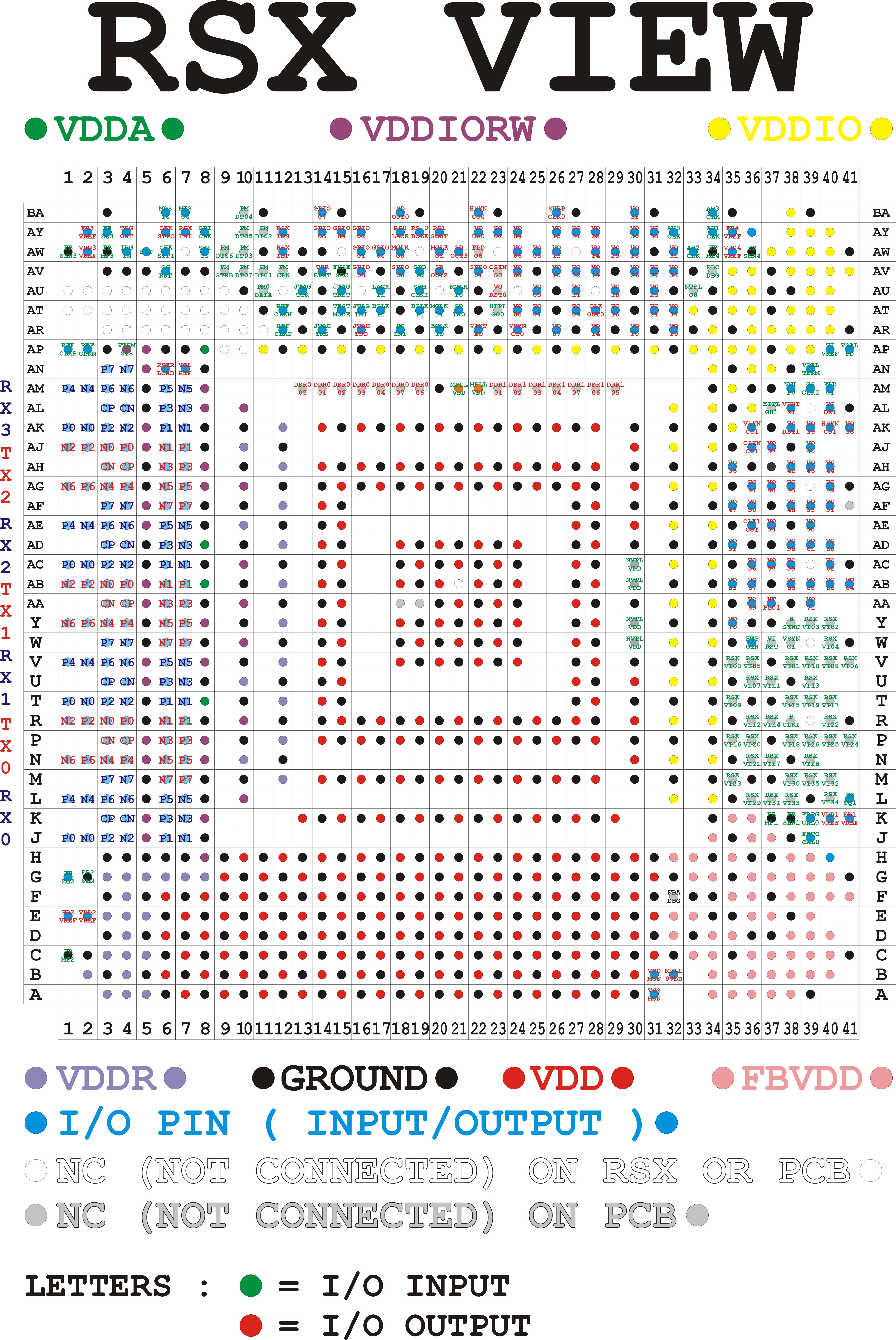
Well, you can see the VDDIO lines coming out from the RSX and going to both the DVE and HDMI chip. Here's the RSX pinout.
RSX_SKEMA.jpg


And here one I made from the board view...
RSX Pinout (Board View).jpg
 
Hello guys,

today I got another VER-001 in my hands:


It starts up, goes through all three stages and then shuts down after 15-20seconds.
No output on screen.

Now, during these 15 seconds, i see:


And then three beeps...


A0801002 = RSX Power on VRAM failure
A0802124 = ????

Similar error:
A0802120 = HDMI Power on failure (IC2502) - Sil9132CBU chip failure or related power line failure - check diodes,fuses and regulator IC2501

So perhaps this case would indicate that NEC/Tokin must be replaced for RSX?
Or... can someone confirm whether A0802124 would also be related to HDMI?

Maybe I'd do the CPU/RSX delid first.
Replace the TC under ihs.
Then test...

If not working, then replace two RSX tokins for tantalum ones.

After that, I assume the A0801002 error should be gone, right?
So.. if there still won't be any output on the screen, but the console won't be turning off... I'd go for the HDMI part, right?
Yikes, I had to go way back to refresh my memory. Looks like you started work on this console (VER-001) back on page 86.

Original errors were 80 2124 and 80 1002. Do you mind giving us a brief synopsis of the work you did? Just to refresh our memory?
 
I usually exchange completely nec caps, could that be possible an issue, anyway going to come back with log of one sur001 board that have special glod before I install new rsx for further tests. Need to exchange it to Linux testing, been asked for further development on that.
added few test before rsx exchange http://s.go.ro/bk2a9o2x
EDIT
Tested with unit off,unit on without hdmi inserted,with unit on hdmi inserted.
 
Last edited:
...going to come back with log of one sur001 board that have special glod before I install new rsx for further tests...
Could you explain what you mean by Special GLOD again. I've heard you refer to this case a number of times and just want a synopsis. What are the specific symptoms of this special case, errorlog, etc?
 
Yes that case when unit is going up to xmb but without image on screen on any port.it is related to rsx.I will explain further so everyone need to understand or is enough if you understand to explain
As reference to bringing command unit will go up to "Connecting to Debug Device (SB UART)"
27db2118d220a0f20c7eb51bf45280c9.jpg


Now if we enable second uart port we can see we are into recovery or if you have already installed fw you can see log is booting further but still no image to any port, probably will get sound(don't really remember , reset image beep is key point faster to understand that issue may be rsx related. Nothing on errlog stored if clear.
Been trying several times to exchange hdmi /AV ic didn't work without see specific errors.
So this is special glod. What make difference on vdd line for rsx instead of 2,5 ohms or bit more we get 1.8 ohms.
e616dd3d57404b045f8706f688eb364a.jpg

As you can see SkaziChris have AV out so his RSX is in good condition.
Always this special glod sorted with good rsx 2.5 ohms.
 
Last edited:
Okay, so Power On Sequence completes successfully without errors. The bootloader begins to load, up to the SB debug, but then stops. SB UART shows that it tries to load the flash from the Starship2 controller, but failed. Is that what you mean?

If so, sounds like a simple FW corruption requiring a HW flasher.

The reason I was curious is because we've seen posts where the SYSCON log gets to the point the SB is intialized and then there's a break in the Redwood RAMBUS FlexIO on the CPU which prevents the SB from interfacing with the CPU/Memory. SYSCON complains about a (Fatal) XDR Link not initialized. This occurs quickly in the bootloader process, which indicates the SB can't communicate with the system memory over the RAMBUS interface. Which I'm starting to think means CPU BGA Failure in cases where the GLOD persists after the RSX is reballed. Remember the CPU BGA can fail too.

The errorlog in those cases usually has A0403034/4xxx errors, predating any work done, but can disappear due to the fragile nature of the defect. Sometimes you get 90 2203, which is a clearer sigh it's related to the SB side of the RC RAMBUS.

But that appears to be the Normal kind of GLOD.

So we can say there are 2 types of GLOD.
  1. Normal GLOD, where errorlog usually has a history of 3034/4xxx, possibly 2203. Often 1001's too. Maybe they tried tokins, or reflow and it became a GLOD. All of this is due to the BGA affecting the FlexIO connection between CPU/SB.
  2. Special GLOD, where the FW has been corrupted. Doesn't register an errors in SYSCON because there's nothing wrong with the POS or solder connection. But it can be seen in SB UART that the "flash filesystem failed to mount."
Is that correct?
 
special glod is going over up to xmb if fw is installed on hdd,nor/nand coruuption it will stop before connecting to sb debbuging,just after all psu ok but cand remember error of syscon or if any ,ive flashed once reversed to test, it just stops after all psu ok
192cb47b05d73047150223bfdb440e56.jpg
 

Similar threads

Back
Top