@RIP-Felix
You might be interested in this: https://pastebin.com/B62i3UsY . I created that some time ago, it's for the Cytology platform, neither 100% correct nor complete.
You can't match all the CELL init steps to the HIG since the IBM HIG only proposes a possible implementation and Sony doesn't stick to that, that's why something like this is possible: https://twitter.com/MinaRalwasser/status/1458862608384155650 . Dumping lv0ldr/metldr is also only possible on Sony's CELL implementation because they didn't follow the guide lines.
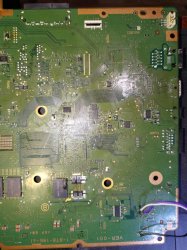
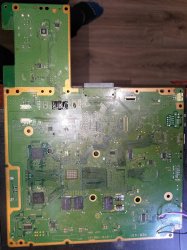
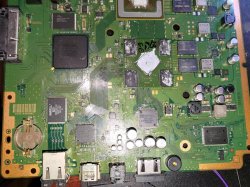
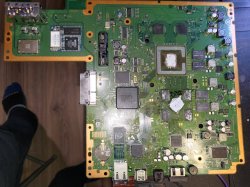
Could you guys check it out on some of your boards too?
I will attempt to remove these components 1 by 1...
And if none are left... and the 27 Ohms is still there...
That might mean that another Panasonic IC shit itself...
Well, I ended up replacing all SMD's around HDMI connector, including induction filters AND the HDMI connector itself.
The 27ohms is gone.
However... PS3 is still showing "Mode not supported" on hdmi port.
Service menu reset does not work.
I am out of ideas for now.
I put it on a bench and will get back to it when I have time.
Well, at least it works on component though..
Well, I ended up replacing all SMD's around HDMI connector, including induction filters AND the HDMI connector itself.
The 27ohms is gone.
However... PS3 is still showing "Mode not supported" on hdmi port.
Service menu reset does not work.
I am out of ideas for now.
I put it on a bench and will get back to it when I have time.
Well, at least it works on component though..
Would you like to consider exchange AV ic. Even if is working fine, just to test as last resort. I always consider AV ic first/primary port then if hdmi is connected should switch to secondary port. It may be dumb idea but nothing else to tell. I can't think to something else if I don't have board on my table. It is something wrong around that area but can't see it. Add top/bottom photos and I'll try to paint few checks for you. Rsx area with backend ports if possible top/bottom.
Well, I ended up replacing all SMD's around HDMI connector, including induction filters AND the HDMI connector itself.
The 27ohms is gone.
However... PS3 is still showing "Mode not supported" on hdmi port.
Service menu reset does not work.
I am out of ideas for now.
I put it on a bench and will get back to it when I have time.
Well, at least it works on component though..
Try to connect the PS3 to a diffrent TV just incase
The problem is... syscon need to check the TV features in every boot (and as far i understand some of them are stored inside syscon EEPROM), this kind of data exchange in between the syscon and the TV only works when connecting by HDMI
If you boot the PS3 with a TV connected by the MultiAV cable then is not posible to get the TV info
Also, i guess the TV info is not updated everytime because is not efficient to write in the syscon EEPROM if the data you are going to write is identical... i guess it does some kind of comparison in between the "old TV info" with the "new TV info" and only is stored if differs
Anyway, my point is this process is a bit problematic, there are times where is needed to boot the PS3 at least 2 times to detect the new TV
Also i think is a good idea to connect it to a different TV (by HDMI) because this way we are sure all the info related with the TV is going to be updated
I just assumed only this ps3 is problematic and another model is fine.Having one test bench setup,doing tests daily ps3/ps4 he probably know how they act.Don't know exactly?
Yes he could assembly to reach xmb and play around settings?
First check that vreg have to go on pin 12 in a rush counting. I'll edit more this post to check.
This is 5v or 5v5 cant remember.
OK so another areas to check if vregs are fine around those areas, I'll focus on those ic's, not having one board of this tipe is a pain without compared values.
I will assume red area is fine, if all seems fine, I will suggest av ic or, that cirrus ic I've found in many analog dvr cameras so I assume is analog output ic, Cxm 4027R would be as last resort.
Or start straight on Cxm 4027R as its a bit unknown how it works.
That ic under rsx I think is for video ram "ICS" with quartz beside with 24.546
First check that vreg have to go on pin 12 in a rush counting. I'll edit more this post to check.
This is 5v or 5v5 cant remember.
OK so another areas to check if vregs are fine around those areas, I'll focus on those ic's, not having one board of this tipe is a pain without compared values.
I will assume red area is fine, if all seems fine, I will suggest av ic or, that cirrus ic I've found in many analog dvr cameras so I assume is analog output ic, Cxm 4027R would be as last resort.
Or start straight on Cxm 4027R as its a bit unknown how it works.
That ic under rsx I think is for video ram "ICS" with quartz beside with 24.546
That vreg passed the continuity test for line 1 (top left) and 12.
I will reassemble the mobo and check the voltages.
I have like... two other VER-001 already flagged as donor boards...
BTW...
Do you guys have a decent solution for mounting temporary radiators/heatspreaders for PS3?
I mean... obviously you can't test the top side of the board without having it cooled down, or else, it will shutdown in like 15 seconds.
I put some heavy PC/CPU radiators on top of CELL & RSX, but they are not screwed in, so that is not enough for longer testing...
@vyktormvmpay25@sandungas you may be interested. I went column by column to be sure these were right. I didn't feel like going all out like Kiaw Did for the RSX Piniout. So I only labeled the Major Voltage lines. It would have taken much longer to label each signal.
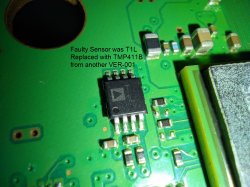
I took a sensor from another ver-001 and the console worked.
From a non-working motherboard for parts COK-002 I will take T1L and both consoles should work.
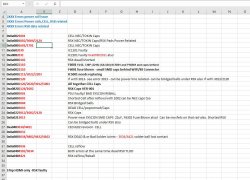
So the technician from the previous links I've shared has sent me the file with fixes for the errors that he's been documenting. He may be wrong about some of them , but it could be good for research. I'm assuming it's mostly for cok-boards unless otherwise specified.
So the technician from the previous links I've shared has sent me the file with fixes for the errors that he's been documenting. He may be wrong about some of them , but it could be good for research. I'm assuming it's mostly for cok-boards unless otherwise specified.
Good, more data. I would just like to caution people. I have a spreadsheet with much more detail about 250+ consoles worth of SYSCON codes at this point. I can tell you that many error codes overlap and can mean different things. Also you have to look at the codes in context of the consoles history (troubleshooting, past errors, rework, etc). So while some of the reported fixes to certain errors may be encouraging, please remember they are clues, not the smoking gun.
I am already on the trail of the errors posted in that account, but they are certainly nice to add to the spreadsheet to corroborate other experiances. So yeah, keep them coming!
I will update the Dev Wiki SYSCON codes soon. Right now I'm still pouring over the 250+ consoles worth of data to make strong case for what some of these codes mean. I have been editing my previous SYSCON Analysis post with these findings, improving/refining the information there. That's my rough draft before I officially add them to the wiki. So check that post for the latest.
@SkaziChris so you have another 2 more VER-001 motherboards ?, and @amxcs another 2 VER-001 motherboards too ?
Please dudes, make us (the whole PS3 scene) a favour and take a look at the syscon model, we (the whole PS3 scene) are a bit desperate to get a dump of a SW-302 syscon
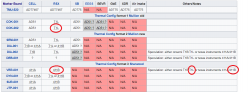
Im not asking to share the dump in public if you dont want, i just asking you to share the dump with @M4j0r because he is doing the research and there are a couple of syscons missing in his collection, take a look at this 2 tables:
The SW-302 is marked in "eye-bleeding colors" because is very important for the research https://www.psdevwiki.com/ps3/Syscon_Hardware#PS3_Syscon_models https://www.psdevwiki.com/ps3/Syscon_Firmware#Syscon_firmwares
There is a prize for completing the collection btw, if at some point @M4j0r completes the collection of syscon firmware dumps he will be able to release a new hack to unlock syscons
In the meantime he is not going to release it because it would be incomplete, so all us (the whole PS3 scene) needs to wait for someone to dump the SW-302 and share it with him
If some other of you is reading this and have a SW-302 please talk with @M4j0r and he will give instructions about how to dump it
In wiki there is other image of the pad layout of that specific CELL model and there are a few differences, good time to review it
The better way to compare them is by overlapping them in 2 layers and switch ON/OFF the layers
I dont know what means the suffix "GB" or "AGB", i guess is something related with the package, but the pad layout is the same
In the RSX models they uses the same suffixes, "GB", "AGB"... and also... "BGB", "CGB" and "DGB"
For the matter of pad layouts we dont care about that suffixes
Power Control Topology - Part 3
(SYSCON Switches and Power On Sequencing)
Introduction:
You may have heard of the term booting a computer. But what actually is taking place is more complex thatn you may realize. The term "BOOT" actually refers to a "bootloader" program that loads the operating system (OS). But before the Bootloader can start, the console must first be able to enter standby. Then it needs to clear Power On Sequence Testing (POST).
When you plug in your PS3, or flip power rocker at the back, the Power Supply Unit delivers power to System Control (SYSCON) and a crystal for it's clock. There are also some thermal monitors and analog voltage regulators needed for the most basic standby functions. What's happening is the SYSCON is powered and waiting. The LED goes solid red. The Bluetooth subsystem is powered so that you can start the console with your controller. The PS3 is just waiting for you to press the power button. If your PSU is dead or the fuses to those Analog Voltage regulators are blown, then you wont even get into Standby!
When you turn the console on it goes through a process called Power On Sequence Testing (POST), which includes 2 processes.
Power On Sequencing (POS): The SYSCON "switches" on voltages to the console subsystems one at a time. They need to be powered on in a certain order, and configured properly before the next system can be powered and configured. In this way the console's bringup is coordinated.
Power On Reset (POR): A series of signals and configuration data that synchronize the chipset. For example, the CPU/GPU/SB are held in reset until the clocks and power supplies have been "switched" on (enabled) by SYSCON and their output has stabilized (Power Good). Then reset is released and the chipset will startup synchronized. Then they will be ready for initialization and configuring.
Once the console has cleared POST the bootloader can begin loading the operating system.
Of course that's the simplified explanation! It doesn't do us much good when you are having an issue and need to track down the culprit. Thanks to theSYSCON errorlogs, we now have error codes that give us information about the problem. More specifically, there is a 4-digit code that points to a particular area. We have already discussed that in great detail.
I recently collated 250+ consoles worth of data and presented an analysis. What I learned is that many of the 4-digit codes overlap. They don't always tell you what you want to hear - That your NEC/TOKINs are bad, or there is specific fuse that needs replaced. Instead it narrows down the list to a number of possabilities. You still need to troubleshoot the board (continuity, resistance, ESR of electrolytic caps, voltages, etc). And you need to observe the console history. Has it been opened? What work has been done? What are past errors in the errorlog telling you? This context leads us to a better diagnosis.
What's less understood and probably more useful in the 2-digit Step Number just before the 4-digit error. For example 20 2120. All the 2120 tells us is that the error is related to the HDMI transmitter. So does that mean the HDMI chip is dead? Well, that depends on context. How does it look? Are there shorts, missing voltages, blown fuses, flux residues, what other errors are in the log? That can help rule out lots of potential issues.
Step# 20 tells us when error 2120 occurred! It tells us if the error occurred in Standby, POST, BOOT, System ON, or System Off states. It's the key to understanding the meaning of the 4-digit error code, because knowing what the console was doing when the error occurred provides vital context. If that step is when the SYSCON switches on a voltage regulator, then it could be a fuse that blew.
And that's exactly what has been reported to happen with errors 202120 /213013. At Step# 20 SYSCON switches on IC6301, which powers up DC/DC converters for the AV Backend. This I/O subsystem is known to cause 2120 errors, but the Step# tells us where to look first. Since it occurred when the SYSCON first enables those voltages, we should really suspect the fuses and voltage regulators. So focus your attention on probing that area. Sure enough, users have reported this error combination can be caused by blown F6302, short C6320, etc. That theose voltages were not present when they attempted to power the console on.
On the other hand, If the same error occurs at a different Step#, it can mean something completely different. For example, @db260179 reported a 00 2120. 2120 is the same 4-digit HDMI error, but the Step# 00 refers to standby. For context, he got the error as soon as he plugged in the console, not when turning it on. He repaired by replacing TH2501, which protects +5V_ANA voltage for the HDMI port. He noted with it blown, IC2501 regulator on pin 6 (HDMI Initialize) is not getting anything. I don't believe he ever mentioned if the replacing the fuse fixed that console or not. It's possible that a bad HDMI cable, or it got knocked, cause a short blowing that fuse. There could have been more damage. The point is, this was the same 2120 error with a completely different issue. The Step# was the only thing that might have clued us in. That is if we weren't preoccupied looking at the HDMI chip and RSX power (tokin or BGA). We were too focused on guessing that we missed a simple fuse. This emphasizes the need to troubleshoot the board THOROUGHLY! Check fuses!!!
"Get on with it!"
So now we know the Step# is important, we just need to know what each Step Number means. What is the console doing?
We have been having this discussion for awhile now...
Sony provides a bit more information about the PS3 system hardware in the "Sony BCU-100 Maintenance Manual". The BCU-100 is the Sony Zego Unit which uses the BE-28 board. The BE-28 board in based on the TMU-520 which is based on the COOKIE-02. So they're all related. You can find the relevant information on the following pages:
@RIP-Felix
You might be interested in this: https://pastebin.com/B62i3UsY . I created that some time ago, it's for the Cytology platform, neither 100% correct nor complete.
You can't match all the CELL init steps to the HIG since the IBM HIG only proposes a possible implementation and Sony doesn't stick to that...
He's referring to this IBM Hardware Installation Guide for the 65nm CELL CPU. I read it pretty thoroughly and inferred the general "cytology" from their "example." It seems like it needs to follow most of that general order. It is highly technical an took several days to even begin to wrap my head around it, but very helpful to understand the Attention, Hard reset, Machine Checkstops, and Livelock signals.
While SONY may not have stuck to the HIG, there is a great deal on information in there about the required sequencing. Anyway, between the HIG and the SYSCON codes I put together the following. Like yours, it' definitely not 100% accurate or anything. Just me attempting to organize the step numbers in context of SYSCON switches and what the console is doing.
Here are just a few of the more useful excerpts:
I understand if that's TMI! It's a complicated process. And that was just IBM's example. As @M4j0r pointed out, SONY deviates from it. That only complicates matters for us. If this interests you at all, I did make an effort to translate the above information in terms of the PS3. To follow is the rotten fruit I yielded...
Initialization Sequence – AKA Power On Sequence Testing (POST).
It may be easier to visualize this using the following voltage flowchart. I have been updating it as I learn more about the console. @sandungas, you were asking about this in another thread, so here you go.
SYSCON drives POWER_GOOD and HARD_RESET signals to 'low'.
Power supplies and reference clocks are activated sequentially. SYSCON Switches...
SW_0 = +5V, +3.3V, & +1.7V MISC
SW_1_A = +3.3V_MK_VDD for Clock Synthesizer
SW_1_B = +2.5V_LREG_XCG_500_MEM
Analog Voltage for the core PLL of IC5004, Clock Generator used to support the Rambus XDR memory subsystem and Redwood logic interface.
The Cell BE power supplies must be turned on in the following order:
SW_6 = +1.2V_YC_RC_VDDIO (I/O voltage supplies, VDD_IO)
SW_7_A = +1.0V_BE_VDDC (Cell BE core voltage supply (VDD) then VCS (the core array voltage). Note, the VID values stored on the CELL itself are not available to be read yet. So the default VID of the VRM is used until then.
SW_8_A = +1.5V_YC_RC_VDDA (Analog voltage supplies, VDD_A)
The RSX power supplies must be turned on in the following order:
SW_8_B = +1.5V VDDIO for both AVCG & RSX Analog IO
SW_8_C = +1.8V_RSX_PLL_VDD & +1.8V_RSX_FBVDDQ
Initialize the Cell BE core logic
Reset the internal state
Set up the core phase-locked loop (PLL)
Adjust the VRM voltage according to the voltage identifier (VID) information stored in the Cell BE processor. The CPU is ready to set the VID dynamically now. From SW_7_A to this point takes about 130ms.
Load the configuration-ring data.
Calibrate the FlexIO interface (initialization, BitTraining, and byte calibration).
Initialize the I/O interface.
Execution of code on the PowerPC Processor Element (PPE).
Initialize the extreme data rate (XDR) I/O cell (XIO) memory interface
Initialize dynamic random access memory (DRAM)
Initialize PPE hardware-implementation dependent (HID) special-purpose registers (SPRs).
Load FW/OS
Done, System loads into XMB and the console is rockin.
I'm still trying to fugure how the step numbers fit in.
A more simplified overview:
When you use the bringup command in Mullion SYSCONs there are SSM states that seem to indicate when the SYSCON performs certain actions. I made a simplified overview using them...
000 -> 101
Power sequence setup called
12 steps (00 - 11 & 20).
101 -> 201
AV Backend Setup
201 -> 102
2 steps (21 & 22)
SW_8_B & SW_8_C enable AV Backend DC/DC convertes.
HDMI Transmitter initialization. Confirmed using HDMI VFB command in SYSCON.
+1.5V_RSX_VDDIO is POR for DVE
102 -> 202
Doesn't have any steps? I don't have an explanation for this.
202 -> 103
2 steps (23 & 30)
23 2102 = Fatal RSX Error (IC2001)
Must be some kind of RSX initilization/checks.
103 -> 203
CPU Livelock setup
203 -> 104
3 steps (31, 32, & 40)
load Configuration Ring Data.
31 3032 = BE Initialization error. Reported when a user knocked R5167 off. +1.2V_YC_RC_VDDIO reference voltage for the CPU's Redwood FlexIO Controller reference clock (BE_RC_REFCLK_P).
Calibrate the FlexIO
40 3034 = CPU/GPU (FlexIO) Power Failure (YC_RC_VDDIO) Usually caused by a BGA defect. These are the SPI voltage lines that connect the CPU/GPU.
40 4xxx = Data error (FlexIO). Usually caused by a BGA defect. These are the SPI DATA lines that connect the CPU/GPU.
Psbd_SbTransMode_Full:0x20e2
4 steps (50-52 & 60)
50 3035 = Occurred on a console exhibiting 3034/4002 then after a failed reflow attempt 232102. After a pressure test the console GLOD with the 503035. There is an 80 1002 in there too.
60 3040 = NAND/NOR Flash Memory, where the OS firmware is stored. The OS can't load if the chip containing it isn't powered. This would be one of the last checks before the power on state is reached, because a power failure here would prevent the boot loader from initializing.
104 -> 204
Doesn't have any steps? I don't have an explanation for this
204 -> 105
3 Steps (61, 62, & FF)
105 -> 400
Power On State
The console is powered on and ready to continue with the boot loader.
Digging in deeper:
And here I attempted to really dive into exactlt what's happening at each Step Number...
SYSCON Reset
A0 = 2030, 2031, 2033, 2124, 2131.
When the power Rocker is flipped on, IC6004 receive +5V_EVER directly from the PSU. It produces /SYSCON_RST automatically.
An error immediately after SYSCON reset probably indicates an issue with the following...
SYSCON Reset serves as enable for IC6009, which is forms +3.3V_THERMAL for RSX/CPU/SB Thermal Monitors.
IC6005/6 are also powered by +5V_EVER and produce +3.3V_EVER and 1.8V_EVER respectively.
SYSCON Switches on Clocks and Power Supplies (DC/DC converters)
SYSCON runs "Bringup", "OnStartingBePowOn()", and "PowerSeq_Setup" which enables clocks and DC/DC converters. SYSCON SW Lines control most of the DC/DC converters. SYSCON waits a certain period of time for the voltages to stabilize and Power Good. After that, SYSCON will error at any point if there is a power fail signal on any of the main voltages it's directly monitoring.
Errors can occur during successive step numbers if the new load and noise generated causes a previously good voltage to fall out of regulation (AC coupling, common mode noise, insufficient decoupling/bypassing, etc). So error codes may overlap with later step numbers.
Note: I don't know which step number corresponds to which Switch exactly, but that could be figured out by sabotaging each DC/DC converter to trigger an error. Here's what we know from reported SYSCON errors..
05 = SW_4 (Ethernet, USB, SB Peripherals, and SB PLL)
06 = SW_5 (Power RSX VRM, default VID)
07 = SW_6 (XIO/FlexIO Reference Voltage)
08 = SW_7 (Power CELL VRM, default VID)
09 = SW_8 (CPU/SB/RSX MIC/BEI Analog Voltages)
A = +1.6V_BE_VDDA & +1.5V_YC_RC_VDDA. MIC & IOIF Analog Voltages. These Controllers interface Analog signals with the digital Core over the FlexIO interface.
10 = PS2 Bridge Chip? (Switches its own subsystem)
11 = Maybe just finishing up initialization of the thermal monitors? IDK. One user had 2131 from a dead thermal monitor that gave an error with this step #. He replaced it to fix.
Initialize CPU/RSX Core and Adjust VRM to VID. AV Backend
Step# 20
SYSCON Initializes the RSX core, VRM adjust voltage acording to VID, and the AV backend initializes. If the RSX is dead or missing it returns 20 1802.
20 = SW_8 (RSX)
B = +1.5V_YC_RC_VDDIO, +9V_ANA, +5V_ANA, +3.3V_ANA & +1.8V_ANA. Analog Voltages for MultiAV Digital Video Encoder (IC2406), Audio DAC (IC2405), & HDMI Transcoder (IC2502).
+1.5V_RSX_VDDIO acts as Power On Reset for the DVE (MultiAV).
C = RSX PLL Voltage and thermal monitor initialization.
SYSCON enables and sets up the HDMI Transmitter. It communicates over I2C.
Step# 21
Errors reported with Step# 21 = 3010 & 3013 (CPU voltage related)
SYSCON enables the CPU's Core and VRM adjust voltage acording to VID.
SYSCON allows a timing delay after enabling IC6103, to account for Soft Start and PWRGD formation (for the voltage to stabilize). I'm not sure how long that procedure takes, but once PWRGD is formed the normal rise time adds about 10µs (RC time constant). 3010 appears to be the error when PWRGD is formed too quickly.
@DeadEnd got a 20 3010 injecting 3.3v on BE_POWGD. SYSCON didn't like that the timing delay was 0µs. It shouldn't have come back so quickly.
@Kleon1876 had a 21 3013 when he damaged a CPU trace while deliding. It caused a BE_SPI DI/DO ERROR - CELL not communicating to syscon via SPI. Many others have had 3013 errors associated with 20 2120. Usually associated with Reflows or Mods involving the CPU (eraser mod). Check MC2 VDDIO Bypassing (C1444-1453).
EDIT:
Found a connection to the Southbridge and step# 30. In the A01 service manual (pg 20/45) there is a list of sub-systems that are powered by +3.3v_SB_VDDIO. And in that list "SB_MAIN(P30)" is listed. In a series of Sabotage tests, @Computer Booter Lifted EN Pin 3 (IC6305), which disables the main power to the Southbridge. The errors it produced were A0302203 & A0403034 (SB:RRAC:BX0:BX:FLEXIO_ID). The step number 30 was produced when SB_Main power was cut!
I didn't make that connection until I was going over the error 60 3040 (NAND Power error). When 3.3v to NAND is cut you get error 60. And in that same list on Pg 20/45 in the service manual there is an item listed as "POWER(P60)." That made me wonder if there is a connection between the P30 and P60 and the Power on sequence step numbers. I'm thinking this list in the service manual is telling us what step number each of those sub-systems is powered up in and if we get an error with those numbers, what went wrong.
P30 = SB_Main
P31 = SB_Paripheral Parts
P32 = SB_Rear USB, ATA0, and PCI
P33 = SB_Front USB
P34 = SB_ATA1
P35 = SB_Ethernet
P40 = SC_Main
P50 = MK XCG
P60 = POWER
Could test this hypothesis, by removing R3846. This will disable the SS2 XEXPOR (power on reset). If we get an error with step number 60, then I'm onto something. This strategy can be use with other voltages on the list, to test the same hypothesis.
Clearly have something to do with the PLL and require the Clock generators to be fully functional.
Differential Signal Power sequencing for BE_RC_REFCLK is needed for timing the FlexIO interface before proceeding to Bit Training. User @Bbowes had error 31 3031 on a console that shorted RSX:TX1 to ground. That shorted the entire FlexIO reference voltage (+1.2V_YC_RC_VDDIO), preventing checks at this step. He also had 31 3032 by accidentally knocking R5167 off, which disrupted the True side of Differential reference clock pair output (IC5004 Pin 24, BE_RC_REFCLK_P). I guess that the Complementary side of Differential reference clock pair output (IC5004 Pin 23, BE_RC_REFCLK_N), who's external resistor network can be disrupted by knocking off R5170, would generate error 31 3033. But that should be tested to confirm.
BitTraining Calibrates the FlexIO interface, which is how the SB/CPU/RSX communicate.
Initialize the IO Interface
Errors reported with Step# 50 - 52 = 1802, 3037, 3035, & 3041 (MK XCG interface or connection?)
Errors reported with Step# 60 = 3040 (SS2/Flash Power)
CPU/SB/RSX to begin coordinating and initializing over the I/O interface.
Not really sure what's happening here exactly, but I guess POR checks each SB peripheral was initialized properly and is not in an error state. If CPU/SB/RSX are not in and error state, then power on self test completed successfully.
End of POST.
Load Firmware and OS
Errors reported with Step# 61 = 1101 & 1802
Bootloader runs and Southbridge accesses the FW stored on NAND. Not sure how the rest of this goes. But if it all goes well the operating system loads.
Any power related issue that causes the voltage to fall out of regulation, such as excessive ripple/noise can trigger a YLOD.
Any unresolved CPU errors can cause BE Attention signal to go high. The SYSCON immediatly shuts off the console, then reads the SPI Status Register to determin the cause. Then it records the an error A0801701 in it's errorlog. Errors that can cause the Attention include...
Unresolved Checkstop errors (14FF)
Livelock Detection (1601)
PLL Unlock Condition (1301)
BGA/Bump Defect that occurs while the Console was On (Step# 80). Subsequent attempts to power on the console would result in 3034/4xxx errors.
Hypothesis: System settings are saved, and the console powers down. If an error prevents the settings from being saved, the SYSCON will throw an error during this state. Often there are HDMI errors during this step. If BGA defects affect the VDDIO line between the RSX and HDMI Transmitter, it will not be able to save user selected video configuration to the EEPROM on the SYSCON. It stalls during the waiting operation beyond the expected delay, SYSCON assumes there's a problem and issues a 90 2120 error (for example). Upon next boot the video setting reverts to its previous state.
The following is just here because I don't have a great place to put them. But I still wanted to get it out there for completeness.
Clock Synthesizer (IC5001)
Powered by +3.3V_MK_VDD.
A 14.31818MHz input crystal (X5001) provides a reference clock from which 4 PLLs generate System clocks.
MK_USB_CLK = USB Clock
SB_SYSCLK = South Bridge System Clock
SB_PCI_CLK = South Bridge PCI Clock
SB_PCI0_CLK = South Bridge PCI0 Clock
SB_SS2_CLK = South Bridge / Starship2 Clock
BC_PCI_CLK = PS2 Bridge Chip PCI Clock
RSX_PLL_REFCLK = Processor Clock
YRCG0 = Yellowstone / Redwood Clock Generator 0
MK_XCG0 = XDR Clock Generator 0
<-- BE_PLL_VDDA
--> BE_PLL_REFCLK (IC5003)
MK_XCG2 = XDR Clock Generator 2
<-- +1.2V_YC_RC_VDDIO
--> SB_RC_REFCLK (IC5004)
--> RSX_RC_REFCLK (IC5004)
--> BE_RC_REFCLK (IC5004)
YRCG1 = Yellowstone / Redwood Clock Generator 1
MK_XCG3= XDR Clock Generator 3
--> BE_Y0_RQ (IC5002)
--> BE_Y1_RQ (IC5002)
XDR 2-Differential Pair Clock Generator (IC5002)
Powered by +2.5V_LREG_XCG_500_MEM.
XCG_EN à EN Pin 11. Where is this sent from?
SMBus Address bit 0 (ID0 Pin 12) is tied High & SMBus Address bit 1 (ID0 Pin 13) is tied High. This sets the output control register bits to enable clock output on differential pairs 1 and 2 (BE_Y0_RQ and BE_Y1_RQ) and read from device 0. Question: What does this accomplish?
/BYPASS Pin 14 is tied High for PLL Mode
XDR 2-Differential Pair Clock Generator (IC5003)
Powered by +2.5V_LREG_XCG_500_MEM.
XCG_EN à EN Pin 11. Pulled High by R5048 when +2.5V_LREG_XCG_500_MEM is present.
Default SMBus Address select 1 (ID0 Pin 12) is tied low & Address select 2 (ID0 Pin 13) is tied Low. This designates a read operation on device 0 (BE_PLL_VDDA). It also sets the operating mode to Hi-Z, disabling the output.
/BYPASS Pin 14 is tied High for PLL Mode
XDR 4-Differential Pair Clock Generator (IC5004)
Powered by +2.5V_LREG_XCG_500_MEM.
XCG_EN à EN Pin 11. Where is this sent from?
SMBus Address bit 0 (ID0 Pin 12) is tied low & SMBus Address bit 1 (ID0 Pin 13) is tied High. This forms the device ID and designated operation. In this case a read operation on device 3 (RSX_RC_REFCLK and YC_RC_VDDIO). Question: What does this accomplish?
In wiki there is other image of the pad layout of that specific CELL model and there are a few differences, good time to review it
The better way to compare them is by overlapping them in 2 layers and switch ON/OFF the layers
I dont know what means the suffix "GB" or "AGB", i guess is something related with the package, but the pad layout is the same
In the RSX models they uses the same suffixes, "GB", "AGB"... and also... "BGB", "CGB" and "DGB"
For the matter of pad layouts we dont care about that suffixes
I started with that, but it's not correct. For example, it has the 1.6v PLL labeled as the same voltage as 1.5V_VDDA. They are completely different. So that one wasn't enough to delineate the voltages. You can't tell MC2_VDDIO from YC_RC_VDDIO is another example.
I also wanted the colors to match the Power flow chart I posted above and the SB/RSX Pinouts I previously posted (where they are the same). And I wanted the nomenclature to match that in the service manual, so there's no ambiguity which voltage "1.5v" is referring to.
@SkaziChris so you have another 2 more VER-001 motherboards ?, and @amxcs another 2 VER-001 motherboards too ?
Please dudes, make us (the whole PS3 scene) a favour and take a look at the syscon model, we (the whole PS3 scene) are a bit desperate to get a dump of a SW-302 syscon
Im not asking to share the dump in public if you dont want, i just asking you to share the dump with @M4j0r because he is doing the research and there are a couple of syscons missing in his collection, take a look at this 2 tables:
The SW-302 is marked in "eye-bleeding colors" because is very important for the research https://www.psdevwiki.com/ps3/Syscon_Hardware#PS3_Syscon_models https://www.psdevwiki.com/ps3/Syscon_Firmware#Syscon_firmwares
There is a prize for completing the collection btw, if at some point @M4j0r completes the collection of syscon firmware dumps he will be able to release a new hack to unlock syscons
In the meantime he is not going to release it because it would be incomplete, so all us (the whole PS3 scene) needs to wait for someone to dump the SW-302 and share it with him
If some other of you is reading this and have a SW-302 please talk with @M4j0r and he will give instructions about how to dump it