PS3 Fault finding YLOD with the SYSCON - First steps and Error reporting

Hello everyone, I have an old ps3 which i got from a friend who was cleaning his house,

IT has a DIA-001 Board. I checked all the fuses but they seem to all work.

It has a quick YLOD, I diagnosed the syscon and i got the following errors:-

Code:
ofst[ 64]:err_code:0xffffffff, clock:0xffffffff
ofst[ 68]:err_code:0xa0022110, clock:0xffffffff
ofst[ 72]:err_code:0xa0022110, clock:0xffffffff
ofst[ 76]:err_code:0xa0022110, clock:0xffffffff
ofst[ 80]:err_code:0xa0022110, clock:0xffffffff
ofst[ 84]:err_code:0xa0022110, clock:0xffffffff
ofst[ 88]:err_code:0xa0022110, clock:0xffffffff
ofst[ 92]:err_code:0xa0022110, clock:0xffffffff
ofst[ 96]:err_code:0xa0022110, clock:0xffffffff
ofst[100]:err_code:0xa0022110, clock:0xffffffff
ofst[104]:err_code:0xa0022110, clock:0xffffffff
ofst[108]:err_code:0xa0022110, clock:0xffffffff
ofst[112]:err_code:0xa0022110, clock:0xffffffff
ofst[116]:err_code:0xa0022110, clock:0xffffffff
ofst[120]:err_code:0xa0022110, clock:0xffffffff
ofst[124]:err_code:0xa0022110, clock:0xffffffff
ofst[  0]:err_code:0xa0022110, clock:0xffffffff
ofst[  4]:err_code:0xa0022110, clock:0xffffffff
ofst[  8]:err_code:0xa0022110, clock:0xffffffff
ofst[ 12]:err_code:0xa0022110, clock:0xffffffff
ofst[ 16]:err_code:0xa0022110, clock:0xffffffff
ofst[ 20]:err_code:0xa0022110, clock:0xffffffff
ofst[ 24]:err_code:0xa0022110, clock:0xffffffff
ofst[ 28]:err_code:0xa0022110, clock:0xffffffff
ofst[ 32]:err_code:0xa0022110, clock:0xffffffff
ofst[ 36]:err_code:0xa0022110, clock:0xffffffff
ofst[ 40]:err_code:0xa0022110, clock:0xffffffff
ofst[ 44]:err_code:0xa0022110, clock:0xffffffff
ofst[ 48]:err_code:0xa0022110, clock:0xffffffff
ofst[ 52]:err_code:0xa0022110, clock:0xffffffff
ofst[ 56]:err_code:0xa0022110, clock:0xffffffff
ofst[ 60]:err_code:0xa0022110, clock:0xffffffff
[mullion]$
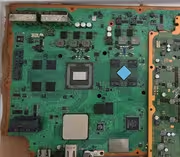
 
Hello everyone, so I finally got my PS3 back (6 months) after the RSX swap but I'm getting error 3004 in the logs. I'm in Colombia so there are very few places where I can do it.

In my case I made the resistors changes in the back by myself and sent the board to a good repair shop where they swapped the GPU. I already married the GPU with the board and fixed the checksums.

Can someone please give some advice regarding this, so I can talk to the expert regarding where he should check?

The PS3 board already had the caps replaced albeit not the RipFelix ones but before all this they were working, could it be that the new 40nm GPU needs better caps?

My board is a COK-001

Code:
ofst[ 24]:err_code:0xffffffff, clock:0x0b536194  2006/01/08 05:37:24
ofst[ 28]:err_code:0xa0801004, clock:0x0b54d90f  2006/01/09 08:19:27
ofst[ 32]:err_code:0xa0801001, clock:0x0b718ec9  2006/01/31 02:58:17
ofst[ 36]:err_code:0xa0801001, clock:0x0b718f64  2006/01/31 03:00:52
ofst[ 40]:err_code:0xa0801001, clock:0x0b718fc2  2006/01/31 03:02:26
ofst[ 44]:err_code:0xa0801001, clock:0x0b7190e7  2006/01/31 03:07:19
ofst[ 48]:err_code:0xa0801001, clock:0x0b719151  2006/01/31 03:09:05
ofst[ 52]:err_code:0xa0801001, clock:0x0b719245  2006/01/31 03:13:09
ofst[ 56]:err_code:0xa0801001, clock:0x0b71925d  2006/01/31 03:13:33
ofst[ 60]:err_code:0xa0801001, clock:0x0b7192e4  2006/01/31 03:15:48
ofst[ 64]:err_code:0xa0801001, clock:0x0b71939d  2006/01/31 03:18:53
ofst[ 68]:err_code:0xa0801001, clock:0x0b719426  2006/01/31 03:21:10
ofst[ 72]:err_code:0xa0801001, clock:0x0b7194f6  2006/01/31 03:24:38
ofst[ 76]:err_code:0xa0801004, clock:0x0b719565  2006/01/31 03:26:29
ofst[ 80]:err_code:0xa0801001, clock:0x0b719575  2006/01/31 03:26:45
ofst[ 84]:err_code:0xa0801001, clock:0x0b71958e  2006/01/31 03:27:10
ofst[ 88]:err_code:0xa0801001, clock:0x0b7195a9  2006/01/31 03:27:37
ofst[ 92]:err_code:0xa0801004, clock:0x0b71a6e1  2006/01/31 04:41:05
ofst[ 96]:err_code:0xa0801004, clock:0x0b72eb1d  2006/02/01 03:44:29
ofst[100]:err_code:0xa0801004, clock:0x0b72ebdf  2006/02/01 03:47:43
ofst[104]:err_code:0xa0801004, clock:0x0b72f0c9  2006/02/01 04:08:41
ofst[108]:err_code:0xa0801004, clock:0x0b72f1dd  2006/02/01 04:13:17
ofst[112]:err_code:0xa0801004, clock:0x0b72fde4  2006/02/01 05:04:36
ofst[116]:err_code:0xa0801004, clock:0x0b72feab  2006/02/01 05:07:55
ofst[120]:err_code:0xa0801004, clock:0x0b758886  2006/02/03 03:20:38
ofst[124]:err_code:0xa0801004, clock:0x0b763de4  2006/02/03 16:14:28
ofst[  0]:err_code:0xa0003001, clock:0x0c8e4efc  2006/09/04 02:42:04
ofst[  4]:err_code:0xa0003001, clock:0x0c8e4efc  2006/09/04 02:42:04
ofst[  8]:err_code:0xa0003001, clock:0x0c8e4f11  2006/09/04 02:42:25
ofst[ 12]:err_code:0xa0003001, clock:0x0c8e4f11  2006/09/04 02:42:25
ofst[ 16]:err_code:0xa0003001, clock:0x0c8e5260  2006/09/04 02:56:32
ofst[ 20]:err_code:0xa0003001, clock:0x0c8e5260  2006/09/04 02:56:32
ofst[ 24]:err_code:0xa0093004, clock:0xffffffff

[mullion]$


becount
Bringup : 1597 times
Shutdown: 1495 times
Power-on: 96day 14hour 56min 32sec


qNBtdvTj
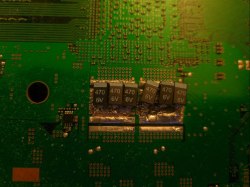
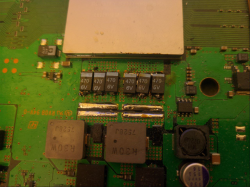
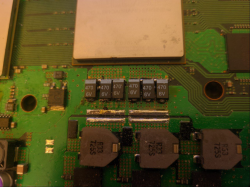
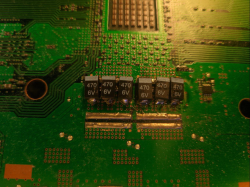
I think your problem is that there is not enough capacitance, you need 3x470uF or 4x330uf for each NecTokin(1200uF), I only see 2 tant caps per NecTokin on your photo, what about the back of board?
@Woodsworth , thanks, I´ve checked the board and I think its cooked, now its giving 3034 and 4401.
@Rahul Vivek , maybe you have a bad IC, but you say its fuses are good, I brougth back to life a COK-001 wich had F6301 blown due to a bad IC(Q6311 on schematic), but only for a few hours because it started artifacting.
 
I think your problem is that there is not enough capacitance, you need 3x470uF or 4x330uf for each NecTokin(1200uF), I only see 2 tant caps per NecTokin on your photo, what about the back of board?
@Woodsworth , thanks, I´ve checked the board and I think its cooked, now its giving 3034 and 4401.
@Rahul Vivek , maybe you have a bad IC, but you say its fuses are good, I brougth back to life a COK-001 wich had F6301 blown due to a bad IC(Q6311 on schematic), but only for a few hours because it started artifacting.
Thank you very much for the reply. I was actually planning to replace all the caps because that job was awful (long story short my original PS3 got lost or stolen at certain repair center and they gave me this one as compensation ) but it was working fine with this caps (albeit the high temperature) when it had the 90nm RSX so either something else got loose during the swap or the 40nm RSX is more sensitive to the bad caps.
I ordered 4 of the RipFelix tantalizers at least to replace the RSX ones. I will disassemble it again and post some pictures of the rear
 
maybe you have a bad IC, but you say its fuses are good, I brougth back to life a COK-001 wich had F6301 blown due to a bad IC(Q6311 on schematic), but only for a few hours because it started artifacting.
I checked the F6301 fuse and its good. However i was unable to locate the ic q6311 you are quoting on my board
 
Hello everyone, I have an old ps3 which i got from a friend who was cleaning his house,

IT has a DIA-001 Board. I checked all the fuses but they seem to all work.

It has a quick YLOD, I diagnosed the syscon and i got the following errors:-

Code:
ofst[ 64]:err_code:0xffffffff, clock:0xffffffff
ofst[ 68]:err_code:0xa0022110, clock:0xffffffff
ofst[ 72]:err_code:0xa0022110, clock:0xffffffff
ofst[ 76]:err_code:0xa0022110, clock:0xffffffff
ofst[ 80]:err_code:0xa0022110, clock:0xffffffff
ofst[ 84]:err_code:0xa0022110, clock:0xffffffff
ofst[ 88]:err_code:0xa0022110, clock:0xffffffff
ofst[ 92]:err_code:0xa0022110, clock:0xffffffff
ofst[ 96]:err_code:0xa0022110, clock:0xffffffff
ofst[100]:err_code:0xa0022110, clock:0xffffffff
ofst[104]:err_code:0xa0022110, clock:0xffffffff
ofst[108]:err_code:0xa0022110, clock:0xffffffff
ofst[112]:err_code:0xa0022110, clock:0xffffffff
ofst[116]:err_code:0xa0022110, clock:0xffffffff
ofst[120]:err_code:0xa0022110, clock:0xffffffff
ofst[124]:err_code:0xa0022110, clock:0xffffffff
ofst[  0]:err_code:0xa0022110, clock:0xffffffff
ofst[  4]:err_code:0xa0022110, clock:0xffffffff
ofst[  8]:err_code:0xa0022110, clock:0xffffffff
ofst[ 12]:err_code:0xa0022110, clock:0xffffffff
ofst[ 16]:err_code:0xa0022110, clock:0xffffffff
ofst[ 20]:err_code:0xa0022110, clock:0xffffffff
ofst[ 24]:err_code:0xa0022110, clock:0xffffffff
ofst[ 28]:err_code:0xa0022110, clock:0xffffffff
ofst[ 32]:err_code:0xa0022110, clock:0xffffffff
ofst[ 36]:err_code:0xa0022110, clock:0xffffffff
ofst[ 40]:err_code:0xa0022110, clock:0xffffffff
ofst[ 44]:err_code:0xa0022110, clock:0xffffffff
ofst[ 48]:err_code:0xa0022110, clock:0xffffffff
ofst[ 52]:err_code:0xa0022110, clock:0xffffffff
ofst[ 56]:err_code:0xa0022110, clock:0xffffffff
ofst[ 60]:err_code:0xa0022110, clock:0xffffffff
[mullion]$
I had a COK-002 board and replaced F6001 and C6019 + C6020 which did get it working for a week. If those are present on that board is suggesting checking them. Also IC5001 and the 3.3v_mk_bds are worth checking. Not sure if you have a schematic. I'm not sure on boards other than COK-001 and 002.
 
Decided to give the one I got working then stopped showing the standby led another go after watching @RIP-Felix 2 parter again. I managed to test a number of components, still have some more to test. Here's my findings. If anyone can be bothered to read through, I'd appreciate hearing your thoughts:


R2408 is close enough to 150kOhms as it should be. R2406 is 87.4kOhms. Should be 100kOhms. On this circuit, I'm missing R2409 and C2401 they are marked with XX so not sure if they are necessary.
C2405 starts at 87kOhms and counts up slowly. C2407 starts at 72.6kOhms and slowly counts up to 73.3kOhms. C2409 slowly climbs from 372.9Ohms. Couldn't measure C2410 as probe wouldn't fit. R2413 was 373Ohms, should be about 390Ohms. Think it's out of its tolerance. R2418 should be 0Ohms, I got 0.1Ohm think that's fine. C2475 is 373Ohms counting up. Same for C2476. C2444 counts up in kOhms, reached 5kOhms. C2451 130.5kOhms. C2452 312Ohms. R2453 312Ohms should be 390Ohms. C2459 337.4Ohms counting up. R2481 0.1Ohm should be 0Ohm. C2433 311.7Ohms. C2471 5.9kOhms, not convinced on my reading. R2430 1.83kOhms should be 2.2kOhms. R2429 exactly the same. C2586 312Ohms. C2525 312Ohms. C2528 69.4Ohms. C2587 69.5Ohms.
Probe point near IC6003 was 1.7kOhms. Should be 4.1kOhms. Probe point near IC6103 read 2.6Ohms.
R6113 read 4kOhms should 4.7kOhms. R6120 read 6.8kOhms should be 10kOhms. R6119 0.91kOhms should be 910Ohms. R6115 56Ohms should be 56Ohms. R6114 0.74kOhms should be 750Ohms. Something odd around IC6107.
R6223 0.9kOhms should be 910Ohms. C6276 also 0.9kOhms. R6210 4kOhms and R6215 10kOhms, latter is fine former should be around 4.7kOhms near IC6204. C6275 was 1.7kOhms and C6200 was 1.7kOhms.
Front ribbon cable CN4010 R4136 is all over the place. Seemed to settle around 2.2kOhms should be 10kOhms. It looks very burnt. R4120 next to it is missing, it is marked as XX though. C4053 8.5kOhms. IC4002 looks to be responsible for Standby LED (STBY_LED), this component is more commonly known as Syscon. It also looks to be responsible for POW_LED, BT_WAKEON, fan things, and lots of others. I suspect IC4002 is not getting the power somewhere hence why the led is not working.

Also, does anyone know where to find the correct values for the probe points on the motherboard? I can't figure it out from the schematic.
Any help is appreciated.
 
Hello, recently my PS3 Slim, Cech3001a, started to shut itself down, timing varied between 1 to 10 minutes. I was able to get syscon logs via the BGtoolset. I took some photos of it and I posted them on Imgur, ItxwGLf is the link to it.

I was told my issue involves the HDMI and AV encoders, but I also saw those 1601 and 1701 errors, I want to make sure what the problem is before trying to fix it.

Only errors are:
0xA0902124
0xA0902024
0xA08014FF
0xA0801701
0xA0801601
0xA0801802 (I only got this once)
0xFFFFFFFF
 
Hi, im new to this and wanted to try it out. So i first checked my own console logs and also buyed one from ebay.


Console #1 CECH-2504B: only shows 0xFFFFFFFF, so that means no errors ? because it works absolutely fine

Console #2 CECH-2004A CFW: 0xA080 2022, this error always comes when i start and close a ps2 iso game,
i use hdmi and have no graphical artifacts or so

Console #3 CECHH04: 0xa40 3034 & 0xa040 4402 at same time, YLOD ca 2-3sec turns red then blinking,
is the RSX really defect or could it be a cold solder joint?
 
Getting this message when i try to run the python script. ill type in ps3_syscon_uart_script.py COM5 CXR and receive this message.
Also in device manager it says "THIS IS NOT A PROLIFIC PL2303 PLEASE CONTACT YOUR SUPPLIER.
Im using everything that is recommended in the RIP Felix syscon tutorial including that USB to TTL.

Code:
C:\Users\Matthew\Desktop\ps3syscon-master\Linux>ps3_syscon_uart_script.py COM5 CXR
Traceback (most recent call last):
  File "C:\Users\Matthew\Desktop\ps3syscon-master\Linux\ps3_syscon_uart_script.py", line 217, in <module>
    main(len(sys.argv), sys.argv)
  File "C:\Users\Matthew\Desktop\ps3syscon-master\Linux\ps3_syscon_uart_script.py", line 179, in main
    ps3 = PS3UART(argv[1], argv[2])
          ^^^^^^^^^^^^^^^^^^^^^^^^^
  File "C:\Users\Matthew\Desktop\ps3syscon-master\Linux\ps3_syscon_uart_script.py", line 47, in __init__
    self.ser.open()
  File "C:\Users\Matthew\AppData\Local\Programs\Python\Python312\Lib\site-packages\serial\serialwin32.py", line 64, in open
    raise SerialException("could not open port {!r}: {!r}".format(self.portstr, ctypes.WinError()))
serial.serialutil.SerialException: could not open port 'COM5': OSError(22, 'A device which does not exist was specified.', None, 433)
 
Tried to swap CELL+SYSCON+NOR+RSX (45nm+40nm) from 2.5k model JSD-001 to 2k model DYN-001, get error 3001. Is something in syscon was changed on newer board? I mean i see that 2.5k have different ic's on 12v power good, like IC6023 was missing, but is that important?
IC6023 is good on dyn-001, no shorts or something.
 
I think your problem is that there is not enough capacitance, you need 3x470uF or 4x330uf for each NecTokin(1200uF), I only see 2 tant caps per NecTokin on your photo, what about the back of board?

So I just checked and one of the blue wires was very loose, it was not lifted but I moved it and it didn't seemed it was held properly in any case I will install the RipFelix tantalizers
DkJmkth


I need to track down a short on the 12V line from the PSU. What do I need to look for and what's the best way of going about this?

Am I right in thinking black probe on ground then touching each side of a capacitor/resistor to see if both sides beep, indicating a short, or am I wrong? Also, how do you go about checking IC's on that line? Some are 4 pins, some are squares with many pins.

this is where I'm struggling. Thanks in advance
 
Tried to swap CELL+SYSCON+NOR+RSX (45nm+40nm) from 2.5k model JSD-001 to 2k model DYN-001, get error 3001. Is something in syscon was changed on newer board? I mean i see that 2.5k have different ic's on 12v power good, like IC6023 was missing, but is that important?
IC6023 is good on dyn-001, no shorts or something.
yep, incompatible:
1 - back original syscon get A0403034 + A0404002
2 - retrain original syscon to 40nm RSX
with commands

PS3 Models: CECHLxx, CECHMxx, CECHPxx, CECHQxx, CECH-20xx
Motherboards: VER-001, DYN-001
Syscons: SW-301, SW-302, SW2-301
40nm RSX Series: CXD5300xxx, CXD5301xxx, & CXD5302xxx
w 182 03 61 82 80 01 91
w 194 21 EC
w 3AC 8B
  • Fix checksum at address 7FE
  • Note: "EC" may not work with all 40nm RSX's. If you get a 3034 error (often with 4002 and a BitTraining FlexIO_ID error), try "EB." It has been noted that the CXD5300GGB needed the EB command.
Now have checksum error with 3 beeps.
How to fix checksum on SW syscon?
command EEPCSUM return this:
>$ eepcsum
00000000
# csum = 0x2958

wanna see the errors with original SYSCON.
Is any way to tell syscon from 2.5k board work with 2k board? both SW2
 
Is this console salvageable?

I have a CECHA01 with the error 3003. I know its a CELL Core Power Failure but how should i go about fixing it? I know the BD is good.

Code:
Microsoft Windows [Version 10.0.22631.3593]
(c) Microsoft Corporation. All rights reserved.

C:\Users\Matthew\Desktop\ps3syscon-master\Linux>ps3_syscon_uart_script.py COM5 CXRF
Press Ctrl+C to exit
>$ auth
Auth successful
Press Ctrl+C to exit
>$ errlog
errlog
ofst[ 52]:err_code:0xffffffff, clock:0x2dd24a36  2024/05/11 15:24:38
ofst[ 56]:err_code:0xa0093003, clock:0x2ddfc624  2024/05/21 20:52:52
ofst[ 60]:err_code:0xa0093003, clock:0x2deaa17d  2024/05/30 02:31:25
ofst[ 64]:err_code:0xa0093003, clock:0xffffffff
ofst[ 68]:err_code:0xa0093003, clock:0xffffffff
ofst[ 72]:err_code:0xa0093003, clock:0xffffffff
ofst[ 76]:err_code:0xa0093003, clock:0xffffffff
ofst[ 80]:err_code:0xa0093003, clock:0xffffffff
ofst[ 84]:err_code:0xa0093003, clock:0xffffffff
ofst[ 88]:err_code:0xa0093003, clock:0xffffffff
ofst[ 92]:err_code:0xa0093003, clock:0xffffffff
ofst[ 96]:err_code:0xa0093003, clock:0xffffffff
ofst[100]:err_code:0xa0093003, clock:0xffffffff
ofst[104]:err_code:0xa0093003, clock:0xffffffff
ofst[108]:err_code:0xa0093003, clock:0xffffffff
ofst[112]:err_code:0xa0093003, clock:0xffffffff
ofst[116]:err_code:0xa0093003, clock:0xffffffff
ofst[120]:err_code:0xa0093003, clock:0xffffffff
ofst[124]:err_code:0xa0093003, clock:0xffffffff
ofst[  0]:err_code:0xa0093003, clock:0xffffffff
ofst[  4]:err_code:0xa0093003, clock:0xffffffff
ofst[  8]:err_code:0xa0093003, clock:0xffffffff
ofst[ 12]:err_code:0xa0093003, clock:0xffffffff
ofst[ 16]:err_code:0xa0093003, clock:0xffffffff
ofst[ 20]:err_code:0xa0093003, clock:0xffffffff
ofst[ 24]:err_code:0xa0093003, clock:0xffffffff
ofst[ 28]:err_code:0xa0093003, clock:0xffffffff
ofst[ 32]:err_code:0xa0093003, clock:0xffffffff
ofst[ 36]:err_code:0xa0093003, clock:0xffffffff
ofst[ 40]:err_code:0xa0093003, clock:0xffffffff
ofst[ 44]:err_code:0xa0093003, clock:0xffffffff
ofst[ 48]:err_code:0xa0093003, clock:0xffffffff
[mullion]$
Press Ctrl+C to exit
>$ becount
becount
Bringup : 2365 times
Shutdown: 2251 times
Power-on: 141day 22hour 48min 16sec
[mullion]$
Press Ctrl+C to exit
>$ bringup
bringup
[SSM] state: 0000 -> 0101
Bringup Mode #0 (0xFF)
[SSM] ssmCb_OnStartingBePowOn() called.
[SSM] First Boot.
[SSM] Bringup mode : syspm_stat=00000000/00000000
[POWSEQ] PowerSeq_Setup called.
[SSM] state: 0101 -> 0301
[SSM] PowSeq Fail : Detected !
[SSM] state: 0301 -> 0700
[POWSEQ] AV Backend Letup
[SSM] Shutdown mode : syspm_stat=00000000/00000000
[ERROR]: 0xa0093003
Press Ctrl+C to exit
>$
 
Hey all o/
Months after my first interaction with this thread, I was finally able to get around soldering the 470 caps. The attempts at the beginning were... less than optimal, especially since I also accidentally grinded away a lot of the copper, but the rest seemed pretty okay to me.
upload_2024-6-9_23-17-56.png upload_2024-6-9_23-18-12.png upload_2024-6-9_23-18-31.png upload_2024-6-9_23-19-1.png
After trying to power on the console via bringup, I am now sadly getting a 3003. It obviously means that I fucked up something, but I can't understand what exactly. Taking out my multimeter, if I place one probe in the exposed positive pad of a cap, and then put the other probe in the negative pad of the PCB, my multimeter beeps. One probe in the negative of the cap and the other in the negative of the pad, or ground, it beeps. Probe in positive pad and probe in negative pad, beeps, same as with positive and negative cap.
I'd really appreciate any advice, I was sure I was gonna get it right this time :(
 
Hi everyone! I recently bought a CECHL04 ps3 with the YLOD. I opened it up and wired the syscon to my UART interface. It had many different error codes that pointed to the HDMI encoder (the big majority, always A009, meaning it barely turned on and varied between 2024 and 2124s) and one that pointed to the RSX's NEC Tokins (1002). Given that, i decided to take the easy route and first change the NEC tokins on the bak of the board, and it turned on right after.

But then, i was testing it, id say some 15 to 30 minutes after turning it on and as i was trying to connect it to the internet to use the BGToolset primarily monitor the RSX and CELL temperatures, it turned off sudenly and gave me a 1301 YLOD (CELL PLL Unlock). i was weirded out, but turned it on again. It turned on fine, but after +/- one minute, the fans started quickly going through the roof (not suddenly, but progressively and fast), it threw the yellow light to warn that the temperature was nearing TJunct and it turned off with a A0801200 (CELL Overheating) and if i turned again right after that, it would occur a bit more quickly (but always with the fans on minimum and the starting temperature i saw from the syscon - tmp 00 - was +/- always on the 50ºC mark). Even after letting it cool off and trying again, the scenery was the same, what was weid, as the thermal paste that came with the console was still a bit fresh and it shouldnt overheat that quickly.
Code:
PS C:\ps3syscon-master\Linux> python ps3_syscon_uart_script.py COM6 SW
Press Ctrl+C to exit
>$ auth
Auth successful
Press Ctrl+C to exit
>$ tmp 0
00000000
# TZone No:00
# Temperature:70.70(0x46B5)

Press Ctrl+C to exit
>$ tmp 1
F0000001
# [UCMD] Invalid char in Rx.

Press Ctrl+C to exit
>$ tmp 01
00000000
# TZone No:01
# Temperature:37.0(0x2500)

Press Ctrl+C to exit
>$ tmp 00
00000000
# TZone No:00
# Temperature:70.70(0x46B5)

Press Ctrl+C to exit
>$ tmp 00
00000000
# TZone No:00
# Temperature:70.70(0x46B5)

Press Ctrl+C to exit
>$ tmp 00
00000000
# TZone No:00
# Temperature:70.70(0x46B5)

Press Ctrl+C to exit
>$ tmp 00
00000000
# TZone No:00
# Temperature:70.70(0x46B5)

Press Ctrl+C to exit
>$ tmp 01
00000000
# TZone No:01
# Temperature:37.0(0x2500)

Press Ctrl+C to exit
>$ tzone
00000000
# 00:1st BE Primary
# 01:RSX Primary

Press Ctrl+C to exit
>$ errlog get 00
00000000 A0801200 0B49D832
Press Ctrl+C to exit
>$ errlog get 00
00000000 A0801200 0B49D832
Press Ctrl+C to exit
>$ tmp 01
00000000
# TZone No:01
# Temperature:37.0(0x2500)

Press Ctrl+C to exit
>$ tmp 00
00000000
# TZone No:00
# Temperature:70.70(0x46B5)

Press Ctrl+C to exit
>$ bringup
00000000
# [SSM] Bringup Start.
# [SSM] PS0 ok.
# [SSM] PS1 ok.
# [SSM] PS2 ok.

Press Ctrl+C to exit
>$ tzone 00
00000000
# [SSM] PS3 ok.
# [SSM] PS4 ok.
# (PowerOn State)
OK 00000000
#!
#!Boot Loader SE Version 2.4.5
#!(Build ID: 3163,33519,
#!Build Data: 2008-07-14_20:31:16)
#!
#!Copyright(C) 2007 Sony Computer Entertainment Inc.All Rights Reserved.
#!
#![INFO]: Connecting to Debug Device (SB UART)
# 00:1st BE Primary
# 01:RSX Primary

Press Ctrl+C to exit
>$ tzone 00tmp 00
00000000
# 00:1st BE Primary
# 01:RSX Primary

Press Ctrl+C to exit
>$ tmp 00
00000000
# TZone No:00
# Temperature:63.70(0x3FB5)

Press Ctrl+C to exit
>$ tmp 00
00000000
# TZone No:00
# Temperature:64.95(0x40F5)

Press Ctrl+C to exit
>$ tmp 01
00000000
# TZone No:01
# Temperature:37.0(0x2500)

Press Ctrl+C to exit
>$ tmp 00
00000000
# TZone No:00
# Temperature:66.70(0x42B5)

Press Ctrl+C to exit
>$ tmp 00
00000000
# TZone No:00
# Temperature:67.45(0x4375)

Press Ctrl+C to exit
>$ tmp 00
00000000
# TZone No:00
# Temperature:68.20(0x4435)

Press Ctrl+C to exit
>$ tmp 00
00000000
# TZone No:00
# Temperature:68.45(0x4475)

Press Ctrl+C to exit
>$ tmp 00
00000000
# TZone No:00
# Temperature:68.95(0x44F5)

Press Ctrl+C to exit
>$
F0000003
# [UCMD] Unknown command.

Press Ctrl+C to exit
>$ tmp 00
00000000
# TZone No:00
# Temperature:69.70(0x45B5)

Press Ctrl+C to exit
>$ tmp 00
00000000
# TZone No:00
# Temperature:70.20(0x4635)

Press Ctrl+C to exit
>$ tmp 00
00000000
# [SSM] Shutdown Start.
# [SSM] Msg 1A22 : being delayed.
# [SSM] Shutdown ok.
# (PowerOff State)
# [SSM] Msg 1A22 : ignored.
# TZone No:00
# Temperature:71.95(0x47F5)

Press Ctrl+C to exit
>$ tmp 02
F0000001
# [UCMD] Invalid char in Rx.

Press Ctrl+C to exit
>$ tzone 00
00000000
# 00:1st BE Primary
# 01:RSX Primary

Press Ctrl+C to exit
>$ tmp 00
00000000
# TZone No:00
# Temperature:71.95(0x47F5)

Press Ctrl+C to exit
>$ bringup
00000000
# [SSM] Bringup Start.
# [SSM] PS0 ok.
# [SSM] PS1 ok.
# [SSM] PS2 ok.

Press Ctrl+C to exit
>$ tmp 00
00000000
# [SSM] PS3 ok.
# [SSM] PS4 ok.
# (PowerOn State)
OK 00000000
#!
#!Boot Loader SE Version 2.4.5
#!(Build ID: 3163,33519,
#!Build Data: 2008-07-14_20:31:16)
#!
#!Copyright(C) 2007 Sony Computer Entertainment Inc.All Rights Reserved.
#!
#![INFO]: Connecting to Debug Device (SB UART)
# TZone No:00
# Temperature:51.95(0x33F5)

Press Ctrl+C to exit
>$ tmp 00
00000000
# TZone No:00
# Temperature:55.70(0x37B5)

Press Ctrl+C to exit
>$ tmp 00
FFFFFFFF Answer length
Press Ctrl+C to exit
>$ tmp 00
F0000002
# [UCMD] csumerr.

Press Ctrl+C to exit
>$ tmp 00
00000000
# TZone No:00
# Temperature:59.20(0x3B35)

Press Ctrl+C to exit
>$ tmp 00
00000000
# TZone No:00
# Temperature:59.95(0x3BF5)

Press Ctrl+C to exit
>$ tmp 00
00000000
# TZone No:00
# Temperature:60.70(0x3CB5)

Press Ctrl+C to exit
>$ tmp 00
00000000
# TZone No:00
# Temperature:61.20(0x3D35)

Press Ctrl+C to exit
>$ tmp 00
00000000
# TZone No:00
# Temperature:61.95(0x3DF5)

Press Ctrl+C to exit
>$ tmp 00
00000000
# TZone No:00
# Temperature:62.70(0x3EB5)

Press Ctrl+C to exit
>$ tmp 00
00000000
# TZone No:00
# Temperature:62.95(0x3EF5)

Press Ctrl+C to exit
>$ tmp 00
00000000
# [SSM] Shutdown Start.
# [SSM] Shutdown ok.
# (PowerOff State)
# TZone No:00
# Temperature:65.95(0x41F5)
>$ bringup
00000000
# [SSM] Bringup Start.
# [SSM] PS0 ok.
# [SSM] PS1 ok.
# [SSM] PS2 ok.

Press Ctrl+C to exit
>$ tmp 00
00000000
# [SSM] PS3 ok.
# [SSM] PS4 ok.
# (PowerOn State)
OK 00000000
#!
#!Boot Loader SE Version 2.4.5
#!(Build ID: 3163,33519,
#!Build Data: 2008-07-14_20:31:16)
#!
#!Copyright(C) 2007 Sony Computer Entertainment Inc.All Rights Reserved.
#!
#![INFO]: Connecting to Debug Device (SB UART)
# TZone No:00
# Temperature:0.95(0x00F5)

Press Ctrl+C to exit
>$ tmp 00
00000000
# TZone No:00
# Temperature:0.95(0x00F5)

Press Ctrl+C to exit
>$ tmp 00
00000000
# TZone No:00
# Temperature:0.95(0x00F5)

Press Ctrl+C to exit
>$ tmp 00
00000000
# [SSM] Shutdown Start.
# [SSM] Shutdown ok.
# (PowerOff State)
# TZone No:00
# Temperature:0.95(0x00F5)

Press Ctrl+C to exit
>$ tzone 00
00000000
# 00:1st BE Primary
# 01:RSX Primary

Press Ctrl+C to exit
>$ tzone 00
00000000
# 00:1st BE Primary
# 01:RSX Primary

Press Ctrl+C to exit
>$ tmp 02
FFFFA831
# [UCMD] Not Exist Zone Index.

Press Ctrl+C to exit
>$ tmp 01
00000000
# TZone No:01
# Temperature:28.75(0x1CC0)

Press Ctrl+C to exit
>$
Exiting...
PS C:\ps3syscon-master\Linux> python ps3_syscon_uart_script.py COM6 SW
Press Ctrl+C to exit
>$ auth
Auth successful
Press Ctrl+C to exit
>$ tmp 01
00000000
# TZone No:01
# Temperature:0.0(0x0000)

Press Ctrl+C to exit
>$ tmp 00
00000000
# TZone No:00
# Temperature:0.0(0x0000)

Press Ctrl+C to exit
>$ bringup
00000000
# [SSM] Bringup Start.
# [SSM] PS0 ok.
# [SSM] PS1 ok.
# [SSM] PS2 ok.

Press Ctrl+C to exit
>$ tmp 00
00000000
# [SSM] PS3 ok.
# [SSM] PS4 ok.
# (PowerOn State)
OK 00000000
#!
#!Boot Loader SE Version 2.4.5
#!(Build ID: 3163,33519,
#!Build Data: 2008-07-14_20:31:16)
#!
#!Copyright(C) 2007 Sony Computer Entertainment Inc.All Rights Reserved.
#!
#![INFO]: Connecting to Debug Device (SB UART)
# TZone No:00
# Temperature:0.95(0x00F5)

Press Ctrl+C to exit
>$ tmp 00
00000000
# TZone No:00
# Temperature:0.95(0x00F5)

Press Ctrl+C to exit
>$ tmp 00
00000000
# TZone No:00
# Temperature:0.95(0x00F5)

Press Ctrl+C to exit
>$ tmp 00
00000000
# TZone No:00
# Temperature:0.95(0x00F5)

Then, since i had already replaced the thermal paste on both the RSX's and CELL's IHS and had already delidded the RSX, i decided to delid the CELL aswell before trying anything more serious with Arctic MX-4. It went fine. But now, monitoring the CELL temperatures on powerup, it now is reporting, always, 0.95 ºC. I am not keen to push the system, as i'm afraid that the CELL might overheat without any fan control.
Code:
>$ bringup
00000000
# [SSM] Bringup Start.
# [SSM] PS0 ok.
# [SSM] PS1 ok.
# [SSM] PS2 ok.

Press Ctrl+C to exit
>$ tmp 00
00000000
# [SSM] PS3 ok.
# [SSM] PS4 ok.
# (PowerOn State)
OK 00000000
#!
#!Boot Loader SE Version 2.4.5
#!(Build ID: 3163,33519,
#!Build Data: 2008-07-14_20:31:16)
#!
#!Copyright(C) 2007 Sony Computer Entertainment Inc.All Rights Reserved.
#!
#![INFO]: Connecting to Debug Device (SB UART)
# TZone No:00
# Temperature:0.95(0x00F5)

Press Ctrl+C to exit
>$ tmp 00
00000000
# TZone No:00
# Temperature:0.95(0x00F5)

Press Ctrl+C to exit
>$ tmp 00
00000000
# TZone No:00
# Temperature:0.95(0x00F5)

Press Ctrl+C to exit
>$ tmp 00
00000000
# TZone No:00
# Temperature:0.95(0x00F5)

Press Ctrl+C to exit

What are your suggestions for what might be going wrong with it, i thank you in advance for your time and suggestions.
1SlrrD5
 
Edit: Now its exhibiting the same sympthoms as before
Code:
PS C:\ps3syscon-master\Linux> python ps3_syscon_uart_script.py COM6 SW
Press Ctrl+C to exit
>$ tmp 00
F0000003

Press Ctrl+C to exit
>$ auth
Auth successful
Press Ctrl+C to exit
>$ tmp 00
00000000
# TZone No:00
# Temperature:0.0(0x0000)

Press Ctrl+C to exit
>$ bringup
00000000
# [SSM] Bringup Start.
# [SSM] PS0 ok.
# [SSM] PS1 ok.
# [SSM] PS2 ok.

Press Ctrl+C to exit
>$ tmp 00
00000000
# [SSM] PS3 ok.
# [SSM] PS4 ok.
# (PowerOn State)
OK 00000000
#!
#!Boot Loader SE Version 2.4.5
#!(Build ID: 3163,33519,
#!Build Data: 2008-07-14_20:31:16)
#!
#!Copyright(C) 2007 Sony Computer Entertainment Inc.All Rights Reserved.
#!
#![INFO]: Connecting to Debug Device (SB UART)
# TZone No:00
# Temperature:25.95(0x19F5)

Press Ctrl+C to exit
>$ tmp 00
00000000
# TZone No:00
# Temperature:28.70(0x1CB5)

Press Ctrl+C to exit
>$ tmp 00
00000000
# TZone No:00
# Temperature:31.95(0x1FF5)

Press Ctrl+C to exit
>$ tmp 00
00000000
# TZone No:00
# Temperature:36.70(0x24B5)

Press Ctrl+C to exit
>$ tmp 00
00000000
# TZone No:00
# Temperature:35.95(0x23F5)

Press Ctrl+C to exit
>$ tmp 00
00000000
# TZone No:00
# Temperature:38.95(0x26F5)

Press Ctrl+C to exit
>$ tmp 00
00000000
# TZone No:00
# Temperature:38.20(0x2635)

Press Ctrl+C to exit
>$ tmp 00
00000000
# TZone No:00
# Temperature:45.45(0x2D75)

Press Ctrl+C to exit
>$ tmp 00
00000000
# TZone No:00
# Temperature:47.45(0x2F75)

Press Ctrl+C to exit
>$ tmp 00
00000000
# TZone No:00
# Temperature:47.20(0x2F35)

Press Ctrl+C to exit
>$ tmp 00
00000000
# TZone No:00
# Temperature:50.45(0x3275)

Press Ctrl+C to exit
>$ tmp 00
00000000
# TZone No:00
# Temperature:54.70(0x36B5)

Press Ctrl+C to exit
>$ tmp 00
00000000
# TZone No:00
# Temperature:56.70(0x38B5)

Press Ctrl+C to exit
>$ tmp 00
00000000
# TZone No:00
# Temperature:58.45(0x3A75)

Press Ctrl+C to exit
>$ tmp 00
00000000
# TZone No:00
# Temperature:60.45(0x3C75)

Press Ctrl+C to exit
>$ tmp 00
00000000
# TZone No:00
# Temperature:60.95(0x3CF5)

Press Ctrl+C to exit
>$ tmp 00
00000000
# TZone No:00
# Temperature:65.95(0x41F5)

Press Ctrl+C to exit
>$ auth
Auth successful
Press Ctrl+C to exit
>$ bringup
00000000
# [SSM] Bringup Start.
# [SSM] PS0 ok.
# [SSM] PS1 ok.
# [SSM] PS2 ok.

Press Ctrl+C to exit
>$ tmp 00
00000000
# [SSM] PS3 ok.
# [SSM] PS4 ok.
# (PowerOn State)
OK 00000000
#!
#!Boot Loader SE Version 2.4.5
#!(Build ID: 3163,33519,
#!Build Data: 2008-07-14_20:31:16)
#!
#!Copyright(C) 2007 Sony Computer Entertainment Inc.All Rights Reserved.
#!
#![INFO]: Connecting to Debug Device (SB UART)
# TZone No:00
# Temperature:50.20(0x3235)

Press Ctrl+C to exit
>$ tmp 00
00000000
# TZone No:00
# Temperature:58.95(0x3AF5)

Press Ctrl+C to exit
>$ tmp 00
00000000
# TZone No:00
# Temperature:63.45(0x3F75)

Press Ctrl+C to exit
>$ tmp 00
00000000
# TZone No:00
# Temperature:64.95(0x40F5)

Press Ctrl+C to exit
>$ tmp 00
00000000
# TZone No:00
# Temperature:69.20(0x4535)

Press Ctrl+C to exit
>$ tmp 00
00000000
# TZone No:00
# Temperature:74.95(0x4AF5)

Press Ctrl+C to exit

would it be wise to replace the CELL Temperature sensor or it wouldn't help...
 
Hello! I have a CECHA01 that recently started YLOD'ding. It will on occasion, boot normally. I brought it up to get the syscon log off of it and promptly powered back down. Im relatively new to the ps3 scene and wondered if anyone had any experience with this issue. Thanks for the help.


Code:
Firmware Version: 4.91 (build 50754)
Platform ID: Cok14
Product Code: 00 84
Product Sub Code: 00 01
Hardware Config: 00000000FFFFFFFF
Syscon Firmware Version: 0B8E.0000000000000006 (EEPROM: 0000000000000006)

Bringup Count: 1032, Shutdown Count: 1004
Runtime: 102 Days, 7 Hours, 9 Minutes, 24 Seconds

Error Log
01: A0022110  Fri Dec 31 19:59:59 1999
02: A0022110  Fri Dec 31 19:59:59 1999
03: A0022110  Fri Dec 31 19:59:59 1999
04: A0022110  Fri Dec 31 19:59:59 1999
05: A0022110  Fri Dec 31 19:59:59 1999
06: A0022110  Fri Dec 31 19:59:59 1999
07: A0022110  Fri Dec 31 19:59:59 1999
08: A0022110  Fri Dec 31 19:59:59 1999
09: A0022110  Fri Dec 31 19:59:59 1999
10: A0022110  Fri Dec 31 19:59:59 1999
11: A0022110  Fri Dec 31 19:59:59 1999
12: A0022110  Fri Dec 31 19:59:59 1999
13: A0022110  Fri Dec 31 19:59:59 1999
14: A0022110  Fri Dec 31 19:59:59 1999
15: A0022110  Fri Dec 31 19:59:59 1999
16: A0022110  Fri Dec 30 20:05:39 2005
17: A0022110  Fri Dec 30 20:05:32 2005
18: A0022110  Fri Dec 30 20:05:14 2005

19: A0022110  Fri Dec 30 20:04:52 2005
20: A0022110  Fri Dec 30 20:04:48 2005
21: A0022110  Fri Dec 30 20:04:45 2005
22: A0022110  Fri Dec 30 20:04:30 2005
23: A0022110  Fri Dec 30 20:04:22 2005
24: A0022110  Fri Dec 30 20:04:19 2005
25: A0022110  Fri Dec 30 20:04:14 2005
26: A0022110  Fri Dec 30 20:04:12 2005
27: A0022110  Fri Dec 30 20:04:10 2005
28: A0022110  Fri Dec 30 20:04:08 2005
29: A0022110  Fri Dec 30 20:03:15 2005
30: A0022110  Fri Dec 30 20:03:10 2005
31: A0022110  Fri Dec 30 20:02:50 2005
32: FFFFFFFF  Fri Dec 30 20:02:42 2005
 
Anyone have issue connecting to sherwood syscons? I cannot get this CECHP01 (VER-001) to connect. Ive switched wires, resoldered multiple times, changed wires and it will not connect. I mainly only work on fat models with mullion syscons but I have connected to a few other sherwoods before.

Should both the RX and TX have 3.3v? I am seeing 3.3 on RX and 0v on TX both when connected or disconnected from the reader
 
Hi There! Got a CECHA01 with all 0xa0022110 errors.
errlog
ofst[ 76]:err_code:0xffffffff, clock:0xffffffff
ofst[ 80]:err_code:0xa0022110, clock:0xffffffff
ofst[ 84]:err_code:0xa0022110, clock:0xffffffff
ofst[ 88]:err_code:0xa0022110, clock:0xffffffff
ofst[ 92]:err_code:0xa0022110, clock:0xffffffff
ofst[ 96]:err_code:0xa0022110, clock:0xffffffff
ofst[100]:err_code:0xa0022110, clock:0xffffffff
ofst[104]:err_code:0xa0022110, clock:0xffffffff
ofst[108]:err_code:0xa0022110, clock:0xffffffff
ofst[112]:err_code:0xa0022110, clock:0xffffffff
ofst[116]:err_code:0xa0022110, clock:0xffffffff
ofst[120]:err_code:0xa0022110, clock:0xffffffff
ofst[124]:err_code:0xa0022110, clock:0xffffffff
ofst[ 0]:err_code:0xa0022110, clock:0xffffffff
ofst[ 4]:err_code:0xa0022110, clock:0xffffffff
ofst[ 8]:err_code:0xa0022110, clock:0xffffffff
ofst[ 12]:err_code:0xa0022110, clock:0xffffffff
ofst[ 16]:err_code:0xa0022110, clock:0xffffffff
ofst[ 20]:err_code:0xa0022110, clock:0xffffffff
ofst[ 24]:err_code:0xa0022110, clock:0xffffffff
ofst[ 28]:err_code:0xa0022110, clock:0xffffffff
ofst[ 32]:err_code:0xa0022110, clock:0xffffffff
ofk:0xffffffff
ofst[ 44]:err_code:0xa0022110, clock:0xffffffff
ofst[ 48]:err_code:0xa0022110, clock:0xffffffff
ofst[ 52]:err_code:0xa0022110, clock:0xffffffff
ofst[ 56]:err_code:0xa0022110, clock:0xffffffff
ofst[ 60]:err_code:0xa0022110, clock:0xffffffff
ofst[ 64]:err_code:0xa0022110, clock:0xffffffff
ofst[ 68]:err_code:0xa0022110, clock:0xffffffff
ofst[ 72]:err_code:0xa0022110, clock:0xffffffff
[mullion]$
becount
Bringup : 2559 times
Shutdown: 2279 times
Power-on: 134day 08hour 31min 21sec
[mullion]$
bringup
[SSM] state: 0000 -> 0101
Bringup Mode #0 (0xFF)
[SSM] ssmCb_OnStartingBePowOn() called.
[SSM] First Boot.
[SSM] Bringup mode : syspm_stat=00000000/00000000
[POWSEQ] PowerSeq_Setup called.

After reviewing the wiki and this thread regarding the 2110 error did some steps:
  • F6001 was missing continuity, replaced it.
  • The rest of the fuses have continuity
  • PS6001 have continuity too (does continuity is a valid probe for this component?)
  • Probed +5V_MISC, its shorted
  • Removed some of the components on the path: Q6002, C6023, C6020, C6028, C6033, C6030
IMG_0473.jpg
After that +5V_MISC still remains shorted and decided to stop for today.

I'll be continuing following the the voltage line trying to find the culprit but maybe anyone have a Hint about what should i prioritize?

Thank you all!
 

Attachments

  • IMG_0473.jpg
    IMG_0473.jpg
    462.5 KB · Views: 37
Last edited:

Similar threads

Back
Top