PS3 Fault finding YLOD with the SYSCON - First steps and Error reporting

Hi! I have a CECHC04, COK-002 with one error 0xa0093003

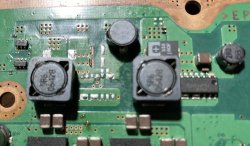
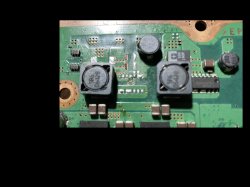
This motherboard was already worked on when I bought it about a year ago. As we can see in the pictures the nectokins were replaced. I tested the +1.0V_BE_VDDC and it shows no V.

>$ bringup
bringup
[SSM] state: 0000 -> 0101
Bringup Mode #0 (0xFF)
[SSM] ssmCb_OnStartingBePowOn() called.
[SSM] First Boot.
[SSM] Bringup mode : syspm_stat=00000000/00000000
[POWSEQ] PowerSeq_Setup called.
[SSM] state: 0101 -> 0301
[SSM] PowSeq Fail : Detected !
[SSM] state: 0301 -> 0700
[POWSEQ] AV Backend Letup
[SSM] Shutdown mode : syspm_stat=00000000/00000000
[ERROR]: 0xa0093003
Press Ctrl+C to exit
>$ shutdown
[POWSEQ] PowerSeq_Letup called.
[SSM] state: 0700 -> 0600
(PowerOff State) (Fatal)
shutdown
[SSM] state: 0600 -> 0000
[SSM] Error state is cleared.
(PowerOff State)

>$ errlog
errlog
ofst[ 4]:err_code:0xffffffff, clock:0xffffffff
ofst[ 8]:err_code:0xffffffff, clock:0xffffffff
ofst[ 12]:err_code:0xffffffff, clock:0xffffffff
ofst[ 16]:err_code:0xffffffff, clock:0xffffffff
ofst[ 20]:err_code:0xffffffff, clock:0xffffffff
ofst[ 24]:err_code:0xffffffff, clock:0xffffffff
ofst[ 28]:err_code:0xffffffff, clock:0xffffffff
ofst[ 32]:err_code:0xffffffff, clock:0xffffffff
ofst[ 36]:err_code:0xffffffff, clock:0xffffffff
ofst[ 40]:err_code:0xffffffff, clock:0xffffffff
ofst[ 44]:err_code:0xffffffff, clock:0xffffffff
ofst[ 48]:err_code:0xffffffff, clock:0xffffffff
ofst[ 52]:err_code:0xffffffff, clock:0xffffffff
ofst[ 56]:err_code:0xffffffff, clock:0xffffffff
ofst[ 60]:err_code:0xffffffff, clock:0xffffffff
ofst[ 64]:err_code:0xffffffff, clock:0xffffffff
ofst[ 68]:err_code:0xffffffff, clock:0xffffffff
ofst[ 72]:err_code:0xffffffff, clock:0xffffffff
ofst[ 76]:err_code:0xffffffff, clock:0xffffffff
ofst[ 80]:err_code:0xffffffff, clock:0xffffffff
ofst[ 84]:err_code:0xffffffff, clock:0xffffffff
ofst[ 88]:err_code:0xffffffff, clock:0xffffffff
ofst[ 92]:err_code:0xffffffff, clock:0xffffffff
ofst[ 96]:err_code:0xffffffff, clock:0xffffffff
ofst[100]:err_code:0xffffffff, clock:0xffffffff
ofst[104]:err_code:0xffffffff, clock:0xffffffff
ofst[108]:err_code:0xffffffff, clock:0xffffffff
ofst[112]:err_code:0xffffffff, clock:0xffffffff
ofst[116]:err_code:0xffffffff, clock:0xffffffff
ofst[120]:err_code:0xffffffff, clock:0xffffffff
ofst[124]:err_code:0xffffffff, clock:0xffffffff
ofst[ 0]:err_code:0xa0093003, clock:0xffffffff
[mullion]$

>$ becount
becount
Bringup : 1384 times
Shutdown: 1303 times
Power-on: 101day 09hour 45min 49sec
[mullion]$

1.jpg
2.jpg
3.jpg
4.jpg

What can I do? Any help will be appreciated!

Thank you!
 
Decided to give the one I got working then stopped showing the standby led another go after watching @RIP-Felix 2 parter again. I managed to test a number of components, still have some more to test. Here's my findings. If anyone can be bothered to read through, I'd appreciate hearing your thoughts:


R2408 is close enough to 150kOhms as it should be. R2406 is 87.4kOhms. Should be 100kOhms. On this circuit, I'm missing R2409 and C2401 they are marked with XX so not sure if they are necessary.
C2405 starts at 87kOhms and counts up slowly. C2407 starts at 72.6kOhms and slowly counts up to 73.3kOhms. C2409 slowly climbs from 372.9Ohms. Couldn't measure C2410 as probe wouldn't fit. R2413 was 373Ohms, should be about 390Ohms. Think it's out of its tolerance. R2418 should be 0Ohms, I got 0.1Ohm think that's fine. C2475 is 373Ohms counting up. Same for C2476. C2444 counts up in kOhms, reached 5kOhms. C2451 130.5kOhms. C2452 312Ohms. R2453 312Ohms should be 390Ohms. C2459 337.4Ohms counting up. R2481 0.1Ohm should be 0Ohm. C2433 311.7Ohms. C2471 5.9kOhms, not convinced on my reading. R2430 1.83kOhms should be 2.2kOhms. R2429 exactly the same. C2586 312Ohms. C2525 312Ohms. C2528 69.4Ohms. C2587 69.5Ohms.
Probe point near IC6003 was 1.7kOhms. Should be 4.1kOhms. Probe point near IC6103 read 2.6Ohms.
R6113 read 4kOhms should 4.7kOhms. R6120 read 6.8kOhms should be 10kOhms. R6119 0.91kOhms should be 910Ohms. R6115 56Ohms should be 56Ohms. R6114 0.74kOhms should be 750Ohms. Something odd around IC6107.
R6223 0.9kOhms should be 910Ohms. C6276 also 0.9kOhms. R6210 4kOhms and R6215 10kOhms, latter is fine former should be around 4.7kOhms near IC6204. C6275 was 1.7kOhms and C6200 was 1.7kOhms.
Front ribbon cable CN4010 R4136 is all over the place. Seemed to settle around 2.2kOhms should be 10kOhms. It looks very burnt. R4120 next to it is missing, it is marked as XX though. C4053 8.5kOhms. IC4002 looks to be responsible for Standby LED (STBY_LED), this component is more commonly known as Syscon. It also looks to be responsible for POW_LED, BT_WAKEON, fan things, and lots of others. I suspect IC4002 is not getting the power somewhere hence why the led is not working.

Also, does anyone know where to find the correct values for the probe points on the motherboard? I can't figure it out from the schematic.
Any help is appreciated.

That is quite a lot of measuring most likely for nothing. Not only that, measuring resistors in circuit is a waste of time. Not to mention you are measuring capacitors using ohms. They rated in microfarads, not ohms. The only thing you can confirm with this is that none of them are shorted, if thats what you were trying to accomplish...

Just to clarify, have you actually tried to turn it on with another button board cable ? FIY they do go bad very often in my experience. And it wont always matter if the blue plastic came off or not. Some type of micro-fracture happens in them from old age and bending when youre messing around with the console. You can order a bunch of new ones from aliexpress for like 3 euros .
 
hello i need help

ofst[ 28]:err_code:0xffffffff, clock:0xffffffff
ofst[ 32]:err_code:0xa0003001, clock:0xffffffff
ofst[ 36]:err_code:0xa0003001, clock:0xffffffff
ofst[ 40]:err_code:0xa0003001, clock:0xffffffff
ofst[ 44]:err_code:0xa0003001, clock:0xffffffff
ofst[ 48]:err_code:0xa0003001, clock:0xffffffff
ofst[ 52]:err_code:0xa0003001, clock:0xffffffff
ofst[ 56]:err_code:0xa0003001, clock:0xffffffff
ofst[ 60]:err_code:0xa0003001, clock:0xffffffff
ofst[ 64]:err_code:0xa0003001, clock:0xffffffff
ofst[ 68]:err_code:0xa0003001, clock:0xffffffff
ofst[ 72]:err_code:0xa0003001, clock:0xffffffff
ofst[ 76]:err_code:0xa0003001, clock:0xffffffff
ofst[ 80]:err_code:0xa0003001, clock:0xffffffff
ofst[ 84]:err_code:0xa0003001, clock:0xffffffff
ofst[ 88]:err_code:0xa0003001, clock:0xffffffff
ofst[ 92]:err_code:0xa0003001, clock:0xffffffff
ofst[ 96]:err_code:0xa0003001, clock:0xffffffff
ofst[100]:err_code:0xa0003001, clock:0xffffffff
ofst[104]:err_code:0xa0003001, clock:0xffffffff
ofst[108]:err_code:0xa0003001, clock:0xffffffff
ofst[112]:err_code:0xa0003001, clock:0xffffffff
ofst[116]:err_code:0xa0003001, clock:0xffffffff
ofst[120]:err_code:0xa0003001, clock:0xffffffff
ofst[124]:err_code:0xa0003001, clock:0xffffffff
ofst[ 0]:err_code:0xa0003001, clock:0xffffffff
ofst[ 4]:err_code:0xa0022110, clock:0xffffffff
ofst[ 8]:err_code:0xa0022110, clock:0xffffffff
ofst[ 12]:err_code:0xa0003001, clock:0xffffffff
ofst[ 16]:err_code:0xa0003001, clock:0xffffffff
ofst[ 20]:err_code:0xa0003001, clock:0xffffffff
ofst[ 24]:err_code:0xa0003001, clock:0xffffffff
[mullion]$
 
Hi! I have a CECHC04, COK-002 with one error 0xa0093003

This motherboard was already worked on when I bought it about a year ago. As we can see in the pictures the nectokins were replaced. I tested the +1.0V_BE_VDDC and it shows no V.

>$ bringup
bringup
[SSM] state: 0000 -> 0101
Bringup Mode #0 (0xFF)
[SSM] ssmCb_OnStartingBePowOn() called.
[SSM] First Boot.
[SSM] Bringup mode : syspm_stat=00000000/00000000
[POWSEQ] PowerSeq_Setup called.
[SSM] state: 0101 -> 0301
[SSM] PowSeq Fail : Detected !
[SSM] state: 0301 -> 0700
[POWSEQ] AV Backend Letup
[SSM] Shutdown mode : syspm_stat=00000000/00000000
[ERROR]: 0xa0093003
Press Ctrl+C to exit
>$ shutdown
[POWSEQ] PowerSeq_Letup called.
[SSM] state: 0700 -> 0600
(PowerOff State) (Fatal)
shutdown
[SSM] state: 0600 -> 0000
[SSM] Error state is cleared.
(PowerOff State)

>$ errlog
errlog
ofst[ 4]:err_code:0xffffffff, clock:0xffffffff
ofst[ 8]:err_code:0xffffffff, clock:0xffffffff
ofst[ 12]:err_code:0xffffffff, clock:0xffffffff
ofst[ 16]:err_code:0xffffffff, clock:0xffffffff
ofst[ 20]:err_code:0xffffffff, clock:0xffffffff
ofst[ 24]:err_code:0xffffffff, clock:0xffffffff
ofst[ 28]:err_code:0xffffffff, clock:0xffffffff
ofst[ 32]:err_code:0xffffffff, clock:0xffffffff
ofst[ 36]:err_code:0xffffffff, clock:0xffffffff
ofst[ 40]:err_code:0xffffffff, clock:0xffffffff
ofst[ 44]:err_code:0xffffffff, clock:0xffffffff
ofst[ 48]:err_code:0xffffffff, clock:0xffffffff
ofst[ 52]:err_code:0xffffffff, clock:0xffffffff
ofst[ 56]:err_code:0xffffffff, clock:0xffffffff
ofst[ 60]:err_code:0xffffffff, clock:0xffffffff
ofst[ 64]:err_code:0xffffffff, clock:0xffffffff
ofst[ 68]:err_code:0xffffffff, clock:0xffffffff
ofst[ 72]:err_code:0xffffffff, clock:0xffffffff
ofst[ 76]:err_code:0xffffffff, clock:0xffffffff
ofst[ 80]:err_code:0xffffffff, clock:0xffffffff
ofst[ 84]:err_code:0xffffffff, clock:0xffffffff
ofst[ 88]:err_code:0xffffffff, clock:0xffffffff
ofst[ 92]:err_code:0xffffffff, clock:0xffffffff
ofst[ 96]:err_code:0xffffffff, clock:0xffffffff
ofst[100]:err_code:0xffffffff, clock:0xffffffff
ofst[104]:err_code:0xffffffff, clock:0xffffffff
ofst[108]:err_code:0xffffffff, clock:0xffffffff
ofst[112]:err_code:0xffffffff, clock:0xffffffff
ofst[116]:err_code:0xffffffff, clock:0xffffffff
ofst[120]:err_code:0xffffffff, clock:0xffffffff
ofst[124]:err_code:0xffffffff, clock:0xffffffff
ofst[ 0]:err_code:0xa0093003, clock:0xffffffff
[mullion]$

>$ becount
becount
Bringup : 1384 times
Shutdown: 1303 times
Power-on: 101day 09hour 45min 49sec
[mullion]$

1.jpg
2.jpg
3.jpg
4.jpg

What can I do? Any help will be appreciated!

Thank you!
Hey man the 3003 could be because of that tokin install.

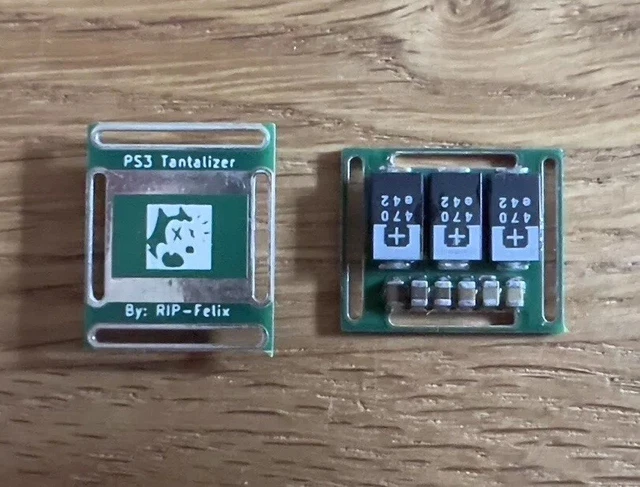
Resolder them to the board and get some thicker wire to bridge the positive terminal and use more wires, what you have there is a fire hazzard (all of the CPU and GPU's power delivery is fed though those capacitors and imagine upwards of 200W of power fed throught these tiny and scarce wires).

Consider getting some of RIPfelix's tantalizers in the long term even if that 3003 isnt caused by the directly by the tokins (seems unlikely).

On another note, since your PS3 has a 90nm GPU, which are known to have defective underfill and will inevitably fail, and it didnt reach the bit training step of the POST (step 40), there's always the chance that your GPU is defective :(. Do you know anything else about the story of the console (has it ever worked in your hands, have you got any more error codes). And when you get your errlog you can cross-refference them with the error codes on the PS3 Dev Wiki so that you can get some answers without waiting for anyone to answer your thread (people might never)
img_5188-1-scaled.jpg
Good Luck! (ou boa sorte :)) )
 
Greetings!
I am starting yet. I would take a liking to it to ask, my case with what probálnátok to start the diagnostics? My motherboard DYN-001. My physical remark, that CELL is getting warm launch but it RSX no.

>$ AUTH
Auth successful
Press Ctrl+C to exit
>$ ERRLOG GET 00
00000000 A0403034 0BFD971D
Press Ctrl+C to exit
>$ ERRLOG GET 01
00000000 A0404402 0BFD971C
Press Ctrl+C to exit
>$ ERRLOG GET 02
00000000 A0403034 0BFD91E7
Press Ctrl+C to exit
>$ ERRLOG GET 03
00000000 A0404402 0BFD91E7
Press Ctrl+C to exit
>$ ERRLOG GET 04
00000000 A0403034 0BFD8B8C
Press Ctrl+C to exit
>$ ERRLOG GET 05
00000000 A0404402 0BFD8B8B
Press Ctrl+C to exit
>$ ERRLOG GET 06
00000000 A0403034 0BFD8B83
Press Ctrl+C to exit
>$ ERRLOG GET 07
00000000 A0404402 0BFD8B82
Press Ctrl+C to exit
>$ ERRLOG GET 08
00000000 A0403034 0BFD8B74
Press Ctrl+C to exit
>$ ERRLOG GET 09
00000000 A0404402 0BFD8B73
Press Ctrl+C to exit
>$ ERRLOG GET 0A
00000000 A0403034 0BFD8B5D
Press Ctrl+C to exit
>$ ERRLOG GET 0B
00000000 A0404402 0BFD8B5C
Press Ctrl+C to exit
>$ ERRLOG GET 0C
00000000 A0403034 0BFD8B3A
Press Ctrl+C to exit
>$ ERRLOG GET 0D
00000000 A0404402 0BFD8B39
Press Ctrl+C to exit
>$ ERRLOG GET 0E
00000000 A0403034 0B4A17F5
Press Ctrl+C to exit
>$ ERRLOG GET 0F
00000000 A0404402 0B4A17F5
Press Ctrl+C to exit
>$ ERRLOG GET 10
00000000 A0403034 0B4A17C1
Press Ctrl+C to exit
>$ ERRLOG GET 11
00000000 A0404402 0B4A17C1
Press Ctrl+C to exit
>$ ERRLOG GET 12
00000000 A0403034 0B4A17A0
Press Ctrl+C to exit
>$ ERRLOG GET 13
00000000 A0404402 0B4A17A0
Press Ctrl+C to exit
>$ ERRLOG GET 14
00000000 A0403034 0B4A178A
Press Ctrl+C to exit
>$ ERRLOG GET 15
00000000 A0404402 0B4A1789
Press Ctrl+C to exit
>$ ERRLOG GET 16
00000000 A0403034 0B4A1772
Press Ctrl+C to exit
>$ ERRLOG GET 17
00000000 A0404402 0B4A1771
Press Ctrl+C to exit
>$ ERRLOG GET 18
00000000 A0403034 0B4A175B
Press Ctrl+C to exit
>$ ERRLOG GET 19
00000000 A0404402 0B4A175A
Press Ctrl+C to exit
>$ ERRLOG GET 1A
00000000 A0403034 0B4A174C
Press Ctrl+C to exit
>$ ERRLOG GET 1B
00000000 A0404402 0B4A174C
Press Ctrl+C to exit
>$ ERRLOG GET 1C
00000000 A0403034 0B4A1643
Press Ctrl+C to exit
>$ ERRLOG GET 1D
00000000 A0404402 0B4A1642
Press Ctrl+C to exit
>$ ERRLOG GET 1E
00000000 A0403034 0B4A1638
Press Ctrl+C to exit
>$ ERRLOG GET 1F
00000000 FFFFFFFF FFFFFFFF
Press Ctrl+C to exit
>$
 
Is there some reason why the bringup command always stops at this point?

[SSM] state: 0000 -> 0101
Bringup Mode #0 (0xFF)
[SSM] ssmCb_OnStartingBePowOn() called.
[SSM] Bringup mode : syspm_stat=00000000/00000000
[POWSEQ] PowerSeq_Setup called.
[SSM] state: 0101 -> 0201
[POWSEQ] AV Backend Setup
[SSM] state: 0201 -> 0102
[SSM] state: 0102 -> 0202
[SSM] state: 0202 -> 0103
[SSM] state: 0103 -> 0203
[SSM] ssmCb_BeforeBeOn() called.
[SSM] state: 0203 -> 0104
Psbd_SbTransMode_Half:0x20e2
 
I need help!

I got a CECHC04 fat model. The power turns on for 4 seconds then it gives the YLOD. It seemed clean no visable damage and the warranty seal was intact.

These are the error logs and bring up down below

Code:
auth successful
Press Ctrl+C to exit
>$ ERRLOG GET 00
00000000 A0003001 FFFFFFFF
Press Ctrl+C to exit
>$ ERRLOG GET 01
00000000 A0003001 FFFFFFFF
Press Ctrl+C to exit
>$ ERRLOG GET 02
00000000 A0003001 FFFFFFFF
Press Ctrl+C to exit
>$ ERRLOG GET 03
00000000 A0003001 FFFFFFFF
Press Ctrl+C to exit
>$ ERRLOG GET 04
00000000 A0003001 FFFFFFFF
Press Ctrl+C to exit
>$ ERRLOG GET 05
00000000 A0003001 FFFFFFFF
Press Ctrl+C to exit
>$ ERRLOG GET 06
00000000 A0003001 FFFFFFFF
Press Ctrl+C to exit
>$ ERRLOG GET 07
00000000 A0003001 FFFFFFFF
Press Ctrl+C to exit
>$ ERRLOG GET 08
00000000 A0003001 FFFFFFFF
Press Ctrl+C to exit
>$ ERRLOG GET 09
00000000 A0003001 FFFFFFFF
Press Ctrl+C to exit
>$ ERRLOG GET 0A
00000000 A0003001 2A327B39
Press Ctrl+C to exit
>$ ERRLOG GET 0B
00000000 A0003001 FFFFFFFF
Press Ctrl+C to exit
>$ ERRLOG GET 0C
00000000 A0003001 FFFFFFFF
Press Ctrl+C to exit
>$ ERRLOG GET 0D
00000000 A0003001 FFFFFFFF
Press Ctrl+C to exit
>$ ERRLOG GET 0E
00000000 A0003001 FFFFFFFF
Press Ctrl+C to exit
>$ ERRLOG GET 0F
00000000 A0003001 FFFFFFFF
Press Ctrl+C to exit
>$ ERRLOG GET 10
00000000 A0003001 FFFFFFFF
Press Ctrl+C to exit
>$ ERRLOG GET 11
00000000 A0003001 FFFFFFFF
Press Ctrl+C to exit
>$ ERRLOG GET 12
00000000 A0003001 FFFFFFFF
Press Ctrl+C to exit
>$ ERRLOG GET 13
00000000 A0603040 FFFFFFFF
Press Ctrl+C to exit
>$ ERRLOG GET 14
00000000 A0603040 2A327DC3
Press Ctrl+C to exit
>$ ERRLOG GET 15
00000000 A0603040 2A327DBE
Press Ctrl+C to exit
>$ ERRLOG GET 16
00000000 A0603040 2A327DBB
Press Ctrl+C to exit
>$ ERRLOG GET 17
00000000 A0603040 2A327DB6
Press Ctrl+C to exit
>$ ERRLOG GET 18
00000000 A0603040 2A327DB3
Press Ctrl+C to exit
>$ ERRLOG GET 19
00000000 A0603040 2A327DAF
Press Ctrl+C to exit
>$ ERRLOG GET 1A
00000000 A0603040 2A327BA7
Press Ctrl+C to exit
>$ ERRLOG GET 1B
00000000 A0003001 2A327BA3
Press Ctrl+C to exit
>$ ERRLOG GET 1C
00000000 A0003001 2A327BA3
Press Ctrl+C to exit
>$ ERRLOG GET 1D
00000000 A0603040 2A327B88
Press Ctrl+C to exit
>$ ERRLOG GET 1E
00000000 A0603040 2A327B85
Press Ctrl+C to exit
>$ ERRLOG GET 1F


ofst[ 72]:err_code:0xffffffff, clock:0x2a327b81  2022/06/07 21:11:29
ofst[ 76]:err_code:0xa0603040, clock:0x2a327b85  2022/06/07 21:11:33
ofst[ 80]:err_code:0xa0603040, clock:0x2a327b88  2022/06/07 21:11:36
ofst[ 84]:err_code:0xa0003001, clock:0x2a327ba3  2022/06/07 21:12:03
ofst[ 88]:err_code:0xa0003001, clock:0x2a327ba3  2022/06/07 21:12:03
ofst[ 92]:err_code:0xa0603040, clock:0x2a327ba7  2022/06/07 21:12:07
ofst[ 96]:err_code:0xa0603040, clock:0x2a327daf  2022/06/07 21:20:47
ofst[100]:err_code:0xa0603040, clock:0x2a327db3  2022/06/07 21:20:51
ofst[104]:err_code:0xa0603040, clock:0x2a327db6  2022/06/07 21:20:54
ofst[108]:err_code:0xa0603040, clock:0x2a327dbb  2022/06/07 21:20:59
ofst[112]:err_code:0xa0603040, clock:0x2a327dbe  2022/06/07 21:21:02
ofst[116]:err_code:0xa0603040, clock:0x2a327dc3  2022/06/07 21:21:07
ofst[120]:err_code:0xa0603040, clock:0xffffffff
ofst[124]:err_code:0xa0003001, clock:0xffffffff
ofst[  0]:err_code:0xa0003001, clock:0xffffffff
ofst[  4]:err_code:0xa0003001, clock:0xffffffff
ofst[  8]:err_code:0xa0003001, clock:0xffffffff
ofst[ 12]:err_code:0xa0003001, clock:0xffffffff
ofst[ 16]:err_code:0xa0003001, clock:0xffffffff
ofst[ 20]:err_code:0xa0003001, clock:0xffffffff
ofst[ 24]:err_code:0xa0003001, clock:0xffffffff
ofst[ 28]:err_code:0xa0003001, clock:0x2a327b39  2022/06/07 21:10:17
ofst[ 32]:err_code:0xa0003001, clock:0xffffffff
ofst[ 36]:err_code:0xa0003001, clock:0xffffffff
ofst[ 40]:err_code:0xa0003001, clock:0xffffffff
ofst[ 44]:err_code:0xa0003001, clock:0xffffffff
ofst[ 48]:err_code:0xa0003001, clock:0xffffffff
ofst[ 52]:err_code:0xa0003001, clock:0xffffffff
ofst[ 56]:err_code:0xa0003001, clock:0xffffffff
ofst[ 60]:err_code:0xa0003001, clock:0xffffffff
ofst[ 64]:err_code:0xa0003001, clock:0xffffffff
ofst[ 68]:err_code:0xa0003001, clock:0xffffffff


>$ bringup
bringup
[SSM] state: 0000 -> 0101
Bringup Mode #0 (0xFF)
[SSM] ssmCb_OnStartingBePowOn() called.
[SSM] First Boot.
[SSM] Bringup mode : syspm_stat=00000000/00000000
[POWSEQ] PowerSeq_Setup called.
[SSM] state: 0101 -> 0201
[POWSEQ] AV Backend Setup
[SSM] state: 0201 -> 0102
[SSM] state: 0102 -> 0202
[SSM] state: 0202 -> 0103
[SSM] state: 0103 -> 0203
[SSM] ssmCb_BeforeBeOn() called.
[SSM] state: 0203 -> 0104
Psbd_SbTransMode_Half:0x21e2
Press Ctrl+C to exit
>$ shutdown
[SSM] state: 0104 -> 0204
[SSM] state: 0204 -> 0105
[SSM] state: 0105 -> 0305
[SSM] ssmCb_AfterBeOn2() called.
[SSM] PowSeq Fail : Detected !
[SSM] state: 0305 -> 0700
[POWSEQ] AV Backend Letup
[SSM] Shutdown mode : syspm_stat=00000000/00000000
[ERROR]: 0xa0603040
[POWSEQ] PowerSeq_Letup called.
[SSM] state: 0700 -> 0600
(PowerOff State) (Fatal)
shutdown
[SSM] state: 0600 -> 0000
[SSM] Error state is cleared.
(PowerOff State)
Press Ctrl+C to exit
>$ bringup
bringup
[SSM] state: 0000 -> 0101
Bringup Mode #0 (0xFF)
[SSM] ssmCb_OnStartingBePowOn() called.
[SSM] Bringup mode : syspm_stat=00000000/00000000
[POWSEQ] PowerSeq_Setup called.
[SSM] state: 0101 -> 0201
[POWSEQ] AV Backend Setup
[SSM] state: 0201 -> 0102
[SSM] state: 0102 -> 0202
[SSM] state: 0202 -> 0103
[SSM] state: 0103 -> 0203
[SSM] ssmCb_BeforeBeOn() called.
[SSM] state: 0203 -> 0104
Psbd_SbTransMode_Half:0x21e2
Press Ctrl+C to exit
>$
[SSM] state: 0104 -> 0204
[SSM] state: 0204 -> 0105
[SSM] state: 0105 -> 0305
[SSM] ssmCb_AfterBeOn2() called.
[SSM] PowSeq Fail : Detected !
[SSM] state: 0305 -> 0700
[POWSEQ] AV Backend Letup
[SSM] Shutdown mode : syspm_stat=00000000/00000000
[ERROR]: 0xa0603040
[POWSEQ] PowerSeq_Letup called.
[SSM] state: 0700 -> 0600
(PowerOff State) (Fatal)

Any help would be appreciated!
 
Update on my original post, I think I found the issue.
p.jpg

Hey all o/
Months after my first interaction with this thread, I was finally able to get around soldering the 470 caps. The attempts at the beginning were... less than optimal, especially since I also accidentally grinded away a lot of the copper, but the rest seemed pretty okay to me.
View attachment 43370 View attachment 43371 View attachment 43372 View attachment 43373
After trying to power on the console via bringup, I am now sadly getting a 3003. It obviously means that I fucked up something, but I can't understand what exactly. Taking out my multimeter, if I place one probe in the exposed positive pad of a cap, and then put the other probe in the negative pad of the PCB, my multimeter beeps. One probe in the negative of the cap and the other in the negative of the pad, or ground, it beeps. Probe in positive pad and probe in negative pad, beeps, same as with positive and negative cap.
I'd really appreciate any advice, I was sure I was gonna get it right this time :(
 
Found a documentation folder in the syscon repo with tons of stuff to dig into.

Thanks to the Testpoints_voltage-COK-001 (Side A).jpg just realized all of these points are shorted to ground.

JL9646 (Q6305) +1.7 MISC
JL9644 (IC6003 vout 1) +5V MISC
JL2451 (IC2408) +1.8V_ANA
JL9655 (IC6304) +1.5V_YC_RC_VDDA
JL9652 (IC6303) +1.5V_YC_RC_VDDIO
JL9653 (VFB/VDRP) +1.0V_BE_VDDS1 (Pad C11)
+1.2_RSX_VDDC (All 4 points)
+1.2_BE_VDDC (All 6 points)
+1.2V_SB_VDDC +1.2V_SB_VDDR

Thing looks grim, i guess that's not normal at all. I'm trying to figure the logic between the ICs, maybe one of these handle that many voltage lines and can be the culprit..
 
Okay nevermind, it seems like the green mask there wasn't a diff pad, so it's okay if it got chewed.
I just got finished resoldering all the 470uF capacitors, I also took the time to clean the mess I had previously done with my solder mountain on one of the pads. Still a 3003. I was only able to get a 1200 when I soldered a parasite cap to the original TOKINs, after that I completely destroyed the TOKINs, soldered the new caps and started getting a 3003.
I don't know what to do, positive and negative have continuity both with and without the caps (without any soldered in place), I'm not sure if that's okay. On one occasion I grinded a bit too much the copper layer and ended up going a level down, exposing just a bit of the copper layer BELOW the surface-level one. I don't think that's an issue though, assuming that layer is also grounded (I'd appreciate it if anyone could please clarify this). I'm pretty certain my caps are soldered in place and none are left hanging loose, so it's not that either.
I honestly don't want to think it's the actual capacitors the problem, I want to assume that if one were bad, it wouldn't be enough to throw a 3003, let alone just for a boot.
I don't know what else to check or test, this is a cry for help for anyone who might have at least an idea of something to try out, because I definitely ran out of ideas. If this doesn't turn well, I won't be too sad because I bought this console for the sake of learning how to actually fix it, but it will be a bummer. Replies are appreciated.
AGC_EGO_S20FE_20240624_164149811.jpg
 
Is there some reason why the bringup command always stops at this point?

[SSM] state: 0000 -> 0101
Bringup Mode #0 (0xFF)
[SSM] ssmCb_OnStartingBePowOn() called.
[SSM] Bringup mode : syspm_stat=00000000/00000000
[POWSEQ] PowerSeq_Setup called.
[SSM] state: 0101 -> 0201
[POWSEQ] AV Backend Setup
[SSM] state: 0201 -> 0102
[SSM] state: 0102 -> 0202
[SSM] state: 0202 -> 0103
[SSM] state: 0103 -> 0203
[SSM] ssmCb_BeforeBeOn() called.
[SSM] state: 0203 -> 0104
Psbd_SbTransMode_Half:0x20e2

You need to press enter after that first printout, but that will only work in command mode using python. Not gui tool.
 
When I took out rsx on dia-001 I expected error 1802, but got 0xa0201b02. Is it something interesting? Because I couldn't find any info about that error
 
Hello people! I need help with a PS3 CECHL04 with a motherboard VER-001
It gives me 3001 error and the 12v prong it's ok and the PSU it's ok.
Please help! I don't know how to continue!
I left the bringup error fatal errors if it helps.


Code:
>$ errlog
00000000
# [SSM] Bringup Start.
# [PowSeq] Error:A101
# [SSM] PS0 ng.
# [SSM] Cond/Fatal received, msg=24D0.
# [SSM] Fataldown Start.
# [SSM] Fataldown ok.
# (PowerOff State) (Fatal)
# [SSM] Clearfatal Start.
# [SSM] Clearfatal ok.
# (PowerOff State)
# CODE     CLOCK
# A0003001 FFFFFFFF
# FFFFFFFF FFFFFFFF
# FFFFFFFF FFFFFFFF
# FFFFFFFF FFFFFFFF
# FFFFFFFF FFFFFFFF
# FFFFFFFF FFFFFFFF
# FFFFFFFF FFFFFFFF
# FFFFFFFF FFFFFFFF
# FFFFFFFF FFFFFFFF
# FFFFFFFF FFFFFFFF
# FFFFFFFF FFFFFFFF
# FFFFFFFF FFFFFFFF
# FFFFFFFF FFFFFFFF
# FFFFFFFF FFFFFFFF
# FFFFFFFF FFFFFFFF
# FFFFFFFF FFFFFFFF
# FFFFFFFF FFFFFFFF
# FFFFFFFF FFFFFFFF
# FFFFFFFF FFFFFFFF
# FFFFFFFF FFFFFFFF
# FFFFFFFF FFFFFFFF
# FFFFFFFF FFFFFFFF
# FFFFFFFF FFFFFFFF
# FFFFFFFF FFFFFFFF
# FFFFFFFF FFFFFFFF
# FFFFFFFF FFFFFFFF
# FFFFFFFF FFFFFFFF
# FFFFFFFF FFFFFFFF
# FFFFFFFF FFFFFFFF
# FFFFFFFF FFFFFFFF
# FFFFFFFF FFFFFFFF

Press Ctrl+C to exit
>$ bringup
00000000
# [SSM] Bringup Start.
# [PowSeq] Error:A101
# [SSM] PS0 ng.
# [SSM] Cond/Fatal received, msg=24D0.
# [SSM] Fataldown Start.

Thanks in advance!
 
Did a 40nm frankie today on a SEALED A00 console.
Code:
ofst[ 56]:err_code:0xffffffff, clock:0x11048504  2009/01/17 12:01:08

ofst[ 60]:err_code:0xa0801004, clock:0x1104c270  2009/01/17 16:23:12

ofst[ 64]:err_code:0xa0801004, clock:0x11301d76  2009/02/19 13:39:02

ofst[ 68]:err_code:0xa0801001, clock:0x12576e82  2009/10/01 13:43:30

ofst[ 72]:err_code:0xa0801001, clock:0x12abc259  2009/12/04 12:51:37

ofst[ 76]:err_code:0xa0801001, clock:0x12e60c62  2010/01/17 17:58:58

ofst[ 80]:err_code:0xa0801001, clock:0x131fcd58  2010/03/02 13:21:28

ofst[ 84]:err_code:0xa0801001, clock:0x13541654  2010/04/11 05:10:44

ofst[ 88]:err_code:0xa0801001, clock:0x1451ca59  2010/10/20 15:42:17

ofst[ 92]:err_code:0xa0801001, clock:0x14ac9a44  2010/12/28 12:53:24

ofst[ 96]:err_code:0xa0801001, clock:0x14acaa8d  2010/12/28 14:02:53

ofst[100]:err_code:0xa0801200, clock:0x15122da7  2011/03/15 14:01:11

ofst[104]:err_code:0xa0801200, clock:0x152f299d  2011/04/06 13:39:41

ofst[108]:err_code:0xa0801200, clock:0x15ac83cf  2011/07/10 15:37:51

ofst[112]:err_code:0xa0801200, clock:0x15ac83e4  2011/07/10 15:38:12

ofst[116]:err_code:0xa0801001, clock:0x15c6f28a  2011/07/30 16:49:14

ofst[120]:err_code:0xa0801001, clock:0x18edb8ad  2013/04/02 15:41:33

ofst[124]:err_code:0xa0801001, clock:0x18fd9982  2013/04/14 16:44:50

ofst[  0]:err_code:0xa0801001, clock:0x19353810  2013/05/26 21:16:00

ofst[  4]:err_code:0xa0801701, clock:0x194489d6  2013/06/07 12:08:54

ofst[  8]:err_code:0xa0801601, clock:0x194489d6  2013/06/07 12:08:54

ofst[ 12]:err_code:0xa0801001, clock:0x19ba0680  2013/09/04 14:56:00

ofst[ 16]:err_code:0xa0801001, clock:0x1b010992  2014/05/10 16:00:18

ofst[ 20]:err_code:0xa0801001, clock:0x1b0bb501  2014/05/18 18:14:25

ofst[ 24]:err_code:0xa0801001, clock:0x1b0e5d95  2014/05/20 18:38:13

ofst[ 28]:err_code:0xa0801001, clock:0x1c1882fc  2014/12/08 15:40:44

ofst[ 32]:err_code:0xa0801004, clock:0x1c1f1e4b  2014/12/13 15:56:59

ofst[ 36]:err_code:0xa0801004, clock:0x1c8721f9  2015/03/02 13:28:25

ofst[ 40]:err_code:0xa0801001, clock:0x1cfadc08  2015/05/29 08:12:56

ofst[ 44]:err_code:0xa0801004, clock:0x1e35d3ba  2016/01/23 06:01:30

ofst[ 48]:err_code:0xa0801001, clock:0x1f4d89fc  2016/08/22 10:01:32

ofst[ 52]:err_code:0xa0901001, clock:0x2ddcd98f  2024/05/19 15:38:55

After using bringup im now getting a 603040 error after about 5 seconds. Wiki says flash/startship issue. I do have 3.3V on TH3204 and the top side nand chip. Not sure where 1.8V_SB_PERI is created to check. Anyone seen this issue? Could this be a RSX problem? Ive never seen this error before.

edit: IC6014 is outputting 1.8V

NVM fixed it
 
Last edited:
Hey,

I'm new to the forum but I have a CECHA01 that I recently acquired. The system powers on with red and green lights for maybe 2 or seconds before powering off and blinking red. The systems was filthy with brown fuzz that indicates overheat potential. No signs of drop damage and tamper seal was intact. Below is the error codes I was able to pull up from following RIP Felix's video.

Code:
>$ errlog
errlog
ofst[ 84]:err_code:0xffffffff, clock:0x1be1a0f7  2014/10/28 00:33:59
ofst[ 88]:err_code:0xa0403034, clock:0x1be1a331  2014/10/28 00:43:29
ofst[ 92]:err_code:0xa0403034, clock:0x1be1a346  2014/10/28 00:43:50
ofst[ 96]:err_code:0xa0403034, clock:0x1be1a352  2014/10/28 00:44:02
ofst[100]:err_code:0xa0403034, clock:0x1be1a35b  2014/10/28 00:44:11
ofst[104]:err_code:0xa0801001, clock:0x1be1a388  2014/10/28 00:44:56
ofst[108]:err_code:0xa0403034, clock:0x1be1a3ae  2014/10/28 00:45:34
ofst[112]:err_code:0xa0403034, clock:0x1be1a743  2014/10/28 01:00:51
ofst[116]:err_code:0xa0403034, clock:0x1be1a763  2014/10/28 01:01:23
ofst[120]:err_code:0xa0403034, clock:0x1be1a76d  2014/10/28 01:01:33
ofst[124]:err_code:0xa0403034, clock:0x1be1a786  2014/10/28 01:01:58
ofst[  0]:err_code:0xa0403034, clock:0x1be1a78c  2014/10/28 01:02:04
ofst[  4]:err_code:0xa0403034, clock:0x1be1a833  2014/10/28 01:04:51
ofst[  8]:err_code:0xa0801001, clock:0x1be1c695  2014/10/28 03:14:29
ofst[ 12]:err_code:0xa0403034, clock:0x1be1c698  2014/10/28 03:14:32
ofst[ 16]:err_code:0xa0403034, clock:0x1be1c69d  2014/10/28 03:14:37
ofst[ 20]:err_code:0xa0403034, clock:0x1be1c6a5  2014/10/28 03:14:45
ofst[ 24]:err_code:0xa0403034, clock:0x1e5e826c  2016/02/23 02:37:32
ofst[ 28]:err_code:0xa0403034, clock:0x1e5e8272  2016/02/23 02:37:38
ofst[ 32]:err_code:0xa0403034, clock:0x1e5e827f  2016/02/23 02:37:51
ofst[ 36]:err_code:0xa0403034, clock:0x1e5e8292  2016/02/23 02:38:10
ofst[ 40]:err_code:0xa0403034, clock:0x1e5e82a2  2016/02/23 02:38:26
ofst[ 44]:err_code:0xa0403034, clock:0x1e5e82d8  2016/02/23 02:39:20
ofst[ 48]:err_code:0xa0403034, clock:0x1e5e82e0  2016/02/23 02:39:28
ofst[ 52]:err_code:0xa0403034, clock:0x1e5e82e6  2016/02/23 02:39:34
ofst[ 56]:err_code:0xa0403034, clock:0x2c1e3072  2023/06/15 20:26:26
ofst[ 60]:err_code:0xa0403034, clock:0x2c1e30a1  2023/06/15 20:27:13
ofst[ 64]:err_code:0xa0902120, clock:0x2c1e30a1  2023/06/15 20:27:13
ofst[ 68]:err_code:0xa0403034, clock:0x2c1e30b5  2023/06/15 20:27:33
ofst[ 72]:err_code:0xa0902120, clock:0x2c1e30b5  2023/06/15 20:27:33
ofst[ 76]:err_code:0xa0403034, clock:0x2e08bebc  2024/06/21 22:44:12
ofst[ 80]:err_code:0xa0403034, clock:0x2e08bed5  2024/06/21 22:44:37
[mullion]$


Code:
>$ becount
becount
Bringup : 1566 times
Shutdown: 1228 times
Power-on: 159day 09hour 33min 18sec
[mullion]$

Code:
>$ bringup
[SSM] state: 0000 -> 0101
Bringup Mode #0 (0xFF)
[SSM] ssmCb_OnStartingBePowOn() called.
[SSM] First Boot.
[SSM] Bringup mode : syspm_stat=00000000/00000000
[POWSEQ] PowerSeq_Setup called.
[SSM] state: 0101 -> 0201
[POWSEQ] AV Backend Setup
[SSM] state: 0201 -> 0102
[SSM] state: 0102 -> 0202
[SSM] state: 0202 -> 0103
[SSM] state: 0103 -> 0203
[SSM] ssmCb_BeforeBeOn() called.
[SSM] state: 0203 -> 0104
Psbd_SbTransMode_Half:0x20e2
[POWERSEQ] Error : BitTraining RSX:RRAC:BX0:BX:FLEXIO_ID
[SSM] state: 0104 -> 0304
[SSM] ssmCb_AfterBeOn2() called.
[SSM] PowSeq Fail : Detected !
[SSM] state: 0304 -> 0700
[POWSEQ] AV Backend Letup
[SSM] Shutdown mode : syspm_stat=00000000/00000000
[ERROR]: 0xa0403034
bringup
Do nothing. (FatalDown State)
[POWSEQ] PowerSeq_Letup called.
[SSM] state: 0700 -> 0600
(PowerOff State) (Fatal)
Press Ctrl+C to exit
>$ auth
Auth successful
Press Ctrl+C to exit
>$ shutdown
shutdown
Do nothing. (PowerOff State)
Press Ctrl+C to exit
>$ shutdown
[SSM] state: 0000 -> 0101
Bringup Mode #0 (0xFF)
[SSM] ssmCb_OnStartingBePowOn() called.
[SSM] First Boot.
[SSM] Bringup mode : syspm_stat=00000000/00000000
[POWSEQ] PowerSeq_Setup called.
shutdown
Do nothing. (UpBusy State)
[SSM] state: 0101 -> 0201
[POWSEQ] AV Backend Setup
[SSM] state: 0201 -> 0102
[SSM] state: 0102 -> 0202
[SSM] state: 0202 -> 0103
[SSM] state: 0103 -> 0203
[SSM] ssmCb_BeforeBeOn() called.
[SSM] state: 0203 -> 0104
Psbd_SbTransMode_Half:0x20e2
[POWERSEQ] Error : BitTraining RSX:RRAC:BX0:BX:FLEXIO_ID
[SSM] state: 0104 -> 0304
[SSM] ssmCb_AfterBeOn2() called.
[SSM] PowSeq Fail : Detected !
[SSM] state: 0304 -> 0700
[POWSEQ] AV Backend Letup
[SSM] Shutdown mode : syspm_stat=00000000/00000000
[ERROR]: 0xa0403034
Press Ctrl+C to exit
>$ bringup
[POWSEQ] PowerSeq_Letup called.
[SSM] state: 0700 -> 0600
(PowerOff State) (Fatal)
[SSM] state: 0600 -> 0000
[SSM] Error state is cleared.
(PowerOff State)
bringup
[SSM] state: 0000 -> 0101
Bringup Mode #0 (0xFF)
[SSM] ssmCb_OnStartingBePowOn() called.
[SSM] Bringup mode : syspm_stat=00000000/00000000
[POWSEQ] PowerSeq_Setup called.
[SSM] state: 0101 -> 0201
[POWSEQ] AV Backend Setup
[SSM] state: 0201 -> 0102
[SSM] state: 0102 -> 0202
[SSM] state: 0202 -> 0103
[SSM] state: 0103 -> 0203
[SSM] ssmCb_BeforeBeOn() called.
[SSM] state: 0203 -> 0104
Psbd_SbTransMode_Half:0x20e2
Press Ctrl+C to exit
>$ bringup
[POWERSEQ] Error : BitTraining RSX:RRAC:BX0:BX:FLEXIO_ID
[SSM] state: 0104 -> 0304
[SSM] ssmCb_AfterBeOn2() called.
[SSM] PowSeq Fail : Detected !
[SSM] state: 0304 -> 0700
[POWSEQ] AV Backend Letup
[SSM] Shutdown mode : syspm_stat=00000000/00000000
[ERROR]: 0xa0403034
[POWSEQ] PowerSeq_Letup called.
[SSM] state: 0700 -> 0600
(PowerOff State) (Fatal)
[SSM] state: 0600 -> 0000
[SSM] Error state is cleared.
(PowerOff State)
[SSM] state: 0000 -> 0101
Bringup Mode #0 (0xFF)
[SSM] ssmCb_OnStartingBePowOn() called.
[SSM] Bringup mode : syspm_stat=00000000/00000000
[POWSEQ] PowerSeq_Setup called.
bringup
Do nothing. (UpBusy State)
[SSM] state: 0101 -> 0201
[POWSEQ] AV Backend Setup
[SSM] state: 0201 -> 0102
[SSM] state: 0102 -> 0202
[SSM] state: 0202 -> 0103
[SSM] state: 0103 -> 0203
[SSM] ssmCb_BeforeBeOn() called.
[SSM] state: 0203 -> 0104
Psbd_SbTransMode_Half:0x20e2
[POWERSEQ] Error : BitTraining RSX:RRAC:BX0:BX:FLEXIO_ID
[SSM] state: 0104 -> 0304
[SSM] ssmCb_AfterBeOn2() called.
[SSM] PowSeq Fail : Detected !
[SSM] state: 0304 -> 0700
[POWSEQ] AV Backend Letup
[SSM] Shutdown mode : syspm_stat=00000000/00000000
[ERROR]: 0xa0403034


I'm looking to see what the consensus is on what the fix would be.

Thank you!
 
Hi guys, I have a CECHA01 model that started giving me a GLOD. It will turn on and run, but no image and no power to the USB ports at all.
It will go into safe mode (or sound like it), but still no video or USB power.
I should note that I had another GLOD console, that would supply power to the USB ports and that turned out to be a bad HDD.
This is not the same.
I've read the syscon logs and included them below.
Additionally, due to the syscon logs showing lots of 1001 errors, i've replaced 1 of the Cell's Tokin's with RIP Felix's Tantalizer. There was no change in behavior afterwards.
I'm unsure of the ps3 boot process, and as such, am not sure if the USB ports receiving no power is normal or not for GLOD. Could there be a bad component in charge of supplying power to the usb ports/hdmi out? or is it likely the cell/caps?

Just looking for a little guidance as i'm not sure if i should continue replacing Tokins for the cell, or look for something else.

As a side question, is there any need to swap the syscon back to External mode after repairing? Or will it function normally in Internal mode?
Thanks.

Error Log (Oldest to Newest)
Code:
ofst[100]:err_code:0xffffffff, clock:0x0b66a0b9  2006/01/22 19:59:53
ofst[104]:err_code:0xa0801004, clock:0x0b66ab2d  2006/01/22 20:44:29
ofst[108]:err_code:0xa0801001, clock:0x0b66ad3e  2006/01/22 20:53:18
ofst[112]:err_code:0xa0801004, clock:0x0b66ba31  2006/01/22 21:48:33
ofst[116]:err_code:0xa0801001, clock:0x0b66c5aa  2006/01/22 22:37:30
ofst[120]:err_code:0xa0801001, clock:0x0b66cab7  2006/01/22 22:59:03
ofst[124]:err_code:0xa0801001, clock:0x0b66cadf  2006/01/22 22:59:43
ofst[  0]:err_code:0xa0801004, clock:0x0b66cbdb  2006/01/22 23:03:55
ofst[  4]:err_code:0xa0801004, clock:0x0b66cc4c  2006/01/22 23:05:48
ofst[  8]:err_code:0xa0801004, clock:0x0b66d063  2006/01/22 23:23:15
ofst[ 12]:err_code:0xa0801004, clock:0x0b66d35d  2006/01/22 23:35:57
ofst[ 16]:err_code:0xa0801001, clock:0x0b66da54  2006/01/23 00:05:40
ofst[ 20]:err_code:0xa0801001, clock:0x0b67eadc  2006/01/23 19:28:28
ofst[ 24]:err_code:0xa0801001, clock:0x0b67f478  2006/01/23 20:09:28
ofst[ 28]:err_code:0xa0801001, clock:0x0b67f496  2006/01/23 20:09:58
ofst[ 32]:err_code:0xa0801001, clock:0x0b67f4b1  2006/01/23 20:10:25
ofst[ 36]:err_code:0xa0801001, clock:0x0b67f4ec  2006/01/23 20:11:24
ofst[ 40]:err_code:0xa0801001, clock:0x0b488680  2005/12/31 00:00:00
ofst[ 44]:err_code:0xa0801001, clock:0x0b4886b9  2005/12/31 00:00:57
ofst[ 48]:err_code:0xa0801001, clock:0x0c1f2659  2006/06/11 19:07:05
ofst[ 52]:err_code:0xa0801001, clock:0x0b4886d3  2005/12/31 00:01:23
ofst[ 56]:err_code:0xa0801001, clock:0x0e5b3557  2007/08/19 17:07:35
ofst[ 60]:err_code:0xa0801001, clock:0x0e5b358d  2007/08/19 17:08:29
ofst[ 64]:err_code:0xa0801001, clock:0x0e5b360c  2007/08/19 17:10:36
ofst[ 68]:err_code:0xa0801001, clock:0x1041fd01  2008/08/22 22:41:05
ofst[ 72]:err_code:0xa0801004, clock:0x1041ffca  2008/08/22 22:52:58
ofst[ 76]:err_code:0xa0801001, clock:0x0b488747  2005/12/31 00:03:19
ofst[ 80]:err_code:0xa0801004, clock:0x0b488b6d  2005/12/31 00:21:01
ofst[ 84]:err_code:0xa0801004, clock:0x0b4893bb  2005/12/31 00:56:27
ofst[ 88]:err_code:0xa0801004, clock:0x0b4893cd  2005/12/31 00:56:45
ofst[ 92]:err_code:0xa0801701, clock:0xffffffff
ofst[ 96]:err_code:0xa0801601, clock:0xffffffff

Bringup
Code:
>$ bringup
bringup
[SSM] state: 0000 -> 0101
Bringup Mode #0 (0xFF)
[SSM] ssmCb_OnStartingBePowOn() called.
[SSM] Bringup mode : syspm_stat=00000000/00000000
[POWSEQ] PowerSeq_Setup called.
[SSM] state: 0101 -> 0201
[POWSEQ] AV Backend Setup
[SSM] state: 0201 -> 0102
[SSM] state: 0102 -> 0202
[SSM] state: 0202 -> 0103
[SSM] state: 0103 -> 0203
[SSM] ssmCb_BeforeBeOn() called.
[SSM] state: 0203 -> 0104
Psbd_SbTransMode_Half:0x20e2
Press Ctrl+C to exit
>$
[SSM] state: 0104 -> 0204
[SSM] state: 0204 -> 0105
[SSM] state: 0105 -> 0400
(PowerOn State)
[SERV NVS] READ CMD

Boot Loader SE Version 1.0.0 (Build ID: 1673,16934, Build Data: 2006-10-30_12:39:57)
Copyright(C) 2006 Sony Computer Entertainment Inc.All Rights Reserved.
[SERV SETCFG] XDR (CH0,CH1) ASSERT
[SERV SETCFG] XDR (CH0,CH1) DEASSERT
[INFO]: Connecting to Debug Device (SB UART)
[SERV NVS] READ CMD
[SERV NVS] READ CMD
[SERV NVS] READ CMD
[SERV NVS] READ CMD
[SERV NVS] READ CMD
[SERV NVS] READ CMD
[SERV NVS] READ CMD
[SERV NVS] READ CMD
[SERV NVS] READ CMD
[SERV NVS] READ CMD
[SERV NVS] READ CMD
[SERV NVS] READ CMD
[SERV NVS] READ CMD
[SERV NVS] READ CMD
[SERV NVS] READ CMD
[SERV NVS] READ CMD
[SERV NVS] READ CMD
[SERV NVS] READ CMD
[SERV NVS] READ CMD
[SERV NVS] READ CMD
[SERV NVS] READ CMD
[SERV NVS] READ CMD
[SERV NVS] READ CMD
[SERV NVS] READ CMD
[SERV THERM] NOTIFY_MODE CMD
[SERV NOTIF] CONTROL_LED
[SERV NOTIF] RING_BUZZER
[SERV NOTIF] CONTROL_LED
[SERV NOTIF] CONTROL_LED
[SERV NOTIF] RING_BUZZER
[SERV NOTIF] CONTROL_LED
[SERV NVS] WRITE CMD
[SERV NVS] READ CMD
[SERV NVS] READ CMD

[mullion]$
Press Ctrl+C to exit
>$ shutdown
shutdown
[SSM] state: 0400 -> 0500
[POWSEQ] AV Backend Letup
[SSM] ssmCb_AfterBeOn() called.
[SSM] Shutdown mode ... req_wake_src = 000000F4, ctxt=00/00
[SSM] Shutdown mode : syspm_stat=00000000/00000000
[POWSEQ] PowerSeq_Letup called.
[SSM] state: 0500 -> 0000
(PowerOff State)
Press Ctrl+C to exit
 
Last edited:
yep, incompatible:
1 - back original syscon get A0403034 + A0404002
2 - retrain original syscon to 40nm RSX
with commands

PS3 Models: CECHLxx, CECHMxx, CECHPxx, CECHQxx, CECH-20xx
Motherboards: VER-001, DYN-001
Syscons: SW-301, SW-302, SW2-301
40nm RSX Series: CXD5300xxx, CXD5301xxx, & CXD5302xxx
w 182 03 61 82 80 01 91
w 194 21 EC
w 3AC 8B
  • Fix checksum at address 7FE
  • Note: "EC" may not work with all 40nm RSX's. If you get a 3034 error (often with 4002 and a BitTraining FlexIO_ID error), try "EB." It has been noted that the CXD5300GGB needed the EB command.
Now have checksum error with 3 beeps.
How to fix checksum on SW syscon?
command EEPCSUM return this:
>$ eepcsum
00000000
# csum = 0x2958

wanna see the errors with original SYSCON.
Is any way to tell syscon from 2.5k board work with 2k board? both SW2
any way to fix checksum on SW syscon?
 

Similar threads

Back
Top