
- Forums
- PlayStation 3 (PS3)
- PS3 Jailbreak CFW and PS3HEN
- Ps3Xploit [Official Forum's] PS3HEN & PS3 Toolset
- PS3Xploit HAN (nonCFW Compatable Models)
You are using an out of date browser. It may not display this or other websites correctly.
You should upgrade or use an alternative browser.
You should upgrade or use an alternative browser.
PS3 HAN [OBSOLETE] [Tutorial] The Great PS3Xploit 3.0 HAN All In One Guide
- Thread starter Fin9ersMcGee
- Start date

Jonny_0093
Forum Noob
when I open apache guys, it says : httpd.exe could not reliably determine the server's fully qualified domain name [...] what does mean?

Fin9ersMcGee
Senior Member
@STLcardsWS
Is there a way for a mod to remove the 20 links limit for my post?
I need to add more links but don't want to leave a big ugly url link.
Rather it be a "Here" style link...
Who would I need to speak to about removing this limit?
Is there a way for a mod to remove the 20 links limit for my post?
I need to add more links but don't want to leave a big ugly url link.
Rather it be a "Here" style link...
Who would I need to speak to about removing this limit?
Last edited:
Fin9ersMcGee
Senior Member
when I open apache guys, it says : httpd.exe could not reliably determine the server's fully qualified domain name [...] what does mean?
Are you using WiFi or LAN cable?
Is there a router between your pc and ps3 connection? Or is it straight LAN cable between pc and ps3?
Fin9ersMcGee
Senior Member
Troubleshooting section added to Part 5 
Jonny_0093
Forum Noob
Are you using WiFi or LAN cable?
Is there a router between your pc and ps3 connection? Or is it straight LAN cable between pc and ps3?
Both ps3 and notebook are connected to router with wi-fi , but I have also an ethernet cable. How can I connect pc and ps3 and set everything to make pkg transfer in good way??
Fin9ersMcGee
Senior Member
Both ps3 and notebook are connected to router with wi-fi , but I have also an ethernet cable. How can I connect pc and ps3 and set everything to make pkg transfer in good way??
WiFi usually has poor transfer speeds and if your connection drops out, then your pkg download will fail and you have to start again.
Best practise for transfers is to have ps3 and pc hooked up to a router.
That being said, I have seen some information about WiFi transfers that I may work into Part 5 of the guide once I've tested the method. But I am busier with testing homebrew options and have a large list of mistakes that need to be addressed in the guide before I try anything WiFi.
Again, for the best results, have your PC AND your PS3 connected to you router via LAN cable
Jonny_0093
Forum Noob
Again, for the best results, have your PC AND your PS3 connected to you router via LAN cable
I managed to find a really good tutorial for connecting PS3 and PC with LAN cable.
Fin9ersMcGee
Senior Member
I managed to find a really good tutorial for connecting PS3 and PC with LAN cable.
Think you could add it on the main page, because that was really helpful for me, and also really fast ( 7gb in 8mins more or less )
Glad this video was helpful for your situation. But my guide is only for HAN related tasks.
Getting a connection between your PC and your PS3 is too broad a topic to discuss in this thread.
I have added a Troubleshooting section for Part5 and may add a link to this video if more people are calling for it.
Connecting your PC and PS3 directly together with a LAN cable also needs some network configuration wizardry on your PC side. So again, its kinda out of the scope of what my guide is covering.
There are plenty of guides on the forums, youtube and blogs outlining connection setup with much more detail than I can write into my guide.
There are more important things that need addressing in my guide like mistakes.
EDIT: Re-reading my reply here, I may have come across a little.... "snappy" with my response. And to which I apologies if I did come across that way.
Everyone's experiences may be different to mine because of so many variables involved.
Keep testing, keep posting discoveries and keep yourself updated with my guide as it is constantly changing as new things are discovered
Last edited:
Jonny_0093
Forum Noob
Glad this video was helpful for your situation. But my guide is only for HAN related tasks.
Getting a connection between your PC and your PS3 is too broad a topic to discuss in this thread.
I have added a Troubleshooting section for Part5 and may add a link to this video if more people are calling for it.
Connecting your PC and PS3 directly together with a LAN cable also needs some network configuration wizardry on your PC side. So again, its kinda out of the scope of what my guide is covering.
There are plenty of guides on the forums, youtube and blogs outlining connection setup with much more detail than I can write into my guide.
There are more important things that need addressing in my guide like mistakes.
It could be used for extra resource, since there are many people that have trouble with that.
P.S. Don't worry, everyone can help create a really good big tutorial, I thought that a good ps3-pc lan tutorial could help since me and a lot of people had problems with that.

Last edited:
Fin9ersMcGee
Senior Member
Small update.
I have reached the end of my time limit to edit this post.
Further updates to the guide are on hold until a moderator gets back to me about how I can continue.
I could use a break anyway
Sit tight folks, the show will continue shortly
I have reached the end of my time limit to edit this post.
Further updates to the guide are on hold until a moderator gets back to me about how I can continue.
I could use a break anyway
Sit tight folks, the show will continue shortly

kaze0704
Member
It appears for me to, but is working correctlywhen I open apache guys, it says : httpd.exe could not reliably determine the server's fully qualified domain name [...] what does mean?

Bloodmoons366466
Member
Im having a bit off a odd problem with psp remasters.I tried to convert a persona 2 innocent sin iso into a pkg and what happens is it converts it to a pkg,i fake sighn it,load it on my usb for installation,turn han enabler on and when i go to load it from my usb it proceeds like normal,im on please wait for 20 minutes,the game goes into a folder and then when i go to install it installs up to 14% and then it gives me the error.The 14% of what gets installed pretty much comes up as corrupted data so its not a installation problem,but it seems like somthing is keeping the iso from being converted correctly into a working pkg.Ive heard its a eboot thing or somthing,im not too informed on this to be honest because i thought psp remaster pkgs would work first try like everything else since they dont require rif injection.
Last edited:
Fin9ersMcGee
Senior Member
Im having a bit off a odd problem with psp remasters.I tried to convert a persona 2 innocent sin iso into a pkg and what happens is it converts it to a pkg,i fake sighn it,load it on my usb for installation,turn han enabler on and when i go to load it from my usb it proceeds like normal,im on please wait for 20 minutes,the game goes into a folder and then when i go to install it installs up to 14% and then it gives me the error.The 14% of what gets installed pretty much comes up as corrupted data so its not a installation problem,but it seems like somthing is keeping the iso from being converted correctly into a working pkg.Ive heard its a eboot thing or somthing,im not too informed on this to be honest because i thought psp remaster pkgs would work first try like everything else since they dont require rif injection.
PSP Remasters have very poor compatibility anyway, but I think your problem is not compatibility here.
Try to start again and follow the steps closely.
Enable HAN before you install.
Double check HAN again.
You may have messed up the conversion process.
Remember to test all your work, there are so many steps involved you could have missed something

NachoJoestar
Member
I'm not from UK, i'm from Chile and the TV is a 1080p Led TV, the GTA San Andreas downloaded from PSN Store boots ok but others don't
I gave up about PS2 Games and tried with PS1 games, the game gave me 80028F17 and PSN Games gave me 80010017 after injecting Rif, i haven't tried any BR Disk Games but i installed WWE 2K17 way back when there was LIC.EDAT injection and it worked
I gave up about PS2 Games and tried with PS1 games, the game gave me 80028F17 and PSN Games gave me 80010017 after injecting Rif, i haven't tried any BR Disk Games but i installed WWE 2K17 way back when there was LIC.EDAT injection and it worked
NachoJoestar
Member
Just to say the games i tried are:
PS1: Crash CTR
PS2: GTA III (Europe Version because USA Version didn't have a valid rap)
PS3: Mortal Kombat II
PS1: Crash CTR
PS2: GTA III (Europe Version because USA Version didn't have a valid rap)
PS3: Mortal Kombat II

Bloodmoons366466
Member
Yeah my han enabler is on.Its somthing with the conversion i think since it asks me if i want to patch the eboot during the process.PSP Remasters have very poor compatibility anyway, but I think your problem is not compatibility here.
Try to start again and follow the steps closely.
Enable HAN before you install.
Double check HAN again.
You may have messed up the conversion process.
Remember to test all your work, there are so many steps involved you could have missed something
Bloodmoons366466
Member
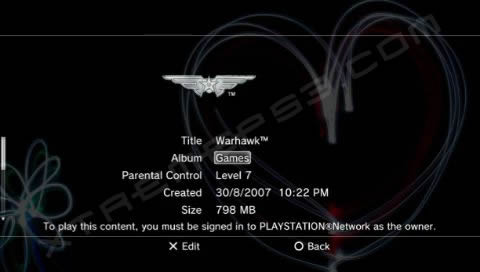
Press square in the game tab on the xmb and it should folder your gamesIs there anyway to create a sub folder under games on the PS3 to store all these installed games so you don't have the giant list on the main screen?

Is there anyway to create a sub folder under games on the PS3 to store all these installed games so you don't have the giant list on the main screen?
Press SQUARE to Group Content > By Album.
i.e. Select Album press X, type a folder name (e.g. Shooters), press Start to accept, press O to return.
Repeat for each game.
Similar threads
-
 PS3HEN Using custom configs for PSP games on PS3 (INSTRUCTIONS)
- Started by Zeldukes
- Replies: 0
-
PS3 [Tutorial] Update Frankenstein PS3 Firmware That is Too Low to Initialize RSX (< 3.41) (NAND Models)
- Started by byt3swap
- Replies: 0
-
PS3 [Tutorial] Update Frankenstein PS3 Firmware That is Too Low to Initialize RSX (< 3.41) (NAND Models)
- Started by byt3swap
- Replies: 0
-
 PS4 Games moved to external Storage with App2USB don't work anymore
- Started by fakex
- Replies: 0