PS3 Tools Collection by aldostools

PS3 PS3 Tools Collection - by Aldostools (Includes Over 50+ Tools/Utility for your CFW Enabled PS3) v4.8.1

[B]@aldostools[/B] :
please fix ps3 file splitter... :(
as you may have read from other posts on this forum, it stalls on splitting big games...
i had no success on any game above 7gb in splitting them,the program freezes...
 
So, I've got into trouble again.

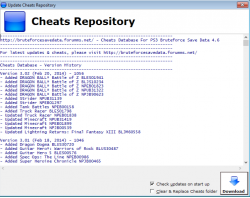
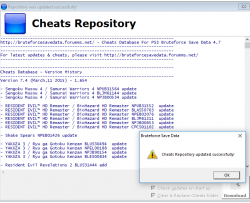
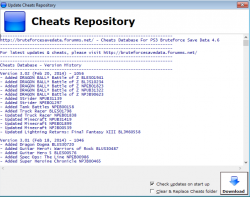
This time it's the update function of Bruteforce Savedata that's bugging out.

At launch it promts to update cheats DB. I update successfully, but then it returns to previous version again.

I run as Admin, so that shouldn't be an issue.
I also grabbed the files and updated manually from Bruteforce Forum, but it's still the same. A clean install including all the pre-requisites didn't help.
 

Attachments

  • Bruteforce1.png
    Bruteforce1.png
    90.7 KB · Views: 307
  • Bruteforce2.png
    Bruteforce2.png
    46.1 KB · Views: 442
  • Bruteforce3.png
    Bruteforce3.png
    90.7 KB · Views: 293
Last edited:
hey i'm having a problem while trying to use psp2ps3 after inputting my iso and clicking convert it does a few things and then tells me its missing iso.bin.edat how do i fix this?
 
Has anyone got Toaru Majutsu no Index (PSP fighting game) to work on PSP2PS3 before, I've tired almost ever thing I can think of to get it to work but no luck, most of the time I just get a black screen or a len network error.

By this time I'll just say the game is not going to work on a PS3... but someone added it to the list as working on
PSP2PS3 "1.7.4 now works perfectly,great game" And I know its not for the other VN Toaru games as they are listed as working as well.

I'll love to see this game in HD but if anyone can give me info on it working or not working for them, that will be a great help.
 
@aldostools these are some awesome tools.

I have a question about the patching the self and eboots. Can it be set to only resign them to 4.20 keys only instead of the lowest? 3.40 and 3.55 is a bit over the top for what am doing though it would give better compatibility, just your tools make this make quicker than hex editing the self and eboot to 4.20 manually, a simple click and patch is much better.
 
@aldostools these are some awesome tools.

I have a question about the patching the self and eboots. Can it be set to only resign them to 4.20 keys only instead of the lowest? 3.40 and 3.55 is a bit over the top for what am doing though it would give better compatibility, just your tools make this make quicker than hex editing the self and eboot to 4.20 manually, a simple click and patch is much better.

I think scetool can meet your needs. :D
 
I think scetool can meet your needs. :D

I like that fact the options are on my context menu so it literally is right click and then patch without doing anything else, i started to manually do them so i could understand the process and what to look for as PSN Patch and others don't always patch all the file's need, for example has a habit of not patching the update files and they are the main ones that need doing as these override the main selfs and eboot on the discs. And am sure the tools uses this to do the job.

I have been using SCE Tool to decrypt some files was just looking for a nice simpler method lol. "Click and Patch" lol
 
ps3 tools uses scetool iirc, but I'm sure that by default it resigns to 3.41/3.55 or 4.21.

Yeah it does, I patch a file with it, checked it and it was on 3.40.

I removed MGS5:TPP from one of my PS3 but I accidentally deleted all the patched files I had for it. Its minimum FW ver is 4.60 so it black screens with the update files when I want to play on MGO. And I don't want the game in ISO format, has to be in JB folder format. So I have downloaded all the update for it with managunz now is just a case of patching the eboots, selfs, and sfo files then I'll do manual update instead off putting them back into a pkg. just FTP them in to place from the PC.

Was doing them all manually at first with HxD just so I can learn how to do it that way if I ever need to do it manually.
 
Yeah it does, I patch a file with it, checked it and it was on 3.40.

I removed MGS5:TPP from one of my PS3 but I accidentally deleted all the patched files I had for it. Its minimum FW ver is 4.60 so it black screens with the update files when I want to play on MGO. And I don't want the game in ISO format, has to be in JB folder format. So I have downloaded all the update for it with managunz now is just a case of patching the eboots, selfs, and sfo files then I'll do manual update instead off putting them back into a pkg. just FTP them in to place from the PC.

Was doing them all manually at first with HxD just so I can learn how to do it that way if I ever need to do it manually.
I cannot recall if you can tweak the "Resign ELF" firmware version default value but you should be able to automate the resigning process using the -template option & a batch (or other script) file to deal with all the binaries (sprx & self).
The template option takes a signed binary as model/template & applies the same sig properties to the resigned file.
You would just need one template file & a batch file could loop through the elf & prx file entries it finds & generate the input & output file names

The syntax goes like this:

scetool --template=template.sprx --verbose --sce-type=SELF --compress-data=TRUE --encrypt my_plugin.prx my_plugin.sprx
 
I cannot recall if you can tweak the "Resign ELF" firmware version default value but you should be able to automate the resigning process using the -template option & a batch (or other script) file to deal with all the binaries (sprx & self).
The template option takes a signed binary as model/template & applies the same sig properties to the resigned file.
You would just need one template file & a batch file could loop through the elf & prx file entries it finds & generate the input & output file names

The syntax goes like this:

scetool --template=template.sprx --verbose --sce-type=SELF --compress-data=TRUE --encrypt my_plugin.prx my_plugin.sprx

Thanks, I'll see if I can tweek it and if not give the template way a go, just looking to make things quicker and easier in the long run.
 
Hi, I just downloaded this, the zip contains a link to this mirror site: http://www.mirrorcreator.com/files/JU59F9IM/

Downloaded file from the first mirror (zippyshare): install_ps3tools_4.8.1(1).exe

Why on earth isn't the file a zip, rar, 7z? Why the hell is it an exe file? This looks quite dodgy!

I scanned the file online, see the result here:
https://www.virustotal.com/#/file/9...f16e6614b67c10d76cfd3c7ed17bd599d69/detection

Yes the description said "some anti viruses detect it but it's a false positive". Actually 35 antiviruses out of 70 (50%) detect is as a trojan.
Would you trust to install this? Not really...
 
Hi, I just downloaded this, the zip contains a link to this mirror site: http://www.mirrorcreator.com/files/JU59F9IM/

Downloaded file from the first mirror (zippyshare): install_ps3tools_4.8.1(1).exe

Why on earth isn't the file a zip, rar, 7z? Why the hell is it an exe file? This looks quite dodgy!

I scanned the file online, see the result here:
https://www.virustotal.com/#/file/9...f16e6614b67c10d76cfd3c7ed17bd599d69/detection

Yes the description said "some anti viruses detect it but it's a false positive". Actually 35 antiviruses out of 70 (50%) detect is as a trojan.
Would you trust to install this? Not really...

There is nothing wrong or dodgy about this, I have this installed on my PC ( And so do countless other people )

Its an exe file because it installs multiple programs to your PC and also adds context menu items for doing quick functions with PS3 files on your PC eg, sprx files EBOOT files, pup file ect. which need to installed to PC's registry for it to do this.

Its a false positive result from AV software because of the nature of some of the tools you get as some of them are for bruteforcing (hacking) files for the ps3.

This tools set contains some must have PC tools for CFW users, depending on what you want to do. If you would rather trust the AV then dont use it but the dev of this AIO tool pack has made some really awsome other things for the PS3 is is a well known and trusted dev in this scene eg WebMAN MOD, IrisMAN.

Again there is nothing wrong with this at all and contains nothing that will damage your PC in any way.

Untitled3.png

This is just a glimpse of some of the tools contained and I use these tools on a regular basis.
 
Im having trouble with getting the context menu to appear with pkg files, im on Windows 10 and tried the registry patches but they fail (access denied) ive tried running both the installer and the pkg_contentid as administrator but no luck so far
 
Im having trouble with getting the context menu to appear with pkg files, im on Windows 10 and tried the registry patches but they fail (access denied) ive tried running both the installer and the pkg_contentid as administrator but no luck so far

What Anti Virus are you using?

Some will block features of this, I use comodo and I have to manully create acceptions for this to have it fully working on Windows 10.

EDIT: Did you also run the installer.exe as admin?
 
What Anti Virus are you using?

Some will block features of this, I use comodo and I have to manully create acceptions for this to have it fully working on Windows 10.

EDIT: Did you also run the installer.exe as admin?
I think i got it all worked out, i created an exception for both the install path and the installer exe, ran the exe as admin then ran pkg contentid exe as admin and i have the options in my right click menu now
 
Back
Top