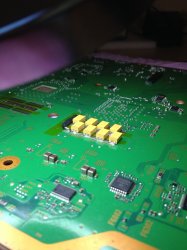
PS3 (Research/Experimental) - NEC/TOKIN Capacitors Replacement - YLOD

Hi
All
Please can anyone explain something
So on the 12v line where the prongs are
If i put my multimeter probes across the two prongs and set meter to continuity beep more the meter beeps for a second and stops. If i change the probes round no beeps but if change them around again same thing .
I've tried different multimeter and get the same
Please can anyone explain what's causing this
Many Thanks

Please stop filling this thread with unrelated topics. Its hard enough already for others to read so many pages to get the correct info with stuff that doesn't belong. It might explain why u keep asking the same questions thats already been confirmed so its why u keep getting ignored.
 
Please stop filling this thread with unrelated topics. Its hard enough already for others to read so many pages to get the correct info with stuff that doesn't belong. It might explain why u keep asking the same questions thats already been confirmed so its why u keep getting ignored.
Hi
I dont think this has been asked
I make a new post and get told to post in this thread
I post in this thread and get told off by other members
This is not fair is it
 
Hi
All
Please can anyone explain something
So on the 12v line where the prongs are
If i put my multimeter probes across the two prongs and set meter to continuity beep more the meter beeps for a second and stops. If i change the probes round no beeps but if change them around again same thing .
I've tried different multimeter and get the same
Please can anyone explain what's causing this
Many Thanks

That's totally normal. A multimeter injects a very small amount of current that can charge up caps in the circuit. Empty caps initially act like a short. Charged caps in DC are open, so the meter stops beeping once it charges it up a little. It's probably not beeping the other way because of flyback diodes that prevent any current flow in the other direction.
 
That's totally normal. A multimeter injects a very small amount of current that can charge up caps in the circuit. Empty caps initially act like a short. Charged caps in DC are open, so the meter stops beeping once it charges it up a little. It's probably not beeping the other way because of flyback diodes that prevent any current flow in the other direction.
Hi Thanks for the reply
Is it normal for this to happen
If I put the probes one way it beeps for a second or two, i know this is ok
but if I switch the probes it does not but if I switch them again they do beep
 
I think I need some opinions on my attempted repair on a CECHA01...

So, currently I have a CECHA01 that I replaced all of the NEC/TOKIN capacitors with AUX's F930J477MNCAJ6 following the guide. I replaced each of the NEC/TOKINs one at a time but I got the same result (YLOD) after I replaced each one. I have also connected the positive nodes of the replacement tantalum capacitors as per the guide when you remove all of the NEC/TOKINs and I have also used electrical tape to make sure the new ones are not shorting against the metal shielding. I don't believe that there are any shorts to ground because of my soldering (I checked this by measuring the resistances at ground and at the positive nodes with the ground plane as reference. Looking at the positive side I get around 2.5 ohms and at the negative side ~0.01 ohms.) After doing all this I get a near instant YLOD (2-3 seconds) when trying to power on the console. I have checked and I don't think I knocked off any smaller components off the board. This PS3 Phat had an intact warranty sticker on it so no one else has made any modifications to it before me. I'm thinking that it could be one of two possibilities...

1. The tantalum capacitors that I am using are 2.8 mm in height. I had tried my best to get them soldered as close to the board as possible so that the metal shielding does not place too much pressure on them. After reading through this post, someone posted that pressure on their tantalums caused issues with their PS3 and they were able to resolve this by cutting the metal shielding. Maybe I have a similar problem? I have notice that if I put some pressure on the metal shielding in such a way that pressure is taken off the tantalums, I get a slightly delayed YLOD (3-4 seconds). This leads me to think that this could be a part of the problem or...

2. Due to the height of the new caps the CPU/GPU are not getting adequate pressure placed on them causing the near instant YLOD.

What do you guys think my problem could be? I've been thinking of ordering some of Panasonic's 2R5TPE470MC tantalum capacitors and trying those out as they are shorter (1.8 mm in height) which would give me a lot more clearance.
 
Last edited:
Thanks for reply and info @squeept, well it was because of your scope test photos, using those small size B caps, that made me go and buy some lol :D I already had the AVX size D ones, but when i saw how well those size Bs fit on your test board, i was like "i gotta get myself some of those!" :welcoming: :hypnotysed:

The only thing for me i think, is that those size Bs have such small gaps underneath between the contacts that when i soldered them in, i might have bridged the (+) and (-) :rolleyes:

That's why i want to re-do it again using size Ds. Then i can feel assured there's no solder bridging going on underneath. I de-soldered everything, ready for re-doing, i put some Kapton tape down on the negative pad strips just to be sure, then aiming to solder to the negative vias instead (as in photo) ...then i can rule stuff out if it's still giving me a YLOD after.

View attachment 25672
This is why I love forums... beautiful such a good idea, so clean...
 
I think I need some opinions on my attempted repair on a CECHA01...

So, currently I have a CECHA01 that I replaced all of the NEC/TOKIN capacitors with AUX's F930J477MNCAJ6 following the guide. I replaced each of the NEC/TOKINs one at a time but I got the same result (YLOD) after I replaced each one. I have also connected the positive nodes of the replacement tantalum capacitors as per the guide when you remove all of the NEC/TOKINs and I have also used electrical tape to make sure the new ones are not shorting against the metal shielding. I don't believe that there are any shorts to ground because of my soldering (I checked this by measuring the resistances at ground and at the positive nodes with the ground plane as reference. Looking at the positive side I get around 2.5 ohms and at the negative side ~0.01 ohms.) After doing all this I get a near instant YLOD (2-3 seconds) when trying to power on the console. I have checked and I don't think I knocked off any smaller components off the board. This PS3 Phat had an intact warranty sticker on it so no one else has made any modifications to it before me. I'm thinking that it could be one of two possibilities...

1. The tantalum capacitors that I am using are 2.8 mm in height. I had tried my best to get them soldered as close to the board as possible so that the metal shielding does not place too much pressure on them. After reading through this post, someone posted that pressure on their tantalums caused issues with their PS3 and they were able to resolve this by cutting the metal shielding. Maybe I have a similar problem? I have notice that if I put some pressure on the metal shielding in such a way that pressure is taken off the tantalums, I get a slightly delayed YLOD (3-4 seconds). This leads me to think that this could be a part of the problem or...

2. Due to the height of the new caps the CPU/GPU are not getting adequate pressure placed on them causing the near instant YLOD.

What do you guys think my problem could be? I've been thinking of ordering some of Panasonic's 2R5TPE470MC tantalum capacitors and trying those out as they are shorter (1.8 mm in height) which would give me a lot more clearance.

Hiya, i think if you could possibly post some photos here of the work you did, i'm sure you could do without disassembling your PS3 again just for the sake of photos, but it could help, as fellow comrades here could spot something that might help.
 
After replace 1 NEC/TOKIN (GPU) my ps3 won't boot:
Anyone can help ?

Hiya mate, like Blue121368 above, please could you post some photos here of the capacitor / solder work you did? It's just, that way someone here is pretty sure to spot something you might have missed. More eyes the better. :tan:

Also, like Fanhais mentioned to you, check your solder on the capacitor. The way your PS3 goes instantly to YLOD without any delay, could maybe suggest the cap isn't soldered in correctly.

What was your PS3 doing before you replaced the capacitor? Was the YLOD as instant as you show in your video?
 
Hiya mate, like Blue121368 above, please could you post some photos here of the capacitor / solder work you did? It's just, that way someone here is pretty sure to spot something you might have missed. More eyes the better. :tan:

Also, like Fanhais mentioned to you, check your solder on the capacitor. The way your PS3 goes instantly to YLOD without any delay, could maybe suggest the cap isn't soldered in correctly.

What was your PS3 doing before you replaced the capacitor? Was the YLOD as instant as you show in your video?
No, YLOD shows only in games like Gran Turismo 6
I attached photo of soldering. This is my second attempt. I've scratched some place near pads to have more space to soldier capacitors. Then I used soldering tin on surface. After that I soldered capacitors.
Vo1q1X9.jpg
 
Edit: I'm testing without thermal paste at all. Last time I've tested it like this (after delid CPU and GPU) it was working fine, I turn it on for about 10 sec. Is this could be a problem ? Do I need thermal paste to test it ?
 
Edit: I'm testing without thermal paste at all. Last time I've tested it like this (after delid CPU and GPU) it was working fine, I turn it on for about 10 sec. Is this could be a problem ? Do I need thermal paste to test it ?
You shouldn't need paste, no, the ps3 isn't testing for paste and it should at least boot all the way up before it shuts down due to overheating.
 
Im taking another look at it and i dont think :rolleyes:
I said that because in the image there are a lot of capacitors at the right and i was not sure what is his purpose... but now im thinking that maybe are all the tiny SMD decoupling capacitors located at the bottom side of CELL/RSX
I'm pretty that's what those are too... It's a bit difficult, since the components are not labeled the same on the diagrams, all they have is a component ID. Then you have to go back and forth with the materials list to see what component is what. But yeah, the capacitors to the right on the block diagram all map to the capacitors below the cell/rsx on the actual board.
 
No, YLOD shows only in games like Gran Turismo 6
I attached photo of soldering. This is my second attempt. I've scratched some place near pads to have more space to soldier capacitors. Then I used soldering tin on surface. After that I soldered capacitors.
Vo1q1X9.jpg

Hiya, have you thought about replacing any more NECs? Is that the only one you have replaced?

Because you may have replaced the good NEC, and the other tired NECs were depending on that one.

And like you know, the NECs work together, if replacing only 1 NEC, and the other NECs are tired / old and past keeping tight values, then the 1 replacement might not help, and you may need to replace more.

Maybe replace the other RSX's (side B) NEC (the one in the photo).

Just a suggestion

(sorry, i edited this so many times, i blame the solder fumes from when i was working on my PS3 earlier lol) :confused:
 
Last edited:
Fellow friends, please can i ask your advice...

So i received that 16AWG soild copper wire, would it be enough to run just 1 bridge wire (in total) for the RSX, and 1 bridge wire for the CELL?

Or do you guys think 2 bridge wires per processor? To be honest, it was hard for me to fit 1 wire with AVX tans, i'm not looking forward to doing more lol. :oops:

AVX_on_PS3.JPG
 
Back
Top