PS3 (Research/Experimental) - NEC/TOKIN Capacitors Replacement - YLOD

With all you did we can confirm that the NEC method worked, as you get and fix the YLOD as you want, but there's a problem with the BGAs or RSX it self. CELL is in good condition since you said the DS3 was paired with the console while having the HDD inserted.


Now, I forgot to mention something you can test on the RSX by using the multimeter. Usually when the RSX is in bad condition, you either get a YLOD (short on the BGAs [maybe] or damaged die) or a GLOD when the RSX is dead or making poor contact with the mobo.

I have consoles with both cases. An A that I have, it has GLOD and a delayed YLOD. Console isn't going to show anything even if I'd change the NECs, I have no response on TV. The previous owner even delidded the RSX and removed a few caps.

This is another trick that I didn't tell you, but is the last resort and you won't be able to let it as is right now without good skills with the iron. I mean, you need to see if the caps on the RSX (luckily you already delidded it) are in short, problably they will be. Then the next step is to remove them and see if you can get something on screen. If you don't know how to test that, just ask. You need to remove every cap that is in short, and test. Btw, the little blue ones I think are resistors, I didn't test them yet.

Many could fix a blackout/YLOD or even GLOD by making this:


I'm gonna upload a couple of pics of my A's RSX so you can understand. All of this is just trial and error :/


P/S: I have some fats stored in boxes, with different problems, just a few have NEC issues only, since the other ones have other problems (apart of the NECs for sure..). Sadly people like to "play" with them before selling them, so this is usually a russian roulette, but most of them have solution, I just need a rework machine..

So, I have an H with GLOD and I'm gonna delid it and compare with an H that is running fine, and that will be the ultimate comparison lol.

P/S: Those bridges look dangerous, the tip of the wire needs to be shorter, just to make contact with the tantalum/positive rail.

thanks for all your help btw. So before I saw your reply, I was messing with it. And while glod, I was applying finger pressure on the rsx and cpu. I also pulled out the usb/WiFi ribbon cable etc and reinserted it a couple of times and suddenly got ylod. I took the bridge wires off, resoldered them carefully, checked my caps...even reflowed and still ylod. Tried a different ribbon cable for the usb mobo and still ylod. I think I might have cracked/shorted something when messing around. what do you think.
 
Still sounds like solder cracks to me...or a dead GPU.
  1. What are the resistance readings between POS and GND rails on the CPU and RSX? This should be about 2.5 Ohms or higher. A smaller resistance indicates a dying chip or bad solder job. I found that cleaning off the flux more thoroughly increased this resistance somewhat, but it got smaller each time I applied hot air near the GPU. Each time you reflow, reball, use hot air to remove tokins or apply heat to install tantalums, the smaller this resistance gets - until the chip is cooked to death. At that point you need a new CPU/RSX.
  2. You said you attempted a reflow, but it may not have actually flowed. What equipment did you use? These details are pretty important for a successful result. I use an IR preheater set to a temperature necessary to raise the motherboard to 150C, then a Hot air gun and 45x45mm SMD square nozzle to bring the chip up to 240-250C. These temperatures are measured using 2 thermocouples. One taped directly next to the chip and the other under the chip on the backside of the motheboard. Even then there's a lag time between when the thermocouple tells me the temp is up and when the solder balls actually go molten. It takes experience to get them to actually flow. You can nudge the chip slightly to see if it moves, then you'll know. The equipment is not fancy (it's quite cheap actually) and I have to manually adjust the temperatures to simulate a profile, but it works with some experience. And I also use BGA rework flux which requires about 90 seconds above 180C to activate. It needs to be fully cleaned off after using or it could corrode the board. Also a reflow could make the solder go molten, but there's a good chance that the old solder and/or dirty pads won't wet. So you'll just get cold solder joints that break during cool down. For these reasons and #1 above, I recommend that you remove the chip and reball. If you go through all the trouble, you may as well go all the way.
 
Still sounds like solder cracks to me...or a dead GPU.
  1. What are the resistance readings between POS and GND rails on the CPU and RSX? This should be about 2.5 Ohms or higher. A smaller resistance indicates a dying chip or bad solder job. I found that cleaning off the flux more thoroughly increased this resistance somewhat, but it got smaller each time I applied hot air near the GPU. Each time you reflow, reball, use hot air to remove tokins or apply heat to install tantalums, the smaller this resistance gets - until the chip is cooked to death. At that point you need a new CPU/RSX.
  2. You said you attempted a reflow, but it may not have actually flowed. What equipment did you use? These details are pretty important for a successful result. I use an IR preheater set to a temperature necessary to raise the motherboard to 150C, then a Hot air gun and 45x45mm SMD square nozzle to bring the chip up to 240-250C. These temperatures are measured using 2 thermocouples. One taped directly next to the chip and the other under the chip on the backside of the motheboard. Even then there's a lag time between when the thermocouple tells me the temp is up and when the solder balls actually go molten. It takes experience to get them to actually flow. You can nudge the chip slightly to see if it moves, then you'll know. The equipment is not fancy (it's quite cheap actually) and I have to manually adjust the temperatures to simulate a profile, but it works with some experience. And I also use BGA rework flux which requires about 90 seconds above 180C to activate. It needs to be fully cleaned off after using or it could corrode the board. Also a reflow could make the solder go molten, but there's a good chance that the old solder and/or dirty pads won't wet. So you'll just get cold solder joints that break during cool down. For these reasons and #1 above, I recommend that you remove the chip and reball. If you go through all the trouble, you may as well go all the way.


I'm a noob when it comes to all the technical terms. I appreciate you being patient.

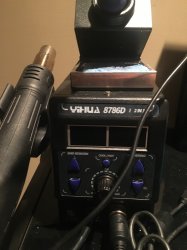
I don't have a ir preheater. I own the soldering station (pic attached). Which ir preheater would you recommend at a reasonable price? I also found the nozzle you mentioned on Amazon. Which setting should I use on my multimeter to get ohm reading you talking about. I reflowed for 30 seconds using the high setting and let it cool off for 15 minutes. It's worked on other boards in the past but this one now gets ylod every time. I don't know if I fried the chip. The only way to find out if I reball it. Are there any forums that detail the reballjng process for a noob?
The POS is positive I take it buts what's the GND? What flux do you recommend I use? I watched a few YouTube videos but they don't detail the temperature work.
 

Attachments

  • 0E4192D1-A9C8-4276-97A6-495F5B822A3A.jpeg
    0E4192D1-A9C8-4276-97A6-495F5B822A3A.jpeg
    1.5 MB · Views: 645
There is a zero percent chance that you reflowed successfully without killing the chip if you didn't use a preheater on a board this thick. Either the solder didn't actually melt, or the chip exceeded safe temperatures.

Which preheater board would you recommend. I have the heat gun so is there one I can buy where I just mount my head gun with the right nozzle? I looked on eBay and the rework stations are 500$+. A bit out of my range.
 
Last edited:
That's the one I got. It works good and has a big heating surface, but the cord it comes with isn't rated for the current this thing draws. Seriously it was getting hot after a few minutes of use, an actual fire hazard! It's not just me, others have complained. I bought a 10 foot 15A cord off amazon to replace the 10A cord it comes with. That worked great.

I also got this thermometer, which came with 2 K-series probes. Cheap, but effective.

As for the nozzle, something like this might work, but it depends on your hot air gun. I'm still waiting on mine, after 2 weeks the package was returned to the seller. They sent me a picture and the problem was obvious. They didn't include my shipping address, just my "[insert my name] in the USA." As if I were so famous everyone knew where I lived..lol. 50,000+ review and 100% positive seller rating, means nothing aparantly. I'd leave a negative review, but you get blackballed nowadays. Found that out the hard way with air B&B! Leave positive feedback or shut the f*$k up! Say anything negative and you'll get banned! What's the point of even having a rating system then anyway? I guess it's for sellers to identify bad buyers, not the other way around!

Again, this rabbit hole goes deep. At this point it will be cheaper to buy a working PS3, the only reason to continue is for personal growth - the education experience. Education ain't free! If you enjoy this stuff, go for it.
 
Last edited:
That's the one I got. It works good and has a big heating surface, but the cord it comes with isn't rated for the current this thing draws. Seriously it was getting hot after a few minutes of use, an actual fire hazard! It's not just me, others have complained. I bought a 10 foot 15A cord off amazon to replace the 10A cord it comes with. That worked great.

I also got this thermometer, which came with 2 K-series probes. Cheap, but effective.

As for the nozzle, something like this might work, but it depends on your hot air gun. I'm still waiting on mine, after 2 weeks the package was returned to the seller. They sent me a picture and the problem was obvious. They didn't include my shipping address, just my "[insert my name] in the USA." As if I were so famous everyone knew where I lived..lol. 50,000+ review and 100% positive seller rating, means nothing aparantly. I'd leave a negative review, but you get blackballed nowadays. Found that out the hard way with air B&B! Leave positive feedback or shut the f*$k up! Say anything negative and you'll get banned! What's the point of even having a rating system then anyway? I guess it's for sellers to identify bad buyers, not the other way around!

Again, this rabbit hole goes deep. At this point it will be cheaper to buy a working PS3, the only reason to continue is for personal growth - the education experience. Education ain't free! If you enjoy this stuff, go for it.


Haha I feel you on the rating situation.
The rabbit hole goes deep my friend and yes, I'm doing it for the educational purposes. Thank you for all your help. I'll update once I decide to purchase the these items and try fixing. You have been great help. My only question is I have been looking for a good tutorial that details like preheater temps and board temps at melting point etc. do you know of a forum or a video that details it well? Is there like a temperature I should be aiming for with the preheater? What's that silver tape like thing I see people putting on the surrounding areas when they reball. My guess is it's to keep from other chips getting fried.
 
I just watched a bunch of reballing videos on youtube until I felt like I could take a shot. If you read page 140 you can find my post on how my first attempt went. The RSX came off well and the board didn't flex, so the method works. But things went south when I tried to remove the CPU.

Without an expensive IR/hot air SMD rework station you'll have to simulate it as best you can. From what I've read, here's what I've put together:
  1. Kapton tape to attach 1st temp probe to underside of chip. This probe will tells me the motherboard temp.
  2. Foil tape to attach 2nd temp probe right next to the edge of the chip.
  3. Mask off the rest of the board with aluminum foil. I only leave the chip exposed for hot air. The foil reflects the heat from the motherboard back down to the topside and insulates it from the the cold air above. The reason for this is to minimize the temperature difference between top and bottom motherboard layers, which would cause the board to curl and components to shear off (good way to destroy a board).
  4. I preheat board to 70C for 30 minutes to an hour, to cook off water and help prevent pop-corning (moisture inside components boils and explodes above 100C). @squeept, what do you use?
  5. Then I increase heat to a setting sufficient to raise board temp to 150C, measured with 1st probe on underside of chip. Once up to temperature I add BGA rework flux to edges of the chip and let it wick under, adding more if it seems like it could take more.
  6. I turn on hot air set to 250C and let it heat up before bringing near the motherboard. I didn't want to turn it on cold pointing at the chip, fearing it might curl the board. Also, I did some testing with my hot air station/gun, nozzle, and a PCB to figure out what setting measures to 240-250C at a medium low fan setting. I made my own square nozzle using kapton tape and aluminum foil, but getting the heat to evenly distribute over chip surface instead of concentrating in the middle was tricky. I bought a commercial one because I don't trust the one I made. I'm still waiting for it to arrive. I will have to retest to figure out what setting the hot air needs to be on. This step is the hardest to get right.
  7. Once the hot air is warmed up, I brought it over the chip starting high and lowering it to increase the temperature. I try and manually simulate a rework profile. 150C --> 180C over 3 minutes, this activates the flux. I add more if needed.
  8. Then I start the flowing step. I lower the nozzle close to rapidly heat the chip from 180C --> 245C. Ideally this would take the least amount of time as possible, to minimize the time the solder is molten and has a chance to oxidize. This can be achieved using very high heat, but it takes time for heat to travel from the top of the chip down to the solder balls. I don't want to overheat the any part of the chip while the rest of it catches up to temp, so that's why I try to calibrate the hot air temperature before hand. This may not be the smartest approach, as it does seem to take longer before the chip actually flows. The first time it took numerous attempts before I realized this. The temp probe read 240C, 250C, 255C, and I tried to pluck the chip, but it wasn't ready. I needed to wait for the solder balls to flow. There's a local temp difference between the probe tip and the solder balls and you have to be patient while nudging the chip to gauge when it's ready to pluck. Part of this can be controlled by how close the nozzle gets to the chip, so starting high and lowering it is how I control the heat. If the chip starts to get too hot, I raise it a little. You're trying to balance the variables to get the BGA to flow while minimizing the time at such a stressful temperature. This takes practice with cheap equipment. It's automated with a proper BGA rework station (must be nice).
  9. Clean & Prep the pads/chip. Pretty strait forward, in theory, annoying in practice.
  10. The flowing step for leaded solder uses a lower temperature. Watch the chip closely. When it raises up then flattens back out it's done. Remove ALL heat. Let it cool thoroughly on it's own. Ideally the amount of time above 150C should be less 30s, but it'll probably be longer. This will not be as good a joint because of oxidation, but without a proper BGA rework station that runs profiles, this is very hard to achieve.
If anyone has pointers that could help me achieve a better result when I attempt my second reball, I'm all ears.
 
My temperature targets are going to be a little different since I have IR top heat that "hits" the chip a little differently. I'll try to make this as quick off the top of my head as possible, especially since we're at risk of completely derailing the thread in to reballing. Lemme try out these spoiler tag things to keep this from being a wall of text...

edit: hmmm.... can I put spoilers in a spoiler? Spoilerception!

1.) drying oven.
save scope images of both chips, then 24 hours a little south of 100C. The PS3 GPU and surrounding area of board popcorns more than anything else I've ever seen, so drying is essential. I think IPC says 8 hours maximum is all you need from long term storage at ambient humidity, but I think that assumes you have a laboratory grade vacuum oven (crazy expensive). I have a large powder coating oven that I retrofitted with a PID controller that can fit the board with the support jig to prevent any warping.
wVIrOGY.jpg


Do not use MEK to "dry" the chip no matter how many nutjobs you see recommending it. It is incredibly dangerous, and repeated exposure without proper ventilation/filtration can lead to neurological disorders. I'm not even sure it does anything, and I have no idea what fucking lunatic came up with the idea. It's explosive brain eating cancer in a bottle that shouldn't even be sold directly to consumers without some kind of license. Don't do it.

2.) lift GPU.
I remember when I was learning, most of the more seasoned folks recommended having 10 or so scrap boards to really dial in your equipment and process. Don't expect to get anything right on your first few tries. Measuring from top touching chip, heat board to 165C stable. Start top heat, ramp up until chip can be gently nudged from all 4 corners and moves freely - around 227C. I think IPC says not to exceed 3C per second, but I like staying closer to 1C per second. Again, feel free to double check me, but I think IPC says TAL (time above liquidus) or the time spent above the melting point of solder (well, not exactly... they specify a hard number like 215C or something) should be limited to 90 seconds at the absolute maximum.

I get by with some relatively cheap equipment because I spent money where it matters: thermocouple. Get a genuine Omega thermocouple (K type). Order direct from the manufacturer, or I guarantee it's a knock-off. I also routinely go over every inch of my plates with a thermal camera and double check with one of those kitchen laser doohickeys to make sure they're heating evenly.

3.) cool board.
You will have undoubtedly liquefied some surrounding solder, so even though you no longer care about the GPU solder connections, you'll still want to cool correctly. You want to cool as SLOWLY as possible while still accounting for the TAL. So, even with the bottom heater off now, the plates are still at temperature and you'll need some forced cooling to get it back down. My rework station has built in long ass tube kind of fan that blows the entire length of the board from the side. What I do is pulse the rocker switch for the fan and watch the temperature. I'll just kind of turn it on for a second or two, then off for a few seconds and repeat, just being mindful of the clock. I'll keep that up until I'm under 200C, then I'll let it go full blast until it's down to about 170C. At that point, I take it off and move back to the workbench to clean the board. That heat is the key to cleaning the site without lifting any pads. Remember to melt lots of leaded solder to mix up with the lead free that's left first, then it's going to come off easier.

4.) reball chip.
I tend to use about a gallon of IPA while cleaning up all of the rosin from the soder wick, so everything goes back in the drying oven for a bit here.

There is a whole damn universe of equipment and methods for this part, so just watch a few YouTube videos until you see one that looks easy to you, then do that.

Your flux amount here is very important. If you use too much, the balls will slide around and screw everything up. Too little and the solder won't flow right. I use about 3 "grains of rice" worth, then I smear it around with a bit of masking tape covering my finger.

5.) solder chip.
This time, I know lots of people say it's okay to run a lower temp profile since you're doing leaded solder now. I just run the same profile as lead free. I think the guidelines again are assuming professional grade equipment that leaves the site and chip perfectly clean of lead free solder, but we live in the real world. I go on the assumption that there is enough lead free left to interfere with things and just do LF again.

Again, your flux amount here is very important. If you use too much, the chip will slide off on its own. Too little and the solder won't flow right. I use about 6 "grains of rice" worth right after I take it out of the drying oven. Then I smear it around with a bit of masking tape covering my finger.

6.) cool board.
Same as above, except this time once you're under 200C you just leave it full blast and take a nap.

7.) ultrasonic bath.
You probably used a "no clean" flux, but you shouldn't trust it if possible. Unless you ordered a name brand flux directly from the manufacturer, again assume that it's either counterfeit or they're lying. It probably needs cleaned. If you don't have access to a suitably sized ultrasonic cleaner, you may want to spend that extra money to make sure you got good no clean flux directly from the manufacturer. I'd pretty much only trust Amtech for a true no clean. In the cleaner, I use SyberKleen 2000. After the bath, I rinse in warm water and scrub every inch with a soft toothbrush. After the rinse, I dip a few times in a 91% IPA bath. This displaces the tap water and all of the impurities in it so that the board dries quickly without any mineral deposits. 91% is important because this is above the azeotropic point of IPA. (You're going to have this bath alcohol saved and reused since it's expensive. At 91%, the solution evaporates homogenously. If you have a 70% alcohol bath, the alcohol will evaporate out on its own very quickly, eventually leaving you with just water.) Then it goes back in the drying oven one last time for a few hours.

8.) test board then check health of TOKINs.
Heat kills, and the TOKIN caps are right there. They'll have been exposed to a full day of boiling temperatures and 2 full rework cycles now, so grab new scope images and compare to the before images to make sure you didn't put them on the brink of death.
 
Last edited:
Yeah, that's why I put everything not directly related to the topic in spoilers. For example...
IPA Tangent:
I think you're confusing azeotrope with solution vapor pressure equilibrium. We usually only care about azeotrops when distilling, because it determines the temperature when the concentration of solvent = solute (in this case, when you can't pull anymore alcohol out without also bringing water over too). In the real world you would stop the distillation before this point and repeat multiple times to concentrate, or use a fractional distillation process. For our purposes however, we only care about the azeotropic point because alcohols above the azeotropic concentration are hygoroscopic, they will pull moisture out of the air. Specifically, the concentration of IPA will decrease quickly in humid environments until it is 91%(v/v) and it won't pull moisture out of the air anymore, but it will still evaporate because it has a lower vapor pressure than the water in solution. All the while evaporation is occurring, the rate of which will decreases as the concentration of IPA decreases, until the relative amount of molecules near the surface that can evaporate reaches an equilibrium. I'm not sure where this is, but because IPA has a higher vapor pressure (~40KPa@25C) than water (~3KPa @25C), it must be quite a bit less than 50%(v/v). Probably less than 15% if I had to guess.
 
IPA Tangent:

Just how far off topic can we get? Alright, let me try to remember how this came up, cause it's not my area. I was showing a chemE buddy my workshop, so I'm sure many drinks were had. When I got to the fume hood with the ultrasonic and IPA bath in it, he started asking a lot of questions. All I know for certain is that he expressed concern about the % of IPA because it's in a large tupperware bin with a flimsy lid that doesn't seal it off to the world. The word "azeotrope" was used, and when I told him it was 91% he explained a bunch of stuff that I forget. I'm wondering if he also thought the IPA went in to the ultrasonic tank since I know he also asked what temperature I heated the cleaning solution to...

So you're saying the azeotrope only applies to actual boiling, and not to room temperature evaporation? And that I should invest in some nicer tupperware with a rubber gasket because whatever % IPA I use is going to evaporate the alcohol out first and dilute itself?

I know this might not seem like a major concern, but my current bath water is probably 2 years old. I run it through a filter from time to time, and it still smells like IPA, but if that's the case I should probably change it out about now.
 
Last edited:
IPA above 91% will pull water out of the air and dilute the IPA to 91%, the best you can hope for with without sealing the lid. If you buy 100% IPA you can just top it off as it evaporates, but most OTC IPA I've seen are 99% (1% water). You're adding water each time you top it off unless you top off with 100%. That will add up over time.

An alcohol refractometer might be a good investment for you. The density and refractive index of ethanol and IPA are close enough for a refractometer with Vol.% scale to give you a good approximation. Problem is that they only 0-80%, but cheap on amazon. Otherwise a glass alcohol hydrometer for light liquid can give you the specific gravity (better, but more expensive).
 
alcohol refractometer

Sorry, mods! Last off topic, I swear!

The cheapo refractometer sounds like the right pick. I'm just looking to make sure the IPA bath is clean & pure to prevent mineral deposits, and it evaporates quickly to prevent any corrosion/oxidation/whatever. Electronics don't like being wet, this I know. I only used 91% because I misunderstood the previous explanation from my friend, but I'm sure anything over 80% still evaporates pretty much just as quick when it's in the drying oven. Thanks, dude!

....this also sounds like it might be the right time to pick up distilling..... next bad batch of wine I brew I can turn in to some hooch!
 
Please help me @Naked_Snake1995 ,
I have Fat PS3 CECHG08 , YLOD at startup immediately shutting down without turning on fan.
I want to change the Nec / Tokin Capasitors and I have read the tutorial but still I am not confirm about which capasitors should use.

Please check this image if it suits my PS3 let me know
poFk869Pp
 
Fix suggested @Naked_Snake1995
cok-001-8-jpg.19122

In that image is only needed to use 1 wire... you have 2 but with 1 is enought
Check with a multimeter to confirm it... the V_IN and V-OUT traces of that "tandem" of tokins are connected to each other

Actually... at the other side of the board there is another "tandem" of 2 tokins that should be connected together with this ones
So... i think is needed 1 single wire for every 4 tokins (incase of removing all the tokins)

what gauge wire should I use for this?
 
Back
Top