
You are using an out of date browser. It may not display this or other websites correctly.
You should upgrade or use an alternative browser.
You should upgrade or use an alternative browser.
PS2 [Testers Needed] UDPBD - The next generation of loading games through LAN on a PS2!
- Thread starter TnA
- Start date
I gave up in the end and realised I could use the USB port on my Netgear router to share the files via SMB. Had to reformat the drive as NTFS, but it all worked easily enough (also needed to revert to OPL 1.0.0, with a fresh config). The drive has only got PS2 ROMs on it, so no concerns with SMB1 being insecure. Performance may not quite match UDPBD, but is good enough.
@Maximus32
what is left to get this over the line? I am happy to help test / coding wise. SMBv1 should be dead and it is clear UDPBD has extreme advantages with speeds compareable to running off a native HDD.
what is left to get this over the line? I am happy to help test / coding wise. SMBv1 should be dead and it is clear UDPBD has extreme advantages with speeds compareable to running off a native HDD.
Hello everyone!
I were able to connect to server (udpbd-vexfat.exe) once. Every other times server doesn't show any signs of incoming connection.
I 've install Wireshark and it show only one packet from PS2 with data "0000". Is it right?

I were able to connect to server (udpbd-vexfat.exe) once. Every other times server doesn't show any signs of incoming connection.
I 've install Wireshark and it show only one packet from PS2 with data "0000". Is it right?
OK. I've found out that it is 100% right but server just doesn't see it somehow. Any advice on Win11 configuring? )Hello everyone!
I were able to connect to server (udpbd-vexfat.exe) once. Every other times server doesn't show any signs of incoming connection.
I 've install Wireshark and it show only one packet from PS2 with data "0000". Is it right?
Last edited by a moderator:
reeper_lumish
Forum Noob
Hello. I am modding my slim PS2 for the first time and want to use Ethernet from my raspberry pi. I was told to use udpdb instead of smb. Where can I get instructions on how to set up udpdb?

shiny-kuki
Forum Noob
Man, had no luck getting this to work.
Using an exFAT virtual drive "P: "
tried server and vexfat version
Disabled firewall
No USB plugged in
Running cmd as admin
Manual start, iLink and MX4SIO off
Nothing
Does it not work with fat PS2?
One thing I noticed is that the server says the full drive size instead of partition size. (supposed to be a 20GB virtual drive)
Also unsure whether I need to set ethernet cable properties, I just left everything dynamic
and then in OPL
IP 192.168.1.10
Mask 255.255.255.0
Gateway 192.168.1.1
DNS Server 192.168.1.1
SMB address type NetBIOS
No idea what I'm doing wrong

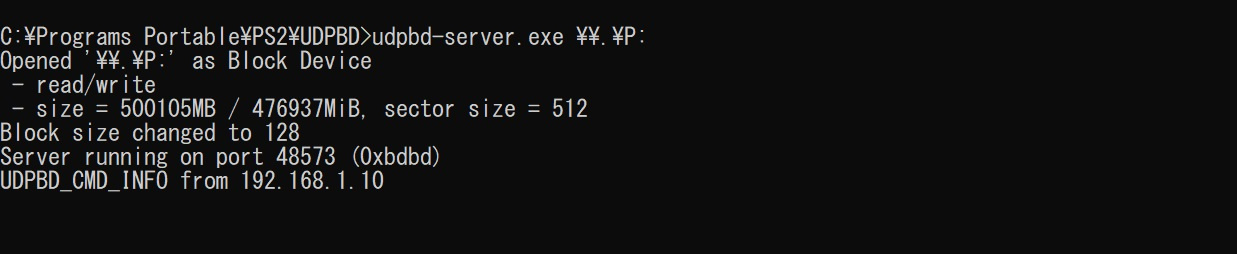
Using an exFAT virtual drive "P: "
tried server and vexfat version
Disabled firewall
No USB plugged in
Running cmd as admin
Manual start, iLink and MX4SIO off
Nothing
Does it not work with fat PS2?
One thing I noticed is that the server says the full drive size instead of partition size. (supposed to be a 20GB virtual drive)
Also unsure whether I need to set ethernet cable properties, I just left everything dynamic
and then in OPL
IP 192.168.1.10
Mask 255.255.255.0
Gateway 192.168.1.1
DNS Server 192.168.1.1
SMB address type NetBIOS
No idea what I'm doing wrong
shiny-kuki
Forum Noob
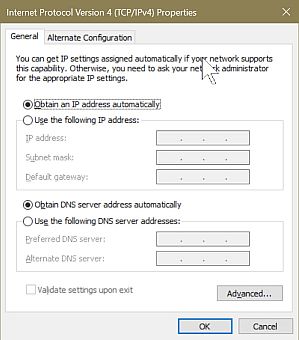
do you set ipv4 properties or it doesn't matter? that's all i can think of. oh wellhi kuki , it does work with Phat PS2s. On my main PC I couldn't get it to work , as an experiment I tried my Laptop and yep worked.
I didn't disable my Firewall or AV btw
shiny-kuki
Forum Noob
Thank you for posting that. I had seen it but it was worth retreading
I got it working now
Not entirely sure what changed, but I did put a .bin/.cue into the DVD folder.... showing how long it's been since I've done any of this stuff, I forgot I have to convert. So that was probably it
Using .iso files
Gradius V (PAL) - working
Burnout Revenge (NTSC) - Use Mode 1 or it will crash - working
God of War (NTSC) - working
Homura (PAL) - Mode 2,3,4,6 - working
Simple 2000 Vol 37 The Shooting Double Shienryu (JP) - working
Dragon Quest V (JP) (English TL) - working
R-Type Final (PAL) - working
The Red Star (PAL) - Black Screen
The Red Star (NTSC) - Black Screen
Last edited by a moderator:

1052
Member
OPL 2044 UDPBD + UDPBD-Vexfat. For better compatibility you can also use OPLNEUTRINO + NEUTRINO UDPBD + UDPBD-Vexfat.New OPL builds with UDPBD?
@El_isra, UDPBD-Server for Windows by @alexparrado does not work with OPL 2044 UDPBD, it only works with OPL 1973 UDPBD.
@TnA, can you please ask some of the developers to compile a new version of UDPBD-Server for Windows from this code?

lopatakal
Member
Thanks!
What cmd-line options I need to use for UDPBD-Vexfat if I put my game images on disc F:? Same as UDPBD-Server?

CRAXY
Member
Hello, the UDPBD-Vexfat gives me errors when I open it but the UDPBD-SERVER does not give me the errors, do you know what it is?OPL 2044 UDPBD + UDPBD-Vexfat. For better compatibility you can also use OPLNEUTRINO + NEUTRINO UDPBD + UDPBD-Vexfat.
@El_isra, UDPBD-Server for Windows by @alexparrado does not work with OPL 2044 UDPBD, it only works with OPL 1973 UDPBD.
@TnA, can you please ask some of the developers to compile a new version of UDPBD-Server for Windows from this code?
I can't get the UDPBD to work guys, if it makes the connection with the OPL but the games don't appear or it doesn't transfer data
Responding to my own comment, I inform you that the OPL BETA 1973 works without problems for me with the UDPBD-SERVER but with the OPL BETA 2044 the games or other files from the storage do not appearHola, el UDPBD-Vexfat me da errores al abrirlo pero el UDPBD-SERVER no me da los errores, ¿sabes qué es?
No logro hacer funcionar el UDPBD muchachos, si hace la conexión con la OPL pero no aparecen los juegos o no transfiere datos
Last edited by a moderator:
1052
Member
UDPBD-Vexfat does not need a separate disk, only a folder is needed, like for SMB. You can simply create a shortcut using this example:What cmd-line options I need to use for UDPBD-Vexfat if I put my game images on disc F:?
Code:
C:\Users\User\Downloads\PS2\udpbd-vexfat.exe C:\Games\PS2CRAXY
Member
Do you know why they decided to do that thing where CFGs don't save? There are games that need configurations to runUDPBD-Vexfat does not need a separate disk, only a folder is needed, like for SMB. You can simply create a shortcut using this example:But UDPBD-Vexfat works in read mode only. This means that VMC and CFG files will not be saved.Code:C:\Users\User\Downloads\PS2\udpbd-vexfat.exe C:\Games\PS2
lemon_child25
Forum Noob
can you please make a new link for the windows server because it says
This content is no longer available.
This content is no longer available.
Similar threads
-
PS2 Help needed getting PS2 udpbd-server running
- Started by BlasterM1ke
- Replies: 0
-
-

-