PS3 «Tutorial» PS3 CELL B/E Thermal Dissipation without removing the IHS

I'm gonna give it a go today. ATM I'm checking the temps on my PS3 2004a. I'm waiting 25 more mins, before taking a screenshot, then I'll repeat the process after the "fix".

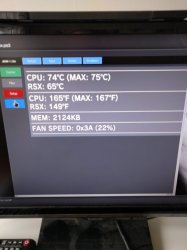
Here's the temps before applying the "fix" with fresh thermal paste (MX2, also have MX4 and Arctic Silver 5 if needed).
View attachment 15525

Use the mx2 or mx4. im not a big fan of the arctic silver 5 as it needs high cure time what in pc is not a big problem but in ps3? i dont know ? i use mx2, mx4 or noctua nth1. no problem ever
 
Use the mx2 or mx4. im not a big fan of the arctic silver 5 as it needs high cure time what in pc is not a big problem but in ps3? i dont know ? i use mx2, mx4 or noctua nth1. no problem ever

I actually had lower temps using AR5, but wanted to try MX2&4. Next time I'll try MX4 tho. Really wish I had my IHS removed as well, as I know from my last PS3 it gives a great benefit in temp reduction.
 
I actually had lower temps using AR5, but wanted to try MX2&4. Next time I'll try MX4 tho. Really wish I had my IHS removed as well, as I know from my last PS3 it gives a great benefit in temp reduction.

I dont know how lower temps you have but when you look on any online test the mx2 or mx4 is in any test better but is only 1 celsius.and for me the biggest advantage is that mx2 and mx4 or nt-h1 have no care tíme what is the biggest concern on any online Forums. But what suit you dont suit me.1000 People 1000 opinion so...
 
Last edited:
What would be the correct measurement for the slim? I know thickness should be 3mm, but what about length and width?

Don't really feel like cramming my calipers down the mobo... ;)
 
What would be the correct measurement for the slim? I know thickness should be 3mm, but what about length and width?

Don't really feel like cramming my calipers down the mobo... ;)
The biggest the better because it will help to "spread" the pressure into a bigger area

In other words... initially is better to "fill" all the hole
But considering the point of contact in between the custom plastic piece (or the rubber) is the surface of the capacitors... then you only need to worry about making it with a size equal than the capacitors
 
...so i chose paper instead
Using "vegetal" materials (paper, wood, etc...) inside a electronics device is not a good idea, with the heating/cooling cycles it degrades a lot and loses his original characteristiques
Ive seen people doing this mod with a ice cream pole... you know like this ones
100-piezas-palillos-artesanales-unids-de-madera-Natural-palillo-de-helado-respetuoso-con-el-medio-ambiente.jpg_640x640.jpg

But is not a good idea either... the only good thing of it is you can eat an ice cream while doing it

Is much better to do it with plastic, rubber, etc...
The point is the plastic works a bit like an "spring"... under pressure it "contracts" but is "pushing" at all times to try to recover his original thickness
 
Currently on run #3. This time I increased the thickness of the eraser to 3.9mm. ~8 mins left until checkpoint, but so far it looks the same.
 
Currently on run #3. This time I increased the thickness of the eraser to 3.9mm. ~8 mins left until checkpoint, but so far it looks the same.
Keep in mind when you boot the PS3 several times consecutivelly it have a temperature cummuated, so all calculations based on the time depends of it and varies in every test

This is why i use to mention that is good to start the tests from ambient temperature, because this way you can have a bit of control with the times
The annoying thing of this is you need to wait (several hours) in between each test to allow the PS3 to return to ambient temperature

The point is you could take accurate temperature samples to compare by doing this before and after the mod:
ambient ---> 15 min ---> 30min

And idealistically you should do exactly the same in that time in all the tests starting from ambient--->15min--->30min in the test before and the other test after... so to simplify things you could be inactive along that time

Anyway... tomorrow when you turn on the PS3 for first time you are going to start from ambient... try to do the same you did the first time before the mod, when you took the screenshot (and try to take the screenshot at the same timing, but maybe you dont remember it exactly, heheh)
 
So, I'm currently trying the alternative of placing cut credit cards as posted a few temps back. 20 mins into the test it looks the same as all other tests.

Final results. Notice that RSX got worse by doing this.
IMG_20190323_113018.jpg

This leads me to the conclusion, in my case at least;

1. This method may or may not work.
2. Not everyone will gain improvement in temps.
3. Other factors could be of importance, ie fan mods, syscon/manual fan control, case mods etc..

I, myself, did all tests using syscon fan control. I also have holes drilled out on top of the fan and on the bottom half of my case. Also I have my PS3 vertically, tho that shouldn't make a difference.
 
Last edited:
Just finished replacing all of my thermal paste (except for the CPU under the IHS). AS5 on RSX chip, MX4 on ram chips and on top of heatspreaders.

Leaving it to cure a while before booting and checking temps after idle in sMan after 30 mins.

Hopefully I can get back to my former temps (55-65°C) on both CPU & RSX.
 
Also I have my PS3 vertically, tho that shouldn't make a difference.
I think that will make a difference, as heat rises, and if the top of console has a bigger surface area it should be better as heat will have have a quicker path to the outside of the main components. Maybe its not a massive difference though.
 
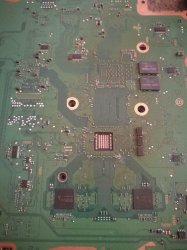
I need to understand the mechanism of creating extra pressure to the CPU . The CPU hole is square . Inside there are some large capacitors on the sides and some small ones in the middle . Do i need to cover only the small ones or all ?
 

Attachments

  • 54525644_282187862675164_2484399540036173824_n.jpg
    54525644_282187862675164_2484399540036173824_n.jpg
    74.7 KB · Views: 1,247
I think that will make a difference, as heat rises, and if the top of console has a bigger surface area it should be better as heat will have have a quicker path to the outside of the main components. Maybe its not a massive difference though.

So I've made some tests. All tests are done with dynamic fan control stock values. All are started from ambient temperature and same room temperature.

1. PS3 vertical = CPU@74-75°C RSX@53-55°C
2. PS3 horizontal = CPU@73-75°C RSX@54-55°C

More fluctuations in CPU temp when I have the PS3 horizontal and more fluctuations in RSX temp when vertical. I have no idea why.

Will make another test with the bottom covered, to see if it affects the airflow in any way.

This is puzzling me, as I should have lower CPU temps on idle. Correct me if I'm wrong.
 
Back
Top