
PS3 «Tutorial» PS3 CELL B/E Thermal Dissipation without removing the IHS

Artifacting its when the GPU Die its about to die, due to poor maintenance and heat damage, the substrate also gets damaged in the process, to a point that the GPU won't show any picture, hence the GLOD, not YLOD, reflow only fixes the Substrate temporarily, but the time-frame its unknown, what i observed through the years its, the more heat you give the longer it lasts, but sometimes that isn't the case.

If the GPU shows signs of Artifacting or GLOD then a Chip replacement its advised, but if the console refuses to start due to a YLOD, then yes, you have to replace the NEC Caps, but with reflowing and reballing when the console gives you a YLOD you're actually damaging/fixing the substrate GPU and temporarily restoring the NECs Capacitive properties, so its two birds with one stone.

Btw, reflowing a dead GPU doesn't need 350°C, because the lead free aloy has a tolerance of 217°C, so you are risking damaging the BGA grid in the process, but i bet that the heat-gun doesn't even push 350°Cs of hot air, combined with the ambient temperature that value decreases, so back to the point, next time when you want to "fix" reflow a dead GPU use 150°Cs, this is more than enough heat to fix the GPU substrate.

Sent from my G8141 using Tapatalk

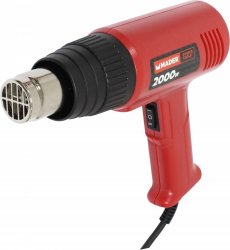
It actually does push out 550*C. While it doesn't have any temperature sensor, I can tell whether it's on 350*C or 500*C by how much glow it does when powered on. 500*C is quite bright, while 350*C is faint.

Anyways, that G04 was already dead when I first got it. It came from a friend's IT repair shop, and he wanted to get rid of a few old things he had no use for. I got these 2 PS3s (this G04 and a H04), and a bunch of AM2/775/462 mobos, mostly working.

And finally, while most professional people that do reflows and such will say this is highly unorthodox, I literally don't have enough fingers on both hands and toes to number how many laptops and MXM GPUs (removable GPUs) I've brought back with this heatgun. Even the worst HP DV6700 I could get my hands on was brought back to life and is still chugging along great.
mader.jpeg
This is the heatgun I'm using, although it's branded Kaufland and not "Mader".


Haven't tried removing NEC/TOKIN caps with it tho.

I had to deal with these dreaded lil' buggers in a Acer Aspire 6920G lappy. I just pried away the top with a small sized wire cutter first, then used a combination of tweezers + pliers to gently rip the cap innards away until I was just left with the terminal pads. Tinned them, stuck in 3x330uF (depends on the application) and it came back to life and worked like brand new.
 
Impressive how well it works on a 69°c CECHL04 I went to 54°c on Ace Combat Assault .
I made the stamp with a silicone pad from tv hs.
Nickel. Thank you.
 
@sandungas

Can mouse pad used to put under the space?

Like this mouse pad is 2mm thick. I can paste two pieces together to make 4mm thick. Or maybe i can find a slightly thicker mouse pad.

https://www.amazon.in/OXYURA-Gaming...d=1&keywords=mouse+pad&qid=1594338794&sr=8-10
I was talking about several ideas in this thread, so im not sure if you are asking me about which material to use to fill the "hole" under CELL

If you mean that hole... if the mouse pad is made of silicone then it should handle well the temperature, but maybe is too soft (this depends of the thickness of the piece you "build" though, you could join 3 layers to make it 6mm thick)

I think is better to use something made of rubber though
 
I can confirm this. My A01 that I bought at launch had this. I wish I had a 3D printer so I could replicate it for my other launch Systems. I think it's made out of Teflon.
7f4b41b5e84bc9c7f5db7d2325487421.jpg


095a1b6e6ba5f08924053c15767f16b6.jpg

dcd8e6452653b67625f869e089f16648.jpg

3f7862ddc7c205a3c4d89b6f4c518137.jpg

45a67f7631083f9d8c9cd39db0fb27e7.jpg


Sent from my iPhone using Tapatalk
Very nice :encouragement:

And yeah, probably is made of teflon, is a nice material for this work, i guess the reason is because the teflon internally have an structure made with fibers, and when the fibers are aligned correctly it resists a lot the compression, in some way it have many of the characteristics of plastics but with huge resistance to compression

Personally if i had a 3D printer and i had to design that piece i would have made it a bit bigger btw (of the same size of the square attached to the metal shield), that would be ideal because our goal is to make it match with the area of the DIE (or the area of the IHS)... so the biggest the better (never exceeding IHS size because that would be pointless)

And additionally i would add a "rubber pad" of the same size in it to achieve the spring effect i was mentioning before, but the fact is this sping effect is not really needed (thats the task of the bending in the clamp), it seems what they was trying to achieve when using teflon was to make that plastic piece the most "solid" posible ;)
 
Im changing my mind the most i look and think in that piece
His size is perfect (and there is no other way to do it) if the goal is to dont touch any SMD component

The piece helps the motherboard structure to keep his strenght (reduced by the hole)... and as a consequence it prevents the bending
Also, the forces are transfered a lot better, without it there are only 4 "bumps" at the corners, and with it there is a thin "squared line" in the center + the 4 "bumps"

I dont think it helps to transfer the pressure directly to CELL (bypassing motherboard and BGA solders) in the way the eraser/rubber mod does... because to achieve this it would be needed to calculate the height of his "internal walls" with a huuuge precission
You know... that height depends a lot of how much "compressed" are the BGA solder balls (we are talking at high precission of fractions of milimeters), and this varyes a lot
 
Last edited:
Because an image worths hundred words...
Without that piece, all the pressure is transfered to this points
prgtSOh.jpg

And with the piece this way:
AaQ7iBQ.jpg

*Im assumming the white piece doesnt really touches CELL
 
Last edited:
Using the rubber trick, I've been having big difference in temp between cpu/rsx. Cpu always above 70°C and rsx ~50-55°C.

I just used a hairdryer and a sanded down nail file to delid my IHS. First time doing so.

Worked great and after a repasted I'm currently sitting in sMan studying the temps on idle. 10mins in and it's cpu/rsx 54/59. Would like the rsx a bit more closer to the cpu at this point, but I'll give it ~20-30 mins per cycle and a few cycles to get more accurate readings.

So far my conclusion is: IHS delid = totally worth it.
 
Stopping test 1 results.

All tests are made with dynamic fan control set at auto @ 70°C

CPU: 61-62°C idle fan @ 23%
RSX: 68-69°C idle fan @ 23%

Updates will follow below

Update:

Test 2 results

CPU: 61-62°C idle fan @ 23%
RSX: 68-69°C idle fan @ 23%

Test 3 results

CPU: 61-62°C idle fan @ 23%
RSX: 68-69°C idle fan @ 23%

Test 4 results

CPU: 61-62°C idle fan @ 23%
RSX: 68-69°C idle fan @ 23%

Seems consistent enough.

Still would've wanted a few degrees lower, but don't we always..? ;)

Gonna check my values after some gaming, but so far so good.
 
Last edited:
First values taken after playing Lego Harry Potter for ~1 hour.

CPU - 62°C
RSX - 68°C
Fan @ 25%

Looks good, but wish RSX was a bit cooler.

Update:

After a bit more playing Lego Harry Potter the temps dropped.

Last 30 min they very steady at:

CPU - 60°C
RSX - 66°C
Fan @ 25%

Any opinions on this?
 
Last edited:
Someone knows the size of that "hole" under CELL ?
I was talking with @kaitlin4599 in this thread and at some point i suggested her to do it with this kind of "rubber feet" (sometimes called also "rubber pads" or just "bumpers"), you know, are used in furniture, as door stoppers, etc...
HP0822-rubber-feet-large-stick-on-pk-20ImageMain-515.jpg


The problem is we dont know the size of the hole, she found them at several sizes... 1/2 inches ... or 3/4 inches (this is meassured at his base btw, keep in mind are like a pyramid and we are going to cut it very close to his base)


Btw, the idea about using this "bumpers" is something i imagined the other day, but i really think is very convenient because:
-Are cheap and easy to find worldwide
-Are made with some kind of rubber (the exact composition doesnt matters much) that is going to resist well the heat and along time (years of use), it also have that effect of being "gummy", when compressed are going to create that efect of being constantly "pushing" like an spring
-Are sold in a pack, and the pack uses to have a bunch of them, so you can cut several of them to try to achieve the correct thickness
-Bonus: it have an adhesive at his base, nice to stick it in the PS3 metal shield :D
 
Last edited:
Using the rubber trick, I've been having big difference in temp between cpu/rsx. Cpu always above 70°C and rsx ~50-55°C.
Most probably the thickness was too low, in the tutorial is suggested to cut them with a thickness of something around 3.3 or 3.5 milimeters (for the FAT PS3 models)

But we really need to think in that thickness as a approach... the fact is almost imposible to create a perfectly flat cut (and perfect paralell to his base) with that precission
I mean... if you tell me that you can cut with your bare hand (and a razor blade) a "fillet" of 3.3 milimeters it would mean that you could cut it too at 3.4 or 2.7... or any other size with a precission of 0.1 milimeters
Thats irrealistic, we dont have so much precision with our bare hands :)

The way to do it is by repeating the same cut several times (like playing lottery), and meassure the result of every cut to see if we was lucky
Is a bit like playing darts, if you throw only 1 dart most probably you are not going to hit in the center... but if you throw 10 darts consecutivelly most probably you are going to hit it :)


Another btw... the other day i also imagined a accurate way to cut it, later @kaitlin4599 improved it by suggesting to use credit cards instead of coins
Anyway coins or credit cards... you can use whatever you want, the idea is we are creating a "gap" in between the razor blade and the table surface accuratelly
Btw, im figuring a way to cut them in a accurate way

1) Place 2 coins on top of a table (a bit separated from each other)
2) Place the razor blade in horizontal on top of the coins
3) Move the bumper in between the coins
And use globes, to do this is going to be needed to "push" the bumper in the direction of the razor blade with your fingers

For this to work.... you need to find 2 coins with the required thickness (a bit more than 3 milimeters)
The resulting cutted rubber bumper "should" have (if well done) the same thickness than the coins
And the cut should be a very flat surface, perfectly paralell with the other side of the bumper with the adhesive


Edit:
Im just checking it, with euro coins is easy to match the required thickness, a coin of 1€ + another coin of 1 cent on top does a total of 3.7 milimeters :D
--------
After the delidding you dont need to do it though, im just mentioning it to share some tips in the tutorial ;)
 
Last edited:
First values taken after playing Lego Harry Potter for ~1 hour.

CPU - 62°C
RSX - 68°C
Fan @ 25%

Looks good, but wish RSX was a bit cooler.

Update:

After a bit more playing Lego Harry Potter the temps dropped.

Last 30 min they very steady at:

CPU - 60°C
RSX - 66°C
Fan @ 25%

Any opinions on this?
You should not worry about RSX, the reason why you was having low RSX temperatures of around 55ºC before the delidding is because CELL was pushing the fan to high speeds and as a side effect RSX was having an excess of cooling
But now it looks normal :encouragement:
 
You should not worry about RSX, the reason why you was having low RSX temperatures of around 55ºC before the delidding is because CELL was pushing the fan to high speeds and as a side effect RSX was having an excess of cooling
But now it looks normal :encouragement:


@sandungs no dice on me finding out the size of the hole spent several hours on google and got no info so keep me posted
 
Well, my temperature was originally CPU 86 / RSX 73 until I replaced the five year old thermal with MX-4. In which case they went down to CPU 67 / RSX 60, which to me was still too warm to be honest.

I was able to respectively get these temps after cutting a 3.5mm eraser, and carefully bent the clamps as they were completely flat (providing no pressure whatsoever). I had no desire to potentially destroy the chips from delidding so I'm extremely grateful this guide exists, as it worked and exceeded expectations with my CECH-2501A

Cheers mate! :D

35074B7D-3FBE-42AD-A010-DCFF98109B08.jpeg
 
Back
Top