"(Not)Dead" C PS3 (NLoD?)

Pacorretaco

Member
Spoiler alert, the console is actually "working".
Check this old video I found:

Mine has same behavior. But I would like to be able to solve whatever problem in the standby circuit if possible, instead of running it like that, with the 12v active all the time.

So help would be appreciated. I guess if it's some IC I might be able to borrow a replacement from other boards I have, which maybe won't need it that much.

Alternatively, any ideas as to what bad things could happen if left like that? Guy from the video implies he left it like so, long term.

Thank you
 
Last edited:
It's a rare, but apparently not that rare problem.
In the comments of that video many claim to have this problem after a dodgy reflow attempt.
In my case I don't know really. I bought it broken already for parts. It might have been heated though there's no real evidence. Board seems not warped at all and no flux remains, bubbled tokins or other signs of mischief.
More or less looks fine to me.

So any help would be appreciated. With some luck this board could even be good.

Cheers
 
PS3 model ?
I dont know the PSU model either, but looks like this https://www.psdevwiki.com/ps3/APS-227
The wire is connecting pin1 and pin5... so is redirecting the 5v from pin5 to pin1

The circuit from PS3 fats related with the buttons is a bit different than other PS3 models because in the fats the buttons are "touch sensitive" and there is a tiny chip next to them to monitor the resistivity of them (when you touch them your body changes the resistivity of the circuit)
As far i remember there was a talk in the forum (with me involved) talking about problems related with that "touch sensitive" chip and alternative ways to bypass it, but i forgot about it sorry i dont know how to find that talk

Anyway... i can show you how it works in PS3 slims, for PS3 fats should be something similar, maybe not completly though
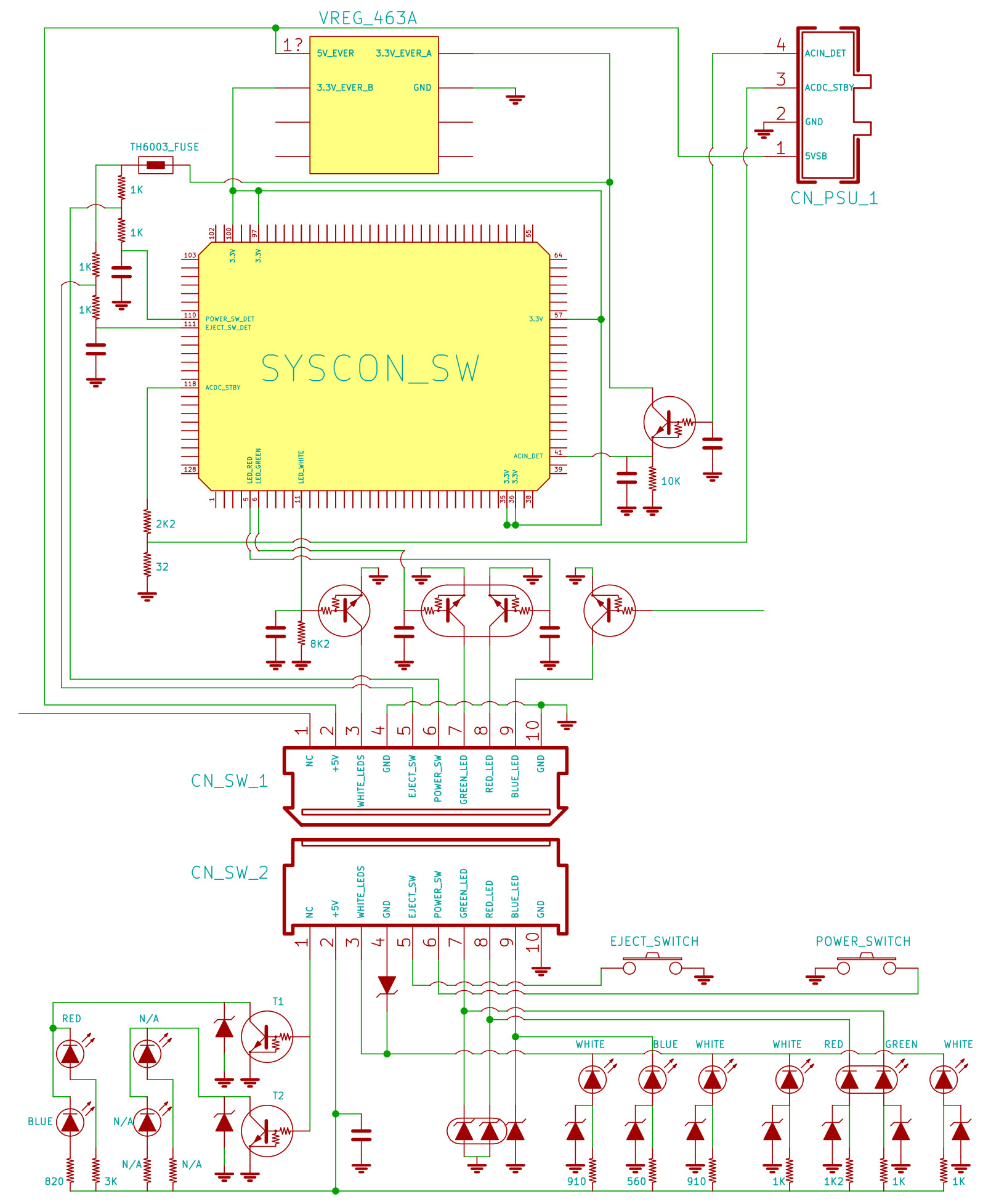
There is a syscon pin that monitors the power button (POWER_SW_DET)
When you press the button syscon detects it and uses another pin (ACDC_STBY) to wakeup the PSU
SYSCON_SWx_JTP-001_JSD-001_HSW-001_CN101.jpg
 
Last edited:
PS3 model ?
I dont know the PSU model either, but looks like this https://www.psdevwiki.com/ps3/APS-227
The wire is connecting pin1 and pin5... so is redirecting the 5v from pin5 to pin1

The circuit from PS3 fats related with the buttons is a bit different than other PS3 models because in the fats the buttons are "touch sensitive" and there is a tiny chip next to them to monitor the resistivity of them (when you touch them your body changes the resistivity of the circuit)
As far i remember there was a talk in the forum (with me involved) talking about problems related with that "touch sensitive" chip and alternative ways to bypass it, but i forgot about it sorry i dont know how to find that talk

Anyway... i can show you how it works in PS3 slims, for PS3 fats should be something similar, maybe not completly though
There is a syscon pin that monitors the power button (POWER_SW_DET)
When you press the button syscon detects it and uses another pin (ACDC_STBY) to wakeup the PSU
SYSCON_SWx_JTP-001_JSD-001_HSW-001_CN101.jpg
Ahh, sorry I should have made that a little clearer than just "C PS3" in the title.
Indeed the PSU is APS-227 belonging to a "C" model PS3. That is an European partially backwards compatible console with COK-002 board insde. (CECHC-04).

By bridging the pins 5 (5vSBY) and pin 1 the PSU is forcefully "woken up" and the 12v becomes active. This is normal behavior of these PSUs. Even if not connected to a PS3 at all.

What still amazes me is that simply by doing this, the Red standby light of the previously "dead" console turns on, and the buttons become responsive. Then the console can turn on (either with the touch sensitive buttons or even wirelessly, with a controller) and is essentially working as normal apparently. Which to me is also surprising, in and of itself.

So im pretty sure it cant be the touch IC, among other things because in these models it's in a whole separate module and I tested with another one.

Still i cant understand how manually enabling the 12 restores all functionality. It shouldn't right?
My concern with this is if it would be safe to have it running like this for long.
 
Well, in general is safe, the PSU gives 5VSB at all times... this line feeds syscon chip that is like a microcontroller and the responsible to do all the bootup
The buttons and leds are connected to syscon, is just in your PS3 it seems syscon is not able to monitor the power button
But syscon is doing his tasks related with the boot sequence and changing his power states normally, i guess there is no problem with it
 
Well, in general is safe, the PSU gives 5VSB at all times... this line feeds syscon chip that is like a microcontroller and the responsible to do all the bootup
The buttons and leds are connected to syscon, is just in your PS3 it seems syscon is not able to monitor the power button
But syscon is doing his tasks related with the boot sequence and changing his power states normally, i guess there is no problem with it
I see. Actually i just checked the psdevwiki page about the APS-227 PSU, and it mentions a 1k resistor is recommended instead of just bridging.
I guess is simply because the PSU itself is expecting a 3.3v instead of the 5v.
And nothing to do with the ps3 board.
Though in respect to that I'd bet it's still pretty Ok even without the resistor.

After all, I have little clue about the actual problem. Without the bridge, it's not just that the syscon is not listening to the buttons. There's no red light either. For all I know, the syscon could be getting no power at all
 
Oh yes i forgot to mention that, the 5VSB from the PSU goes to a small "votage regulator" chip that converts it to 3.3v. Then the 3.3v feeds syscon chip
So... syscon chip works at 3.3v and when his "output" pins are in "high" state they sends 3.3v
You could connect a wire in the 3.3v output of that voltage regulator to the PSU... from an electrical point of view this would be exactly what does the original circuit

Btw, i found the other talk when we was talking about this "touch sensitive" buttons
https://www.psx-place.com/threads/cechg03-stuck-in-fan-test-mode.20453/page-2#post-161613

You mentioned your motherboard have that buttons in a "children" board... but the circuit probably is pretty much the same
The weakest point of it is that chip named IC4001 because is the responsible to messure the resistivity of the button surface

You know... sometimes it happens that you have your body chargued with electrostatic electricity and you touch something (a person, a car, etc...) and appears a spark in your fringertip
Imagine if this happens in the "touch senstitive" buttons of the PS3... the spark goes directly into the motherboard, lol... so it can damage the chip monitoring the buttons (or other components around it, if you are lucky maybe is just a resistor or capacitor)
 
Btw the console is actually running firmware 2.53
I guess it's still best to go 4.86 first to then install noBD cfw, get eid root key and then breathe safely. Needs Bd remarry as well.
Ill give it a try. Hopefully it survives the process
Thanks btw
 
Btw the console is actually running firmware 2.53
I guess it's still best to go 4.86 first to then install noBD cfw, get eid root key and then breathe safely. Needs Bd remarry as well.
Ill give it a try. Hopefully it survives the process
Thanks btw
I would format the hdd in PC just incase, mostly because probably you dont have anything worthy inside it
Then update to 4.86 OFW and use bgerville toolset web to apply the cfw flash patch
Then install a noBD CFW from recovery

But i would suggest to really try to do your best to fix the hardware problems related with BD, because being restricted to use only noBD firmwares is a pain (you will have to beg in forums for cfw devs to release special versions for noBD, some of them doesnt does it), also the noBD firmwares have some feature restrictions too
 
I would format the hdd in PC just incase, mostly because probably you dont have anything worthy inside it
Then update to 4.86 OFW and use bgerville toolset web to apply the cfw flash patch
Then install a noBD CFW from recovery

But i would suggest to really try to do your best to fix the hardware problems related with BD, because being restricted to use only noBD firmwares is a pain (you will have to beg in forums for cfw devs to release special versions for noBD, some of them doesnt does it), also the noBD firmwares have some feature restrictions too
Oh, yes that's more or less what I meant I was going to do. Not sure why to format the hdd first but anyway, sorry if I derailed my own conversation hehe

the way i understand it, in order to grab the eid root key needed to do a bd remarry (among other things) you need to launch for example rebug toolbox, which you can't do if your bd drive isn't married. (The irony). So first you need the noBD firmware to jump through that hoop yes? Then once the ERK is obtained is time to install the normal CFW, and do the actual remarrying.
So from 2.53 OFW > 4.86OFW for bgtoolset > 4.86 rebug noBD CFW for retrieving ERK > normal CFW then remarry and done.
That's what I have in mind for best path to restore this fat girl, assuming she doesn't faint in the process.
Then I suppose there would be options to downgrade back to 2.53 from 4.86 CFW. Even if no real reason i suppose.

Sorry for the small misunderstanding
 
I suggested to format the hdd because i guess it came with the PS3 and has not been used since many time ago, so you are not sure how good/bad is it, also you are going to need to install 4 or 5 firmwares, and the firmware installer writes some files in hdd
If the hdd have problems it could drive you crazy

In my oppinion the noBD is an intermediate step to have the PS3 in a stable state, as you said, it allows to 1) dump flash, 2) dump eid root key, 3) enable QA
Also, take some time at that point to do some temperature tests, try to see if you can fix the touch sensitive buttons, the remarry, etc...

Btw, what happens when you press the eject button ?
 
I suggested to format the hdd because i guess it came with the PS3 and has not been used since many time ago, so you are not sure how good/bad is it, also you are going to need to install 4 or 5 firmwares, and the firmware installer writes some files in hdd
If the hdd have problems it could drive you crazy

In my oppinion the noBD is an intermediate step to have the PS3 in a stable state, as you said, it allows to 1) dump flash, 2) dump eid root key, 3) enable QA
Also, take some time at that point to do some temperature tests, try to see if you can fix the touch sensitive buttons, the remarry, etc...

Btw, what happens when you press the eject button ?

Ahh, I think now I understand what you were saying about the hdd. However I wasn't too worried about that, mostly because these old models have 256MB NAND on which the firmware is stored completely. Unlike the newer models. For example If you were to put a different hdd, the console would simply ask to format, but after clicking OK the system will boot quickly without asking for firmware on USB or anything like that. Because the firmware is not installed on the HDD and therefore is untouched.
So the hdd only is used to store the .PUP file copied from the USB for the update. That's why I thought not so much room for catastrophe related to HDD. (Of course if the process somehow is interrupted, the problem would be bigger. I'd need to restore the NAND which is not so easy)

As for the rest of the concerns... Well before doing any of this, i kept the console on for a while to see that the fans aren't ramping up too much meaning temps are more or less in check (which is surprising; could mean it had not that much use). I'll still delid if it survives all this.

That's the thing with the "buttons". They are OK (with the bridge trick) So the issue is deeper than just buttons. (There is normally no red light either, and also will not turn on wirelessly)
But all seems Ok with the bridge trick
Eject button works as expected too. If nodisc inside, 3 beeps. If I put disc, it will spin, makelasernoises and eject normally. But no game on screen and can't launch apps(black screen). So classical unmarried symptoms. That can be solved at least.
Honestly Ideally I wanted to solve the misterious problem before doing all this. But I still dont even understand what the real issue is...
 
By the way, In the end I went ahead with the whole process. And It was a success; all went smoothly (and the hdd still has the old data etc). The console is now running Rebug 4.86 and the Blu-ray drive is working well. Tried some PS2 games and all seems OK. (Jak 3 PAL disc actually seemed to work well. I thought the game was supposed to have issues but ran more or less fine)
As for the temperatures they are a bit surprising. This machine I didn't delid but it is actually all under control. Still I will delid sooner or later I guess. In my experience the 10-15 degree difference between CPU and RSX is pretty normal in these models. RSX is pretty cool still.
Webman shows about 150days of use. (Not sure how accurate is this data)

This BD drive btw actually doesn't do the annoying motor insert sound at startup, which I thought was standard. Maybe there's something slightly wrong with the other consoles. But it's a minor thing of course.

I suppose there would be ways also to go back to the old 2.53 firmware. Although probably no point in doing that.

What I did do before all this was the resistor thing instead of a jumper wire. 1k ohm actually didn't do the trick for some reason. Instead of putting the jumper wire back I put a 100ohm in and it works. So yea, totally scientific.

If one day the console blows up or something I'll happily report back.

For now it will stay with the workaround jumper wire (or resistor) in lieu of a proper fix. Unless some further information comes across of course.

Cheers
 
The problem about not having the power buton are:
-you cant enter recovery menu
-you cant make a soft reboot if the game freezes/crashes

The problem about not being able to enter recovery menu... well, doesnt matters much because you should not need it frequently, but eventually you will need it (to run hdd manteinance tasks, and to fix XMB database problems)

And the other problem if the game freezes/crashes... only allows you cut the power with the ON/OFF switch at the back... this is going to generate problems in the hdd filesystem... eventually it could generate "bad blocks" in it (phisically damaged)... and 99% of the times the PS3 is going to ask you to "restore filesystem" at the next boot

--------
When talking about temperatures i use to round numbers to multiplyers of 5ºC... because usually we are carring some innacuracies "here and there", but when talking about the difference of temperatures in between CELL and RSX i use to say something around 10ºC or 12ºC is aceptable.... but over 15ºC is too much, it means it really needs a delidding

Btw, a test you should do is to let the PS3 to cool down to ambient temperature (for some hours)... then:
1) power ON the PS3
2) enter in a app to display temperatures (rebug toolbox, irisman, multiman, etc..)
3) stay idle inside it for more than 30 minutes

The difference of temperatures in between CELL and RSX (after the 30 minutes) in that test should be smaller than the 12ºC i mentioned
 
The problem about not having the power buton are:
-you cant enter recovery menu
-you cant make a soft reboot if the game freezes/crashes

The problem about not being able to enter recovery menu... well, doesnt matters much because you should not need it frequently, but eventually you will need it (to run hdd manteinance tasks, and to fix XMB database problems)

And the other problem if the game freezes/crashes... only allows you cut the power with the ON/OFF switch at the back... this is going to generate problems in the hdd filesystem... eventually it could generate "bad blocks" in it (phisically damaged)... and 99% of the times the PS3 is going to ask you to "restore filesystem" at the next boot

--------
When talking about temperatures i use to round numbers to multiplyers of 5ºC... because usually we are carring some innacuracies "here and there", but when talking about the difference of temperatures in between CELL and RSX i use to say something around 10ºC or 12ºC is aceptable.... but over 15ºC is too much, it means it really needs a delidding

Btw, a test you should do is to let the PS3 to cool down to ambient temperature (for some hours)... then:
1) power ON the PS3
2) enter in a app to display temperatures (rebug toolbox, irisman, multiman, etc..)
3) stay idle inside it for more than 30 minutes

The difference of temperatures in between CELL and RSX (after the 30 minutes) in that test should be smaller than the 12ºC i mentioned

See, the "buttons" are actually fine. So I can press them normally without problems and they work. In fact I would say the console is "fully" operational... Provided the PSU jumper trick is present; making the 12v active all the time.
If not, the whole console is "dead"
More or less like in the video.


Regarding temperatures... well maybe it's another mystery too, worthy of another thread. The thing is, I have other consoles that I delidded and all of them have a considerable difference between CELL and RSX. Even delidded, I have normally more than 10 degrees higher on the CELL CPU. I like to test on the normal XMB with webMan popup because with other apps it depends as well.
For example MultiMan will make the gap be even bigger, because the RSX is working even less in this application.
Conversely, maybe in a real game, the gap will be quite smaller.
But in XMB the gap I still always think it's too big. Because for example I have a slim Where the RSX is actually hotter than CPU.

So maybe it's just me doing something wrong. This "not delidded" console is not much worse than my delidded ones.

Maybe I'll include pictures of temperature tests. But maybe better to make new thread?

Thanks for the help btw
 
i could only boot my cechc04 ps3 only of i do this. so i realy thank you. but is there a fix to be able to boot it without this trick?
I guess is the transsistor of the image in post 3
Located in between syscon pin #41 and the white connector of the PSU

That schematic is from a PS3 Slim though, but in the other PS3 models it should not be much different
 
Ok, I decided to take another look at this small problem.
(The console is still working "fine", but with the trick of course. Also I admit I didn't really use it too much)

I thought I'd use a wattmeter to help see better what is going on.
-When the PSU pins 1 and 5 are bridged, the 12v clicks on and the PSU thing itself draws about 7w from the wall. (This is without even the board attached, should be normal for all PSUs)
-Now I notice that the 12v prongs don't actually need to be plugged at all for the standby light to turn on.
This is to say, the bridging of pins 1 and 5 itself is what is making the standby work. The 12v becomes active at the same time but this actually had nothing to do. The magic is when pins 1 and 5 are bridged.

In this state I was also able to connect syscon no problems. Nothing surprising there though.

So to recap:
-Bridging pins 1 and 5 of the auxiliary PSU connector on the board makes the console behave normally
-The power draw of this system when in standby (thanks to the trick) is about 9w.
-A normal system in standby (without this issue) is drawing about 1.8 watts

Because I know the PSU by itself is drawing about 7w when bridged, I guess this trick should be safe at least for the board, since it's drawing more or less the normal 1.8w.
Just that something inside the PSU is working there all the time making some noise and drawing 7w.

Cheers
 
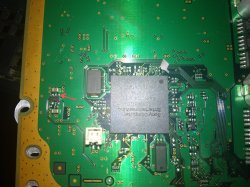
So @sandungas you say it can be a transistor huh?, makes sense, though I think I'm not going to attempt anything yet anyway.

The one with the red arrow looks the most suspicious to me. That pin goes to pin 5 of the PSU connector, I checked with multimeter.
On the thing it's printed "LCARKI"

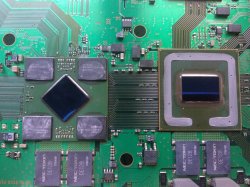
* As a side note, I opened this thing mostly because it needed delid, and I saw something a bit interesting:
The memory chips on this RSX don't say Qimonda, but actually Infineon.
Maybe this was an early production unit made right before Qimonda split from Infineon. I don't think this appears in the wiki (Maybe because it's meaningless, at the end of the day it should be the same module).
But I wonder if this is something rare or something. I never saw this before.

Cheers
 

Attachments

  • IMG_20210406_131648~2.jpg
    IMG_20210406_131648~2.jpg
    2.6 MB · Views: 121
  • IMG_20210405_191938.jpg
    IMG_20210405_191938.jpg
    6.2 MB · Views: 134

Similar threads

Back
Top