PS3 (Research/Experimental) - NEC/TOKIN Capacitors Replacement - YLOD

Yes. Its a chip that monitors the health of the PS3 and records errors to help diagnose problems. SONYs service dept. would use it to quickly repair or replace the device. It saves time diagnosing. Until recently we didn't have access to it and were guessing. Now, we can. So that's the best place to start.
Its a matter of attenuation (noise reduction). Its a lot more complicated than a simple loss of capacitance. And it depends if we are talking about CPU or RSX tokins. It also depends on model. Some model PS3 can still operate with half their tokins missing, but not the BC ones. CPU tokins are more forgiving than RSX. If RSX tokins are good then you can probably get away the CPU tokins degrading by half their combined capacitance. But the console may have issues under load, IDK.

The other problem is that combining capacitors changes the frequency response curve and can introduce antiresonance peaks that actually increase noise. If that happens at a critical frequency, it could cause problem and be counterproductive. So there is more to this than just adding capacitance to make up for losses.

Sorry for the non-answer, but this is not a simple LC filter. Its a 2 stage filter combining RLC stages to amplify the attenuation. Its calibrated carefully and the parts chosen by SONY deliberately. We have to be careful to replace the tokins with an imperfect, but adequate alternative, since tokins are EOL and difficult to install.

As you've stated in previous posts, you were trying to get the noise down introducing 270uf caps instead of 470uf because you thought the noise factor was an issue; then found the rsx didn't like that combination but the cell did... Was this because of noise... or capacitance of each cap (or combination)? Do you think caps with less noise on face value is a key factor, or is it more experimenting with different caps... which then relate to or cause the right or wrong frequency in the rsx/cell - tokin relationship?

Cheers
 
Yeah, the RSX was less forgiving about noise. The 270uF B case caps were insufficient to achieve adequate attenuation (noise reduction). The 470uF TaPol did the trick.

The CPU still had the 270uF. They were enough allow the console to boot and remain stable, but I recently removed them and installed 12x 470uF TaPol + 12x 22uF MLCC + 12x 10uF MLCC using my PCB. I recommend you use the MLCCs if using AlPol caps, but TaPol don't need them. Using KEMETs k-sim I decided that was adequate to reduce the impedance below 1ohm for 100KHz-10MHz switch mode noise. It can be more smoothly reduced using one 1uF, 2.2uF, 4.7uF, 10uF, 22uF, and 47uF MLCCs. But it's easier to just use 3 each of 10 & 22 and the gains are not worth the extra expense and headache, IMO. But you can populate it any way you like.

I haven't taken any O-scope measurements yet though. I will soon. I'm curious how much noise the Tantalizers reduce the noise on the CPU. With the 270uF it was about 30mVpp. But there were 2 distinct peaks that I think have to do with combining 2 different sized caps (470uF on RSX side, and 270uF on CPU side). We'll see.
 
Just an FYI, capacitors do 2 things:
  1. They provide energy storage (capacitance) to make up for momentary gaps in current. There are voltage drops that occur as a device uses current with quick changes in load, like a processor running at 100% for a second, then at 20%, and so on, many times per second. A capacitor smooths out these gaps so there is always ample voltage and current to meet any demand.
  2. They provide a low impedance path to ground for certain frequencies. You need to select capacitors so that their frequency response curve (the part that has low impeedanc) encompasses the frequency range of the noise in your circuit. In this case, 100KHz-10MHz.
Processors are very sensitive to noise of certain frequencies. If the noise isn't filtered (decoupled), then it can interfere with normal signals and cause the data not to make it where its going intact. This eats CPU cycles to process and resend the data. If the noise is bad enough then there isn't enough time left to resend the data and the device won't operate correctly. So there is a range where a little noise is okay, but too much will cause a YLOD. This doesn't equate to a simple lack of capacitance. You have to also consider the frequency response curve of the capacitor.

Also, the less noise the more efficient the processor will run (no CPU cycles wasted resending data). Wasted cycles are time spent producing heat. So reducing noise, reduces how hard the processor has to work. So a noise free processor is a cool, happy, long lived processor!
 
Nice supplemental on the noise/frequency/capacitance relationship. It was mentioned that a BC ps3 can't work without all 4 tokins present (I assume this is needed for capacitance). With Samsonay's and Pacorretaco's fix, they only introduced 2 new caps (one on each side of the existing tokins). For this scenario, do you think the likelihood of this fix was more in line with boosting degraded capacitance (from a degraded tokin), or fixing some noise that was introduced as a result of the degraded tokin?

Cheers
 
Nice supplemental on the noise/frequency/capacitance relationship. It was mentioned that a BC ps3 can't work without all 4 tokins present (I assume this is needed for capacitance). With Samsonay's and Pacorretaco's fix, they only introduced 2 new caps (one on each side of the existing tokins). For this scenario, do you think the likelihood of this fix was more in line with boosting degraded capacitance (from a degraded tokin), or fixing some noise that was introduced as a result of the degraded tokin?

Cheers

Hmm, the thing is, I did the experiment on 2 separate COK 002 boards. Backwards compatible (BC) systems.

Yes, they turned on just fine with 2 tokins simply missing. Both RSX and CPU side tested.
It's true I didn't do stress testing or anything. But they did both turn on no ptoblems. Certainly not what somebody would call YLOD or anything.

It was some time ago but actually I think I recorded a video and all.

Worth reminding that I did never find tokin problems on these or any COK boards. Only on other later models.
 
...It was mentioned that a BC ps3 can't work without all 4 tokins present (I assume this is needed for capacitance). With Samsonay's and Pacorretaco's fix, they only introduced 2 new caps (one on each side of the existing tokins). For this scenario, do you think the likelihood of this fix was more in line with boosting degraded capacitance (from a degraded tokin), or fixing some noise that was introduced as a result of the degraded tokin?

Cheers
I would imagine if there isn't enough capacitance to smooth out voltage drops during peak loads, the console will likely just YLOD on boot during the POST process. It does a basic test on boot to see if the processors are alive and kicking. That's the rev-up you hear when you first start the console. It's not taxing like an intense game, but it's more than just idling in the XMB. So that really only leaves the noise component.

The noise is more variable. Noise spikes can occur at any time due to any load. If they occur at an important time, they'll interfere and eat up CPU cycles. If it gets bad enough, they'll cause a YLOD. So in @Pacorretaco's case the noise increase caused by removing half the tokins wasn't enough to cause an instant YLOD, but it surely would have caused the CPU/GPU to work harder (more heat) and probably would have caused a YLOD under stress (like a game). In the case of tokins losing capacitance, they steadily allow more noise in. So you can add tantalums like he did to replace the lost capacitance, but the reason we use 470uF is because they're impedance vs frequency curve (frequency response curve) has a resonance frequency centered at the correct range of the switching noise range. So yes, it adds back capacitance, but does so surgically targeting the noise frequency.

Here's an example of just 3x 470uF TaPol caps...
Tantalum (alone).PNG
The red box is the area of concern. from 100KHz-10MHz is the component of switching noise that the tokins are responsible for decoupling. Notice how the impedance curve pops out the top of the box? That means noise of 3MHz+ will not be reduced below 10mOhms (I chose that number to be safe, but can it be calculated as Z_target if you have the correct information). Here's an Oscilloscope image of the noise left over after replacing with just 470uF tantalum Polymer caps...
Working Target Plateau.png

The RSX (Blue) has 12x470uF TaPol caps and the CPU (Yellow) has 18x 270uF TaPol B-case caps. You can see that the remaining noise on the RSX has a frequency of 1.92MHz and an amplitude of about 10mVpp. Based on the K-sim above we were expecting it to be 3MHz, but real world doesn't match theoretical exactly. It was pretty close though. The frequency of the noise on the CPU is 2.63MHz and if you look closely there are 2 distinct amplitudes of noise. One 30mVpp peak followed by two ~20mVpp peaks. That's what I meant when I said there appears to be 2 distinct peaks when I combined having 470uF caps on the RSX and 270uF caps on the CPU. The K-sim of the 270uF caps shift their frequency response curve to the left. So they allow more noise through the "red box" above (target frequency). I "think" that explains why the frequency of the noise is different and why it's amplitude is higher. However, it's important to note that this noise is being produced primarily by the IOR switching voltage regulators and the CPU has three of them, whereas the RSX has two. So the RSX filter doesn't have to remove as much noise as CPU's does.

The above noise is fine. That combination of capacitors was stable in intense games, no problem, but I think I could do better. That's why I added MLCC pads to my Tantalizer PCB. Here's what the K-sim of my recommended combination looks like (3x470uF TaPol + 3x22uF MLCC + 3x10uF MLCC)...
Tantalizer (recommended).PNG

That gets the combined frequency response curve below the 10mOhm threshold I'm shooting for. But notice that the capacitors I chose target the 1-3MHz frequency? That's the noise I measured! I think this is the easiest and cheapest solution, since you only have to buy 2 additional caps. It's easier to source them and to keep them separate while installing. However, the curve can be theoretically improved using this combination...
Tantalizer (best).PNG

...But it's more expensive sourcing 47uF MLCCs and keeping 6 different MLCCs separate during installation is annoying. It does look sweet on paper, but who knows if the real world performance is worth the added expense and headache. Also, it could result in worse performance, since it's doesn't reduce the 1-3MHz noise as much as my targeted approach does (theoretically. I still need to measure the results). EDIT: Here are the measurements for the tantalizers on the CPU...
Target Plateau (normal aqu).png

Noise on the CPU went down predictably. It's well under control now, but there appears to be more noise on the RSX now. It is stable. Perhaps the RSX needs MLCCs also, IDK. It's possible that an anti resonance peak in the CPU side has amplified the noise in the RSX side, but it's still under the threshold and not causing problems, so I'll leave it alone until it does. However, it's up to you what you populate the PCB with, so you can play with the K-sim and come up with a frequency response curve you like.
 
Last edited:
@RIP-Felix So I have applied liquid flux and made sure it went in under both the cpu and gpu. Used the heat gun to bake/melt the solder contacts and did two passes with a cooling down in between, just to make sure it removed any cracked solder point. Now this is where I should have had removed the IHS from both the CPU and GPU, GPU temps are somewhat okay, it was idling around 50°c and the CPU was at a staggering 80°c. Those temperatures never occurred before at least for the CPU. My guess is I messed with the thermal contacts in the IHS. That was obviously an oversight. Any tips on how to remove them? I saw some videos but you obviously have experience on the matter. Thanks.

Sent from my SM-G973W using Tapatalk
 
@RIP-Felix So I have applied liquid flux and made sure it went in under both the cpu and gpu. Used the heat gun to bake/melt the solder contacts and did two passes with a cooling down in between, just to make sure it removed any cracked solder point. Now this is where I should have had removed the IHS from both the CPU and GPU, GPU temps are somewhat okay, it was idling around 50°c and the CPU was at a staggering 80°c. Those temperatures never occurred before at least for the CPU. My guess is I messed with the thermal contacts in the IHS. That was obviously an oversight. Any tips on how to remove them? I saw some videos but you obviously have experience on the matter. Thanks.

Sent from my SM-G973W using Tapatalk

You dried thermal glue/paste under both. Painter knife for cpu. Flat head + something to sheild rsx form dents works on gpu ihs removal. Just did both the other day trying to fix a COK-001.
 
You dried thermal glue/paste under both. Painter knife for cpu. Flat head + something to sheild rsx form dents works on gpu ihs removal. Just did both the other day trying to fix a COK-001.
Yeah that was my fault. I knew I should have done it but I guess I rushed too much. I will get that done for sure. Maybe use the hair dryer to soften the glue under the ihs? I don't want to attempt it with the heat gun.

Sent from my SM-G973W using Tapatalk
 
@RIP-Felix So I have applied liquid flux and made sure it went in under both the cpu and gpu. Used the heat gun to bake/melt the solder contacts and did two passes with a cooling down in between, just to make sure it removed any cracked solder point. Now this is where I should have had removed the IHS from both the CPU and GPU, GPU temps are somewhat okay, it was idling around 50°c and the CPU was at a staggering 80°c. Those temperatures never occurred before at least for the CPU. My guess is I messed with the thermal contacts in the IHS. That was obviously an oversight. Any tips on how to remove them? I saw some videos but you obviously have experience on the matter. Thanks.

Sent from my SM-G973W using Tapatalk
CPU delid tool...
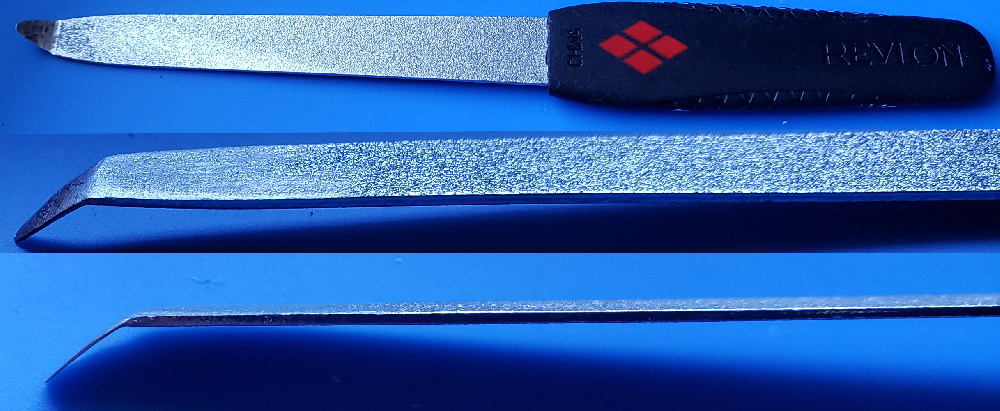
Make one of these to delid the CPU:

Heat up the end of a fingernail file (buy one from the store, don't grab one from the GF or Misses unless you have a death wish). Use a lighter to heat the tip up and make the metal malleable, then bend ~1cm of the tip to an angle with pliers. Now use a dremel with a sanding stone to grind away the bottom of the tip and make it very thin. It needs to be able to fit underneath the heat spreader on the CPU. Notice there is a gap in the silicone glue on one side:

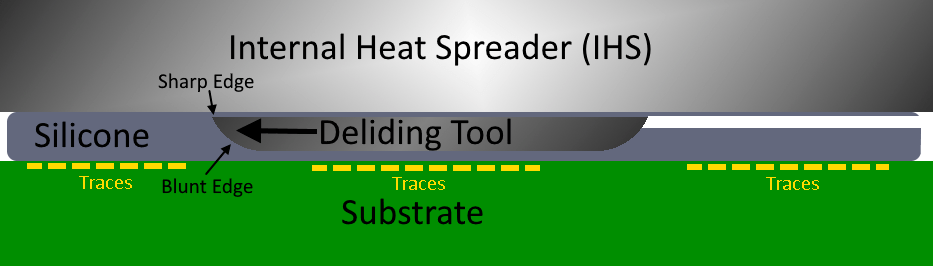
Use sand paper to blunt the bottom edge of the tool so it can't dig into the substrate, where the traces are on the CPU. That'll destroy them. Just rub the tool along some paper and if it glides smooth you'll be fine. Now use some vasoline or grease to get the tool started. Place it under the edge of the heat spreader and use firm steady pressure. Brace with both hand so you don't slip. Once the tool begin cutting it will ride along a cushion of silicone and the blunt edge will force the sharp cutting edge against the Heat spreader. Now just cut along the edge of the chip, all the way around it. Be careful at the end, when you're about to cut through or you can slip and cut something you don't want to. Just watch this video and you'll have a good idea how to do it.
For the GPU, you need to use a different method:
NSC is pretty long winded, but he shows how to safely delid the RSX earlier in the video. His method is good for doing it cold, but I don't really like his method. It's longer and hard to get a good angle. And his hammer scares the sh!t out of me! I prefer to use hot air (hair drier works too) to warm the RSX for a minute or so (not directly on the chip, but in circular motions 4-5 inches above it just, to get the glue warm, not hot). This softens the thermal adhesive enough so you can pop off the RSX heat Spreader. I use a card and a thin butter knife. The side that faces the CPU, with traces going between them, doesn't have any SMD components like the other 3 sides do. So you can only do this on that side. Heat, insert the card, then use the butter knife to get under the edge of the heat spreader. Be sure you get under the heat spreader, not just on the edge of it. You actually need to get underneath it so you can gently add prying force. Slowly add pressure until the glue gives and the heat spreader pops off. The card protects the substrate from the blunt metal edge of the butter knife. Use something thinner if you can't get under the edge with your butter knife, but be sure it's blunt or it can ding into the substrate (even digging through the card first). It need to be thin enough to get under, but have enough girth to not bend when you pry up.

Sounds complicated but the process is actually quite easy, only takes a few minutes. The hardest par is making the proper CPU deliding tool. It took me about an hour shaving down the tip to get it thin enough to fit under the IHS. I'd shave it a bit, test. Shave away a bit more, then test. Sand, test. eventually I got it to work. I have delided about six consoles now and the CPU is the easiest because of that tool. Most people can delid their RSX pretty easily, but are deterred by the silicone on the CPU. The CPU really needs it or the console will suffer from overheating.
 
Many thanks RIP-Felix, I knew you were going to have your own method and to be fair I prefer that one instead of using the hammer as well [emoji1] I'm good with a hammer, maybe too good and I will think it's a damn brick wall and there goes my PS3. I will attempt this between today or tomorrow if I find time. I will report back with the results, once again thank you!

P.S: I have sent you a little token of appreciation.

Sent from my SM-G973W using Tapatalk
 
Last edited:
Many thanks RIP-Felix, I knew you were going to have your own method and to be fair I prefer that one instead of using the hammer as well [emoji1] I'm good with a hammer, maybe too good and I will think it's a damn brick wall and there goes my PS3. I will attempt this between today or tomorrow if I find time. I will report back with the results, once again thank you!

P.S: I have sent you a little token of appreciation.
Let us know how it goes. Poping off the RSX IHS can be a bit scary, but I've not had any issues doing so. Actually, the thermal adhesive SONY used on the 30xx model I recently delided was much harder to get off. It didn't seem to soften with heat and I was afraid of how much force it required to pry it off! But it came off without damaging anything too, so just ad force slowly and be ready to catch the IHS so it doesn't flip off and hit something.

What do you mean by your post script? I do not have any way to accept "appreciation." So if you "sent" me something, it's possible you accidentally sent it someone else's way.

Felix purrs when you stroke his ego, but I do this for fun and offer my thoughts free. Everything I learned was from others here and around the web, so really I'm just reiterating them here to record what I've learned like a save state. So I can go back later and re-learn it. And so others can benefit from it too - unless it's total BS, in which case it stands as a candid example of learning traps...which is beneficial too. It's good to have others to bounce ideas off and tell you when you're wrong. Iron sharpens iron. So while it's nice to hear positive things, you can take that adulation and internalize it. Let it empower you to learn whatever what you need to know to reach your goals. Learning should be a fun, goal oriented process, with periodic successes and failures. And when you come across some tid-bit of information that might help move the thread forward, share your find with us and we'll bounce the ball around, hopefully in the forward direction. Teamwork has no I!
 
Last edited:
Let us know how it goes. Poping off the RSX IHS can be a bit scary, but I've not had any issues doing so. Actually, the thermal adhesive SONY used on the 30xx model I recently delided was much harder to get off. It didn't seem to soften with heat and I was afraid of how much force it required to pry it off! But it came off without damaging anything too, so just ad force slowly and be ready to catch the IHS so it doesn't flip off and hit something.

What do you mean by your post script? I do not have any way to accept "appreciation." So if you "sent" me something, it's possible you accidentally sent it someone else's way.

Felix purrs when you stroke his ego, but I do this for fun and offer my thoughts free. Everything I learned was from others here and around the web, so really I'm just reiterating them here to record what I've learned like a save state. So I can go back later and re-learn it. And so others can benefit from it too - unless it's total BS, in which case it stands as a candid example of learning traps...which is beneficial too. It's good to have others to bounce ideas off and tell you when you're wrong. Iron sharpens iron. So while it's nice to hear positive things, you can take that adulation and internalize it. Let it empower you to learn whatever what you need to know to reach your goals. Learning should be a fun, goal oriented process, with periodic successes and failures. And when you come across some tid-bit of information that might help move the thread forward, share your find with us and we'll bounce the ball around, hopefully in the forward direction. Teamwork has no I!
Appreciate it anyway. I love how the community here helps anyone out without BS(so far [emoji1]).

I will be careful and steal anyway some of my wife tools. I will just tell her that she must have misplaced it or something. She doesn't inspect my work areas [emoji1787]

Oh I have sent you a one month VIP for tapatalk. Regardless if you use it or not.

Cheers.

Sent from my SM-G973W using Tapatalk
 
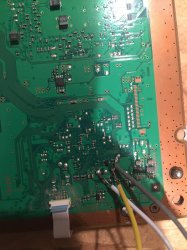
Need help please. Here my reballed cecha001. It was working good for almost 2 years. I had webman temps never exceeding 58c on both chips. The other day I turned it on and while in the xmb and no gaming it ylod. Now a delayed ylod. I don't get it. If this ylod is overheat related it makes no sense as I never let it get above 58c even when gaming. Now I'm trying to dump the error code but I'm getting the auth fail. I have tried both the python way and the GUI way. Same thing. I have a solid red llght and uart is plugged into com 3 and still nothing. Has anyone had success dumping error codes on a cok-001 board? I followed the pdf and I think I got the points soldered on right. Here is a pic. What are your thoughts? Why would my system ylod right now if temps weren't an issue. And....before I attempt a reflow I would like to know what the error is. If it's necs I don't want to reflow and damage the good reball. Could it be a bad power supply? If that's the case would I still have the red solid light when I flip the switch?
 

Attachments

  • FD85EC60-C4E6-4C87-91DA-AEED2492DFB0.jpeg
    FD85EC60-C4E6-4C87-91DA-AEED2492DFB0.jpeg
    1.7 MB · Views: 673
Need help please. Here my reballed cecha001. It was working good for almost 2 years. I had webman temps never exceeding 58c on both chips. The other day I turned it on and while in the xmb and no gaming it ylod. Now a delayed ylod. I don't get it. If this ylod is overheat related it makes no sense as I never let it get above 58c even when gaming. Now I'm trying to dump the error code but I'm getting the auth fail. I have tried both the python way and the GUI way. Same thing. I have a solid red llght and uart is plugged into com 3 and still nothing. Has anyone had success dumping error codes on a cok-001 board? I followed the pdf and I think I got the points soldered on right. Here is a pic. What are your thoughts? Why would my system ylod right now if temps weren't an issue. And....before I attempt a reflow I would like to know what the error is. If it's necs I don't want to reflow and damage the good reball. Could it be a bad power supply? If that's the case would I still have the red solid light when I flip the switch?
You are missing gnd point. Please check pdf after moving diag point to gnd. Diag point it should be left floating on air in first place until you do EEP SET stage.
After EEP SET, another point of gnd should be used to tie diag pin. Use AUTH with big letters in first stage of pdf tutorial.
 
Need help please. Here my reballed cecha001. It was working good for almost 2 years. I had webman temps never exceeding 58c on both chips. The other day I turned it on and while in the xmb and no gaming it ylod. Now a delayed ylod. I don't get it. If this ylod is overheat related it makes no sense as I never let it get above 58c even when gaming. Now I'm trying to dump the error code but I'm getting the auth fail. I have tried both the python way and the GUI way. Same thing. I have a solid red llght and uart is plugged into com 3 and still nothing. Has anyone had success dumping error codes on a cok-001 board? I followed the pdf and I think I got the points soldered on right. Here is a pic. What are your thoughts? Why would my system ylod right now if temps weren't an issue. And....before I attempt a reflow I would like to know what the error is. If it's necs I don't want to reflow and damage the good reball. Could it be a bad power supply? If that's the case would I still have the red solid light when I flip the switch?
Yes, as vyktor says, it looks like you are missing GND point. You can just use an alligator clip or whatever. Be careful with those wires because it looks dangerous.

About the temperatures... Sadly It means very little in my opinion.
It's very possible to have problems even when the temperatures are low. (Besides the fan making the console fly away out the window)
People tend to blame everything to the high temperatures but things aren't so simple.

Simple example...
If "overheating" were the cause of most of the problems... Then why the later fat models (J,K,L...) are more reliable than the old fat models if they actually run quite hotter normally by design?
The old ones are much cooler but fail much more. Interesting huh.

But you are right of course. Check the error log because it could be anything.
And anything means anything.
 
You are missing gnd point. Please check pdf after moving diag point to gnd. Diag point it should be left floating on air in first place until you do EEP SET stage.
After EEP SET, another point of gnd should be used to tie diag pin. Use AUTH with big letters in first stage of pdf tutorial.

thank you. I checked the pdf Nd for the cok001 it doesn't show where the grn point is. It does show for other models. What do I do?
 
thank you. I checked the pdf Nd for the cok001 it doesn't show where the grn point is. It does show for other models. What do I do?
Gnd copper edge of motherboard or soldering to a point where you find parts with metal shield, apart from net socket I think is only part with different kind of isolation in some cases. Use an multimeter on continuous test(beep check).
For motherboard safety you can use white spots on right side.
3d7b5650316b98f1853d1b550e19f654.jpg
 
Last edited:
Back
Top